设置项目
如何创建新 Flutter 应用的说明。
预览你将构建的 Wikipedia 阅读器应用,并使用所需 package 设置初始项目。
你将完成的内容
步骤
1
介绍
介绍
在接下来的几课中,你将学习如何在 Flutter 应用中处理数据。你将构建一个从 Wikipedia API 获取并显示文章摘要的应用。
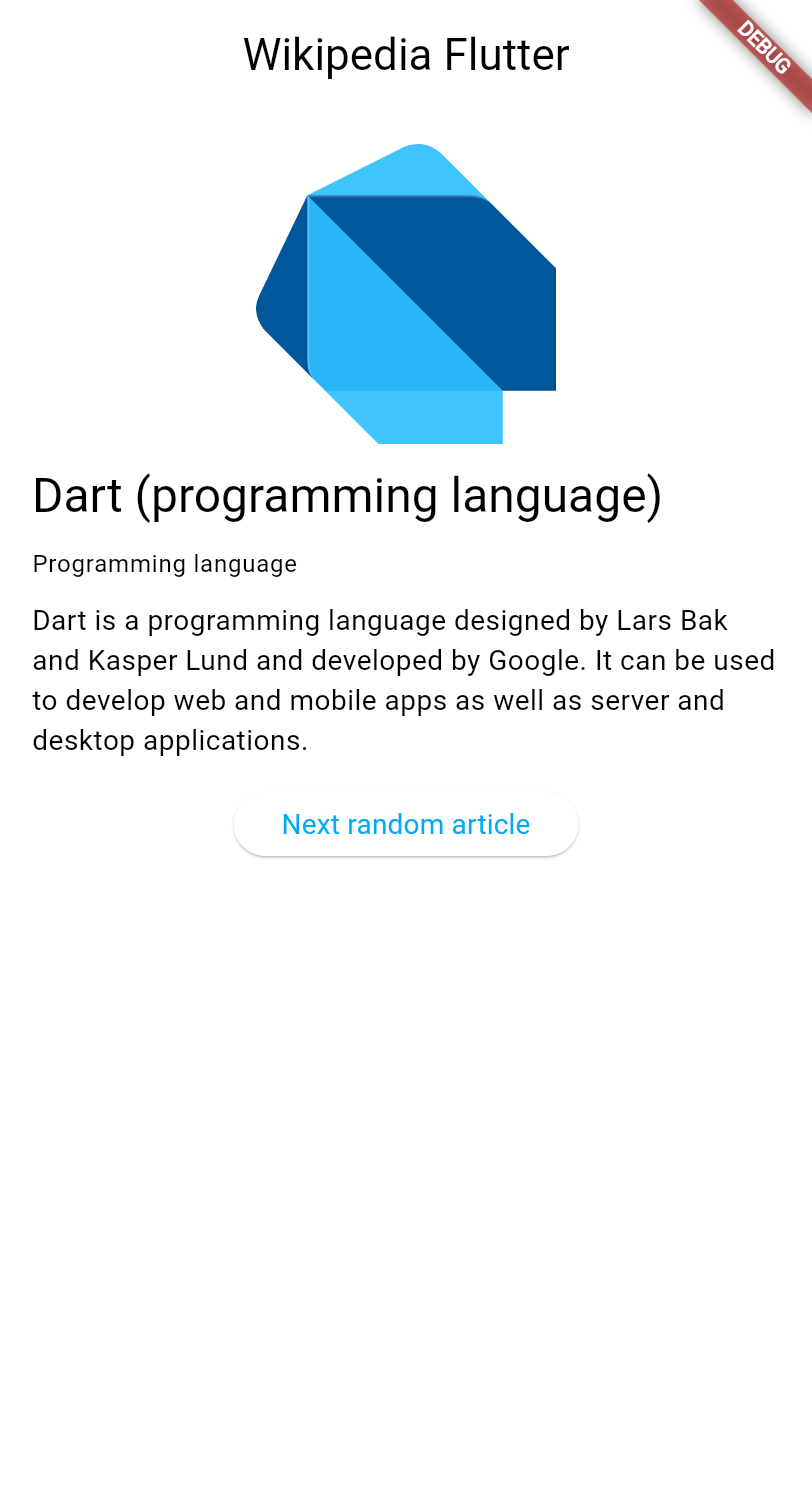
这些课程将探讨:
在 Flutter 中发起 HTTP 请求。
-
使用
ChangeNotifier管理应用状态。 使用 MVVM 架构模式。
-
创建在数据变化时自动更新的响应式用户界面。
本教程假定你已完成 Getting started with Dart 和 Introduction to Flutter UI 教程,因此不会解释 HTTP、JSON 或 widget 基础等概念。
2
创建新的 Flutter 项目
创建新的 Flutter 项目
使用 Flutter CLI 创建新的 Flutter 项目。在你偏好的终端中,运行以下命令以创建精简的 Flutter 应用:
flutter create wikipedia_reader --empty
3
添加所需依赖
添加所需依赖
你的应用需要 http package 来发起 HTTP 请求。将其添加到你的项目中:
cd wikipedia_reader && flutter pub add http
4
查看起始代码
查看起始代码
首先,创建新文件 lib/summary.dart 以定义Wikipedia 文章摘要的数据模型。该文件没有特殊逻辑,只是表示 Wikipedia API 返回数据的类的集合。将下面的代码复制到文件中即可,之后可以忽略它。如果你对基本 Dart 类还不熟悉,应先阅读 Dart Getting Started
教程。
/// Representation of the JSON data returned by the Wikipedia API.
class Summary {
/// Returns a new [Summary] instance.
Summary({
required this.titles,
required this.pageId,
required this.extract,
required this.extractHtml,
required this.lang,
required this.dir,
required this.url,
this.description,
this.thumbnail,
this.originalImage,
});
/// The title information of this article.
final TitlesSet titles;
/// The page ID of this article.
final int pageId;
/// The first few sentences of the article in plain text.
final String extract;
/// The first few sentences of the article in HTML format.
final String extractHtml;
/// The language code of the article's content, such as "en" for English.
final String lang;
/// The text directionality of the article's content, such as "ltr" or "rtl".
final String dir;
/// The URL of the page.
final String url;
/// A description of the article, if available.
final String? description;
/// A thumbnail-sized version of the article's primary image, if available.
final ImageFile? thumbnail;
/// The original full-sized article's primary image, if available.
final ImageFile? originalImage;
/// Whether this article has an image.
bool get hasImage => originalImage != null && thumbnail != null;
/// Returns a new [Summary] instance and imports its values from a JSON map
static Summary fromJson(Map<String, Object?> json) {
return switch (json) {
{
'titles': final Map<String, Object?> titles,
'pageid': final int pageId,
'extract': final String extract,
'extract_html': final String extractHtml,
'thumbnail': final Map<String, Object?> thumbnail,
'originalimage': final Map<String, Object?> originalImage,
'lang': final String lang,
'dir': final String dir,
'description': final String description,
'content_urls': {
'desktop': {'page': final String url},
'mobile': {'page': String _},
},
} =>
Summary(
titles: TitlesSet.fromJson(titles),
pageId: pageId,
extract: extract,
extractHtml: extractHtml,
thumbnail: ImageFile.fromJson(thumbnail),
originalImage: ImageFile.fromJson(originalImage),
lang: lang,
dir: dir,
description: description,
url: url,
),
{
'titles': final Map<String, Object?> titles,
'pageid': final int pageId,
'extract': final String extract,
'extract_html': final String extractHtml,
'lang': final String lang,
'dir': final String dir,
'description': final String description,
'content_urls': {
'desktop': {'page': final String url},
'mobile': {'page': String _},
},
} =>
Summary(
titles: TitlesSet.fromJson(titles),
pageId: pageId,
extract: extract,
extractHtml: extractHtml,
lang: lang,
dir: dir,
description: description,
url: url,
),
{
'titles': final Map<String, Object?> titles,
'pageid': final int pageId,
'extract': final String extract,
'extract_html': final String extractHtml,
'lang': final String lang,
'dir': final String dir,
'content_urls': {
'desktop': {'page': final String url},
'mobile': {'page': String _},
},
} =>
Summary(
titles: TitlesSet.fromJson(titles),
pageId: pageId,
extract: extract,
extractHtml: extractHtml,
lang: lang,
dir: dir,
url: url,
),
_ => throw FormatException('Could not deserialize Summary, json=$json'),
};
}
@override
String toString() =>
'Summary['
'titles=$titles, '
'pageId=$pageId, '
'extract=$extract, '
'extractHtml=$extractHtml, '
'thumbnail=${thumbnail ?? 'null'}, '
'originalImage=${originalImage ?? 'null'}, '
'lang=$lang, '
'dir=$dir, '
'description=$description'
']';
}
// Image path and size, but doesn't contain any Wikipedia descriptions.
class ImageFile {
/// Returns a new [ImageFile] instance.
ImageFile({required this.source, required this.width, required this.height});
/// The URI of the original image.
final String source;
/// The width of the original image.
final int width;
/// The height of the original image.
final int height;
/// The file extension of the image, or 'err' if one can't be determined.
String get extension {
final extension = getFileExtension(source);
// By default, return a non-viable image extension.
return extension ?? 'err';
}
/// Returns a JSON map representation of this [ImageFile].
Map<String, Object?> toJson() {
return <String, Object?>{
'source': source,
'width': width,
'height': height,
};
}
/// Returns a new [ImageFile] instance with its values populated from [json].
static ImageFile fromJson(Map<String, Object?> json) {
if (json case {
'source': final String source,
'height': final int height,
'width': final int width,
}) {
return ImageFile(source: source, width: width, height: height);
}
throw FormatException('Could not deserialize OriginalImage, json=$json');
}
@override
String toString() =>
'OriginalImage[source_=$source, width=$width, height=$height]';
}
class TitlesSet {
/// Returns a new [TitlesSet] instance.
TitlesSet({
required this.canonical,
required this.normalized,
required this.display,
});
/// The non-prefixed DB key for the article.
///
/// Might contain changes such as underscores instead of spaces.
/// Best suited for making request URIs, but still requires percent-encoding.
final String canonical;
/// The [normalized title](https://www.mediawiki.org/wiki/API:Query#Example_2:_Title_normalization)
/// of the article.
final String normalized;
/// The title as it should be displayed to the user.
final String display;
/// Returns a new [TitlesSet] instance with its values populated from [json].
static TitlesSet fromJson(Map<String, Object?> json) {
if (json case {
'canonical': final String canonical,
'normalized': final String normalized,
'display': final String display,
}) {
return TitlesSet(
canonical: canonical,
normalized: normalized,
display: display,
);
}
throw FormatException('Could not deserialize TitleSet, json=$json');
}
@override
String toString() =>
'TitlesSet['
'canonical=$canonical, '
'normalized=$normalized, '
'display=$display'
']';
}
String? getFileExtension(String file) {
final segments = file.split('.');
if (segments.isNotEmpty) return segments.last;
return null;
}
const acceptableImageFormats = ['png', 'jpg', 'jpeg'];
然后,打开 lib/main.dart 并将现有代码替换为此基本结构,其中添加了应用所需的导入:
import 'dart:convert';
import 'dart:io';
import 'package:flutter/material.dart';
import 'package:http/http.dart';
import 'summary.dart';
void main() {
runApp(const MainApp());
}
class MainApp extends StatelessWidget {
const MainApp({super.key});
@override
Widget build(BuildContext context) {
return MaterialApp(
home: Scaffold(
appBar: AppBar(title: const Text('Wikipedia Flutter')),
body: const Center(child: Text('Loading...')),
),
);
}
}
此代码提供了带有标题栏和占位内容的基本应用结构。顶部的导入包含 HTTP 请求、JSON 解析和 Wikipedia 数据模型所需的全部内容。
5
运行应用
运行应用
通过运行应用测试一切是否正常:
flutter run -d chrome
你应看到一个简单应用,应用栏显示「Wikipedia Flutter」,屏幕中央显示「Loading...」。
6
回顾
回顾
你完成的内容
以下是你本课构建与学习内容的摘要。预览了 Wikipedia 阅读器应用
你正在开始一个专注于数据处理的新教程章节。你将学习 HTTP 请求、使用 ChangeNotifier 的状态管理,以及 MVVM 架构模式。
添加了 http package 并创建了数据模型
你使用 flutter pub add 安装了用于发起 HTTP 请求的 http package,并创建了用于 Wikipedia 数据的 Summary
类。 package 让你可以利用社区构建的现有代码,而不必从零开始构建一切。
设置了初始项目结构
你的应用已具备基本结构,包含 HTTP 请求、JSON 解析和 Wikipedia 数据所需的全部导入。你已准备好从 Wikipedia API 获取真实数据!
7
自测
自测
项目设置测验
1 / 2flutter create 时 --empty 标志有什么作用?
-
创建一个完全没有文件的项目。
不正确。
项目仍包含必要文件;只是使用精简模板。
-
创建一个样板代码更少的精简 Flutter 项目。
正确!
--empty标志会生成不含默认计数器应用的精简起始模板。 -
创建一个没有任何依赖的项目。
不正确。
项目仍包含核心 Flutter 依赖。
-
创建一个只能在 Web 上运行的项目。
不正确。
该标志不限制平台;只影响起始模板。
-
flutter install [package_name]不正确。
正确命令使用
pub add,而非install。 -
flutter pub add [package_name]正确!
运行
flutter pub add会将 package 添加到 pubspec.yaml 并下载。 -
dart get [package_name]不正确。
添加 package 的命令是
flutter pub add或编辑 pubspec.yaml。 -
flutter package install [package_name]不正确。
没有
flutter package命令;请使用flutter pub add。
除非另有说明,本文档之所提及适用于 Flutter 3.47.2 版本。本页面最后更新时间:2026-06-18。查看文档源码 或者 为本页面内容提出建议。