创建 widget
了解无状态 widget 以及如何构建你自己的 widget。
学习创建自定义 widget,并使用最常见的 SDK widget,例如 Container、Center 和 Text。
你将完成的内容
步骤
1
开始之前
开始之前
本应用依赖一些与 UI 无关的游戏逻辑,因此不在本教程范围内。在继续之前,你需要将此逻辑添加到你的应用中。
-
下载以下 Dart 文件,并将其保存为项目目录中的
lib/game.dart。game.dartdart/// Game logic and supporting types for Birdle, /// a five-letter word-guessing game similar to Wordle. /// /// Defines the [Game] state machine and the /// [Word], [Letter], and [HitType] data model used to /// represent guesses and their evaluation against a hidden word. library; import 'dart:collection'; import 'dart:math'; /// The result of evaluating a [Letter] of a guess against the hidden word. enum HitType { /// The letter hasn't yet been evaluated. none, /// The letter matches the hidden word's letter at the same position. hit, /// The letter is in the hidden word, but at a different position. partial, /// The letter doesn't appear in the hidden word. miss, } /// A single character paired with its [HitType] against the hidden word. typedef Letter = ({String char, HitType type}); /// Every word that can be legally entered as a guess. const List<String> allLegalGuesses = [...legalWords, ...legalGuesses]; /// Words that can be chosen as the hidden word. const List<String> legalWords = ['aback', 'abase', 'abate', 'abbey', 'abbot']; /// Additional words accepted as guesses beyond those in [legalWords]. const List<String> legalGuesses = [ 'aback', 'abase', 'abate', 'abbey', 'abbot', 'abhor', 'abide', 'abled', 'abode', 'abort', ]; /// Game state of a single round of Birdle, /// a five-letter word-guessing game similar to Wordle. /// /// Exposes the state and methods a UI needs to /// evaluate guesses and track progress, /// but doesn't advance play on its own. /// /// Clients drive each round by calling [guess] to submit an attempt and /// [resetGame] to start over. class Game { /// The default maximum number of guesses allowed in a [Game]. static const int defaultMaxGuesses = 5; /// Creates a new game with [maxGuesses] guesses allowed. /// /// If [seed] is provided, the hidden word is /// chosen deterministically from [legalWords], /// otherwise it is selected at random. Game({this.maxGuesses = defaultMaxGuesses, this.seed}) : _wordToGuess = _generateInitialWord(seed), _guesses = List<Word>.filled(maxGuesses, Word.empty()); /// The maximum number of guesses allowed in this game. final int maxGuesses; /// The seed used to choose the hidden word, /// or `null` if it was selected at random. final int? seed; /// The current hidden word, exposed publicly through [hiddenWord]. Word _wordToGuess; /// Backing storage for [guesses]. /// /// Holds every guess slot in order, /// with unfilled slots represented by empty [Word]s. List<Word> _guesses; /// The word the player is trying to guess. Word get hiddenWord => _wordToGuess; /// An unmodifiable view of every guess slot, including those still empty. UnmodifiableListView<Word> get guesses => UnmodifiableListView(_guesses); /// The most recently submitted guess, /// or an empty [Word] if no guesses have been made. Word get previousGuess { final index = _guesses.lastIndexWhere((word) => word.isNotEmpty); return index == -1 ? Word.empty() : _guesses[index]; } /// The index of the next empty guess slot, or `-1` if every slot is full. int get activeIndex => _guesses.indexWhere((word) => word.isEmpty); /// The number of guesses still available to the player. int get guessesRemaining { if (activeIndex == -1) return 0; return maxGuesses - activeIndex; } /// Whether the most recent guess matches the hidden word. bool get didWin { if (_guesses.first.isEmpty) return false; for (final letter in previousGuess) { if (letter.type != HitType.hit) return false; } return true; } /// Whether all allowed guesses have been used without winning. bool get didLose => guessesRemaining == 0 && !didWin; /// Picks a new hidden word and clears every submitted guess. void resetGame() { _wordToGuess = _generateInitialWord(seed); _guesses = List<Word>.filled(maxGuesses, Word.empty()); } /// Evaluates [guess] against the hidden word, /// records the result in [guesses], and returns it. /// /// For finer control, use [isLegalGuess] to validate input or /// [matchGuessOnly] to evaluate without recording the result. Word guess(String guess) { final result = matchGuessOnly(guess); addGuessToList(result); return result; } /// Whether [guess] is a legal word to guess. /// /// UIs can call this method before [guess] to /// show players a message when they enter an invalid word. bool isLegalGuess(String guess) => Word.fromString(guess).isLegalGuess; /// Evaluates [guess] against the hidden word without advancing the game. Word matchGuessOnly(String guess) => Word.fromString(guess).evaluateGuess(_wordToGuess); /// Stores [guess] in the next empty slot of [guesses]. void addGuessToList(Word guess) { final guessIndex = activeIndex; if (guessIndex == -1) { throw StateError('No guesses remaining.'); } _guesses[guessIndex] = guess; } /// Returns the starting hidden word for a new round. /// /// Picks a deterministic word from [legalWords] when [seed] is provided, /// or one at random otherwise. static Word _generateInitialWord(int? seed) => seed == null ? Word.random() : Word.fromSeed(seed); } /// A five-letter word made up of [Letter]s, each tracking its [HitType]. class Word with IterableMixin<Letter> { /// Creates a word backed by the specified list of [Letter]s. Word(this._letters); /// Creates a word with five blank letters of [HitType.none]. factory Word.empty() => Word(List<Letter>.filled(5, (char: '', type: HitType.none))); /// Creates a [Word] from [guess]. /// /// Each character is lowercased, /// every [Letter] starts as [HitType.none]. factory Word.fromString(String guess) { if (guess.length != 5) { throw ArgumentError.value( guess, 'guess', 'Must be exactly 5 characters long.', ); } final letters = guess .toLowerCase() .split('') .map((char) => (char: char, type: HitType.none)) .toList(); return Word(letters); } /// Creates a word chosen at random from [legalWords]. factory Word.random() { final random = Random(); final nextWord = legalWords[random.nextInt(legalWords.length)]; return Word.fromString(nextWord); } /// Creates a word chosen from [legalWords] using [seed] as an index. factory Word.fromSeed(int seed) => Word.fromString(legalWords[seed % legalWords.length]); /// An unmodifiable list of [Letter]s that make up this word. final List<Letter> _letters; @override Iterator<Letter> get iterator => _letters.iterator; /// Whether every [Letter] in this word has no character. @override bool get isEmpty => every((letter) => letter.char.isEmpty); @override int get length => _letters.length; /// The [Letter] at index [i] in word. Letter operator [](int i) => _letters[i]; @override String toString() => _letters.map((letter) => letter.char).join().trim(); /// Returns a multi-line string showing each [Letter] alongside its [HitType]. /// /// Used to play the game from the command line. String toStringVerbose() => _letters .map((letter) => '${letter.char} - ${letter.type.name}') .join('\n'); } /// Validation and guess-evaluation logic on [Word]. extension WordUtils on Word { /// Whether this word appears in [allLegalGuesses]. bool get isLegalGuess => allLegalGuesses.contains(toString()); /// Compares this [Word] against the specified [hiddenWord] /// and returns a new [Word] with the same letters, /// but where each [Letter] has new a [HitType] of /// [HitType.hit], [HitType.partial], or [HitType.miss]. Word evaluateGuess(Word hiddenWord) { assert(isLegalGuess); final result = List<Letter>.filled(length, (char: '', type: HitType.none)); // Counts hidden-word letters that can still be claimed as partial matches. final unmatchedHiddenLetterCounts = <String, int>{}; // Reserve exact matches before scoring partial matches. for (var i = 0; i < length; i++) { final guessChar = this[i].char; final hiddenChar = hiddenWord[i].char; if (guessChar == hiddenChar) { result[i] = (char: guessChar, type: HitType.hit); } else { // Track non-hit hidden letters for the partial-match pass. final unmatchedCount = unmatchedHiddenLetterCounts[hiddenChar] ?? 0; unmatchedHiddenLetterCounts[hiddenChar] = unmatchedCount + 1; } } // Spend each remaining hidden letter only once for partial matches. for (var i = 0; i < length; i++) { if (result[i].type == HitType.hit) continue; final guessChar = this[i].char; final unmatchedCount = unmatchedHiddenLetterCounts[guessChar] ?? 0; final isPartial = unmatchedCount > 0; if (isPartial) { // Use one available hidden letter for this partial match. unmatchedHiddenLetterCounts[guessChar] = unmatchedCount - 1; } result[i] = ( char: guessChar, type: isPartial ? HitType.partial : HitType.miss, ); } return Word(result); } } -
要访问
game.dart库中定义的类型,请在你的lib/main.dart文件中添加对它的 import:main.dartdartimport 'package:flutter/material.dart'; import 'game.dart';
2
StatelessWidget 的结构
StatelessWidget 的结构
Widget 是一个继承 Flutter widget 类之一的 Dart 类,此处为 StatelessWidget。
打开 main.dart 文件,在 MainApp 类下方添加以下代码,其中定义了一个名为 Tile 的新 widget。
class Tile extends StatelessWidget {
const Tile(this.letter, this.hitType, {super.key});
final String letter;
final HitType hitType;
@override
Widget build(BuildContext context) {
return Container();
}
}
构造函数
#
Tile 类有一个 constructor,用于定义渲染 widget 时需要传入哪些数据。此处,构造函数接受两个参数:
-
表示方块猜测字母的
String。 -
表示猜测结果的
HitTypeenum value,用于确定方块颜色。例如,HitType.hit会得到绿色方块。
向 widget 构造函数传入数据是使 widget 可复用的核心。
Build 方法
#
最后,还有至关重要的 build 方法,每个 widget 都必须定义它,且它始终返回另一个 widget。
class Tile extends StatelessWidget {
const Tile(this.letter, this.hitType, {super.key});
final String letter;
final HitType hitType;
@override
Widget build(BuildContext context) {
// TODO: Replace Container with widgets.
return Container();
}
}
3
使用自定义 widget
使用自定义 widget
应用开发完成后,屏幕上将会有 25 个该 widget 的实例。不过现在只显示一个,以便你能看到每次更新调整后的效果。在 MainApp.build 方法中,将 Text widget 替换为 Tile
widget:
class MainApp extends StatelessWidget {
const MainApp({super.key});
@override
Widget build(BuildContext context) {
return const MaterialApp(
home: Scaffold(
body: Center(
child: Tile('A', HitType.hit), // NEW
),
),
);
}
}
目前,你的应用会是空白的,因为 Tile widget 返回空的 Container,默认情况下不会显示任何内容。
4
Container widget
Container widget
Tile widget 由三个最常见的核心 widget 组成:
Container、Center 和 Text。
Container
是一个便捷 widget,封装了多个核心样式 widget,例如 Padding、ColoredBox、SizedBox
和 DecoratedBox。
因为完成的 UI 包含 25 个整齐排列的 Tile widget,它应有明确尺寸。在 Container 上设置 width 和 height 属性。(你也可以用 SizedBox widget 实现,但接下来你会用到 Container 的更多属性。)
class Tile extends StatelessWidget {
const Tile(this.letter, this.hitType, {super.key});
final String letter;
final HitType hitType;
@override
Widget build(BuildContext context) {
// NEW
return Container(
width: 60,
height: 60,
// TODO: Add needed widgets
);
}
}
5
BoxDecoration 装饰
BoxDecoration 装饰
接下来,使用以下代码为方块添加 Border:
class Tile extends StatelessWidget {
const Tile(this.letter, this.hitType, {super.key});
final String letter;
final HitType hitType;
@override
Widget build(BuildContext context) {
// NEW
return Container(
width: 60,
height: 60,
decoration: BoxDecoration(
border: Border.all(color: Colors.grey.shade300),
// TODO: add background color
),
);
}
}
BoxDecoration 是一个知道如何为 widget 添加多种装饰的对象,从背景色到边框、盒子阴影等。此处,你添加了边框。热重载后,白色方块周围应出现浅色边框。
游戏完成后,方块颜色将取决于用户的猜测。用户猜对时方块为绿色,字母正确但位置错误时为黄色,字母和位置都错误时为灰色。
下图展示了三种情况。
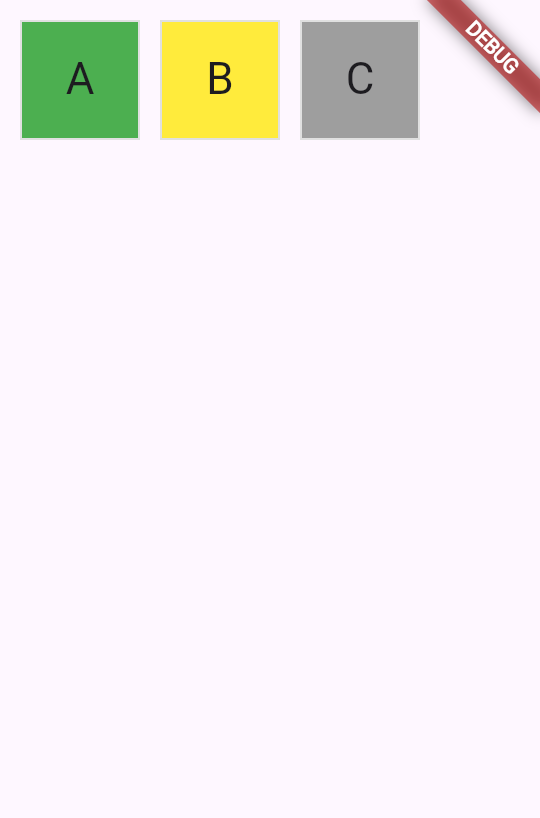
要在 UI 中实现这一点,使用 switch expression
设置 BoxDecoration 的 color。
class Tile extends StatelessWidget {
const Tile(this.letter, this.hitType, {super.key});
final String letter;
final HitType hitType;
@override
Widget build(BuildContext context) {
return Container(
width: 60,
height: 60,
decoration: BoxDecoration(
border: Border.all(color: Colors.grey.shade300),
color: switch (hitType) {
HitType.hit => Colors.green,
HitType.partial => Colors.yellow,
HitType.miss => Colors.grey,
_ => Colors.white,
},
// TODO: add children
),
);
}
}
6
子 widget
子 widget
最后,将 Center 和 Text widget 添加到 Container.child 属性。
Flutter SDK 中的大多数 widget 都有 child 或 children 属性,分别用于传入 widget 或 widget 列表。在自己的自定义 widget 中使用相同的命名约定是最佳实践。
class Tile extends StatelessWidget {
const Tile(this.letter, this.hitType, {super.key});
final String letter;
final HitType hitType;
@override
Widget build(BuildContext context) {
return Container(
width: 60,
height: 60,
decoration: BoxDecoration(
border: Border.all(color: Colors.grey.shade300),
color: switch (hitType) {
HitType.hit => Colors.green,
HitType.partial => Colors.yellow,
HitType.miss => Colors.grey,
_ => Colors.white,
},
),
child: Center(
child: Text(
letter.toUpperCase(),
style: Theme.of(context).textTheme.titleLarge,
),
),
);
}
}
热重载后,应用中心会出现一个包含 A 字母的绿色方块。要测试不同的颜色,请尝试将 MainApp 中的 Tile widget 替换为以下任一示例,然后进行热重载:
// main.dart line ~16
// green
Tile('A', HitType.hit);
// grey
Tile('A', HitType.miss);
// yellow
Tile('A', HitType.partial);
很快,这个小方块将成为屏幕上众多 widget 之一。在下一课中,你将开始构建一个 5x5 网格游戏棋盘。
7
回顾
回顾
你完成的内容
以下是你本课构建与学习内容的摘要。构建了自定义 StatelessWidget
你通过扩展 StatelessWidget 创建了新的 Tile widget。每个 widget 都有用于接收数据的构造函数和返回其他 widget 的
build 方法。此模式是 Flutter 构建用户界面的基础。
通过构造函数参数使 widget 可复用
通过将 letter 和 hitType 作为构造函数参数,你的 Tile widget 可以显示不同内容和颜色。通过构造函数传递数据是创建灵活、可复用组件的方式。
使用 Container 和 BoxDecoration 为 widget 设置样式
你使用 Container 设置 widget 尺寸,使用 BoxDecoration 添加边框和背景色。然后通过对 hitType
值使用 switch 表达式有条件地设置方块颜色。
8
自测
自测
Widget 基础测验
1 / 2build 方法必须返回什么?
-
描述 widget 的 String。
不正确。
build方法返回 widget,而非 String。 -
另一个 widget。
正确!
build方法始终返回另一个 widget,该 widget 构成 widget 树的一部分。 -
表示成功或失败的 boolean。
不正确。
widget 不表示成功与否;它们返回要渲染的其他 widget。
-
若无内容可显示则返回 null。
不正确。
build方法不能返回 null;它必须返回有效的 widget。
-
ThemeData
不正确。
ThemeData 用于应用级样式,而非单个 container 的装饰。
-
TextStyle
不正确。
TextStyle 用于文本格式,而非 container 装饰。
-
BoxDecoration
正确!
BoxDecoration 可为 Container 添加边框、背景色、渐变、阴影等。
-
EdgeInsets
不正确。
EdgeInsets 用于指定内边距或外边距,而非视觉装饰。
除非另有说明,本文档之所提及适用于 Flutter 3.47.2 版本。本页面最后更新时间:2026-08-20。查看文档源码 或者 为本页面内容提出建议。