提示词 (Prompt)
了解如何在 Flutter 中使用系统指令、动态参数与版本化技术构建并优化生成式 AI 提示词。
假设你已用 Firebase 项目及配置好 Flutter 应用以使用 Firebase AI Logic SDK (可在 README 中了解),即可开始使用生成式 AI。生成式 AI 是机器学习 (ML) 的一个分支,用在大规模人类语言上训练的神经网络产出大语言模型 (LLM)。目前最好的模型(如 Google Gemini)训练数据本质上覆盖整个互联网。
在这种规模下,用如此多数据训练的模型能够解读人类语言并产出有用的人类语言输出。你肯定用过 Gemini 聊天应用(或 ChatGPT、Claude 等),因此知道若用模糊语言与 LLM 对话,往往得到模糊且常错误的结果。要获得好结果,就得用好提示词。
提示词构建
#提示词是你提供给 LLM 以获得期望输出的输入,可包含文本以及零个或多个文件(如图像或 PDF)。若你在应用中构建聊天,用户将输入提示词(Flutter AI Toolkit 有助于构建聊天 UI)。若你用 LLM 实现应用功能(如从图像解析填字游戏数据),则需自己构建提示词。如何构建很重要。
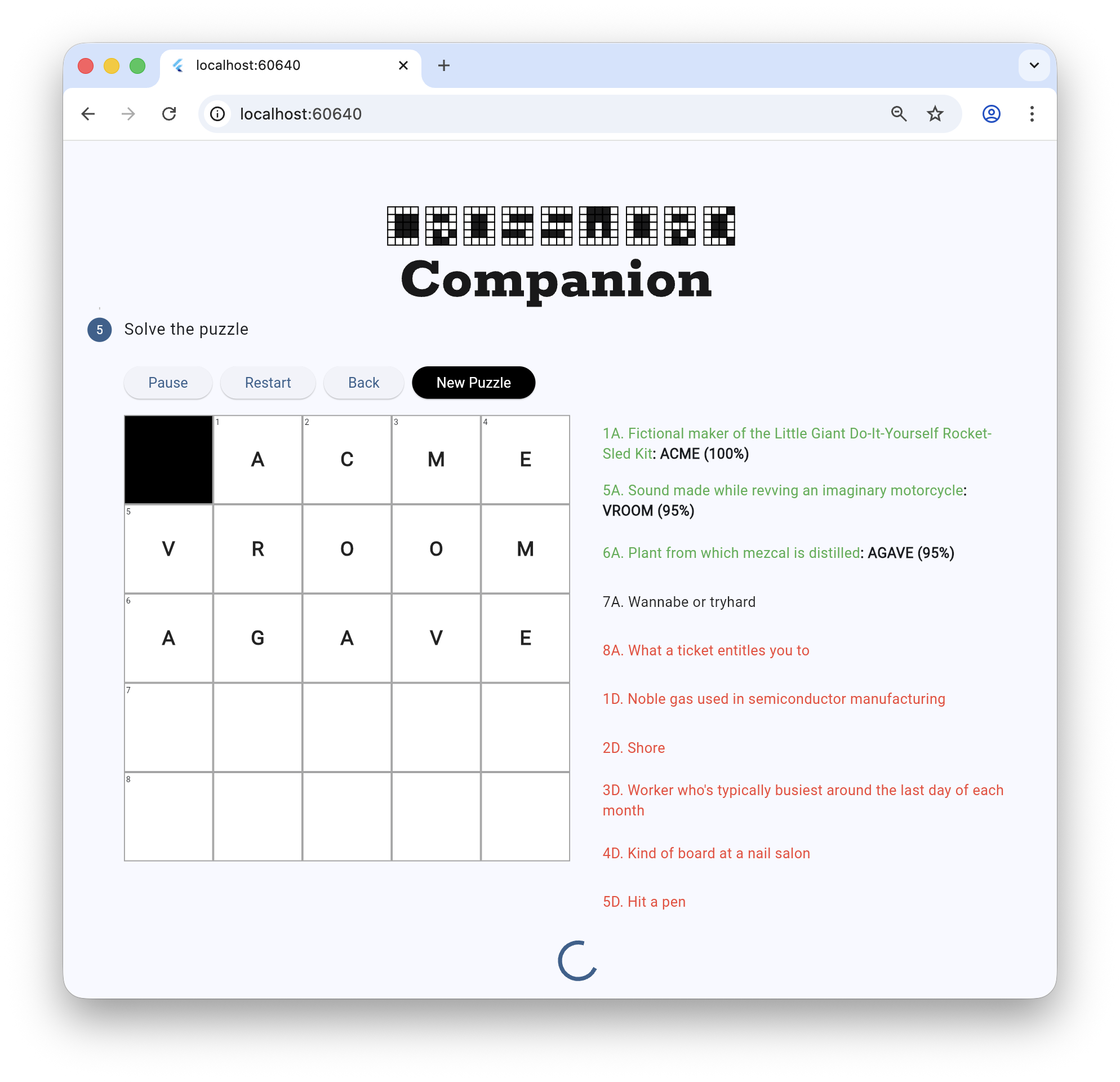
例如,构建 Crossword Companion 时,最初的线索求解提示词如下:
You are a crossword puzzle solver. Your goal is to solve the puzzle by filling in the grid with the correct answers. Given the current state of the crossword grid and a single clue, provide the answer for that clue. The answer should be a single word, returned in a JSON object that matches the following schema: '{"type": "object", "properties": {"answer": {"type": "string"}}}'.
# Puzzle Information
## Grid Layout
The grid is (${grid.width}x${grid.height}):
${_getGridStateAsString(grid)}
## Clue
${clue.number} ${clue.direction == ClueDirection.across ? 'Across' : 'Down'}: ${clue.text}
这条提示词并非一无是处——它有一些有用部分:
-
角色 (Persona):「You are a crossword puzzle solver」缩小模型关注点
-
上下文 (Context): 谜题的当前状态
-
查询 (Query): 请求某条线索的解答
-
格式 (Format): 以 JSON 输出结果,供程序解析
然而,由于数据的二维性质,对部分模型这是难解的提示词。 Gemini 2.5 Flash(当时可用模型中更高效者)结果不一致。 Gemini 2.5 Pro 质量优秀但更慢更贵。调试发现 Pro 每次调用几乎解完整张谜题,却只返回单条线索的答案。
需要的是 Flash 的效率与 Pro 的质量。为此需要改进提示词:
Your task is to solve the following crossword clue.
**Clue:** "${clue.text}"
**Constraints:**
- The answer is a **$length-letter** word.
- The current letter pattern is `$pattern`, where `_` represents an unknown letter.
Return your answer and confidence score in the required JSON format.
该提示词要求解线索、提供重要上下文并指定输出格式。不再传入整个二维网格状态,输入收窄为长度要求与模式(如 "_ R _ Y")。这些简化让 Flash 产出高质量且足够快的结果,使观看过程有趣。
分层提示词
#用于求解线索的提示词不是模型看到的唯一提示词。还有系统指令(也称 system message 或 system prompt),在创建模型实例时设置。可将系统指令视为「这是你要做的」,而各条提示词是「现在做这个」。
以下是线索求解模型的部分系统指令(其余稍后可见):
final clueSolverSystemInstruction =
'''
You are an expert crossword puzzle solver.
**Follow these rules at all times:**
1. **Prefer Common Words:** Prioritize common English words and proper nouns. Avoid obscure, archaic, or highly technical terms unless the clue strongly implies them.
2. **Match the Clue:** Ensure your answer strictly matches the clue's tense, plurality (singular vs. plural), and part of speech.
3. **Verify Grammatically:** If a clue implies a specific part of speech (e.g., it's a verb, adverb, or plural), it's a good idea to use the `getWordMetadata` tool to verify your candidate answer matches. However, avoid using it for every clue.
4. **Be Confident:** Provide a confidence score from 0.0 to 1.0 indicating your certainty.
5. **Trust the Clue Over the Pattern:** The provided letter pattern is only a suggestion based on other potentially incorrect answers. Your primary goal is to find the best word that fits the **clue text**. If you are confident in an answer that contradicts the provided pattern, you should use that answer.
6. **Format Correctly:** You must return your answer in the specified JSON format.
...
''';
有了要用的模型与系统指令,即可创建实例:
// The model for solving clues.
_clueSolverModel = FirebaseAI.googleAI().generativeModel(
  model: 'gemini-2.5-flash',
  systemInstruction: Content.text(clueSolverSystemInstruction),
  ...
);
系统指令常为静态,各条提示词通常根据数据动态创建。
参数化提示词
#每条线索求解提示词用线索文本、答案目标长度以及此前已解线索形成的模式(如 "_R_Y")创建:
String getSolverPrompt(Clue clue, int length, String pattern) =>
'''
Your task is to solve the following crossword clue.
**Clue:** "${clue.text}"
**Constraints:**
- The answer is a **$length-letter** word.
- The current letter pattern is `$pattern`, where `_` represents an unknown letter.
Return your answer and confidence score in the required JSON format.
''';
有了提示词,即可传给模型获取线索答案:
final result = await _clueSolverModel.generateContent(
  prompt: getSolverPrompt(clue, length, pattern),
);
提示词版本化
#
这个基础应用把提示词字符串放在代码里,难以查找和更新。生产应用最好将提示词与代码分离,例如打包为 Flutter 资源。组织提示词文件的一种方式是用 Google dotprompt 格式,可编写如下 .prompt 文件:
---
model: googleai/gemini-2.5-flash
input:
schema:
text: string
output:
format: json
schema:
title?: string, the title of the article if it has one
summary: string, a 3-sentence summary of the text
tags?(array, a list of string tag category for the text): string
---
Extract the requested information from the given text. If a piece of information is not present, omit that field from the output.
Text:
要在 Dart 和 Flutter 项目中展开 .prompt 文件,可使用 dotprompt_dart package。
除非另有说明,本文档之所提及适用于 Flutter 3.47.2 版本。本页面最后更新时间:2026-08-19。查看文档源码 或者 为本页面内容提出建议。