功能集成
如何与其他 Flutter 功能集成。
除 LlmChatView
自动提供的功能外,多个集成点可让应用与其他功能无缝融合以提供额外能力:
-
欢迎消息:向用户显示初始问候。
-
建议提示词:提供预定义提示词引导交互。
-
系统指令:向 LLM 提供特定输入以影响其回复。
-
禁用附件与音频输入:移除聊天 UI 的可选部分。
-
管理取消或错误行为:更改用户取消或 LLM 错误时的行为。
-
管理历史:各 LLM 提供商均支持管理聊天历史,便于清空、动态更改及在会话间存储。
-
聊天序列化/反序列化:在应用会话间存储与恢复对话。
-
自定义响应 widget:引入专用 UI 组件展示 LLM 回复。
-
自定义样式:定义独特视觉样式使聊天外观与整体应用一致。
-
无 UI 聊天:直接与 LLM 提供商交互而不影响用户当前聊天会话。
-
自定义 LLM 提供商:构建自有 LLM 提供商以将聊天与你自己的模型后端集成。
-
重路由提示词:调试、记录或重路由发往提供商的消息以排查问题或动态路由提示词。
欢迎消息
#聊天视图让你提供自定义欢迎消息以为用户设定上下文:
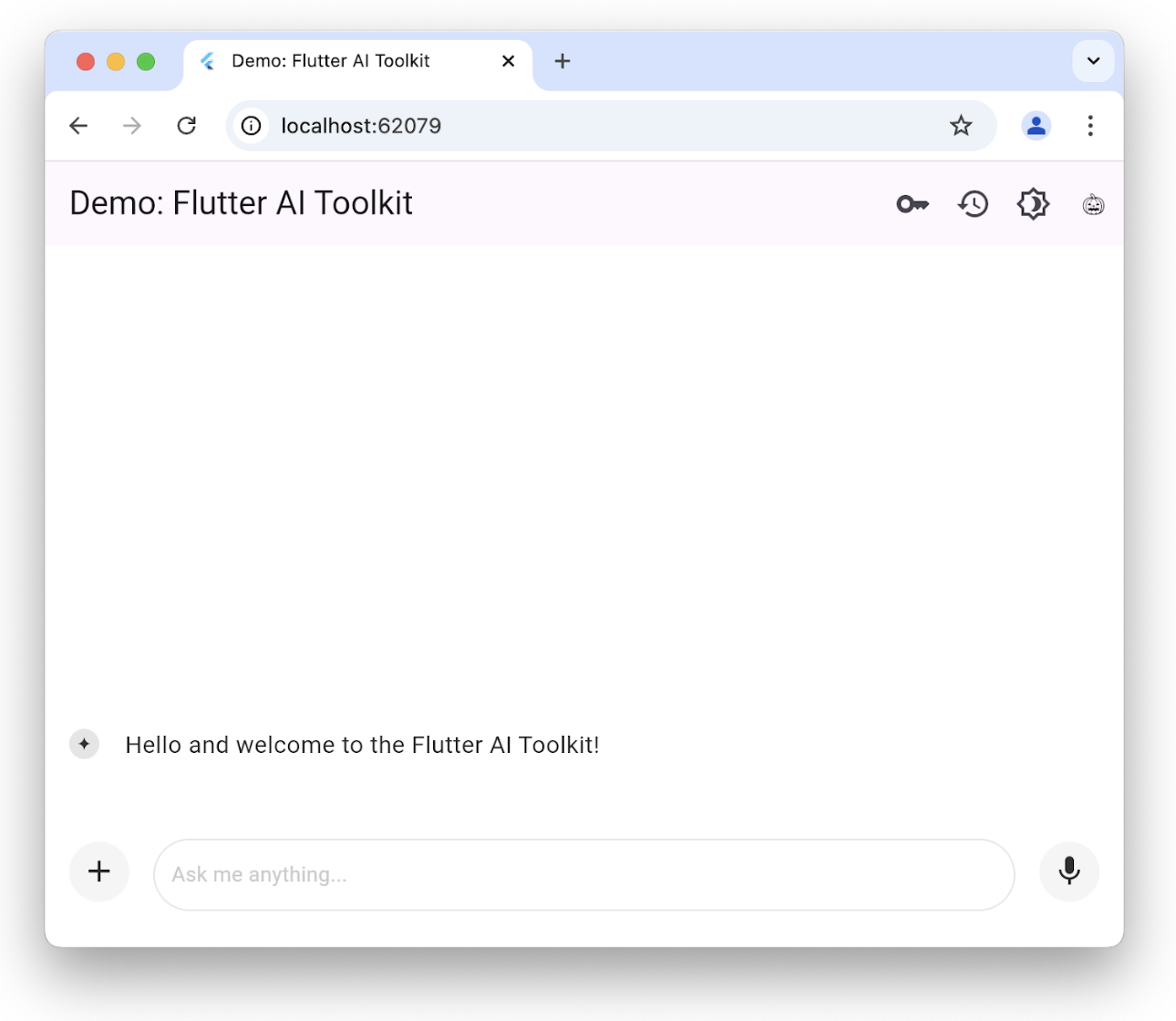
可通过设置 welcomeMessage 参数为 LlmChatView 初始化欢迎消息:
class ChatPage extends StatelessWidget {
const ChatPage({super.key});
@override
Widget build(BuildContext context) => Scaffold(
appBar: AppBar(title: const Text(App.title)),
body: LlmChatView(
welcomeMessage: 'Hello and welcome to the Flutter AI Toolkit!',
provider: FirebaseProvider(
model: FirebaseAI.geminiAI().generativeModel(
model: 'gemini-2.5-flash',
),
),
),
);
}
完整示例请参阅 welcome 示例。
建议提示词
#你可提供一组建议提示词,让用户了解聊天会话的优化方向:
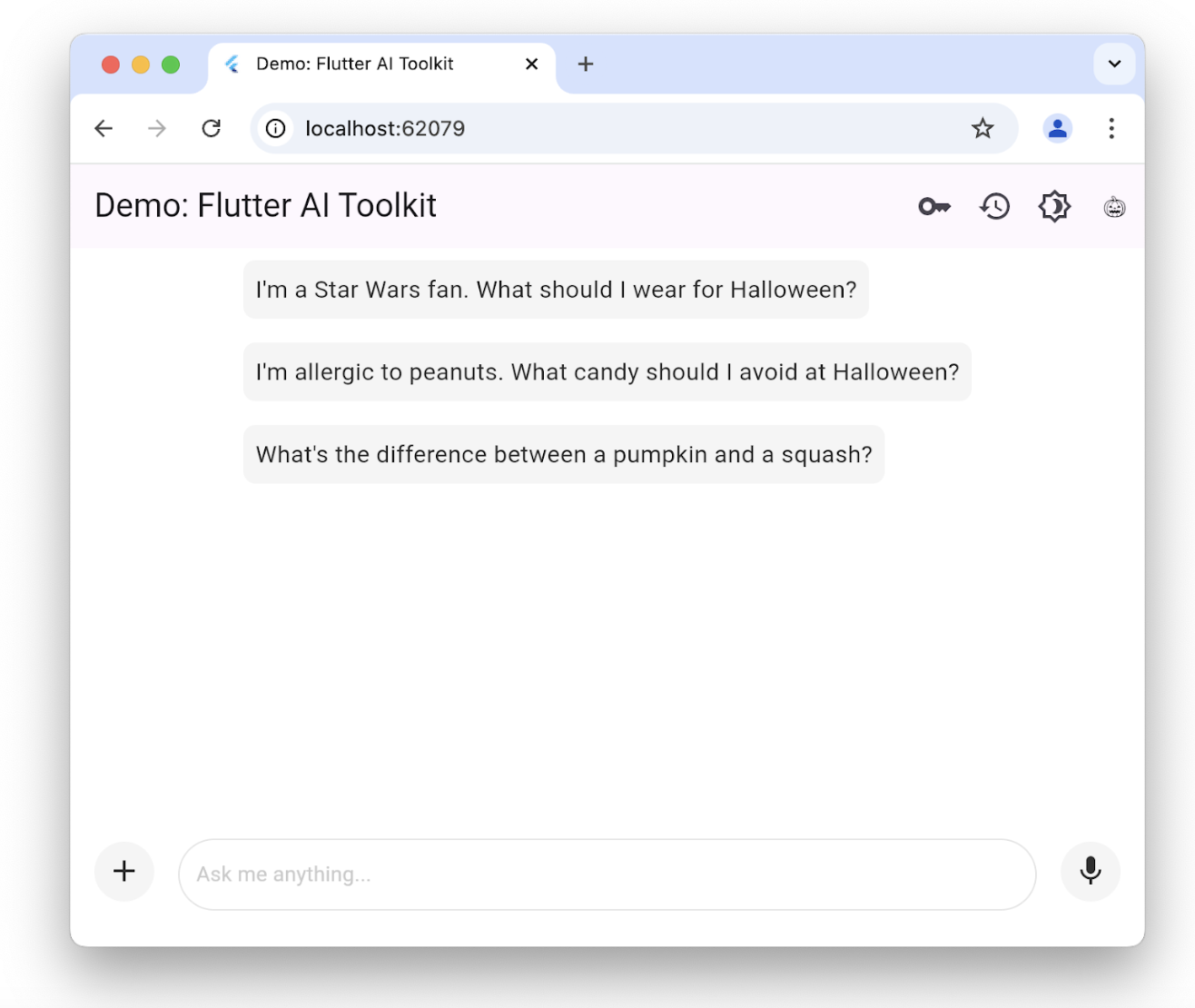
建议仅在无现有聊天历史时显示。点按某条会立即作为请求发送给底层 LLM。要设置建议列表,构造 LlmChatView 时传入 suggestions 参数:
class ChatPage extends StatelessWidget {
const ChatPage({super.key});
@override
Widget build(BuildContext context) => Scaffold(
appBar: AppBar(title: const Text(App.title)),
body: LlmChatView(
suggestions: [
'I\'m a Star Wars fan. What should I wear for Halloween?',
'I\'m allergic to peanuts. What candy should I avoid at Halloween?',
'What\'s the difference between a pumpkin and a squash?',
],
provider: FirebaseProvider(
model: FirebaseAI.geminiAI().generativeModel(
model: 'gemini-2.5-flash',
),
),
),
);
}
完整示例请参阅 suggestions 示例。
LLM 指令
#
要根据应用需求优化 LLM 回复,需要为其提供指令。例如,recipes 示例应用
使用 GenerativeModel 类的 systemInstructions 参数,使 LLM 专注于根据用户指令提供食谱:
class _HomePageState extends State<HomePage> {
...
// create a new provider with the given history and the current settings
LlmProvider _createProvider([List<ChatMessage>? history]) => FirebaseProvider(
history: history,
...,
model: FirebaseAI.geminiAI().generativeModel(
model: 'gemini-2.5-flash',
...,
systemInstruction: Content.system('''
You are a helpful assistant that generates recipes based on the ingredients and
instructions provided as well as my food preferences, which are as follows:
${Settings.foodPreferences.isEmpty ? 'I don\'t have any food preferences' : Settings.foodPreferences}
You should keep things casual and friendly. You may generate multiple recipes in a single response, but only if asked. ...
''',
),
),
);
...
}
设置系统指令因提供商而异;FirebaseProvider 可通过 systemInstruction 参数提供。
注意此处我们在创建传给 LlmChatView 构造函数的 LLM 提供商时纳入用户偏好。每次用户更改偏好时,我们在创建过程中设置指令。
recipes 应用让用户通过 scaffold 上的 drawer 更改食物偏好:
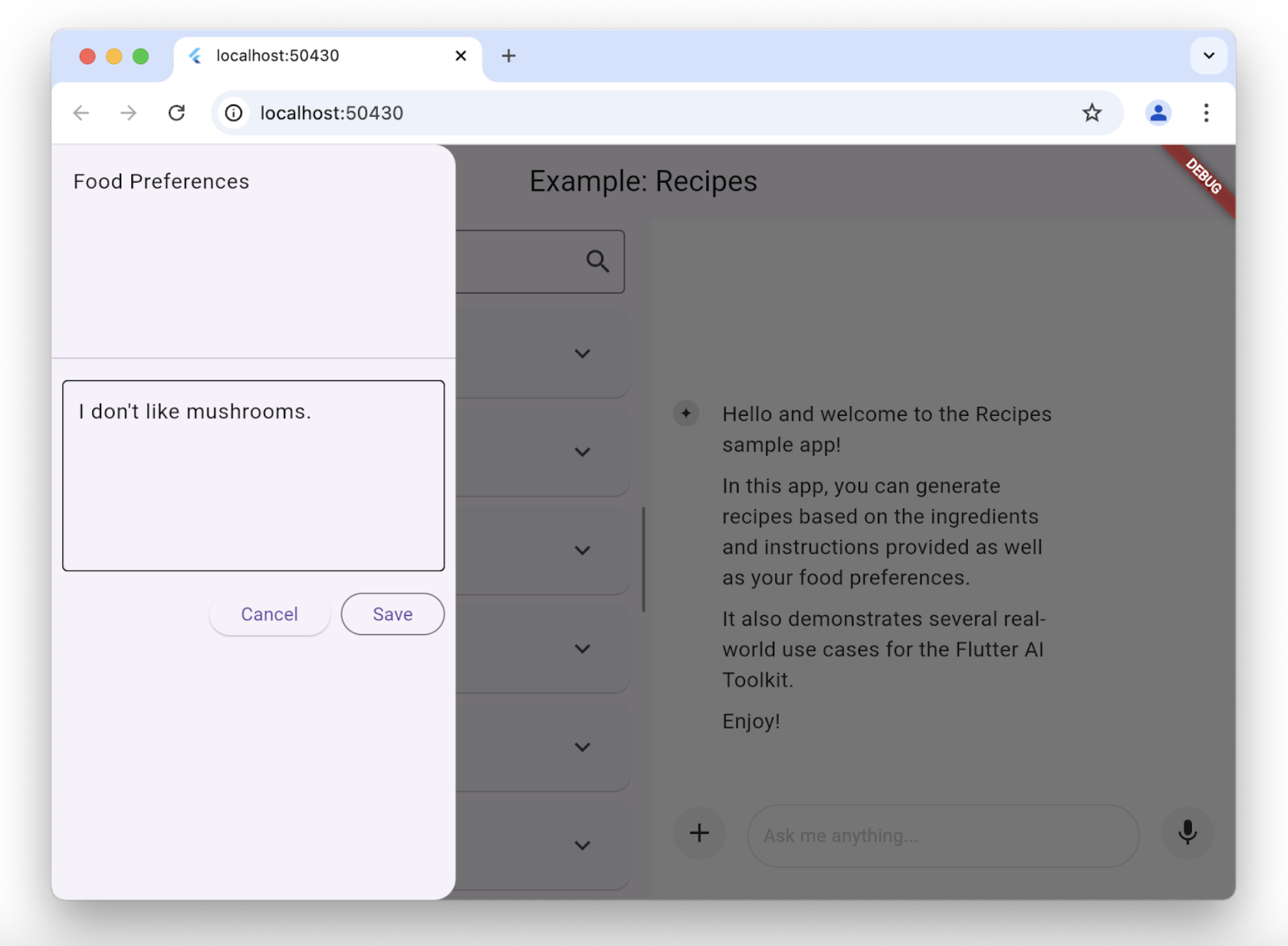
每当用户更改食物偏好,recipes 应用会创建使用新偏好的新模型:
class _HomePageState extends State<HomePage> {
  ...
  void _onSettingsSave() => setState(() {
        // move the history over from the old provider to the new one
        final history = _provider.history.toList();
        _provider = _createProvider(history);
      });
}
函数调用
#
要让 LLM 代表用户执行操作,可提供 LLM 可调用的工具(函数)集。
FirebaseProvider 开箱支持函数调用,处理循环:发送用户提示词、接收 LLM 的函数调用请求、执行函数并将结果返回 LLM,直至生成最终文本回复。
使用函数调用需定义工具并传给 FirebaseProvider。详情请参阅 function calling 示例。
禁用附件与音频输入
#
若要禁用附件(+ 按钮)或音频输入(麦克风按钮),可在 LlmChatView 构造函数中使用 enableAttachments 与 enableVoiceNotes
参数:
class ChatPage extends StatelessWidget {
const ChatPage({super.key});
@override
Widget build(BuildContext context) {
// ...
return Scaffold(
appBar: AppBar(title: const Text('Restricted Chat')),
body: LlmChatView(
// ...
enableAttachments: false,
enableVoiceNotes: false,
),
);
}
}
这两个标志默认为 true。
自定义语音转文字
#
默认情况下,AI 工具包通过传给 LlmChatView 的 LlmProvider 提供语音转文字实现。若要提供自有实现(例如使用设备特定服务),可实现 SpeechToText 接口并传给 LlmChatView 构造函数:
LlmChatView(
  // ...
  speechToText: MyCustomSpeechToText(),
)
详情请参阅 custom STT 示例。
管理取消或错误行为
#默认情况下,用户取消 LLM 请求时,LLM 回复会追加 "CANCEL" 字符串并弹出已取消消息。同样,发生 LLM 错误(如网络断开)时,回复会追加 "ERROR" 并弹出含错误详情的对话框。
可通过 LlmChatView 的 cancelMessage、errorMessage、onCancelCallback
与 onErrorCallback 参数覆盖取消与错误行为。例如以下代码替换默认取消处理:
class ChatPage extends StatelessWidget {
// ...
void _onCancel(BuildContext context) {
ScaffoldMessenger.of(
context,
).showSnackBar(const SnackBar(content: Text('Chat cancelled')));
}
@override
Widget build(BuildContext context) => Scaffold(
appBar: AppBar(title: const Text(App.title)),
body: LlmChatView(
// ...
onCancelCallback: _onCancel,
cancelMessage: 'Request cancelled',
),
);
}
你可覆盖其中任意或全部参数;未覆盖的项将使用 LlmChatView 默认值。
管理历史
#定义所有可接入聊天视图的 LLM 提供商的标准接口 包含获取与设置提供商历史的能力:
abstract class LlmProvider implements Listenable {
Stream<String> generateStream(
String prompt, {
Iterable<Attachment> attachments,
});
Stream<String> sendMessageStream(
String prompt, {
Iterable<Attachment> attachments,
});
Iterable<ChatMessage> get history;
set history(Iterable<ChatMessage> history);
}
提供商历史变更时会调用 Listenable 基类暴露的 notifyListener 方法。这意味着你可手动用 add 与 remove 订阅/取消订阅,或用它构造 ListenableBuilder
实例。
generateStream 调用底层 LLM 而不影响历史。
sendMessageStream 在回复完成时向提供商历史添加两条新消息(用户消息与 LLM 回复)。聊天视图处理用户聊天提示词时用 sendMessageStream,处理语音输入时用 generateStream。
要查看或设置历史,可访问 history 属性:
void _clearHistory() => _provider.history = [];
在保持历史的同时重建提供商时,访问提供商历史也很有用:
class _HomePageState extends State<HomePage> {
  ...
  void _onSettingsSave() => setState(() {
        // move the history over from the old provider to the new one
        final history = _provider.history.toList();
        _provider = _createProvider(history);
      });
}
_createProvider 方法用上一提供商的历史 以及 新用户偏好创建新提供商。对用户而言无缝:可继续聊天,而 LLM 回复会考虑新的食物偏好。例如:
class _HomePageState extends State<HomePage> {
  ...
  // create a new provider with the given history and the current settings
  LlmProvider _createProvider([List<ChatMessage>? history]) =>
    FirebaseProvider(
      history: history,
      ...
    );
  ...
}
实践请参阅 recipes 示例应用 与 history 示例应用。
聊天序列化/反序列化
#
要在应用会话间保存与恢复聊天历史,需能序列化与反序列化每条用户提示词(含附件)及每条 LLM 回复。两类消息均在 ChatMessage 类中暴露。序列化可使用各 ChatMessage 实例的 toJson
方法。
Future<void> _saveHistory() async {
// get the latest history
final history = _provider.history.toList();
// write the new messages
for (var i = 0; i != history.length; ++i) {
// skip if the file already exists
final file = await _messageFile(i);
if (file.existsSync()) continue;
// write the new message to disk
final map = history[i].toJson();
final json = JsonEncoder.withIndent(' ').convert(map);
await file.writeAsString(json);
}
}
反序列化同理,使用 ChatMessage 类的静态 fromJson 方法:
Future<void> _loadHistory() async {
// read the history from disk
final history = <ChatMessage>[];
for (var i = 0;; ++i) {
final file = await _messageFile(i);
if (!file.existsSync()) break;
final map = jsonDecode(await file.readAsString());
history.add(ChatMessage.fromJson(map));
}
// set the history on the controller
_provider.history = history;
}
为确保序列化快速完成,建议每条用户消息只写入一次。否则用户每次都要等待应用重写全部消息,面对二进制附件时可能耗时较长。
实践请参阅 history 示例应用。
自定义响应 widget
#默认情况下,聊天视图显示的 LLM 回复为格式化 Markdown。但有时你需要创建与应用特定且集成的自定义 widget 展示 LLM 回复。例如,在 recipes 示例应用 中用户请求食谱时, LLM 回复用于创建与应用其余部分一致的食谱展示 widget,并提供 Add 按钮以便用户将食谱加入数据库:
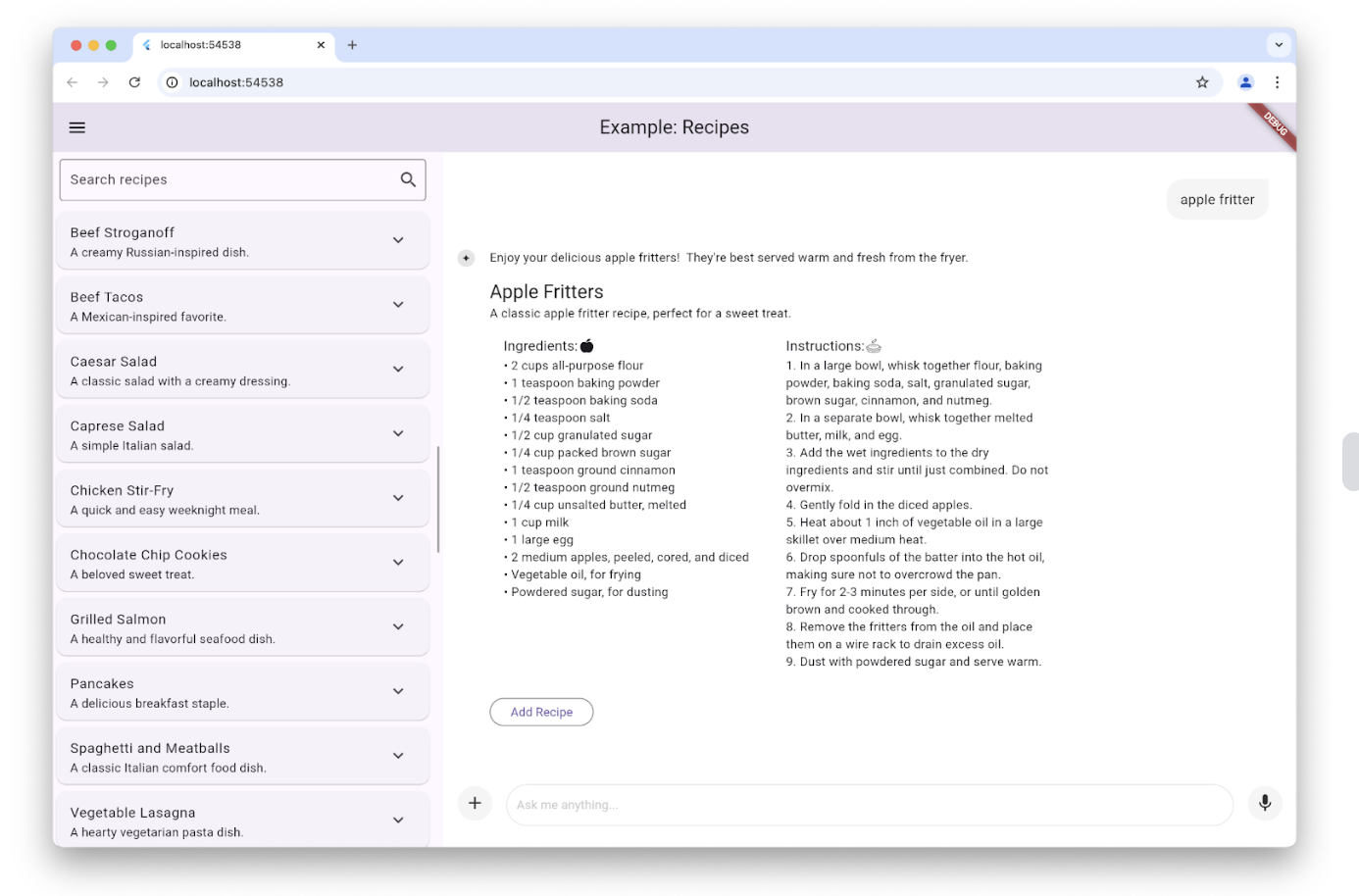
通过设置 LlmChatView 构造函数的 responseBuilder 参数实现:
LlmChatView(
  provider: _provider,
  welcomeMessage: _welcomeMessage,
  responseBuilder: (context, response) => RecipeResponseView(
    response,
  ),
),
此例中,RecipeResponseView widget 用 LLM 提供商的回复文本构造,并在 build 方法中使用:
class RecipeResponseView extends StatelessWidget {
const RecipeResponseView(this.response, {super.key});
final String response;
@override
Widget build(BuildContext context) {
final children = <Widget>[];
String? finalText;
// created with the response from the LLM as the response streams in, so
// many not be a complete response yet
try {
final map = jsonDecode(response);
final recipesWithText = map['recipes'] as List<dynamic>;
finalText = map['text'] as String?;
for (final recipeWithText in recipesWithText) {
// extract the text before the recipe
final text = recipeWithText['text'] as String?;
if (text != null && text.isNotEmpty) {
children.add(MarkdownBody(data: text));
}
// extract the recipe
final json = recipeWithText['recipe'] as Map<String, dynamic>;
final recipe = Recipe.fromJson(json);
children.add(const Gap(16));
children.add(Column(
crossAxisAlignment: CrossAxisAlignment.start,
children: [
Text(recipe.title, style: Theme.of(context).textTheme.titleLarge),
Text(recipe.description),
RecipeContentView(recipe: recipe),
],
));
// add a button to add the recipe to the list
children.add(const Gap(16));
children.add(OutlinedButton(
onPressed: () => RecipeRepository.addNewRecipe(recipe),
child: const Text('Add Recipe'),
));
children.add(const Gap(16));
}
} catch (e) {
debugPrint('Error parsing response: $e');
}
...
return Column(
crossAxisAlignment: CrossAxisAlignment.start,
children: children,
);
}
}
此代码解析文本,从 LLM 提取介绍文字与食谱,并与 Add Recipe 按钮一起替代 Markdown 显示。
注意我们将 LLM 回复解析为 JSON。常见做法是将提供商设为 JSON 模式并提供 schema 限制回复格式以确保可解析。各提供商以不同方式暴露此功能,FirebaseProvider 通过 GenerationConfig 实现,recipes 示例如下:
class _HomePageState extends State<HomePage> {
...
// create a new provider with the given history and the current settings
LlmProvider _createProvider([List<ChatMessage>? history]) => FirebaseProvider(
...
model: FirebaseAI.geminiAI().generativeModel(
...
generationConfig: GenerationConfig(
responseMimeType: 'application/json',
responseSchema: Schema(...),
systemInstruction: Content.system('''
...
Generate each response in JSON format
with the following schema, including one or more "text" and "recipe" pairs as
well as any trailing text commentary you care to provide:
{
"recipes": [
{
"text": "Any commentary you care to provide about the recipe.",
"recipe":
{
"title": "Recipe Title",
"description": "Recipe Description",
"ingredients": ["Ingredient 1", "Ingredient 2", "Ingredient 3"],
"instructions": ["Instruction 1", "Instruction 2", "Instruction 3"]
}
}
],
"text": "any final commentary you care to provide",
}
''',
),
),
);
...
}
此代码将 responseMimeType 设为 'application/json',
responseSchema 设为定义可解析 JSON 结构的 Schema 实例。此外,最好在系统指令中也要求 JSON 并描述 schema,此处已这样做。
实践请参阅 recipes 示例应用。
自定义样式
#
聊天视图自带背景、文本框、按钮、图标、建议等默认样式。可通过 LlmChatView 构造函数的 style 参数完全自定义:
LlmChatView(
  provider: FirebaseProvider(...),
  style: LlmChatViewStyle(...),
),
例如,custom styles 示例应用 用此功能实现万圣节主题应用:
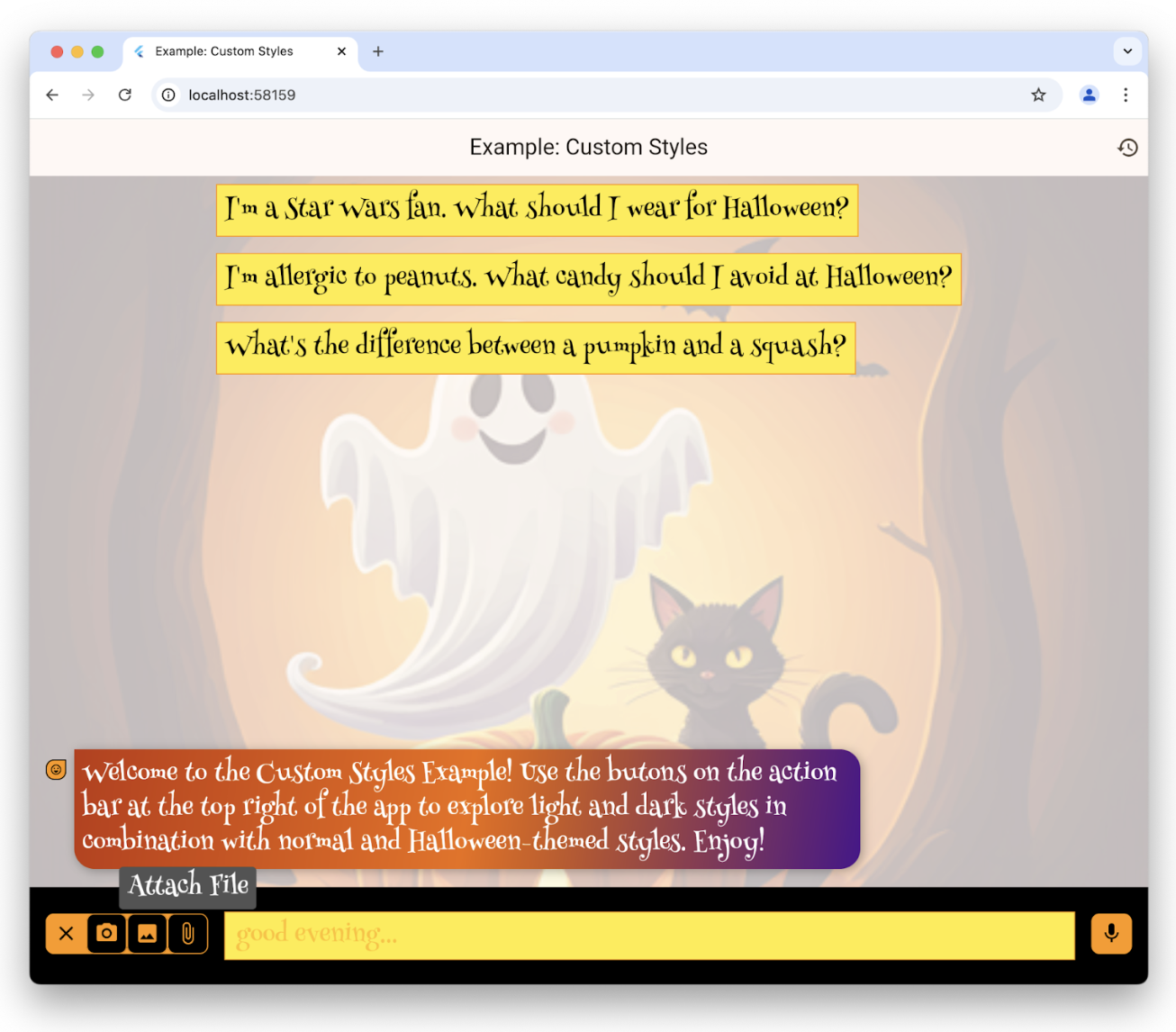
LlmChatViewStyle 可用样式完整列表请参阅 参考文档。还可用 LlmChatViewStyle 的 voiceNoteRecorderStyle 自定义录音机外观,见
styles 示例。
除 custom styles 示例 与 styles 示例 外,还可参阅 dark mode 示例 与 演示应用。
无 UI 聊天
#不必使用聊天视图即可访问底层提供商功能。除使用其专有接口直接调用外,也可通过 LlmProvider 接口 使用。
例如,recipes 示例应用在编辑食谱页面提供 Magic 按钮,用于根据当前食物偏好更新数据库中的现有食谱。点按按钮可预览建议的更改并决定是否应用:
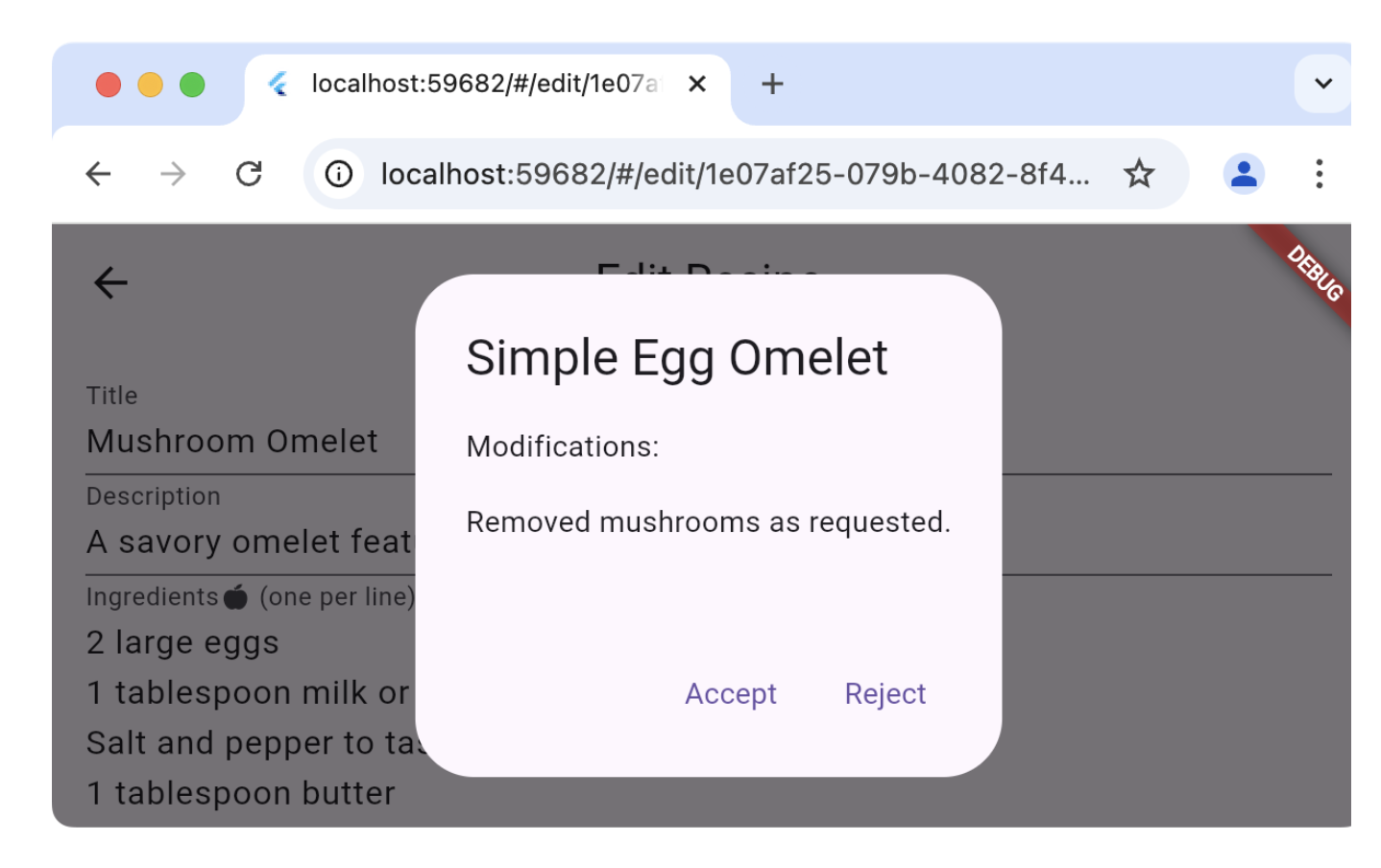
编辑食谱页面不使用应用聊天部分同一提供商(否则会在用户聊天历史中插入多余消息与回复),而是创建自有提供商并直接使用:
class _EditRecipePageState extends State<EditRecipePage> {
...
final _provider = FirebaseProvider(...);
...
Future<void> _onMagic() async {
final stream = _provider.sendMessageStream(
'Generate a modified version of this recipe based on my food preferences: '
'${_ingredientsController.text}\n\n${_instructionsController.text}',
);
var response = await stream.join();
final json = jsonDecode(response);
try {
final modifications = json['modifications'];
final recipe = Recipe.fromJson(json['recipe']);
if (!context.mounted) return;
final accept = await showDialog<bool>(
context: context,
builder: (context) => AlertDialog(
title: Text(recipe.title),
content: Column(
crossAxisAlignment: CrossAxisAlignment.start,
children: [
const Text('Modifications:'),
const Gap(16),
Text(_wrapText(modifications)),
],
),
actions: [
TextButton(
onPressed: () => context.pop(true),
child: const Text('Accept'),
),
TextButton(
onPressed: () => context.pop(false),
child: const Text('Reject'),
),
],
),
);
...
} catch (ex) {
...
}
}
}
}
调用 sendMessageStream 会在提供商历史中创建条目,但因未关联聊天视图而不会显示。也可调用 generateStream 复用现有提供商而不影响聊天历史。
实践请参阅 recipes 示例的 Edit Recipe 页面。
重路由提示词
#
若要调试、记录或操控聊天视图与底层提供商之间的连接,可实现 LlmStreamGenerator
函数,并通过 messageSender 参数传给 LlmChatView:
class ChatPage extends StatelessWidget {
final _provider = FirebaseProvider(...);
@override
Widget build(BuildContext context) => Scaffold(
appBar: AppBar(title: const Text(App.title)),
body: LlmChatView(
provider: _provider,
messageSender: _logMessage,
),
);
Stream<String> _logMessage(
String prompt, {
required Iterable<Attachment> attachments,
}) async* {
// log the message and attachments
debugPrint('# Sending Message');
debugPrint('## Prompt\n$prompt');
debugPrint('## Attachments\n${attachments.map((a) => a.toString())}');
// forward the message on to the provider
final response = _provider.sendMessageStream(
prompt,
attachments: attachments,
);
// log the response
final text = await response.join();
debugPrint('## Response\n$text');
// return it
yield text;
}
}
此示例记录往返的用户提示词与 LLM 回复。将函数作为 messageSender 时,你须负责调用底层提供商,否则消息不会送达。借此可实现动态路由到提供商或检索增强生成(RAG)等高级能力。
实践请参阅 logging 示例应用。
除非另有说明,本文档之所提及适用于 Flutter 3.47.2 版本。本页面最后更新时间:2026-08-19。查看文档源码 或者 为本页面内容提出建议。