# 热重载 (Hot reload)
> 使用热重载提高你的开发速度和体验。
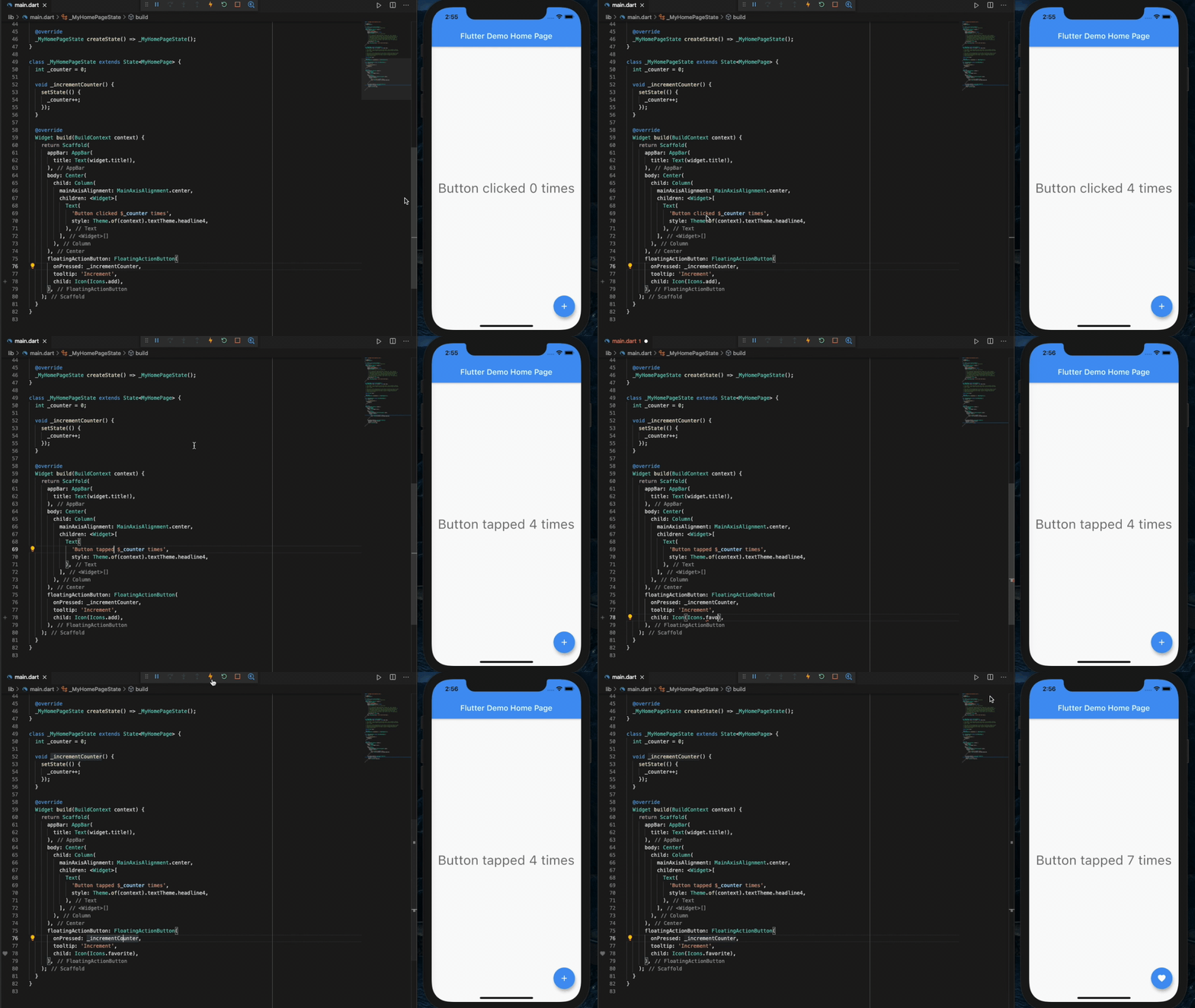
Flutter's hot reload feature helps you quickly and
easily experiment, build UIs, add features, and fix bugs.
Hot reload works by injecting updated source code files
into the [Dart runtime][].
After the Dart runtime updates classes with the new versions of fields and functions,
the Flutter framework automatically rebuilds the widget tree,
allowing you to quickly view the effects of your changes.
Flutter 的热重载功能可帮助你在无需重新启动应用程序的情况下
快速、轻松地测试、构建用户界面、添加功能以及修复错误。
通过将更新的源代码文件注入到
[Dart 运行时 (runtime)][Dart runtime] 来实现热重载。
在 Dart 运行时 (runtime) 使用新的字段和函数更新类之后,
Flutter 框架会自动重新构建 widget 树,以便你可以快速查看更改的效果。
{:width="100%"}
A demo of hot reload in DartPad
DartPad 中热重载功能的演示
## How to perform a hot reload
## 如何进行热重载
If you are using an AI coding assistant like [Google Antigravity](/ai/antigravity),
you can use Agent mode to automatically hot reload your running application
as soon as you prompt the agent to apply changes.
For details, see [Agentic Hot Reload](/ai/antigravity#agentic-hot-reload).
如果你正在使用类似 [Google Antigravity](/ai/antigravity) 这样的 AI 编程助手,
你可以通过 Agent 模式,在你使用提示词 (prompt) 更改应用后,
自动热重载正在运行的应用程序。
详情请参见 [Agentic 热重载](/ai/antigravity#agentic-hot-reload)。
To hot reload a Flutter app manually:
想要手动热重载 Flutter 应用:
1. Run the app from a supported [Flutter editor][] or a terminal window.
Either a physical or virtual device can be the target.
**Only Flutter apps in debug mode can be hot reloaded or hot restarted.**
在支持 [Flutter 编辑器][Flutter editor]
或终端窗口运行应用程序,物理机或虚拟器都可以。
**Flutter 应用程序只有在 DEBUG 模式下才能执行热重载或者热重启。**
1. Modify one of the Dart files in your project.
Most types of code changes can be hot reloaded;
for a list of changes that require a hot restart,
see [Special cases](#special-cases).
修改项目中的一个 Dart 文件。
大多数类型的代码更改可以热重载,然而一些 [特别情况](#special-cases)
需要热重启应用程序以生效。
1. If you're working in an IDE/editor that supports Flutter's IDE tools
and hot reload on save is enabled,
select **Save All** (`cmd-s`/`ctrl-s`),
or click the hot reload button on the toolbar.
如果你在支持 Flutter 的 IDE 或编辑器中工作,且已启用保存时热重载,
请选择 **Save All** (`Command + S`/`Ctrl + S`),
或单击工具栏上的 Hot Reload 按钮。
:::tip 启用保存时热重载
From your preferred IDE,
enable autosave and hot reloads on save.
在你使用的 IDE 中启用自动保存和保存时热重载。
**VS Code**
Add the following to your `.vscode/settings.json` file:
在 `.vscode/settings.json` 中添加以下内容:
```json
"files.autoSave": "afterDelay",
"dart.flutterHotReloadOnSave": "all",
```
**Android Studio and IntelliJ**
**Android Studio 和 IntelliJ**
* Open `Settings > Tools > Actions on Save` and select
`Configure autosave options`.
打开 `Settings > Tools > Actions on Save` 并选择
`Configure autosave options`。
- Check the option to `Save files if the IDE is idle for X seconds`.
选择 `Save files if the IDE is idle for X seconds` 选项。
- **Recommended:** Set a small delay duration. For example, 2 seconds.
**推荐:** 设置较短的延迟时间,例如 2 秒。
* Open `Settings > Languages & Frameworks > Flutter`.
打开 `Settings > Languages & Frameworks > Flutter`。
- Check the option to `Perform hot reload on save`.
选择 `Perform hot reload on save` 选项。
:::
If you're running the app at the command line using `flutter run`,
enter `r` in the terminal window.
如果你正在使用命令行 `flutter run` 运行应用程序,请在终端窗口输入 `r`。
After a successful hot reload operation,
you'll see a message in the console similar to:
成功执行热重载后,你将在控制台中看到类似于以下内容的消息:
```console
Performing hot reload...
Reloaded 1 of 448 libraries in 978ms.
```
The app updates to reflect your change,
and the current state of the app is preserved.
Your app continues to execute from where it was prior
to run the hot reload command.
The code updates and execution continues.
应用程序将以你的更改进行更新,并保留应用程序当前的状态。
你的应用程序将继续从之前运行热重载命令的位置开始执行。代码被更新并继续执行。
:::secondary
**What is the difference between hot reload, hot restart,
and full restart?**
**热重载、热重启和完全重启之间有什么区别?**
* **Hot reload** loads code changes into the VM or the browser,
and re-builds the widget tree, preserving the app state;
it doesn't rerun `main()` or `initState()`.
(`⌘\` in IntelliJ and Android Studio, `⌃F5` in VSCode)
**热重载** 会将代码更改转入 VM 或者浏览器,重建 widget 树并保持应用的状态,
整个过程不会重新运行 `main()` 或者 `initState()`。
(在 IntelliJ 和 Android Studio 中的快捷键是 `⌘\`,在 VSCode 中是 `⌃F5`)
* **Hot restart** loads code changes into the VM or the browser,
and restarts the Flutter app, losing the app state.
On the web, this can restart the app without a full page refresh.
(`⇧⌘\` in IntelliJ and Android Studio, `⇧⌘F5` in VSCode)
**热重启** 会将代码更改转入 VM 或者浏览器,重启 Flutter 应用,不保留应用状态。
(在 IDEA 中的快捷键是 `⇧⌘\`,在 VSCode 中是 `⇧⌘F5`)
* **Full restart** restarts the iOS, Android, or web app.
This takes longer because it also recompiles the
Java / Kotlin / Objective-C / Swift / JavaScript code.
On the web, it also restarts the Dart Development Compiler.
There is no specific keyboard shortcut for this;
you need to stop and start the run configuration.
**完全重启** 将会完全重新运行应用。
该进程较为耗时,因为它会重新编译原生部分
(Java / Kotlin / Objective-C / Swift) 代码。
在 Web 平台上,它同时会重启 Dart 开发编译器。
完全重启并没有既定的快捷键,你需要手动停止后重新运行。
Flutter web now supports hot restart and [hot reload][].
Flutter Web 现已支持热重启和 [热重载][hot reload]。
:::
[hot reload]: /platform-integration/web/building#hot-reload-web
{:width="100%"}
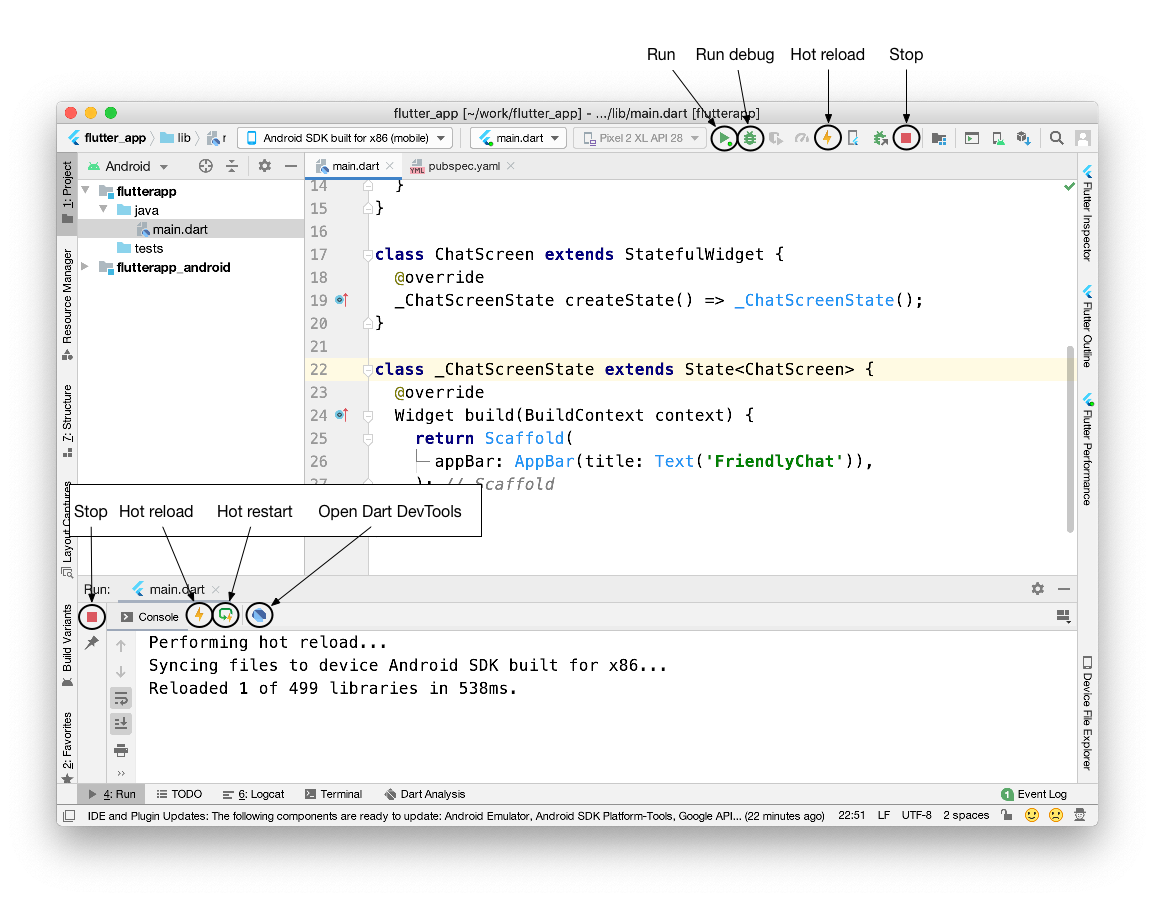
Controls for run, run debug, hot reload, and hot restart in Android Studio
Android Studio 中的运行、运行调试、热重载和热重启的控件位置
A code change has a visible effect only if the modified
Dart code is run again after the change. Specifically,
a hot reload causes all the existing widgets to rebuild.
Only code involved in the rebuilding of the widgets
is automatically re-executed. The `main()` and `initState()`
functions, for example, are not run again.
只有修改后的 Dart 代码再次运行时,代码更改才会产生可见效果。
具体来说,热重载会导致所有现有的 widgets 重新构建。
只有与 widgets 重新构建相关的代码才会自动重新执行。
`main()` and `initState()` 方法则不会再次运行。
## Special cases
## 特别情况
The next sections describe specific scenarios that involve
hot reload. In some cases, small changes to the Dart code
enable you to continue using hot reload for your app.
In other cases, a hot restart, or a full restart is needed.
下面的部分会描述一些热重载的特别的情况。
在某些情况下,对 Dart 代码的小改动将确保你能够继续使用热重载。
在其他情况下,需要热重启或完全重启。
### An app is killed
### 应用被强制停止
Hot reload can break when the app is killed.
For example, if the app was in the background for too long.
热重载会在应用被强制停止之后断开连接。
比如一直在后台运行的应用(会被系统强制停止)。
### Compilation errors
### 编译错误
When a code change introduces a compilation error,
hot reload generates an error message similar to:
当代码更改导致编译错误时,热重载会生成类似于以下内容的错误消息:
```plaintext
Hot reload was rejected:
'/path/to/project/lib/main.dart': warning: line 16 pos 38: unbalanced '{' opens here
Widget build(BuildContext context) {
^
'/path/to/project/lib/main.dart': error: line 33 pos 5: unbalanced ')'
);
^
```
In this situation, simply correct the errors on the
specified lines of Dart code to keep using hot reload.
在这种情况下,只需更正上述代码的错误,即可以继续使用热重载。
### CupertinoTabView's builder
### CupertinoTabView 的 builder
Hot reload won't apply changes made to
a `builder` of a `CupertinoTabView`.
For more information, see [Issue 43574][].
热重载对 `CupertinoTabView` 的 `builder` 不起作用。
你可以查看 [Issue 43574][] 了解更多细节。
### Enumerated types
### 枚举类型
Hot reload doesn't work when enumerated types are
changed to regular classes or regular classes are
changed to enumerated types.
在枚举类型与普通的类定义互相转换时,热重载无法生效。
For example:
例如:
Before the change:
更改前:
```dart
enum Color { red, green, blue }
```
After the change:
更改后:
```dart
class Color {
Color(this.i, this.j);
final int i;
final int j;
}
```
### Generic types
### 泛型
Hot reload won't work when generic type declarations
are modified. For example, the following won't work:
在泛型发生改变时,热重载不会生效。下面的例子将不会有效果:
Before the change:
更改前:
```dart
class A {
T? i;
}
```
After the change:
更改后:
```dart
class A {
T? i;
V? v;
}
```
### Native code
### 原生代码
If you've changed native code (such as Kotlin, Java, Swift,
or Objective-C), you must perform a full restart (stop and
restart the app) to see the changes take effect.
如果你更改了原生代码(例如 Kotlin、Java、Swift 或 Objective-C),
你必须要进行完全重启(停止后重新运行应用)才能让更改生效。
### Previous state is combined with new code
### 新的代码与旧的状态结合
Flutter's stateful hot reload preserves the state of your app.
This approach enables you to view the effect of the most
recent change only, without throwing away the current state.
For example, if your app requires a user to log in,
you can modify and hot reload a page several levels down in
the navigation hierarchy, without re-entering your login credentials.
State is kept, which is usually the desired behavior.
Flutter 有状态的热重载将保持你的应用的状态。
这项特性让你能够在不丢失状态的情况下,预览代码作出的改动。
例如,如果你的应用需要用户登录,你可以调整路由相关的内容重载几次,
而不需要重新进入登录流程。过程中状态是保持的,一般与预期相符。
If code changes affect the state of your app (or its dependencies),
the data your app has to work with might not be fully consistent
with the data it would have if it executed from scratch.
The result might be different behavior after a hot reload
versus a hot restart.
如果代码改动会影响你的应用的状态(或应用的依赖),
则应用里正在使用的数据可能与从一开始执行的数据不完全一致。
热重载和热重启的结果可能不一致。
### Recent code change is included but app state is excluded
### 最近的代码更改生效但应用状态被排除
In Dart, [static fields are lazily initialized][static-variables].
This means that the first time you run a Flutter app and a
static field is read, it's set to whatever value its
initializer was evaluated to.
Global variables and static fields are treated as state,
and are therefore not reinitialized during hot reload.
在 Dart 中,[静态字段是延迟初始化的][static-variables]。
这意味着第一次运行 Flutter 应用程序并读取静态字段时,
会将静态字段的值设为其初始表达式的结果。
全局变量和静态字段都被视为状态,因此在热重载期间不会重新初始化。
If you change initializers of global variables and static fields,
a hot restart or restart the state where the initializers are hold
is necessary to see the changes.
For example, consider the following code:
如果更改全局变量和静态字段的初始化语句,则需要完全重启以查看更改。
例如,参考以下代码:
```dart
final sampleTable = [
Table(
children: const [
TableRow(children: [Text('T1')]),
],
),
Table(
children: const [
TableRow(children: [Text('T2')]),
],
),
Table(
children: const [
TableRow(children: [Text('T3')]),
],
),
Table(
children: const [
TableRow(children: [Text('T4')]),
],
),
];
```
After running the app, you make the following change:
运行应用程序后,如果进行以下更改:
```dart
final sampleTable = [
Table(
children: const [
TableRow(children: [Text('T1')]),
],
),
Table(
children: const [
TableRow(children: [Text('T2')]),
],
),
Table(
children: const [
TableRow(children: [Text('T3')]),
],
),
Table(
children: const [
TableRow(
children: [Text('T10')], // modified
),
],
),
];
```
You hot reload, but the change is not reflected.
热重载后,这个改变并没有产生效果。
Conversely, in the following example:
相反,在下面示例中:
```dart
const foo = 1;
final bar = foo;
void onClick() {
print(foo);
print(bar);
}
```
Running the app for the first time prints `1` and `1`.
Then, you make the following change:
第一次运行应用程序会打印 `1` 和 `1`。然后,如果你进行以下更改:
```dart
const foo = 2; // modified
final bar = foo;
void onClick() {
print(foo);
print(bar);
}
```
While changes to `const` field values are always hot reloaded,
the static field initializer is not rerun. Conceptually,
`const` fields are treated like aliases instead of state.
虽然对 `const` 定义的字段值的更改始终会重新加载,
但不会重新运行静态字段的初始化语句。
从概念上讲,`const` 字段被视为别名而不是状态。
The Dart VM detects initializer changes and flags when a set
of changes needs a hot restart to take effect.
The flagging mechanism is triggered for
most of the initialization work in the above example,
but not for cases like the following:
Dart VM 在一组更改需要完全重启才能生效时,会检测初始化程序更改和标志。
在上面的示例中,大部分初始化工作都会触发标记机制,但不适用于以下情况:
```dart
final bar = foo;
```
To update `foo` and view the change after hot reload,
consider redefining the field as `const` or using a getter to
return the value, rather than using `final`.
For example, either of the following solutions work:
为了能够更改 `foo` 并在热重载后查看更改,
应该将字段重新用 `const` 定义或使用 getter 来返回值,而不是使用 `final`。
下面的解决方案均可使用:
```dart
const foo = 1;
const bar = foo; // Convert foo to a const...
void onClick() {
print(foo);
print(bar);
}
```
```dart
const foo = 1;
int get bar => foo; // ...or provide a getter.
void onClick() {
print(foo);
print(bar);
}
```
For more information, read about the [differences
between the `const` and `final` keywords][const-new] in Dart.
你可以阅读 Dart 中 [`const` 和 `final` 关键字的区别][const-new] 了解更多。
### Recent UI change is excluded
### 用户界面没有改变
Even when a hot reload operation appears successful and generates no
exceptions, some code changes might not be visible in the refreshed UI.
This behavior is common after changes to the app's `main()` or
`initState()` methods.
即使热重载操作看起来成功了并且没有抛出异常,
但某些代码更改可能在更新的 UI 中不可见。
这种行为在更改应用程序的 `main()` 方法后很常见。
As a general rule, if the modified code is downstream of the root
widget's `build()` method, then hot reload behaves as expected.
However, if the modified code won't be re-executed as a result
of rebuilding the widget tree, then you won't
see its effects after hot reload.
作为一般规则,如果修改后的代码位于根 widget 的
`build()` 方法的下游,则热重载将按预期运行。
但是,如果修改后的代码不会因重新构建 widget 树而重新执行的话,
那么在热重载后你将看不到它更改后的效果。
For example, consider the following code:
例如,参考以下代码:
```dart
import 'package:flutter/material.dart';
void main() {
runApp(MyApp());
}
class MyApp extends StatelessWidget {
const MyApp({super.key});
@override
Widget build(BuildContext context) {
return GestureDetector(onTap: () => print('tapped'));
}
}
```
After running this app, change the code as follows:
运行应用程序后,你可能会像如下示例更改代码:
```dart
import 'package:flutter/widgets.dart';
void main() {
runApp(const Center(child: Text('Hello', textDirection: TextDirection.ltr)));
}
```
With a hot restart, the program starts from the beginning,
executes the new version of `main()`,
and builds a widget tree that displays the text `Hello`.
如果你进行了完全重启,程序会从头开始执行新的 `main()` 方法,
并构建一个 widget 树来显示文本 `Hello`。
However, if you hot reload the app after this change,
`main()` and `initState()` are not re-executed,
and the widget tree is rebuilt with the unchanged instance
of `MyApp` as the root widget.
This results in no visible change after hot reload.
但是,如果你在更改后是通过热重载运行,
`main()` 和 `initState()` 方法不会重新执行,
并且会使用未修改的 `MyApp` 实例作为根 widget 树来构建新的 widget 树,
热重载后结果没有变化。
## How it works
## 热重载的原理
When hot reload is invoked, the host machine looks
at the edited code since the last compilation.
The following libraries are recompiled:
调用热重载时,主机会查看自上次编译以来编辑的代码。重新编译以下文件:
* Any libraries with changed code
任何有代码更改的文件
* The application's main library
应用程序的主入口文件
* The libraries from the main library leading
to affected libraries
受主入口文件影响的文件
The source code from those libraries is compiled into
[kernel files][] and sent to the mobile device's Dart VM.
这些库中的源代码被编译为 [内核文件][kernel files],
并发送到移动设备的 Dart VM 中。
The Dart VM re-loads all libraries from the new kernel file.
So far no code is re-executed.
Dart VM 重新加载新内核文件中的所有文件。
到这一步为止,没有重新执行任何代码。
The hot reload mechanism then causes the Flutter framework
to trigger a rebuild/re-layout/repaint of all existing
widgets and render objects.
最后,热重载机制在 Flutter 框架中触发所有现有的
widget 和渲染对象的重建/重新布局/重绘 (reassemble)。
[static-variables]: https://dart.cn/language/classes#static-variables
[const-new]: https://dart.cn/language/variables#final-and-const
[Dart runtime]: https://dart.cn/overview#platform
[Flutter editor]: /tools/editors
[Issue 43574]: https://github.com/flutter/flutter/issues/43574
[kernel files]: https://github.com/dart-lang/sdk/tree/main/pkg/kernel