# DevTools 2.8.0 release notes
> Release notes for Dart and Flutter DevTools version 2.8.0.
The 2.8.0 release of the Dart and Flutter DevTools
includes the following changes among other general improvements.
To learn more about DevTools, check out the
[DevTools overview](https://docs.flutter.dev/tools/devtools).
## General updates
* Improvements for initial page load time -
[#3325](https://github.com/flutter/devtools/pull/3325)
* Performance improvements for connecting DevTools to a device,
particularly impactful for low-memory devices -
[#3468](https://github.com/flutter/devtools/pull/3468)
* For users on Flutter 2.8.0 or greater (or Dart 2.15.0 or greater),
DevTools should now be launched via the `dart devtools` command
instead of running `pub global activate devtools`.
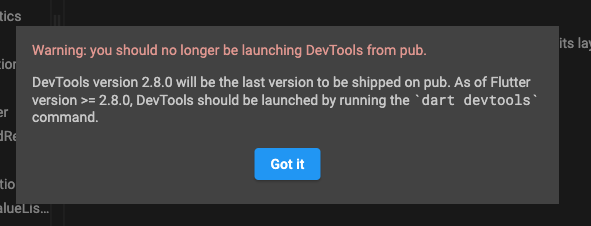
DevTools 2.8.0 will be the last version of DevTools shipped on pub,
and all future versions of DevTools will be shipped as part of the Dart SDK.
If you see this warning,
be sure to open DevTools via `dart devtools` instead of from pub:
## Performance updates
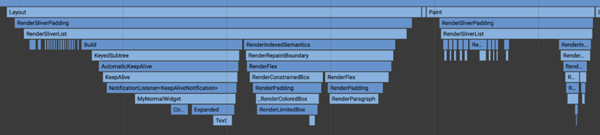
* Added a new "Enhance Tracing" feature to help users diagnose UI jank
stemming from expensive Build, Layout, and Paint operations.

The expected workflow is as such:
1. User is investigating UI jank in the performance page
2. User notices a long Build, Layout, and/or Paint event
3. User turns on the respective tracking toggle in the "Enhance Tracing" feature
4. User reproduces the UI jank in their app
5. User looks at the new set of Timeline events, which should now have
additional child events for widgets built, render objects laid out,
and/or render objects painted
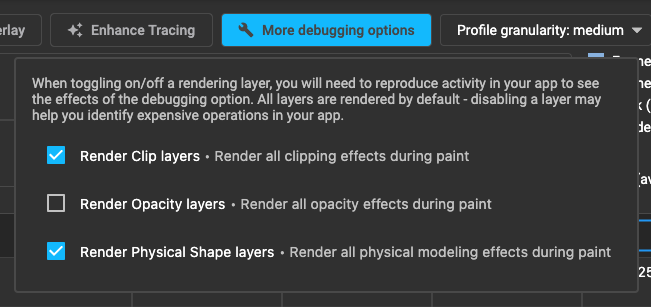
* Added new "More debugging options" feature to allow for disabling
rendering layers for Clip, Opacity, and Physical Shapes.
The expected workflow is as such:
1. User is investigating UI jank in the performance page
2. User notices a lot of janky frames and suspects it could be due to
excessive use of clipping, opacity, or physical shapes.
3. User turns off the respective render layer toggle in the "More
debugging options" feature
4. User reproduces the UI jank in their app
5. If the UI jank is reduced with a rendering layer turned off,
the user should try to optimize their app to use
less clipping/opacity/physical shape effects.
If the UI jank is not reduced,
the user now knows that the performance problem
is not due to these UI effects.
## Debugger updates
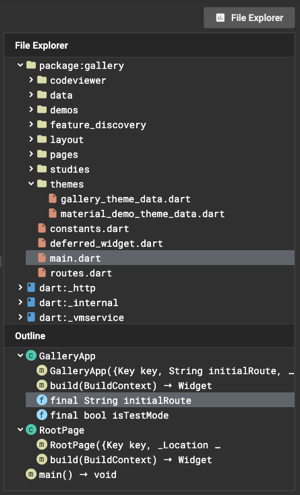
* Replaced the "Libraries" pane with a "File Explorer" pane -
[#3448](https://github.com/flutter/devtools/pull/3448).
The "File Explorer" pane has two components:
1. A tree view of the libraries present in your application.
You can use the File Explorer to find and open a library,
or you can use the existing Ctrl / Cmd +
P keyboard shortcut to search for a file.
1. A new "Outline" view that shows the structure of the selected library.
This view will show classes, members, methods, etc.,
and when an item is selected,
the source view will jump to the respective line of code
for the selected item.
* Performance improvements to expression evaluation auto complete -
[#3463](https://github.com/flutter/devtools/pull/3463)
* Fixed a bug with keyboard shortcuts -
[#3458](https://github.com/flutter/devtools/pull/3458)
* UI polish - [#3421](https://github.com/flutter/devtools/pull/3421),
[#3449](https://github.com/flutter/devtools/pull/3449)
## Full commit history
To find a complete list of changes since the previous release,
check out
[the diff on GitHub](https://github.com/flutter/devtools/compare/v2.7.0...v2.8.0).