# 在 Android Studio 上运行开发者工具
> 学习如何在 Android Studio 上启动和使用开发者工具。
## Install the Flutter plugin
## 安装 Flutter 插件
Add the Flutter plugin if you don't already have it installed.
This can be done using the normal **Plugins** page in the IntelliJ
and Android Studio settings. Once that page is open,
you can search the marketplace for the Flutter plugin.
请在第一次使用前添加 Flutter 插件,
它可以在 Intellij 或 Android Studio 设置中的 **Plugins** 页面中添加,
页面打开后,你可以在 marketPlace 中搜索到 Flutter 插件。
## Start an app to debug {: #run-and-debug}
## 开始调试一个应用
To open DevTools, you first need to run a Flutter app.
This can be accomplished by opening a Flutter project,
ensuring that you have a device connected,
and clicking the **Run** or **Debug** toolbar buttons.
需要在启动调试工具前开启一个 Flutter 应用,
它可以通过打开 Flutter 项目实现,
首先要确保你已经完成设备的连接,
然后只需点击工具栏的 **Run** 或 **Debug** 按钮。
## Launch DevTools from the toolbar/menu
## 从工具栏/菜单启动调试工具
Once an app is running,
you can start DevTools using one of the following techniques:
应用启动后,你可以通过以下几种方式运行调试工具:
* Select the **Open DevTools** toolbar action in the Run view.
运行界面下,在工具栏选择 **Open DevTools**(启动调试工具)。
* Select the **Open DevTools** toolbar action in the Debug view.
(if debugging)
调试界面下,在工具栏选择 **Open DevTools**。
* Select the **Open DevTools** action from the **More Actions**
menu in the Flutter Inspector view.
Flutter Inspector 里,在 **More Actions**
的菜单中选择 **Open DevTools**。
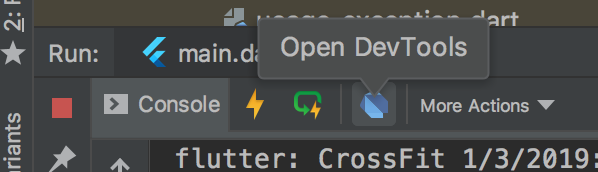{:width="100%"}
## Launch DevTools from an action
## 从事件 (action) 中启动调试工具
You can also open DevTools from an IntelliJ action.
Open the **Find Action...** dialog
(on macOS, press Cmd + Shift + A),
and search for the **Open DevTools** action.
When you select that action, the DevTools server
launches and a browser instance opens pointing to the DevTools app.
你同样可以在 IntelliJ 中运行调试工具,
先开启 **Find Action...** 对话框
(macOS 上可以同时按下 Cmd + Shift + A),
然后查找 **Open DevTools** 选项。
选择该操作后,相关服务会启动,并打开指向待调试应用的浏览器实例。
When opened with an IntelliJ action, DevTools is not connected
to a Flutter app. You'll need to provide a service protocol port
for a currently running app. You can do this using the inline
**Connect to a running app** dialog.
调试工具在 IntelliJ 事件启动时并不会直接连接到 Flutter 应用,
因此当前应用的服务协议端口是必须的,
你可以在 **Connect to a running app** 的对话框中开启。