# Flutter 架构概览
> 更深入的 Flutter 架构概览, 包含其设计层面的核心原理及概念。
This article is intended to provide a high-level overview of the architecture of
Flutter, including the core principles and concepts that form its design.
If you are interested in how to architect a Flutter app,
check out [Architecting Flutter apps][].
本文旨在提供更深入的 Flutter 架构概览,
包含其设计层面的核心原理及概念。
如果你对如何架构 Flutter 应用感兴趣,
请查看 [架构 Flutter 应用][Architecting Flutter apps]。
[Architecting Flutter apps]: /app-architecture
Flutter is a cross-platform UI toolkit that is designed to allow code reuse
across operating systems such as iOS, Android, web, and desktop,
while also allowing
applications to interface directly with underlying platform services.
The goal is to enable developers to deliver high-performance apps
that feel natural on different platforms,
embracing differences where they exist while sharing as
much code as possible.
Flutter 是一个跨平台的 UI 工具集,
它的设计初衷,就是允许在各种操作系统上复用同样的代码,例如 iOS 和 Android,
同时让应用程序可以直接与底层平台服务进行交互。
如此设计是为了让开发者能够在不同的平台上,都能交付拥有原生体验的高性能应用,
尽可能地共享复用代码的同时,包容不同平台的差异。
During development, Flutter apps run in a VM that offers
stateful hot reload of changes without needing a full recompile.
For release, Flutter apps are compiled directly to machine code,
whether Intel x64 or ARM instructions,
or to JavaScript if targeting the web.
The framework is open source, with a permissive BSD license,
and has a thriving ecosystem of third-party packages that
supplement the core library functionality.
在开发中,Flutter 应用会在一个 VM(程序虚拟机)中运行,
从而可以在保留状态且无需重新编译的情况下,热重载相关的更新。
对于发行版 (release) ,Flutter 应用程序会直接编译为机器代码
(Intel x64 或 ARM 指令集),或者针对 Web 平台的 JavaScript。
Flutter 的框架代码是开源的,遵循 BSD 开源协议,并拥有蓬勃发展的第三方库生态来补充核心库功能。
This overview is divided into a number of sections:
概览分为以下几部分内容:
1. The **layer model**: The pieces from which Flutter is constructed.
**分层模型**:Flutter 的构成要素。
1. **Reactive user interfaces**: A core concept for Flutter user interface
development.
**响应式用户界面**:Flutter 用户界面开发的核心概念。
1. An introduction to **widgets**: The fundamental building blocks
of Flutter user interfaces.
**widget** 介绍:构建 Flutter 用户界面的基石。
1. The **rendering process**: How Flutter turns UI code into pixels.
**渲染过程**:Flutter 如何将界面布局转化为像素。
1. An overview of the **platform embedders**: The code that lets mobile and
desktop OSes execute Flutter apps.
**平台嵌入层** 的概览:让 Flutter 应用可以在移动端及桌面端操作系统执行的代码。
1. **Integrating Flutter with other code**: Information about
different techniques available to Flutter apps.
**将 Flutter 与其他代码进行集成**:Flutter 应用可用的各项技术的更多信息。
1. **Support for the web**: Concluding remarks about the characteristics of
Flutter in a browser environment.
**Web 支持**:Flutter 在浏览器环境中的特性的概述。
## Architectural layers
## 架构层
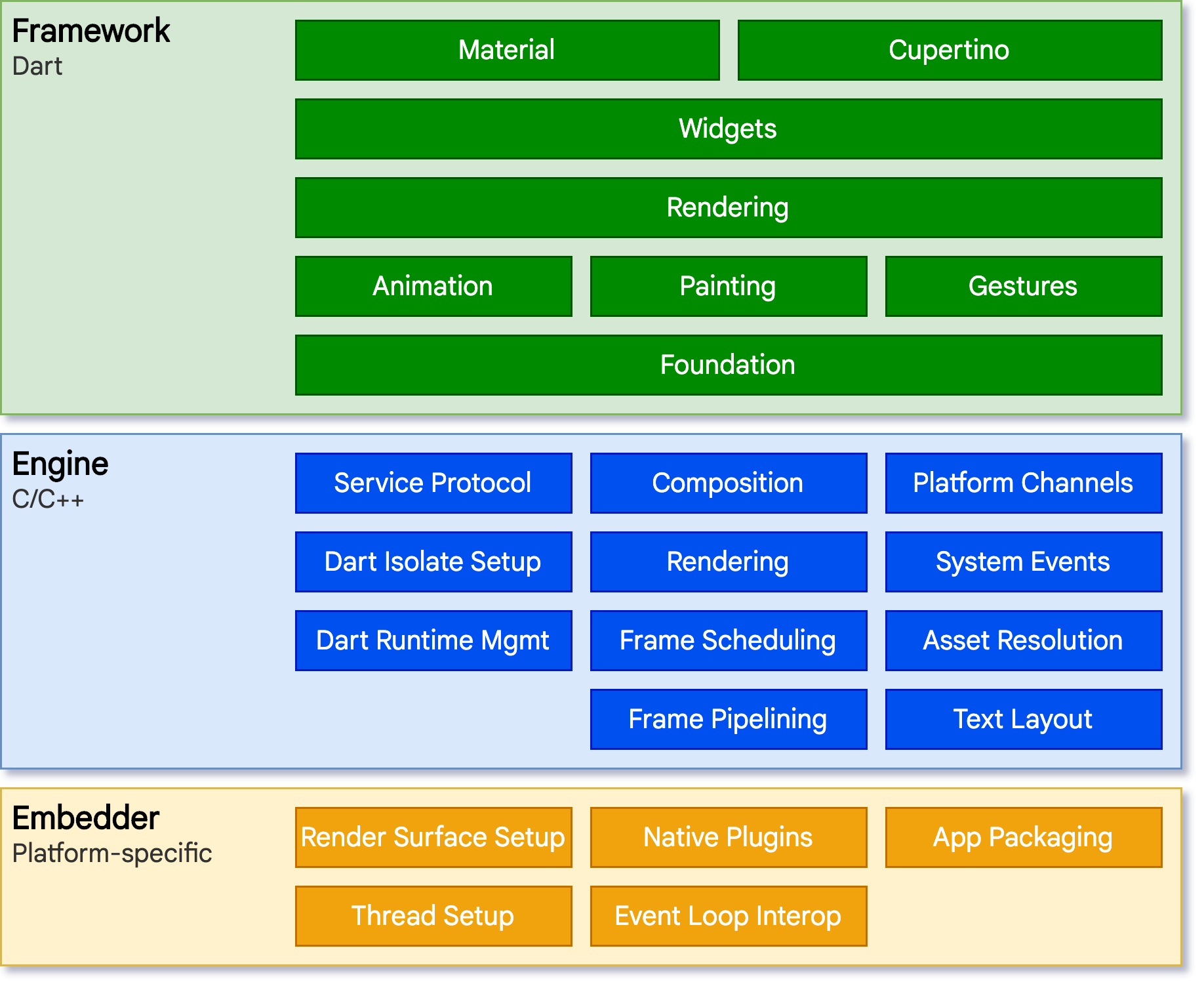
Flutter is designed as an extensible, layered system. It exists as a series of
independent libraries that each depend on the underlying layer. No layer has
privileged access to the layer below, and every part of the framework level is
designed to be optional and replaceable.
Flutter 被设计为一个可扩展的分层系统。
它可以被看作是各个独立的组件的系列合集,上层组件各自依赖下层组件。
组件无法越权访问更底层的内容,并且框架层中的各个部分都是可选且可替代的。
{:width="100%"}
To the underlying operating system, Flutter applications are packaged in the
same way as any other native application. A platform-specific embedder provides
an entrypoint; coordinates with the underlying operating system for access to
services like rendering surfaces, accessibility, and input; and manages the
message event loop. The embedder is written in a language that is appropriate
for the platform: currently Java and C++ for Android, Swift and
Objective-C/Objective-C++ for iOS and macOS,
and C++ for Windows and Linux. Using the embedder, Flutter
code can be integrated into an existing application as a module,
or the code might be the entire content of the application.
Flutter includes a number of embedders
for common target platforms, but other embedders also
exist.
对于底层操作系统而言,Flutter 应用程序的包装方式与其他原生应用相同。
在每一个平台上,会包含一个特定的嵌入层,
从而提供一个程序入口,程序由此可以与底层操作系统进行协调,
访问诸如 surface 渲染、辅助功能和输入等服务,并且管理事件循环队列。
该嵌入层采用了适合当前平台的语言编写,例如 Android 使用的是 Java 和 C++,
iOS 和 macOS 使用的是 Swift 和 Objective-C/Objective-C++,Windows 和 Linux 使用的是 C++。
Flutter 代码可以通过嵌入层,以模块方式集成到现有的应用中,也可以作为应用的主体。
Flutter 本身包含了各个常见平台的嵌入层,同时也存在一些其他的嵌入层。
At the core of Flutter is the **Flutter engine**,
which is mostly written in C++ and supports
the primitives necessary to support all Flutter applications.
The engine is responsible for rasterizing composited scenes
whenever a new frame needs to be painted.
It provides the low-level implementation of Flutter's core API,
including graphics text layout, file and network I/O, a Dart runtime,
and compile toolchain.
**Flutter 引擎** 毫无疑问是 Flutter 的核心,
它主要使用 C++ 编写,并提供了 Flutter 应用所需的原语。
当需要绘制新一帧的内容时,引擎将负责对需要合成的场景进行栅格化。
它提供了 Flutter 核心 API 的底层实现,
包括图形文本布局、文件及网络 I/O、Dart 运行时及编译环境的工具链。
:::note
If you have a question about which devices support
Impeller, check out [Impeller availability][]
for detailed information.
如果你对哪些设备支持 Impeller 有疑问,
请查看 [Impeller availability][] 了解更多详细信息。
:::
[Impeller availability]: https://flutter.cn/go/can-i-use-impeller
[Skia]: https://skia.org
[Impeller]: /perf/impeller
The engine is exposed to the Flutter framework through
[`dart:ui`](https://github.com/flutter/flutter/tree/main/engine/src/flutter/lib/ui),
which wraps the underlying C++ code in Dart classes. This library
exposes the lowest-level primitives, such as classes for driving input,
graphics, and text rendering subsystems.
引擎将底层 C++ 代码包装成 Dart 代码,通过
[`dart:ui`](https://github.com/flutter/flutter/tree/main/engine/src/flutter/lib/ui)
暴露给 Flutter 框架层。
该库暴露了最底层的原语,包括用于驱动输入、图形、和文本渲染的子系统的类。
Typically, developers interact with Flutter through the **Flutter framework**,
which provides a modern, reactive framework written in the Dart language. It
includes a rich set of platform, layout, and foundational libraries, composed of
a series of layers. Working from the bottom to the top, we have:
通常,开发者可以通过 **Flutter 框架层** 与 Flutter 交互,
该框架提供了以 Dart 语言编写的现代响应式框架。
它包括由一系列层组成的一组丰富的平台,布局和基础库。从下层到上层,依次有:
* Basic **[foundational](https://api.flutter-io.cn/flutter/foundation/foundation-library.html)**
classes, and building block services such as
**[animation](https://api.flutter-io.cn/flutter/animation/animation-library.html),
[painting](https://api.flutter-io.cn/flutter/painting/painting-library.html), and
[gestures](https://api.flutter-io.cn/flutter/gestures/gestures-library.html)** that offer
commonly used abstractions over the underlying foundation.
基础的 **[foundational](https://api.flutter-io.cn/flutter/foundation/foundation-library.html)**
类及一些基层之上的构建块服务,如 **[animation](https://api.flutter-io.cn/flutter/animation/animation-library.html)、
[painting](https://api.flutter-io.cn/flutter/painting/painting-library.html) 和
[gestures](https://api.flutter-io.cn/flutter/gestures/gestures-library.html)**,
它们可以提供上层常用的抽象。
* The **[rendering layer](https://api.flutter-io.cn/flutter/rendering/rendering-library.html)**
provides an abstraction for dealing with layout.
With this layer, you can build a tree of renderable objects.
You can manipulate these objects dynamically, with the
tree automatically updating the layout to reflect your changes.
**[渲染层](https://api.flutter-io.cn/flutter/rendering/rendering-library.html)**
用于提供操作布局的抽象。有了渲染层,你可以构建一棵可渲染对象的树。
在你动态更新这些对象时,渲染树也会自动根据你的变更来更新布局。
* The **[widgets layer](https://api.flutter-io.cn/flutter/widgets/widgets-library.html)** is
a composition abstraction. Each render object in the rendering layer has a
corresponding class in the widgets layer. In addition, the widgets layer
allows you to define combinations of classes that you can reuse. This is the
layer at which the reactive programming model is introduced.
**[widget 层](https://api.flutter-io.cn/flutter/widgets/widgets-library.html)**
是一种组合的抽象。每一个渲染层中的渲染对象,都在 widgets 层中有一个对应的类。
此外,widgets 层让你可以自由组合你需要复用的各种类。
响应式编程模型就在该层级中被引入。
* The
**[Material](https://api.flutter-io.cn/flutter/material/material-library.html)**
and
**[Cupertino](https://api.flutter-io.cn/flutter/cupertino/cupertino-library.html)**
libraries offer comprehensive sets of controls that use the widget layer's
composition primitives to implement the Material or iOS design languages.
**[Material](https://api.flutter-io.cn/flutter/material/material-library.html)** 和
**[Cupertino](https://api.flutter-io.cn/flutter/cupertino/cupertino-library.html)** 库
提供了全面的 widgets 层的原语组合,这套组合分别实现了 Material 和 iOS 设计规范。
The Flutter framework is relatively small; many higher-level features that
developers might use are implemented as packages, including platform plugins
like [camera](https://pub-web.flutter-io.cn/packages/camera) and
[webview](https://pub-web.flutter-io.cn/packages/webview_flutter), as well as platform-agnostic
features like [characters](https://pub-web.flutter-io.cn/packages/characters),
[http](https://pub-web.flutter-io.cn/packages/http), and
[animations](https://pub-web.flutter-io.cn/packages/animations) that build upon the core Dart and
Flutter libraries. Some of these packages come from the broader ecosystem,
covering services like [in-app
payments](https://pub-web.flutter-io.cn/packages/square_in_app_payments), [Apple
authentication](https://pub-web.flutter-io.cn/packages/sign_in_with_apple), and
[animations](https://pub-web.flutter-io.cn/packages/lottie).
Flutter 框架相对较小,因为一些开发者可能会使用到的更高层级的功能
已经被拆分到不同的 package 中,使用 Dart 和 Flutter 的核心库实现,
其中包括平台插件,例如
[camera](https://pub-web.flutter-io.cn/packages/camera) 和
[webview](https://pub-web.flutter-io.cn/packages/webview_flutter);与平台无关的功能,例如
[characters](https://pub-web.flutter-io.cn/packages/characters)、
[http](https://pub-web.flutter-io.cn/packages/http) 和
[animations](https://pub-web.flutter-io.cn/packages/animations)。
还有一些 package 来自于更为宽泛的生态系统中,例如
[应用内支付](https://pub-web.flutter-io.cn/packages/square_in_app_payments)、
[Apple 认证](https://pub-web.flutter-io.cn/packages/sign_in_with_apple) 和
[Lottie 动画](https://pub-web.flutter-io.cn/packages/lottie)。
The rest of this overview broadly navigates down the layers, starting with the
reactive paradigm of UI development. Then, we describe how widgets are composed
together and converted into objects that can be rendered as part of an
application. We describe how Flutter interoperates with other code at a platform
level, before giving a brief summary of how Flutter's web support differs from
other targets.
该概览的其余部分将从 UI 开发的响应式范例开始,浏览各个构建层。
而后,我们会讲述 widgets 如何被组织,并转换成应用程序的渲染对象。
同时我们也会讲述 Flutter 如何在平台层面与其他代码进行交互,
最终,我们会对目前 Flutter 对于 Web 平台的支持与其他平台的异同做一个总结。
## Anatomy of an app
## 应用剖析
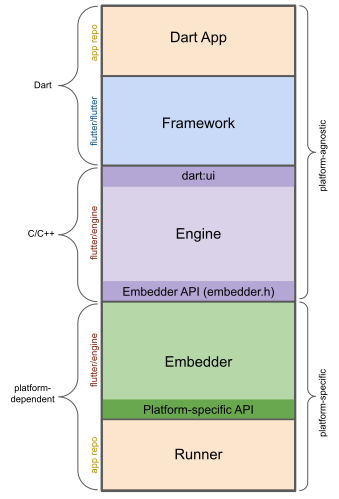
The following diagram gives an overview of the pieces
that make up a regular Flutter app generated by `flutter create`.
It shows where the Flutter Engine sits in this stack,
highlights API boundaries, and identifies the repositories
where the individual pieces live. The legend below clarifies
some of the terminology commonly used to describe the
pieces of a Flutter app.
下图为你展示了一个通过 `flutter create` 命令创建的应用的结构概览。
该图展示了引擎在架构中的定位,突出展示了 API 的操作边界,并且标识出了每一个组成部分。
 **Dart App**
**Dart 应用**
* Composes widgets into the desired UI.
将 widget 合成预期的 UI。
* Implements business logic.
实现对应的业务。
* Owned by app developer.
由应用开发者进行管理。
**Framework** ([source code](https://github.com/flutter/flutter/tree/main/packages/flutter/lib))
**框架**([源代码](https://github.com/flutter/flutter/tree/main/packages/flutter/lib))
* Provides higher-level API to build high-quality apps
(for example, widgets, hit-testing, gesture detection,
accessibility, text input).
提供了上层的 API 封装,用于构建高质量的应用
(例如 widget、触摸检测、手势竞技、无障碍和文字输入)。
* Composites the app's widget tree into a scene.
将应用的 widget 树构建至一个 Scene 中。
**Engine** ([source code](https://github.com/flutter/flutter/tree/main/engine/src/flutter/shell/common))
**引擎**([源代码](https://github.com/flutter/flutter/tree/main/engine/src/flutter/shell/common))
* Responsible for rasterizing composited scenes.
将已经合成的 Scene 进行栅格化。
* Provides low-level implementation of Flutter's core APIs
(for example, graphics, text layout, Dart runtime).
对 Flutter 的核心 API 进行了底层封装
(例如图形图像、文本布局和 Dart 的运行时)
* Exposes its functionality to the framework using the **dart:ui API**.
将其功能通过 **dart:ui API** 暴露给框架。
* Integrates with a specific platform using the Engine's **Embedder API**.
使用 **嵌入层 API** 与平台进行整合。
**Embedder** ([source code](https://github.com/flutter/flutter/tree/main/engine/src/flutter/shell/platform))
**嵌入层**([源代码](https://github.com/flutter/flutter/tree/main/engine/src/flutter/shell/platform))
* Coordinates with the underlying operating system
for access to services like rendering surfaces,
accessibility, and input.
协调底层操作系统的服务,例如渲染层、无障碍和输入。
* Manages the event loop.
管理事件循环体系。
* Exposes **platform-specific API** to integrate the Embedder into apps.
将 **特定平台的 API** 暴露给应用集成嵌入层。
**Runner**
**运行器**
* Composes the pieces exposed by the platform-specific
API of the Embedder into an app package runnable on the target platform.
将嵌入层暴露的平台 API 合成为目标平台可以运行的应用包。
* Part of app template generated by `flutter create`,
owned by app developer.
部分内容由 `flutter create` 生成,由应用开发者进行管理。
## Reactive user interfaces
## 响应式用户界面
On the surface, Flutter is [a reactive, declarative UI framework][faq],
in which the developer provides a mapping from application state to interface
state, and the framework takes on the task of updating the interface at runtime
when the application state changes. This model is inspired by
[work that came from Facebook for their own React framework][fb],
which includes a rethinking of many traditional design principles.
粗略一看,Flutter 是
[一个响应式的且伪声明式的 UI 框架][faq],
开发者负责提供应用状态与界面状态之间的映射,框架则在运行时将应用状态的更改更新到界面上。
这样的模型架构的灵感来自
[Facebook 自己的 React 框架][fb]
,其中包含了对传统设计理念的再度解构。
[faq]: /resources/faq#what-programming-paradigm-does-flutters-framework-use
[fb]: https://www.youtube.com/watch?time_continue=2&v=x7cQ3mrcKaY&feature=emb_logo
In most traditional UI frameworks, the user interface's initial state is
described once and then separately updated by user code at runtime, in response
to events. One challenge of this approach is that, as the application grows in
complexity, the developer needs to be aware of how state changes cascade
throughout the entire UI. For example, consider the following UI:
在大部分传统的 UI 框架中,界面的初始状态通常会被一次性定义,
然后,在运行时根据用户代码分别响应事件进行更新。
在这里有一项大挑战,即随着应用程序的复杂性日益增长,
开发者需要对整个 UI 的状态关联有整体的认知。
让我们来看看如下的 UI:
{:width="66%"}
There are many places where the state can be changed: the color box, the hue
slider, the radio buttons. As the user interacts with the UI, changes must be
reflected in every other place. Worse, unless care is taken, a minor change to
one part of the user interface can cause ripple effects to seemingly unrelated
pieces of code.
很多地方都可以更改状态:颜色框、色调滑条、单选按钮。
在用户与 UI 进行交互时,状态的改变可能会影响到每一个位置。
更糟糕的是,UI 的细微变动很有可能会引发无关代码的连锁反应,尤其是当开发者并未注意其关联的时候。
One solution to this is an approach like MVC, where you push data changes to the
model through the controller, and then the model pushes the new state to the view
through the controller. However, this also is problematic, since creating and
updating UI elements are two separate steps that can easily get out of sync.
我们可以通过类似 MVC 的方式进行处理,
开发者将数据的改动通过控制器(Controller)推至模型(Model),
模型再将新的状态通过控制器推至界面(View)。
但这样的处理方式仍然存在问题,
因为创建和更新 UI 元素的操作被分离开了,容易造成它们的不同步。
Flutter, along with other reactive frameworks, takes an alternative approach to
this problem, by explicitly decoupling the user interface from its underlying
state. With React-style APIs, you only create the UI description, and the
framework takes care of using that one configuration to both create and/or
update the user interface as appropriate.
Flutter 与其他响应式框架类似,采用了显式剥离基础状态和用户界面的方式,来解决这一问题。
你可以通过 React 风格的 API,创建 UI 的描述,让框架负责通过配置优雅地创建和更新用户界面。
In Flutter, widgets (akin to components in React) are represented by immutable
classes that are used to configure a tree of objects. These widgets are used to
manage a separate tree of objects for layout, which is then used to manage a
separate tree of objects for compositing. Flutter is, at its core, a series of
mechanisms for efficiently walking the modified parts of trees, converting trees
of objects into lower-level trees of objects, and propagating changes across
these trees.
在 Flutter 里,widgets(类似于 React 中的组件)是用来配置对象树的不可变类。
这些 widgets 会管理单独的布局对象树,接着参与管理合成的布局对象树。
Flutter 的核心就是一套高效的遍历树的变动的机制,
它会将对象树转换为更底层的对象树,并在树与树之间传递更改。
A widget declares its user interface by overriding the `build()` method, which
is a function that converts state to UI:
`build()` 是将状态转化为 UI 的方法,widget 通过重写该方法来声明 UI 的构造:
```plaintext
UI = f(state)
```
The `build()` method is by design fast to execute and should be free of side
effects, allowing it to be called by the framework whenever needed (potentially
as often as once per rendered frame).
`build()` 方法在框架需要时都可以被调用(每个渲染帧可能会调用一次),
从设计角度来看,它应当能够快速执行且没有额外影响的。
This approach relies on certain characteristics of a language runtime (in
particular, fast object instantiation and deletion). Fortunately, [Dart is
particularly well suited for this
task](https://blog.flutter.dev/flutter-dont-fear-the-garbage-collector-d69b3ff1ca30).
这样的实现设计依赖于语言的运行时特征(特别是对象的快速实例化和清除)。
幸运的是,[Dart 非常适合这份工作](https://blog.flutter.dev/flutter-dont-fear-the-garbage-collector-d69b3ff1ca30)。
## Widget
As mentioned, Flutter emphasizes widgets as a unit of composition. Widgets are
the building blocks of a Flutter app's user interface, and each widget is an
immutable declaration of part of the user interface.
如前所述,Flutter 强调以 widgets 作为组成单位。
Widgets 是构建 Flutter 应用界面的基础块,每个 widget 都是一部分不可变的 UI 声明。
Widgets form a hierarchy based on composition. Each widget nests inside its
parent and can receive context from the parent. This structure carries all the
way up to the root widget (the container that hosts the Flutter app, typically
`MaterialApp` or `CupertinoApp`), as this trivial example shows:
Widgets 通过布局组合形成一种层次结构关系。
每个 Widget 都嵌套在其父级的内部,并可以通过父级接收上下文。
从根布局(托管 Flutter 应用的容器,通常是 `MaterialApp` 或 `CupertinoApp`)开始,
自上而下都是这样的结构,如下面的示例所示:
```dart
import 'package:flutter/material.dart';
import 'package:flutter/services.dart';
void main() => runApp(const MyApp());
class MyApp extends StatelessWidget {
const MyApp({super.key});
@override
Widget build(BuildContext context) {
return MaterialApp(
home: Scaffold(
appBar: AppBar(title: const Text('My Home Page')),
body: Center(
child: Builder(
builder: (context) {
return Column(
children: [
const Text('Hello World'),
const SizedBox(height: 20),
ElevatedButton(
onPressed: () {
print('Click!');
},
child: const Text('A button'),
),
],
);
},
),
),
),
);
}
}
```
In the preceding code, all instantiated classes are widgets.
在上面的代码中,所有实例化的类都是 widgets。
Apps update their user interface in response to events (such as a user
interaction) by telling the framework to replace a widget in the hierarchy with
another widget. The framework then compares the new and old widgets, and
efficiently updates the user interface.
应用会根据事件交互(例如用户操作),通知框架替换层级中的旧 widget 为新 widget,
然后框架会比较新旧 widgets,高效地更新用户界面。
Flutter has its own implementations of each UI control, rather than deferring to
those provided by the system: for example, there is a pure [Dart
implementation](https://api.flutter-io.cn/flutter/cupertino/CupertinoSwitch-class.html)
of both the [iOS Toggle
control](https://developer.apple.com/design/human-interface-guidelines/toggles)
and the [one for](https://api.flutter-io.cn/flutter/material/Switch-class.html) the
[Android equivalent](https://m3.material.io/components/switch).
Flutter 拥有其自己的 UI 控制实现,而不是由系统自带的方法进行托管:
例如,
[iOS 的 Toggle 控件](https://developer.apple.com/design/human-interface-guidelines/toggles)
有一个 [对应的 widget](https://api.flutter-io.cn/flutter/cupertino/CupertinoSwitch-class.html),
[Android 的选择控件](https://m3.material.io/components/switch)
有一个 [对应的 widget](https://api.flutter-io.cn/flutter/material/Switch-class.html)。
This approach provides several benefits:
这样的实现有几个优势:
* Provides for unlimited extensibility. A developer who wants a variant of the
Switch control can create one in any arbitrary way, and is not limited to the
extension points provided by the OS.
提供了无限的扩展性。当开发者想要一个 Switch 的改装时,他们可以以任意方式创建一个,
而不被系统提供的扩展所限制。
* Avoids a significant performance bottleneck by allowing Flutter to composite
the entire scene at once, without transitioning back and forth between Flutter
code and platform code.
Flutter 可以直接合成所有的场景,而无需在 Flutter 与原生平台之间来回切换,
从而避免了明显的性能瓶颈。
* Decouples the application behavior from any operating system dependencies. The
application looks and feels the same on all versions of the OS, even if the OS
changed the implementations of its controls.
将应用的行为与操作系统的依赖解耦。
在任意一种系统平台上体验应用,都将是一致的,就算某个系统更改了其控件的实现,也是如此。
### Composition
### 组成
Widgets are typically composed of many other small, single-purpose widgets that
combine to produce powerful effects.
Widgets 通常由更小的且用途单一的 widgets 组合而成,提供更强大的功能。
Where possible, the number of design concepts is kept to a minimum while
allowing the total vocabulary to be large. For example, in the widgets layer,
Flutter uses the same core concept (a `Widget`) to represent drawing to the
screen, layout (positioning and sizing), user interactivity, state management,
theming, animations, and navigation. In the animation layer, a pair of concepts,
`Animation`s and `Tween`s, cover most of the design space. In the rendering
layer, `RenderObject`s are used to describe layout, painting, hit testing, and
accessibility. In each of these cases, the corresponding vocabulary ends up
being large: there are hundreds of widgets and render objects, and dozens of
animation and tween types.
在设计时,相关的设计概念已尽可能地少量存在,而通过大量的内容进行填充。
(译者注:即以最小的原语加最多的单一实现创造出最大的价值。)
举个例子,Flutter 在 widgets 层中使用了相同的概念(一个 `Widget`)
来表示屏幕上的绘制、布局(位置和大小)、用户交互、状态管理、主题、动画及导航。
在动画层,`Animation` 和 `Tween` 这对概念组合,涵盖了大部分的设计空间。
在渲染层,`RenderObject` 用来描述布局、绘制、触摸判断及可访问性。
在这些场景中,最终对应包含的内容都很多:
有数百个 widgets 和 render objects,以及数十种动画和补间类型。
The class hierarchy is deliberately shallow and broad to maximize the possible
number of combinations, focusing on small, composable widgets that each do one
thing well. Core features are abstract, with even basic features like padding
and alignment being implemented as separate components rather than being built
into the core. (This also contrasts with more traditional APIs where features
like padding are built in to the common core of every layout component.) So, for
example, to center a widget, rather than adjusting a notional `Align` property,
you wrap it in a [`Center`](https://api.flutter-io.cn/flutter/widgets/Center-class.html)
widget.
类的层次结构是有意的浅而广,以最大限度地增加可能的组合数量,
重点放在小的、可组合的 widget 上,确保每个 widget 都能很好地完成一件事情。
核心功能均被抽象,甚至像边距和对齐这样的基础功能,都被实现为单独的组件,而不是内置于核心中。
(这样的实现也与传统的 API 形成了对比,类似边距这样的功能通常都内置在了每个组件的公共核心内,
Flutter 中的 widget 则不同。)因此,如果你需要将一个 widget 居中,
与其调整 `Align` 这样的属性,不如将它包裹在一个
[`Center`](https://api.flutter-io.cn/flutter/widgets/Center-class.html) widget 内。
There are widgets for padding, alignment, rows, columns, and grids. These layout
widgets do not have a visual representation of their own. Instead, their sole
purpose is to control some aspect of another widget's layout. Flutter also
includes utility widgets that take advantage of this compositional approach.
Flutter 中包含了边距、对齐、行、列和网格系列的 widgets。
这些布局类型的 widgets 自身没有视觉内容,
而只用于控制其他 widgets 的部分布局条件。
Flutter 也包含了以这种组合方法组成的实用型 widgets。
For example, [`Container`](https://api.flutter-io.cn/flutter/widgets/Container-class.html), a
commonly used widget, is made up of several widgets responsible for layout,
painting, positioning, and sizing. Specifically, `Container` is made up of the
[`LimitedBox`](https://api.flutter-io.cn/flutter/widgets/LimitedBox-class.html),
[`ConstrainedBox`](https://api.flutter-io.cn/flutter/widgets/ConstrainedBox-class.html),
[`Align`](https://api.flutter-io.cn/flutter/widgets/Align-class.html),
[`Padding`](https://api.flutter-io.cn/flutter/widgets/Padding-class.html),
[`DecoratedBox`](https://api.flutter-io.cn/flutter/widgets/DecoratedBox-class.html), and
[`Transform`](https://api.flutter-io.cn/flutter/widgets/Transform-class.html) widgets, as you
can see by reading its source code. A defining characteristic of Flutter is that
you can drill down into the source for any widget and examine it. So, rather
than subclassing `Container` to produce a customized effect, you can compose it
and other widgets in novel ways, or just create a new widget using
`Container` as inspiration.
例如,一个常用的 widget
[`Container`](https://api.flutter-io.cn/flutter/widgets/Container-class.html),
是由几个 widget 组合而成,包含了布局、绘制、定位和大小的功能。
更具体地说,`Container` 是由
[`LimitedBox`](https://api.flutter-io.cn/flutter/widgets/LimitedBox-class.html)、
[`ConstrainedBox`](https://api.flutter-io.cn/flutter/widgets/ConstrainedBox-class.html)、
[`Align`](https://api.flutter-io.cn/flutter/widgets/Align-class.html)、
[`Padding`](https://api.flutter-io.cn/flutter/widgets/Padding-class.html)、
[`DecoratedBox`](https://api.flutter-io.cn/flutter/widgets/DecoratedBox-class.html) 和
[`Transform`](https://api.flutter-io.cn/flutter/widgets/Transform-class.html) 组成的,
你也可以通过查看源码看到这些组合。
Flutter 有一个典型的特征,即你可以深入到任意一个 widget,查看其源码。
因此,你可以通过同样的方式组合其他的 widgets,也可以参考 `Container` 来创建其他的 widget,
而不需要继承 `Container` 来实现自定义的效果。
### Building widgets
### 构建 widgets
As mentioned earlier, you determine the visual representation of a widget by
overriding the
[`build()`](https://api.flutter-io.cn/flutter/widgets/StatelessWidget/build.html) function to
return a new element tree. This tree represents the widget's part of the user
interface in more concrete terms. For example, a toolbar widget might have a
build function that returns a [horizontal
layout](https://api.flutter-io.cn/flutter/widgets/Row-class.html) of some
[text](https://api.flutter-io.cn/flutter/widgets/Text-class.html) and
[various](https://api.flutter-io.cn/flutter/material/IconButton-class.html)
[buttons](https://api.flutter-io.cn/flutter/material/PopupMenuButton-class.html). As needed,
the framework recursively asks each widget to build until the tree is entirely
described by [concrete renderable
objects](https://api.flutter-io.cn/flutter/widgets/RenderObjectWidget-class.html). The
framework then stitches together the renderable objects into a renderable object
tree.
先前提到,你可以通过重写
[`build()`](https://api.flutter-io.cn/flutter/widgets/StatelessWidget/build.html)
方法,返回一个新的元素树,来定义视觉展示。
这棵树用更为具体的术语表示了 widget 在 UI 中的部分。
例如,工具栏 widget 的 build 方法可能会返回
[水平布局](https://api.flutter-io.cn/flutter/widgets/Row-class.html),
其中可能包含一些 [文字](https://api.flutter-io.cn/flutter/widgets/Text-class.html),
[各种各样](https://api.flutter-io.cn/flutter/material/IconButton-class.html) 的
[按钮](https://api.flutter-io.cn/flutter/material/PopupMenuButton-class.html)。
根据需要,框架会递归请求每个 widget 进行构建,直到整棵树都被
[具体的可渲染对象](https://api.flutter-io.cn/flutter/widgets/RenderObjectWidget-class.html)
描述为止。
然后,框架会将可渲染的对象缝合在一起,组成可渲染对象树。
A widget's build function should be free of side effects. Whenever the function
is asked to build, the widget should return a new tree of widgets,
regardless of what the widget previously returned. The
framework does the heavy lifting work to determine which build methods need to
be called based on the render object tree (described in more detail later). More
information about this process can be found in the [Inside Flutter
topic](/resources/inside-flutter#linear-reconciliation).
Widget 的 build 方法应该是没有副作用的。每当一个方法要求构建时,
widget 都应当能返回一个 widget 的元素树[^1],
与先前返回的 widget 也没有关联。
框架会根据渲染对象树(稍后将进一步介绍)来确定哪些构建方法需要被调用,这是一项略显繁重的工作。
有关这个过程的更多信息,可以在
[Flutter 工作原理](/resources/inside-flutter#linear-reconciliation)
中进一步了解。
On each rendered frame, Flutter can recreate just the parts of the UI where the
state has changed by calling that widget's `build()` method. Therefore it is
important that build methods should return quickly, and heavy computational work
should be done in some asynchronous manner and then stored as part of the state
to be used by a build method.
每个渲染帧,Flutter 都可以根据变化的状态,调用 `build()` 方法重建部分 UI。
因此,保证 build 方法轻量且能快速返回 widget 是非常关键的,
繁重的计算工作应该通过一些异步方法完成,并存储在状态中,在 build 方法中使用。
While relatively naive in approach, this automated comparison is quite
effective, enabling high-performance, interactive apps. And, the design of the
build function simplifies your code by focusing on declaring what a widget is
made of, rather than the complexities of updating the user interface from one
state to another.
尽管这样的实现看起来不够成熟,但这样的自动对比方法非常有效,可以实现高性能的交互应用。
同时,以这种方式设计的 build 方法,将着重点放在 widget 组成的声明上,从而简化了你的代码,
而不是以一种状态去更新另一种状态这样的复杂过程。
### Widget state
### Widget 的状态
The framework introduces two major classes of widget: _stateful_ and _stateless_
widgets.
框架包含两种核心的 widget 类:**有状态的** 和 **无状态的** widget。
Many widgets have no mutable state: they don't have any properties that change
over time (for example, an icon or a label). These widgets subclass
[`StatelessWidget`](https://api.flutter-io.cn/flutter/widgets/StatelessWidget-class.html).
大部分 widget 都没有需要变更的状态:它们并不包含随时变化的属性(例如图标或者标签)。
这些 widget 会继承
[`StatelessWidget`](https://api.flutter-io.cn/flutter/widgets/StatelessWidget-class.html)。
However, if the unique characteristics of a widget needs to change based on user
interaction or other factors, that widget is _stateful_. For example, if a
widget has a counter that increments whenever the user taps a button, then the
value of the counter is the state for that widget. When that value changes, the
widget needs to be rebuilt to update its part of the UI. These widgets subclass
[`StatefulWidget`](https://api.flutter-io.cn/flutter/widgets/StatefulWidget-class.html), and
(because the widget itself is immutable) they store mutable state in a separate
class that subclasses [`State`](https://api.flutter-io.cn/flutter/widgets/State-class.html).
`StatefulWidget`s don't have a build method; instead, their user interface is
built through their `State` object.
然而,当 widget 拥有需要根据用户交互或其他因素而变化的特有属性,它就是 **有状态的**。
例如,计数器 widget 在用户点击按钮时数字递增,那么计数值就是计数器 widget 的状态。
当值变化时,widget 则需要被重建以更新相关部分的 UI。
这些 widget 会继承
[`StatefulWidget`](https://api.flutter-io.cn/flutter/widgets/StatefulWidget-class.html),
并且「可变的」状态会保存在继承
[`State`](https://api.flutter-io.cn/flutter/widgets/State-class.html) 的另一个子类中
(因为 widget 本身是不可变的)。
`StatefulWidget` 自身没有 build 方法,而在其对应的 `State` 对象中。
Whenever you mutate a `State` object (for example, by incrementing the counter),
you must call [`setState()`](https://api.flutter-io.cn/flutter/widgets/State/setState.html)
to signal the framework to update the user interface by calling the `State`'s
build method again.
每当你更改 `State` 对象时(例如计数增加),你需要调用
[`setState()`](https://api.flutter-io.cn/flutter/widgets/State/setState.html)
来告知框架,再次调用 `State` 的构建方法来更新 UI。
Having separate state and widget objects lets other widgets treat both stateless
and stateful widgets in exactly the same way, without being concerned about
losing state. Instead of needing to hold on to a child to preserve its state,
the parent can create a new instance of the child at any time without losing the
child's persistent state. The framework does all the work of finding and reusing
existing state objects when appropriate.
将状态和 widget 对象分离,可以使其他 widget 无差异地看待无状态和有状态 widget,
而不必担心丢失状态。父级无需担心状态的丢失,可以随时创建新的实例,
并不需要通过子级关系保持其状态。
框架也会在合适的时间,复用已存在的状态对象。
### State management
### 状态管理
So, if many widgets can contain state, how is state managed and passed around
the system?
那么,在众多 widget 都持有状态的情况下,系统中的状态是如何被传递和管理的呢?
As with any other class,
you can use a constructor in a widget to initialize its data,
so a `build()` method can ensure that any child widget
is instantiated with the data it needs:
与其他类相同,你可以通过 widget 的构造函数来初始化数据,
如此一来 `build()` 方法可以确保子 widget 使用其所需的数据进行实例化:
```dart
@override
Widget build(BuildContext context) {
return ContentWidget([!importantState!]);
}
```
Where `importantState` is a placeholder for the class
that contains the state important to the `Widget`.
其中 `importantState` 是一个占位符,
代表包含对该 `Widget` 而言重要状态的类。
As widget trees get deeper, however,
passing state information up and down the
tree hierarchy becomes cumbersome.
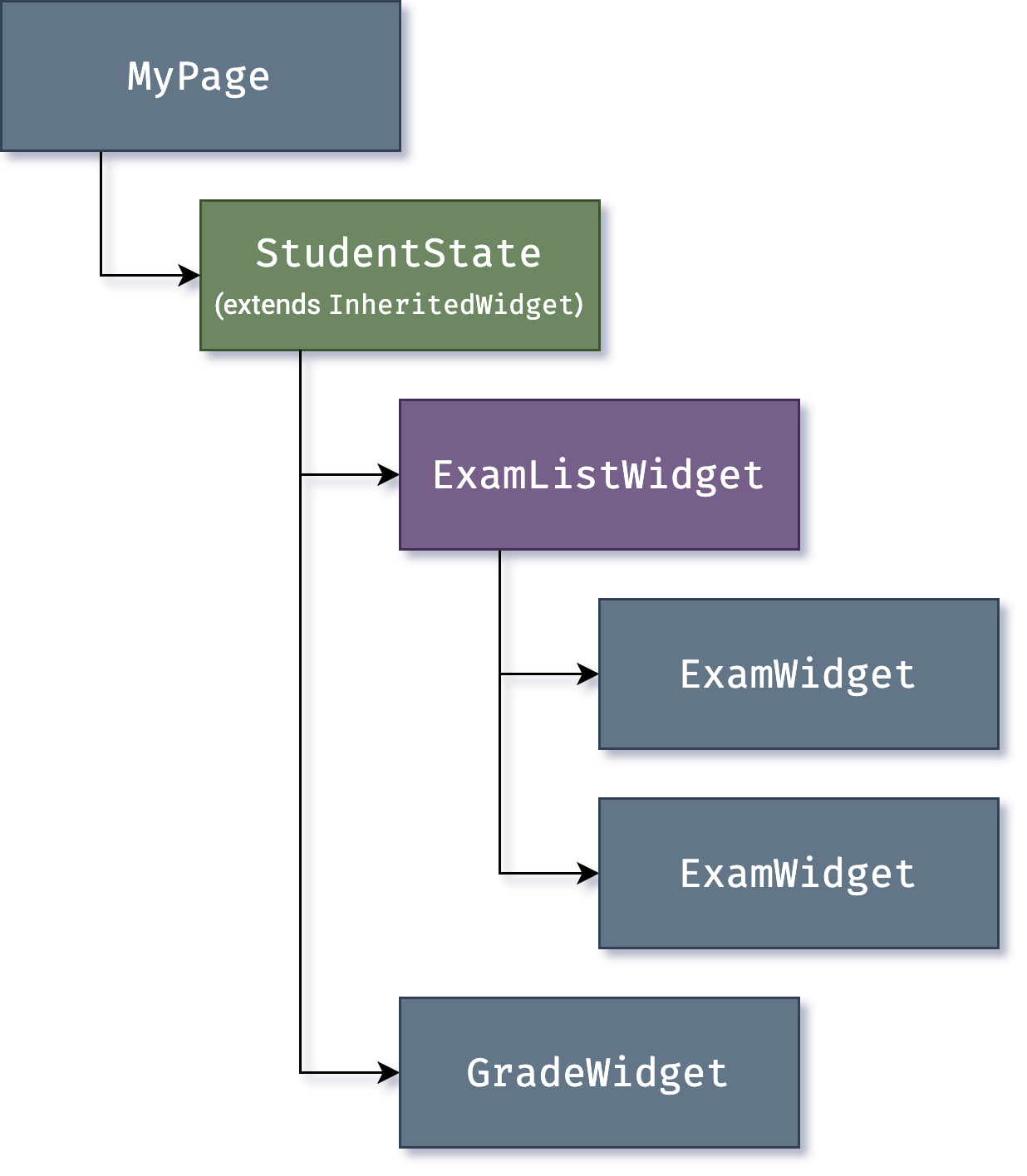
So, a third widget type, [`InheritedWidget`][],
provides an easy way to grab data from a shared ancestor.
You can use `InheritedWidget` to create a state widget
that wraps a common ancestor in the
widget tree, as shown in this example:
然而,随着 widget 树层级逐渐加深,依赖树形结构上下传递状态信息会变得十分麻烦。
这时,第三种类型的 widget——
[`InheritedWidget`](https://api.flutter-io.cn/flutter/widgets/InheritedWidget-class.html),
提供了一种从共同的祖先节点获取数据的简易方法。
你可以使用 `InheritedWidget` 创建包含状态的 widget,
该 widget 会将一个共同的祖先节点包裹在 widget 树中,如下面的例子所示:
{:width="50%" .diagram-wrap}
[`InheritedWidget`]: https://api.flutter-io.cn/flutter/widgets/InheritedWidget-class.html
Whenever one of the `ExamWidget` or `GradeWidget` objects needs data from
`StudentState`, it can now access it with a command such as:
现在,当 `ExamWidget` 或 `GradeWidget` 对象需要获取 `StudentState` 的数据时,
可以直接使用以下方式:
```dart
final studentState = StudentState.of(context);
```
The `of(context)` call takes the build context
(a handle to the current widget location),
and returns [the nearest ancestor in the tree][]
that matches the `StudentState` type.
`InheritedWidget`s also offer an `updateShouldNotify()` method,
which Flutter calls to determine whether a state
change should trigger a rebuild of child widgets that use it.
调用 `of(context)` 会根据当前构建的上下文(即当前 widget 位置的句柄),
并返回类型为 `StudentState` 的
[在树中距离最近的祖先节点][the nearest ancestor in the tree]。
`InheritedWidget` 同时也包含了 `updateShouldNotify()` 方法,
Flutter 会调用它来判断依赖了某个状态的 widget 是否需要重建。
[the nearest ancestor in the tree]: https://api.flutter-io.cn/flutter/widgets/BuildContext/dependOnInheritedWidgetOfExactType.html
Flutter itself uses `InheritedWidget` extensively as part
of the framework for shared state,
such as the application's _visual theme_, which includes
[properties like color and type styles][] that are
pervasive throughout an application.
The `MaterialApp` `build()` method inserts a theme
in the tree when it builds, and then deeper in the hierarchy a widget
can use the `.of()` method to look up the relevant theme data.
`InheritedWidget` 在 Flutter 框架中被大量用于共享状态,例如应用的 **视觉主题**,
包含了应用于整个应用的
[颜色和字体样式等属性][properties like color and type styles]。
`MaterialApp` 的 `build()` 方法会在构建时在树中插入一个主题,
更深层级的 widget 便可以使用 `.of()` 方法来查找相关的主题数据。
For example:
例如:
```dart
Container(
color: Theme.of(context).secondaryHeaderColor,
child: Text(
'Text with a background color',
style: Theme.of(context).textTheme.titleLarge,
),
);
```
[properties like color and type styles]: https://api.flutter-io.cn/flutter/material/ThemeData-class.html
As applications grow, more advanced state management approaches that reduce the
ceremony of creating and using stateful widgets become more attractive. Many
Flutter apps use utility packages like
[provider](https://pub-web.flutter-io.cn/packages/provider), which provides a wrapper around
`InheritedWidget`. Flutter's layered architecture also enables alternative
approaches to implement the transformation of state into UI, such as the
[flutter_hooks](https://pub-web.flutter-io.cn/packages/flutter_hooks) package.
随着应用程序的不断迭代,更高级的状态管理方法变得更有吸引力,
它们可以减少有状态的 widget 的创建。
许多 Flutter 应用使用了 [provider](https://pub-web.flutter-io.cn/packages/provider) 用于状态管理,
它对 `InheritedWidget` 进行了进一步的包装。
Flutter 的分层架构也允许使用其他实现来替换状态至 UI 的方案,例如
[flutter_hooks](https://pub-web.flutter-io.cn/packages/flutter_hooks)。
## Rendering and layout
## 渲染和布局
This section describes the rendering pipeline, which is the series of steps that
Flutter takes to convert a hierarchy of widgets into the actual pixels painted
onto a screen.
本节介绍 Flutter 的渲染机制,
包括将 widget 层级结构转换成屏幕上绘制的实际像素的一系列步骤。
### Flutter's rendering model
### Flutter 的渲染模型
You might be wondering: if Flutter is a cross-platform framework,
then how can it offer comparable performance to
single-platform frameworks?
你可能思考过:既然 Flutter 是一个跨平台的框架,那么它如何提供与原生平台框架相当的性能?
It's useful to start by thinking about how traditional
Android apps work. When drawing,
you first call the Java code of the Android framework.
The Android system libraries provide the components
responsible for drawing themselves to a `Canvas` object,
which Android can then render with [Skia][],
a graphics engine written in C/C++ that calls the
CPU or GPU to complete the drawing on the device.
让我们从安卓原生应用的角度开始思考。
当你在编写绘制的内容时,你需要调用 Android 框架的 Java 代码。
Android 的系统库提供了可以将自身绘制到 Canvas 对象的组件,
接下来 Android 就可以使用由 C/C++ 编写的 [Skia][] 图像引擎,
调用 CPU 和 GPU 完成在设备上的绘制。
Cross-platform frameworks _typically_ work by creating
an abstraction layer over the underlying native
Android and iOS UI libraries, attempting to smooth out the
inconsistencies of each platform representation.
App code is often written in an interpreted language like JavaScript,
which must in turn interact with the Java-based
Android or Objective-C-based iOS system libraries to display UI.
All this adds overhead that can be significant,
particularly where there is a lot of
interaction between the UI and the app logic.
**通常来说**,跨平台框架都会在 Android 和 iOS 的 UI 底层库上创建一层抽象,
该抽象层尝试抹平各个系统之间的差异。
这时,应用程序的代码常常使用 JavaScript 等解释型语言来进行编写,
这些代码会与基于 Java 的 Android 和基于 Objective-C 的 iOS 系统进行交互,
最终显示 UI 界面。
所有的流程都增加了显著的开销,在 UI 和应用逻辑有繁杂的交互时更为如此。
By contrast, Flutter minimizes those abstractions,
bypassing the system UI widget libraries in favor
of its own widget set. The Dart code that paints
Flutter's visuals is compiled into native code,
which uses Impeller for rendering.
Impeller is shipped along with the application,
allowing the developer to upgrade their app to stay
updated with the latest performance improvements
even if the phone hasn't been updated with a new Android version.
The same is true for Flutter on other native platforms,
such as Windows or macOS.
相比之下,Flutter 通过绕过系统 UI 组件库,使用自己的 widget 内容集,削减了抽象层的开销。
用于绘制 Flutter 图像内容的 Dart 代码被编译为机器码,并使用 Impeller 进行渲染。
Impeller 与应用一同捆绑运行,
让开发者能在设备未更新到最新的系统时,
也能跟进升级自己的应用,保证稳定性并提升性能。
:::note
If you want to know which devices Impeller supports,
check out [Impeller availability][].
For more information,
visit [Impeller rendering engine][]
如果你想知道 Impeller 支持哪些设备,
请查看 [Impeller availability][]。
更多信息,请查阅 [Impeller 渲染引擎][Impeller rendering engine]。
:::
[Impeller rendering engine]: /perf/impeller
### From user input to the GPU
### 从用户操作到 GPU
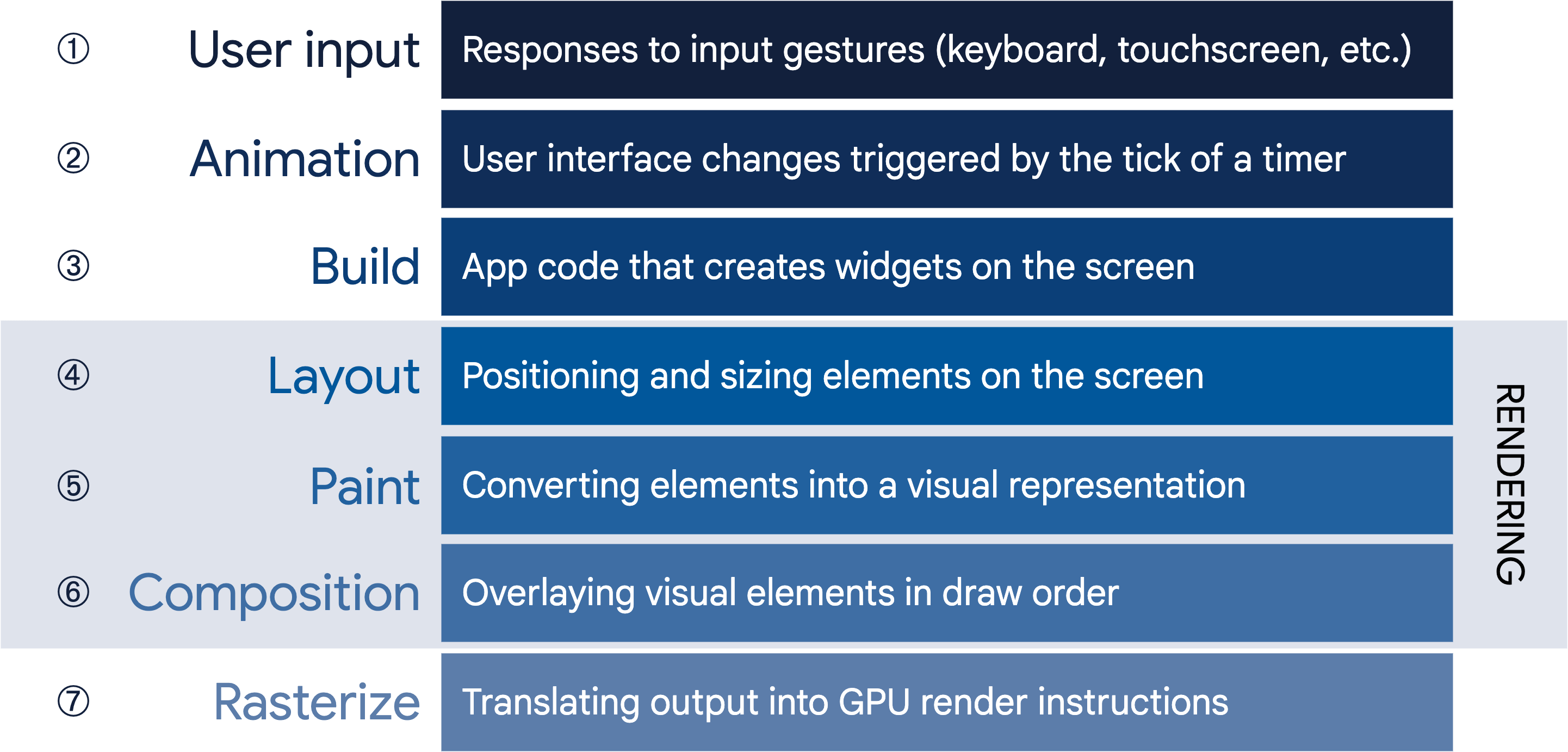
The overriding principle that Flutter applies to its
rendering pipeline is that **simple is fast**.
Flutter has a straightforward pipeline for how data flows to
the system, as shown in the following sequencing diagram:
对于 Flutter 的渲染机制而言,首要原则是 **简单快速**。
Flutter 为数据流向系统提供了直通的管道,如以下的流程图所示:
{:width="100%" .diagram-wrap}
Let's take a look at some of these phases in greater detail.
接下来,让我们更加深入了解其中的一些阶段。
### Build: from Widget to Element
### 构建:从 Widget 到 Element
Consider this code fragment that demonstrates a widget hierarchy:
首先观察以下的代码片段,它代表了一个简单的 widget 层次结构:
```dart
Container(
color: Colors.blue,
child: Row(
children: [
Image.network('https://www.example.com/1.png'),
const Text('A'),
],
),
);
```
When Flutter needs to render this fragment,
it calls the `build()` method, which
returns a subtree of widgets that renders
UI-based on the current app state.
During this process,
the `build()` method can introduce new widgets,
as necessary, based on its state.
As an example, in the preceding code fragment,
`Container` has `color` and `child` properties.
From looking at the [source
code](https://github.com/flutter/flutter/blob/02efffc134ab4ce4ff50a9ddd86c832efdb80462/packages/flutter/lib/src/widgets/container.dart#L401)
for `Container`, you can see that if the color is not null,
it inserts a `ColoredBox` representing the color:
当 Flutter 需要绘制这段代码片段时,框架会调用 `build()` 方法,
返回一棵基于当前应用状态来绘制 UI 的 widget 子树。
在这个过程中,`build()` 方法可能会在必要时,根据状态引入新的 widget。
在上面的例子中,`Container` 的 `color` 和 `child` 就是典型的例子。
我们可以查看 `Container` 的
[源代码](https://github.com/flutter/flutter/blob/02efffc134ab4ce4ff50a9ddd86c832efdb80462/packages/flutter/lib/src/widgets/container.dart#L401),
你会看到当 `color` 属性不为空时,`ColoredBox` 会被加入用于颜色布局。
```dart
if (color != null)
current = ColoredBox(color: color!, child: current);
```
Correspondingly, the `Image` and `Text` widgets might insert child widgets such
as `RawImage` and `RichText` during the build process. The eventual widget
hierarchy might therefore be deeper than what the code represents,
as in this case:
与之对应的,`Image` 和 `Text` 在构建过程中也会引入 `RawImage` 和 `RichText`。
如此一来,最终生成的 widget 结构比代码表示的层级更深,
在该场景中如下图[^2]:
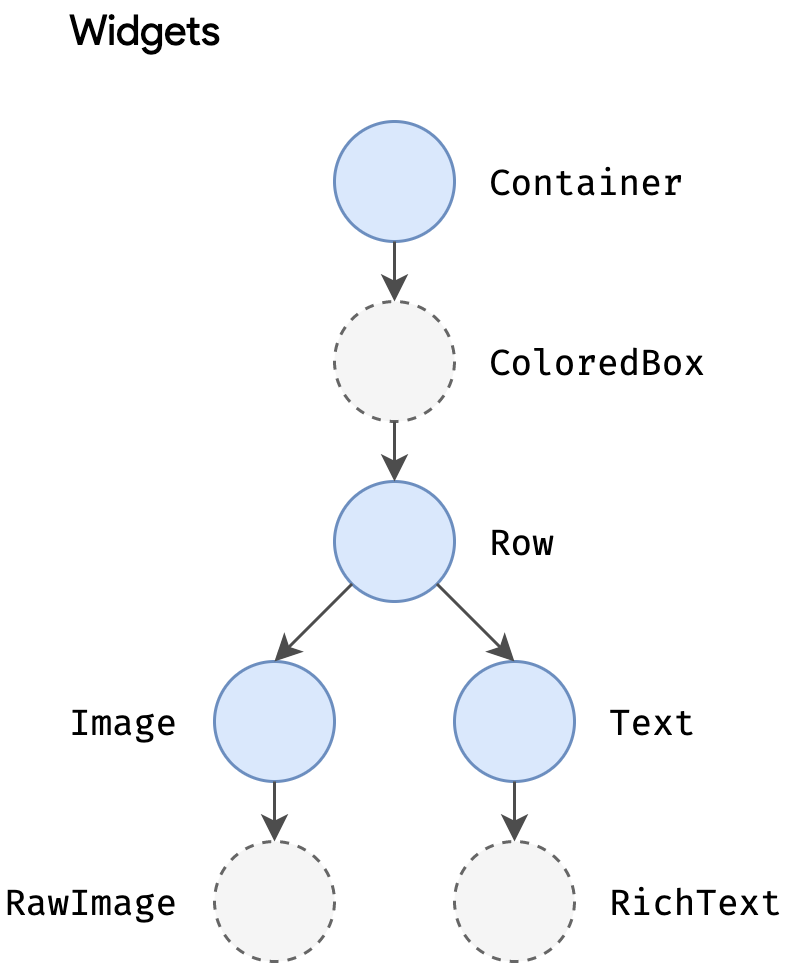{:width="40%" .diagram-wrap}
This explains why, when you examine the tree through
a debug tool such as the
[Flutter inspector](/tools/devtools/inspector),
part of the Flutter/Dart DevTools,
you might see a structure that is considerably deeper than what
is in your original code.
这就是为什么你在使用 Dart DevTools 的
[Flutter inspector](/tools/devtools/inspector)
调试 widget 树结构时,会发现实际的结构比你原本代码中的结构层级更深。
During the build phase, Flutter translates the widgets expressed in code into a
corresponding **element tree**, with one element for every widget. Each element
represents a specific instance of a widget in a given location of the tree
hierarchy. There are two basic types of elements:
在构建的阶段,Flutter 会将代码中描述的 widgets 转换成对应的 **Element 树**,
每一个 Widget 都有一个对应的 Element。
每一个 Element 代表了树状层级结构中特定位置的 widget 实例。
目前有两种 Element 的基本类型:
- `ComponentElement`, a host for other elements.
`ComponentElement`,其他 Element 的宿主。
- `RenderObjectElement`, an element that participates in the layout or paint
phases.
`RenderObjectElement`,参与布局或绘制阶段的 Element。
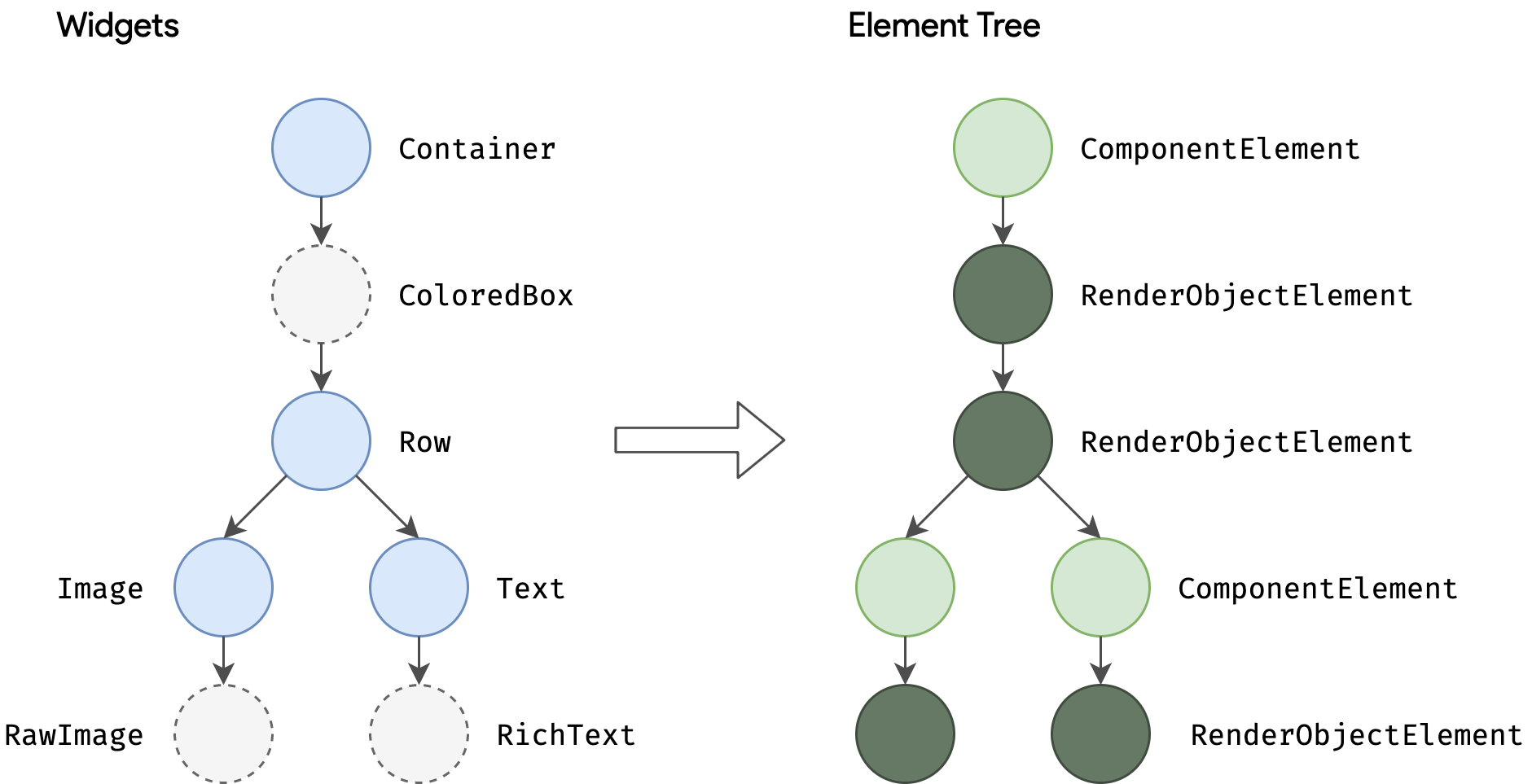{:width="85%" .diagram-wrap}
`RenderObjectElement`s are an intermediary between their widget analog and the
underlying `RenderObject`, which we'll come to later.
`RenderObjectElement` 是底层 `RenderObject` 与对应的 widget 之间的桥梁,
我们晚些会介绍它。
The element for any widget can be referenced through its `BuildContext`, which
is a handle to the location of a widget in the tree. This is the `context` in a
function call such as `Theme.of(context)`, and is supplied to the `build()`
method as a parameter.
任何 widget 都可以通过其 `BuildContext` 引用到 Element,
它是该 widget 在树中的位置的句柄。
类似 `Theme.of(context)` 方法调用中的 `context`,
它作为 `build()` 方法的参数被传递。
Because widgets are immutable, including the parent/child relationship between
nodes, any change to the widget tree (such as changing `Text('A')` to
`Text('B')` in the preceding example) causes a new set of widget objects to be
returned. But that doesn't mean the underlying representation must be rebuilt.
The element tree is persistent from frame to frame, and therefore plays a
critical performance role, allowing Flutter to act as if the widget hierarchy is
fully disposable while caching its underlying representation. By only walking
through the widgets that changed, Flutter can rebuild just the parts of the
element tree that require reconfiguration.
由于 widgets 以及它上下节点的关系都是不可变的,
因此,对 widget 树做的任何操作
(例如将 `Text('A')` 替换成 `Text('B')`)
都会返回一个新的 widget 对象集合。
但这并不意味着底层呈现的内容必须要重新构建。
Element 树每一帧之间都是持久化的,因此起着至关重要的性能作用,
Flutter 依靠该优势,实现了一种好似 widget 树被完全抛弃,而缓存了底层表示的机制。
Flutter 可以根据发生变化的 widget,来重建需要重新配置的 Element 树的部分。
### Layout and rendering
### 布局和渲染
It would be a rare application that drew only a single widget. An important part
of any UI framework is therefore the ability to efficiently lay out a hierarchy
of widgets, determining the size and position of each element before they are
rendered on the screen.
很少有应用只绘制单个 widget。
因此,有效地排布 widget 的结构及在渲染完成前决定每个 Element 的大小和位置,
是所有 UI 框架的重点之一。
The base class for every node in the render tree is
[`RenderObject`](https://api.flutter-io.cn/flutter/rendering/RenderObject-class.html), which
defines an abstract model for layout and painting. This is extremely general: it
does not commit to a fixed number of dimensions or even a Cartesian coordinate
system (demonstrated by [this example of a polar coordinate
system](https://dartpad.cn/?id=596b1d6331e3b9d7b00420085fab3e27)). Each
`RenderObject` knows its parent, but knows little about its children other than
how to _visit_ them and their constraints. This provides `RenderObject` with
sufficient abstraction to be able to handle a variety of use cases.
在渲染树中,每个节点的基类都是
[`RenderObject`](https://api.flutter-io.cn/flutter/rendering/RenderObject-class.html),
该基类为布局和绘制定义了一个抽象模型。
这是再平凡不过的事情:它并不总是一个固定的大小,甚至不遵循笛卡尔坐标规律
(根据该 [极坐标系的示例](https://dartpad.cn/596b1d6331e3b9d7b00420085fab3e27) 所示)。
每一个 `RenderObject` 都了解其父节点的信息,
但对于其子节点,除了如何 **访问** 和获得他们的布局约束,并没有更多的信息。
这样的设计让 `RenderObject` 拥有高效的抽象能力,能够处理各种各样的使用场景。
During the build phase, Flutter creates or updates an object that inherits from
`RenderObject` for each `RenderObjectElement` in the element tree.
`RenderObject`s are primitives:
[`RenderParagraph`](https://api.flutter-io.cn/flutter/rendering/RenderParagraph-class.html)
renders text,
[`RenderImage`](https://api.flutter-io.cn/flutter/rendering/RenderImage-class.html) renders
an image, and
[`RenderTransform`](https://api.flutter-io.cn/flutter/rendering/RenderTransform-class.html)
applies a transformation before painting its child.
在构建阶段,Flutter 会为 Element 树中的每个 `RenderObjectElement` 创建
或更新其对应的一个从 `RenderObject` 继承的对象。
`RenderObject` 实际上是原语:
渲染文字的
[`RenderParagraph`](https://api.flutter-io.cn/flutter/rendering/RenderParagraph-class.html)、
渲染图片的
[`RenderImage`](https://api.flutter-io.cn/flutter/rendering/RenderImage-class.html)
以及在绘制子节点内容前应用变换的
[`RenderTransform`](https://api.flutter-io.cn/flutter/rendering/RenderTransform-class.html)
是更为上层的实现。
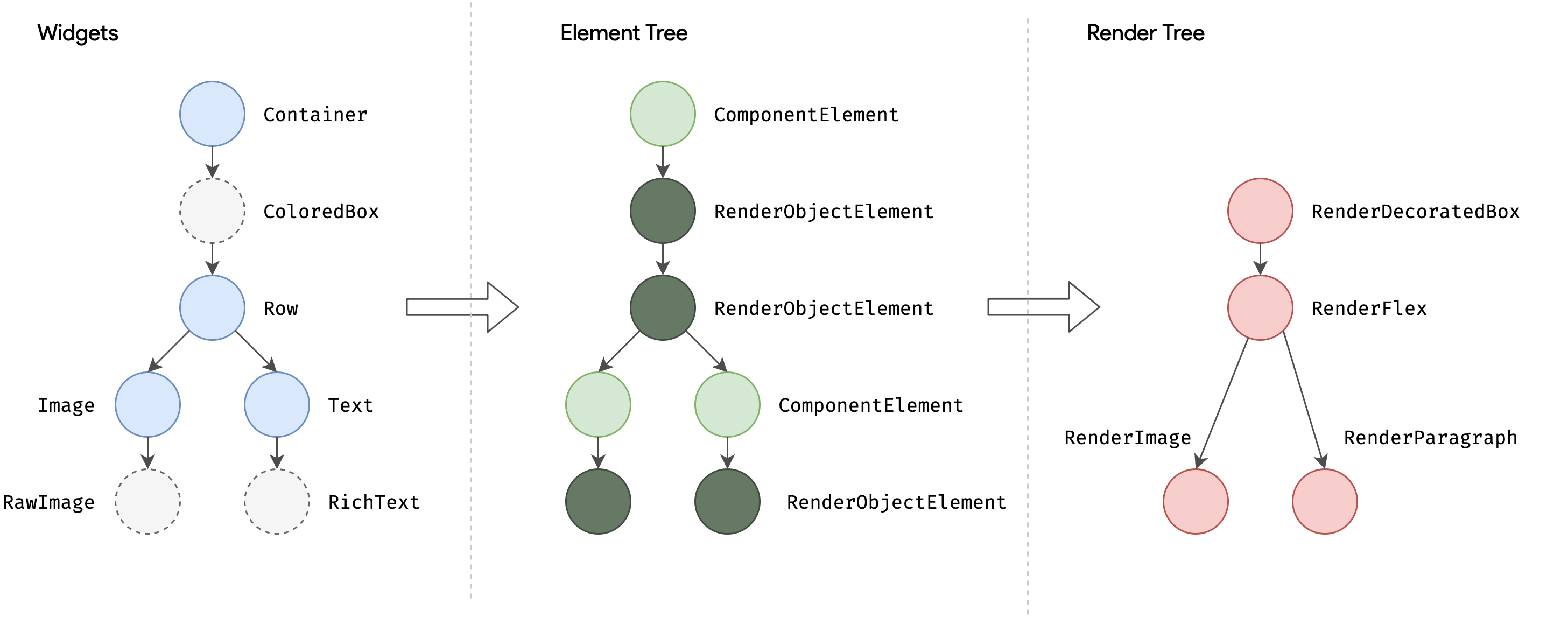{:width="100%" .diagram-wrap}
Most Flutter widgets are rendered by an object that inherits from the
`RenderBox` subclass, which represents a `RenderObject` of fixed size in a 2D
Cartesian space. `RenderBox` provides the basis of a _box constraint model_,
establishing a minimum and maximum width and height for each widget to be
rendered.
大部分的 Flutter widget 是由一个继承了 `RenderBox` 的子类的对象渲染的,
它们呈现出的 `RenderObject` 会在二维笛卡尔空间中拥有固定的大小。
`RenderBox` 提供了 **盒子限制模型**,为每个 widget 关联了渲染的最小和最大的宽度和高度。
To perform layout, Flutter walks the render tree in a depth-first traversal and
**passes down size constraints** from parent to child. In determining its size,
the child _must_ respect the constraints given to it by its parent. Children
respond by **passing up a size** to their parent object within the constraints
the parent established.
在进行布局的时候,Flutter 会以 DFS(深度优先遍历)方式遍历渲染树,
并 **将限制以自上而下的方式** 从父节点传递给子节点。
子节点若要确定自己的大小,则 **必须** 遵循父节点传递的限制。
子节点的响应方式是在父节点建立的约束内 **将大小以自下而上的方式** 传递给父节点。
{:width="70%" .diagram-wrap}
At the end of this single walk through the tree, every object has a defined size
within its parent's constraints and is ready to be painted by calling the
[`paint()`](https://api.flutter-io.cn/flutter/rendering/RenderObject/paint.html)
method.
在遍历完一次树后,每个对象都通过父级约束而拥有了明确的大小,随时可以通过调用
[`paint()`](https://api.flutter-io.cn/flutter/rendering/RenderObject/paint.html)
进行渲染。
The box constraint model is very powerful as a way to layout objects in _O(n)_
time:
盒子限制模型十分强大,它的对象布局的时间复杂度是 **O(n)**:
- Parents can dictate the size of a child object by setting maximum and minimum
constraints to the same value. For example, the topmost render object in a
phone app constrains its child to be the size of the screen. (Children can
choose how to use that space. For example, they might just center what they
want to render within the dictated constraints.)
父节点可以通过设定最大和最小的尺寸限制,决定其子节点对象的大小。
例如,在一个手机应用中,最高层级的渲染对象将会限制其子节点的大小为屏幕的尺寸。
(子节点可以选择如何占用空间。例如,它们可能在设定的限制中以居中的方式布局。)
- A parent can dictate the child's width but give the child flexibility over
height (or dictate height but offer flexibility over width). A real-world example
is flow text, which might have to fit a horizontal constraint but vary
vertically depending on the quantity of text.
父节点可以决定子节点的宽度,而让子节点灵活地自适应布局高度(或决定高度而自适应宽度)。
现实中有一种例子就是流式布局的文本,它们常常会填充横向限制,再根据文字内容的多少决定高度。
This model works even when a child object needs to know how much space it has
available to decide how it will render its content. By using a
[`LayoutBuilder`](https://api.flutter-io.cn/flutter/widgets/LayoutBuilder-class.html) widget,
the child object can examine the passed-down constraints and use those to
determine how it will use them, for example:
这样的盒子约束模型,同样也适用于子节点对象需要知道有多少可用空间渲染其内容的场景,
通过使用 [`LayoutBuilder`](https://api.flutter-io.cn/flutter/widgets/LayoutBuilder-class.html) widget,
子节点可以得到从上层传递下来的约束,并合理利用该约束对象,使用方法如下:
```dart
Widget build(BuildContext context) {
return LayoutBuilder(
builder: (context, constraints) {
if (constraints.maxWidth < 600) {
return const OneColumnLayout();
} else {
return const TwoColumnLayout();
}
},
);
}
```
More information about the constraint and layout system,
along with working examples, can be found in the
[Understanding constraints](/ui/layout/constraints) topic.
更多有关约束和布局系统的信息,及可参考的例子,可以在
[深入理解 Flutter 布局约束](/ui/layout/constraints)
文章中查看。
The root of all `RenderObject`s is the `RenderView`, which represents the total
output of the render tree. When the platform demands a new frame to be rendered
(for example, because of a
[vsync](https://source.android.com/devices/graphics/implement-vsync) or because
a texture decompression/upload is complete), a call is made to the
`compositeFrame()` method, which is part of the `RenderView` object at the root
of the render tree. This creates a `SceneBuilder` to trigger an update of the
scene. When the scene is complete, the `RenderView` object passes the composited
scene to the `Window.render()` method in `dart:ui`, which passes control to the
GPU to render it.
所有 `RenderObject` 的根节点是 `RenderView`,代表了渲染树的总体输出。
当平台需要渲染新的一帧内容时
(例如一个 [vsync](https://source.android.com/devices/graphics/implement-vsync)
信号或者一个纹理的更新完成),会调用一次 `compositeFrame()` 方法,
它是 `RenderView` 的一部分。
该方法会创建一个 `SceneBuilder` 来触发当前画面的更新。
当画面更新完毕,`RenderView` 会将合成的画面传递给 `dart:ui` 中的 `Window.render()` 方法,
控制 GPU 进行渲染。
Further details of the composition and rasterization stages of the pipeline are
beyond the scope of this high-level article, but more information can be found
[in this talk on the Flutter rendering
pipeline](https://www.youtube.com/watch?v=UUfXWzp0-DU).
有关渲染流程的合成和栅格化阶段的更多细节,将不在本篇深入文章中讨论,
但可以在
[关于 Flutter 渲染流程的讨论](https://www.bilibili.com/video/BV1Zx411o7tq/)
中了解更多。
## Platform embedding
## 平台嵌入
As we've seen, rather than being translated into the equivalent OS widgets,
Flutter user interfaces are built, laid out, composited, and painted by Flutter
itself. The mechanism for obtaining the texture and participating in the app
lifecycle of the underlying operating system inevitably varies depending on the
unique concerns of that platform. The engine is platform-agnostic,
presenting a [stable ABI (Application Binary Interface)][ABI].
that provides a _platform embedder_ with a way to set up and use Flutter.
我们都知道,Flutter 的界面构建、布局、合成和绘制全都由 Flutter 自己完成,
而不是转换为对应平台系统的原生组件。
获取纹理和联动应用底层的生命周期的方法,不可避免地会根据平台特性而改变。
Flutter 引擎本身是与平台无关的,它提供了一个 [稳定的 ABI(应用二进制接口)][ABI],
包含一个 **平台嵌入层**,可以通过其方法设置并使用 Flutter。
[ABI]: https://github.com/flutter/flutter/blob/main/engine/src/flutter/shell/platform/embedder/embedder.h
The platform embedder is the native OS application that hosts all Flutter
content, and acts as the glue between the host operating system and Flutter.
When you start a Flutter app, the embedder provides the entrypoint,
initializes the Flutter engine, obtains threads for UI and rastering,
and creates a texture that Flutter can write to.
The embedder is also responsible for the app lifecycle,
including input gestures (such as mouse, keyboard, touch), window
sizing, thread management, and platform messages.
Flutter includes platform embedders for Android, iOS, Windows,
macOS, and Linux; you can also create a
custom platform embedder, as in [this worked
example](https://github.com/chinmaygarde/fluttercast) that supports remoting
Flutter sessions through a VNC-style framebuffer or [this worked example for
Raspberry Pi](https://github.com/ardera/flutter-pi).
平台嵌入层是用于呈现所有 Flutter 内容的原生系统应用,
它充当着宿主操作系统和 Flutter 之间的粘合剂的角色。
当你启动一个 Flutter 应用时,嵌入层会提供一个入口,初始化 Flutter 引擎,
获取 UI 和栅格化线程,创建 Flutter 可以写入的纹理。
嵌入层同时负责管理应用的生命周期,包括输入的操作(例如鼠标、键盘和触控)、
窗口大小的变化、线程管理和平台消息的传递。
Flutter 拥有 Android、iOS、Windows、macOS 和 Linux 的平台嵌入层,
当然,开发者可以创建自定义的嵌入层,正如这个
[可用的例子](https://github.com/chinmaygarde/fluttercast)
以 VNC 风格的帧缓冲区支持了远程 Flutter,还有
[支持树莓派运行的例子](https://github.com/ardera/flutter-pi)。
Each platform has its own set of APIs and constraints. Some brief
platform-specific notes:
每一个平台都有各自的一套 API 和限制。以下是一些关于平台简短的说明:
- As of Flutter 3.29, the UI and platform threads are merged on
iOS and Android. Specifically, the UI thread
is removed and the Dart code runs on the native platform thread.
For more information, see [The great thread merge][] video.
从 Flutter 3.29 起,iOS 和 Android 平台上的 UI 线程与平台线程已合并。
具体而言,UI 线程已经被移除,Dart 代码现在运行在原生平台的线程上。
更多详情内容,请参阅 [The great thread merge][] 视频。
- On iOS and macOS, Flutter is loaded into the embedder as a `UIViewController`
or `NSViewController`, respectively. The platform embedder creates a
`FlutterEngine`, which serves as a host to the Dart VM and your Flutter
runtime, and a `FlutterViewController`, which attaches to the `FlutterEngine`
to pass UIKit or Cocoa input events into Flutter and to display frames
rendered by the `FlutterEngine` using Metal or OpenGL.
在 iOS 和 macOS 上,
Flutter 分别通过 `UIViewController` 和 `NSViewController` 载入到嵌入层。
这些嵌入层会创建一个 `FlutterEngine`,作为 Dart VM 和你的 Flutter 运行时的宿主,
还有一个 `FlutterViewController`,关联对应的 `FlutterEngine`,
传递 UIKit 或者 Cocoa 的输入事件到 Flutter,
并将 `FlutterEngine` 渲染的帧内容通过 Metal 或 OpenGL 进行展示。
- On Android, Flutter is, by default, loaded into the embedder as an `Activity`.
The view is controlled by a
[`FlutterView`](https://api.flutter-io.cn/javadoc/io/flutter/embedding/android/FlutterView.html),
which renders Flutter content either as a view or a texture, depending on the
composition and z-ordering requirements of the Flutter content.
在 Android 上,Flutter 默认作为一个 `Activity` 加载到嵌入层中。
此时视图是通过一个
[`FlutterView`](https://api.flutter-io.cn/javadoc/io/flutter/embedding/android/FlutterView.html)
进行控制的,基于 Flutter 内容的合成和 z 排列 (z-ordering) 的要求,
将 Flutter 的内容以视图模式或纹理模式进行呈现。
- On Windows, Flutter is hosted in a traditional Win32 app, and content is
rendered using
[ANGLE](https://chromium.googlesource.com/angle/angle/+/master/README.md), a
library that translates OpenGL API calls to the DirectX 11 equivalents.
在 Windows 上,Flutter 的宿主是一个传统的 Win32 应用,内容是通过一个将 OpenGL API
调用转换成 DirectX 11 的等价调用的库
[ANGLE](https://chromium.googlesource.com/angle/angle/+/master/README.md)
进行渲染的。
[The great thread merge]: https://youtu.be/miW7vCmQwnw?si=9EYvRDxtkpkPrcSO
## Integrating with other code
## 与其他代码进行集成
Flutter provides a variety of interoperability mechanisms, whether you're
accessing code or APIs written in a language like Kotlin or Swift, calling a
native C-based API, embedding native controls in a Flutter app, or embedding
Flutter in an existing application.
Flutter 提供了多种代码交互机制,无论你是在调用 Kotlin 或者 Swift 这些语言编写的代码或 API,
或是调用 C 语言基础的 API,或是将原生代码能力嵌入 Flutter 应用,
又或是将 Flutter 嵌入现有的应用。
### Platform channels
### 平台通道
For mobile and desktop apps, Flutter allows you to call into custom code through
a _platform channel_, which is a mechanism for communicating between your
Dart code and the platform-specific code of your host app. By creating a common
channel (encapsulating a name and a codec), you can send and receive messages
between Dart and a platform component written in a language like Kotlin or
Swift. Data is serialized from a Dart type like `Map` into a standard format,
and then deserialized into an equivalent representation in Kotlin (such as
`HashMap`) or Swift (such as `Dictionary`).
对于移动端和桌面端应用而言,Flutter 提供了通过 **平台通道** 调用自定义代码的能力,
这是一种非常简单的在宿主应用之间让 Dart 代码与平台代码通信的机制。
通过创建一个常用的通道(封装通道名称和编码),开发者可以在
Dart 与使用 Kotlin 和 Swift 等语言编写的平台组件之间发送和接收消息。
数据会由 Dart 类型(例如 Map)序列化为一种标准格式,
然后反序列化为 Kotlin(例如 `HashMap`)或者 Swift(例如 `Dictionary`)中的等效类型。
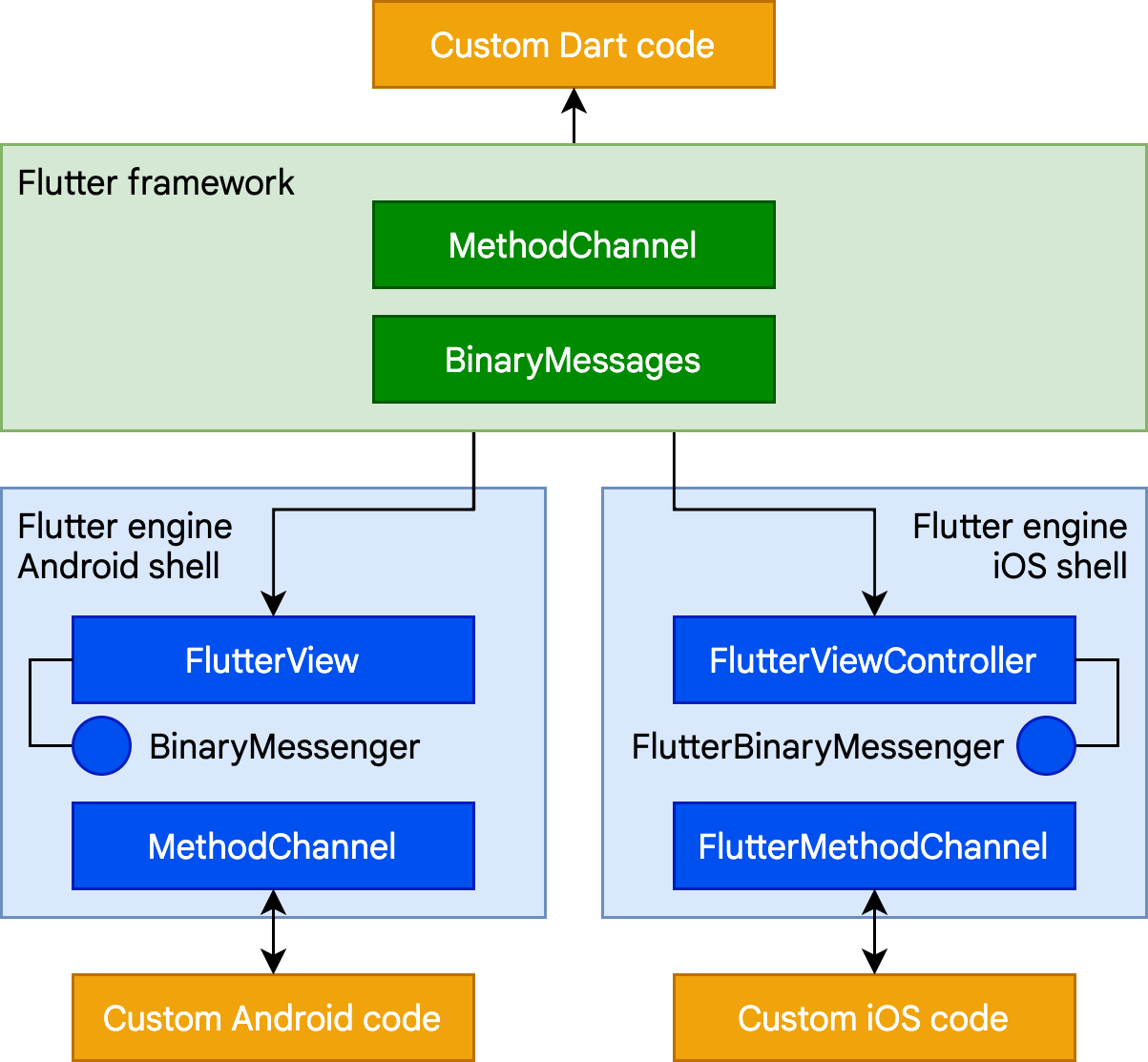{:width="65%" .diagram-wrap}
The following is a short platform channel example of a Dart call to a receiving
event handler in Kotlin (Android) or Swift (iOS):
下方的示例是在 Kotlin (Android) 或 Swift (iOS) 中处理 Dart 调用平台通道事件
的简单接收处理:
```dart
// Dart side
const channel = MethodChannel('foo');
final greeting = await channel.invokeMethod('bar', 'world') as String;
print(greeting);
```
```kotlin
// Android (Kotlin)
val channel = MethodChannel(flutterView, "foo")
channel.setMethodCallHandler { call, result ->
when (call.method) {
"bar" -> result.success("Hello, ${call.arguments}")
else -> result.notImplemented()
}
}
```
```swift
// iOS (Swift)
let channel = FlutterMethodChannel(name: "foo", binaryMessenger: flutterView)
channel.setMethodCallHandler {
(call: FlutterMethodCall, result: FlutterResult) -> Void in
switch (call.method) {
case "bar": result("Hello, \(call.arguments as! String)")
default: result(FlutterMethodNotImplemented)
}
}
```
Further examples of using platform channels, including examples for desktop
platforms, can be found in the [flutter/packages](https://github.com/flutter/packages)
repository. There are also [thousands of plugins
already available](https://pub-web.flutter-io.cn/flutter) for Flutter that cover many common
scenarios, ranging from Firebase to ads to device hardware like camera and
Bluetooth.
更多关于如何使用平台通道的例子,包括桌面平台的示例,
可以在 [flutter/plugins](https://github.com/flutter/packages) 代码仓库找到。
Flutter 还有 [数以千计可用的插件](https://pub-web.flutter-io.cn/flutter),
涵盖从 Firebase、广告以及到摄像头和蓝牙等
设备硬件许多常见的应用场景。
### Foreign Function Interface (FFI)
### 外部函数接口 (FFI)
For C-based APIs, including those that can be generated for code written in
modern languages like Rust or Go, Dart provides a direct mechanism for binding
to native code using the `dart:ffi` library. The foreign function interface
(FFI) model can be considerably faster than platform channels, because no
serialization is required to pass data. Instead, the Dart runtime provides the
ability to allocate memory on the heap that is backed by a Dart object and make
calls to statically or dynamically linked libraries. FFI is available for all
platforms other than web, where the [JS interop libraries][] and
[`package:web`][] serve a similar purpose.
对于基于 C 语言的 API,包括使用现代语言 Rust 或 Go 生成的代码,
Dart 也提供了 `dart:ffi` 库,一套直接绑定原生代码的机制。
外部函数接口 (foreign function interface,FFI) 比平台通道更快,因为不需要序列化即可传递数据。
实际上,Dart 的运行时提供了在堆上分配 Dart 对象内存的支持,以及调用静态或动态链接库的能力。
除了 Web 平台外,FFI 在其他平台均可以使用,因为 Web 平台上的
[JS interop 库][JS interop libraries] 和 [`package:web`][] 已经具有相同的用途。
To use FFI, you create a `typedef` for each of the Dart and unmanaged method
signatures, and instruct the Dart VM to map between them. As an example,
here's a fragment of code to call the traditional Win32 `MessageBox()` API:
若你需要使用 FFI,请为每一个 Dart 和未经管理的函数的签名创建一个 `typedef`,
并且指示 Dart VM 为它们创建关联。
下面这段代码片段是调用 Win32 的 `MessageBox()` API 的简单示例:
```dart
import 'dart:ffi';
import 'package:ffi/ffi.dart'; // contains .toNativeUtf16() extension method
typedef MessageBoxNative =
Int32 Function(
IntPtr hWnd,
Pointer lpText,
Pointer lpCaption,
Int32 uType,
);
typedef MessageBoxDart =
int Function(
int hWnd,
Pointer lpText,
Pointer lpCaption,
int uType,
);
void exampleFfi() {
final user32 = DynamicLibrary.open('user32.dll');
final messageBox = user32.lookupFunction(
'MessageBoxW',
);
final result = messageBox(
0, // No owner window
'Test message'.toNativeUtf16(), // Message
'Window caption'.toNativeUtf16(), // Window title
0, // OK button only
);
}
```
[JS interop libraries]: https://dart.cn/interop/js-interop
[`package:web`]: https://pub-web.flutter-io.cn/packages/web
### Rendering native controls in a Flutter app
### 在 Flutter 应用中渲染原生内容
Because Flutter content is drawn to a texture and its widget tree is entirely
internal, there's no place for something like an Android view to exist within
Flutter's internal model or render interleaved within Flutter widgets. That's a
problem for developers that would like to include existing platform components
in their Flutter apps, such as a browser control.
由于 Flutter 的内容会绘制在单一的纹理内,并且 widget 树是完全在内部的,
因此在 Flutter 的内部模型中无法存在 Android 视图之类的内容,也无法与 Flutter 的 widget 交错渲染
对于需要在 Flutter 应用中展示原生组件(例如内置浏览器)的开发者来说,这是一个问题。
Flutter solves this by introducing platform view widgets
([`AndroidView`](https://api.flutter-io.cn/flutter/widgets/AndroidView-class.html)
and [`UiKitView`](https://api.flutter-io.cn/flutter/widgets/UiKitView-class.html))
that let you embed this kind of content on each platform. Platform views can be
integrated with other Flutter content. Each of
these widgets acts as an intermediary to the underlying operating system. For
example, on Android, `AndroidView` serves three primary functions:
Flutter 通过引入了平台 widget
([`AndroidView`](https://api.flutter-io.cn/flutter/widgets/AndroidView-class.html) 和
[`UiKitView`](https://api.flutter-io.cn/flutter/widgets/UiKitView-class.html))
解决了这个问题,开发者可以在每一种平台上嵌入此类内容。
平台视图可以与其他的 Flutter 内容集成[^3]。
这些 widget 充当了底层操作系统与 Flutter 之间的桥梁。
例如在 Android 上,`AndroidView` 主要提供了三项功能:
- Making a copy of the graphics texture rendered by the native view and
presenting it to Flutter for composition as part of a Flutter-rendered surface
each time the frame is painted.
拷贝原生视图渲染的图形纹理,在 Flutter 每帧渲染时提交给 Flutter 渲染层进行合成。
- Responding to hit testing and input gestures, and translating those into the
equivalent native input.
响应命中测试和输入手势,将其转换为等效的原生输入事件。
- Creating an analog of the accessibility tree, and passing commands and
responses between the native and Flutter layers.
创建类似的可访问性树,并在原生层与 Flutter 层之间传递命令和响应。
Inevitably, there is a certain amount of overhead associated with this
synchronization. In general, therefore, this approach is best suited for complex
controls like Google Maps where reimplementing in Flutter isn't practical.
但不可避免的是,这样的同步操作必然会带来相应的开销。
因此该方法通常更适合复杂的控件,例如谷歌地图这种不适合在 Flutter 中重新实现的。
Typically, a Flutter app instantiates these widgets in a `build()` method based
on a platform test. As an example, from the
[google_maps_flutter](https://pub-web.flutter-io.cn/packages/google_maps_flutter) plugin:
通常 Flutter 应用会在 `build()` 方法中基于平台判断来实例化这些 widget。
例如在 [google_maps_flutter](https://pub-web.flutter-io.cn/packages/google_maps_flutter)
插件中:
```dart
if (defaultTargetPlatform == TargetPlatform.android) {
return AndroidView(
viewType: 'plugins.flutter.io/google_maps',
onPlatformViewCreated: onPlatformViewCreated,
gestureRecognizers: gestureRecognizers,
creationParams: creationParams,
creationParamsCodec: const StandardMessageCodec(),
);
} else if (defaultTargetPlatform == TargetPlatform.iOS) {
return UiKitView(
viewType: 'plugins.flutter.io/google_maps',
onPlatformViewCreated: onPlatformViewCreated,
gestureRecognizers: gestureRecognizers,
creationParams: creationParams,
creationParamsCodec: const StandardMessageCodec(),
);
}
return Text(
'$defaultTargetPlatform is not yet supported by the maps plugin',
);
```
Communicating with the native code underlying the `AndroidView` or `UiKitView`
typically occurs using the platform channels mechanism, as previously described.
如上文所述,`AndroidView` 和 `UiKitView` 通常是利用平台通道的机制与原生进行通信。
At present, platform views aren't available for desktop platforms, but this is
not an architectural limitation; support might be added in the future.
目前桌面平台尚未支持平台视图,但这并不是一个架构层面的限制。
未来可能将增加对桌面平台的支持。
### Hosting Flutter content in a parent app
### 在上层应用中托管 Flutter 内容
The converse of the preceding scenario is embedding a Flutter widget in an
existing Android or iOS app. As described in an earlier section, a newly created
Flutter app running on a mobile device is hosted in an Android activity or iOS
`UIViewController`. Flutter content can be embedded into an existing Android or
iOS app using the same embedding API.
与上一个场景相反的是,将 Flutter widget 集成至现有的 Android 或 iOS 应用中。
先前提到,新创建的 Flutter 应用,在移动设备上是在一个 Android 的 Activity 或
iOS 的 `UIViewController` 中运行。
开发者可以使用相同的嵌入 API 将 Flutter 内容集成至现有的 Android 或 iOS 应用中。
The Flutter module template is designed for easy embedding; you can either embed
it as a source dependency into an existing Gradle or Xcode build definition, or
you can compile it into an Android Archive or iOS Framework binary for use
without requiring every developer to have Flutter installed.
Flutter 模块模板设计简单,易于嵌入。
开发者可以将其作为源代码依赖项集成到 Gradle 或 Xcode 构建定义中,
或者将其打包成 Android Archive (AAR) 或 iOS Framework 二进制供其他开发者使用,
而无需安装 Flutter。
The Flutter engine takes a short while to initialize, because it needs to load
Flutter shared libraries, initialize the Dart runtime, create and run a Dart
isolate, and attach a rendering surface to the UI. To minimize any UI delays
when presenting Flutter content, it's best to initialize the Flutter engine
during the overall app initialization sequence, or at least ahead of the first
Flutter screen, so that users don't experience a sudden pause while the first
Flutter code is loaded. In addition, separating the Flutter engine allows it to
be reused across multiple Flutter screens and share the memory overhead involved
with loading the necessary libraries.
Flutter 引擎需要一段短暂的时间做初始化,用于加载 Flutter 的共享库、初始化 Dart 的运行时、
创建并运行 Dart isolate 线程并将渲染层与 UI 进行绑定。
为了最大限度地减少呈现 Flutter 界面时的延迟,
最好是在应用初始化时或至少在第一个 Flutter 页面展示前,一并初始化 Flutter 引擎,
如此一来用户不会在首个 Flutter 页面加载时感到突然地卡顿。
另外,Flutter 的引擎分离使得多个 Flutter 页面可以复用引擎,共享必要库加载时的内存消耗。
More information about how Flutter is loaded into an existing Android or iOS app
can be found at the [Load sequence, performance and memory
topic](/add-to-app/performance).
更多将 Flutter 集成至现有的 Android 和 iOS 应用的内容,可在
[控制加载顺序,优化性能与内存](/add-to-app/performance)
文章中查看。
## Flutter web support
## Flutter 对 Web 的支持
While the general architectural concepts apply to all platforms that Flutter
supports, there are some unique characteristics of Flutter's web support that
are worthy of comment.
虽然 Flutter 支持的所有平台的都适用于同一个架构概念,
但是在 Web 平台的支持上有一些独特的特征值得说明。
Dart has been compiling to JavaScript for as long as the language has existed,
with a toolchain optimized for both development and production purposes.
Many important apps compile from Dart to JavaScript and run in production today,
including the [advertiser tooling for Google Ads](https://ads.google.com/home/).
Because the Flutter framework is written in Dart, compiling it to JavaScript
was relatively straightforward.
Dart 语言存在之初就已经支持直接编译成 JavaScript,并且针对开发和生产目的对其工具链进行了优化。
许多重要的应用已经使用 Dart 编译成的 JavaScript 在生产环境上运行,
包括 [Google Ads 的广告商工具](https://ads.google.cn/home/)。
由于 Flutter 框架是 Dart 编写的,将其编译成 JavaScript 相对而言更为简单。
However, the Flutter engine, written in C++,
is designed to interface with the
underlying operating system rather than a web browser.
A different approach is therefore required.
然而,使用 C++ 编写的 Flutter 引擎是为了与底层操作系统进行交互的,
而不是为 Web 浏览器设计的。
因此我们需要另辟蹊径。
On the web, Flutter compiles your application code into either JavaScript
or [WebAssembly][Dart WebAssembly support] (when building with `--wasm`),
rendering graphics using a WebAssembly build of the Skia engine.
在 web 端,Flutter 会将应用程序代码编译为 JavaScript
或者 [WebAssembly][Dart WebAssembly support](使用 `--wasm` 构建的时候),
并通过 Skia 引擎的 WebAssembly 构建版本来渲染图形。
Web 版本的分层架构图如下所示:
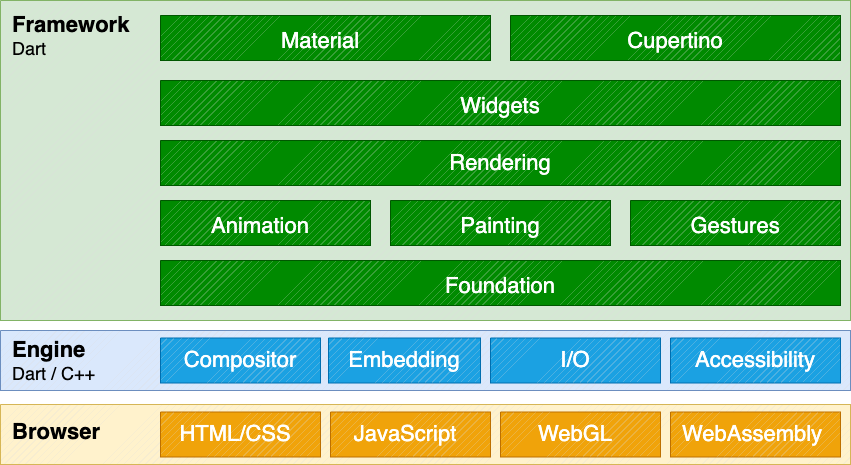{:width="80%" .diagram-wrap}
Perhaps the most notable difference compared to other
platforms on which Flutter runs is that there is no need
for Flutter to provide a Dart runtime.
Instead, the Flutter framework (along with any code you write)
is compiled to JavaScript or WebAssembly.
It's also worthy to note that Dart has very few language
semantic differences across all of its modes
(JIT versus AOT, native versus web compilation),
and most developers will never write a line of code that
runs into such a difference.
与其他运行 Flutter 的平台相比,最明显的区别也许是 Flutter 不再需要提供 Dart 的运行时。
取而代之的是 Flutter 框架本身(和你写的代码)一并编译成 JavaScript 或 WebAssembly。
另外值得注意的是,Dart 在不同模式下(JIT 和 AOT、平台原生和 Web 编译)的语义几乎没有差异,
大部分开发者绝对可以无差异地编写这两种模式下的代码。
During development time, Flutter web uses
[`dartdevc`](https://dart.cn/tools/dartdevc),
a compiler that supports incremental compilation
and therefore allows hot restart and
[hot reload behind a flag][].
Conversely, when you are ready to create a production app
for the web, [`dart2js`](https://dart.cn/tools/dart2js) or
`dart2wasm` compiles the Flutter core and framework along with your
application into optimized output that can be deployed to any web server.
Code can be offered in a single file or split
into multiple files through [deferred imports][].
在进行开发时,Web 版本的 Flutter 使用支持增量编译的编译器
[`dartdevc`](https://dart.cn/tools/dartdevc) 进行编译,
以支持热重启和 [热重载(使用特定指令启用热重载)][hot reload behind a flag]。
相反,当你准备好创建一个生产环境的 Web 应用时,
[`dart2js`](https://dart.cn/tools/dart2js) 或 `dart2wasm`
会将 Flutter 核心和框架与你的应用一起编译成经过优化的输出,可部署在任何服务器上。
代码可以在单个文件中提供,也可拆分至多个文件以
[延迟加载库][deferred imports]
提供。
For more information on Flutter web, check out
[Web support for Flutter][].
要了解更多关于 Flutter web 的信息,
请查阅 [Flutter 的 Web 支持][Web support for Flutter]。
[Dart WebAssembly support]: https://dart.dev/web/wasm
[deferred imports]: https://dart.cn/language/libraries#lazily-loading-a-library
[Web support for Flutter]: /platform-integration/web
## Further information
## 更多信息
For those interested in more information about the internals of Flutter,
the [Inside Flutter](/resources/inside-flutter) whitepaper
provides a useful guide to the framework's design philosophy.
若你对 Flutter 的更多内部细节感兴趣
[Flutter 工作原理](/resources/inside-flutter)
白皮书为框架的设计理念提供了很好的入门途径。
[^1]: While the `build` function returns a fresh tree,
you only need to return something _different_ if
there's some new configuration to incorporate.
If the configuration is in fact the same,
you can just return the same widget.
[^1]: 在 `build` 方法返回一个全新的结构树时,
你只需要返回不同的内容,就可以合并一些新的配置。
如果配置实际上是相同的,完全可以返回同样的 widget。
[^2]: This is a slight simplification for ease of reading.
In practice, the tree might be more complex.
[^2]: 为了便于阅读,该图已进行简化。实际上的结构可能更为复杂。
[^3]: There are some limitations with this approach, for example,
transparency doesn't composite the same way for a platform view as
it would for other Flutter widgets.
[^3]: 该方法有一些局限性,例如,
平台视图的透明度计算与其他 Flutter widget 的计算不同。
**Dart App**
**Dart 应用**
* Composes widgets into the desired UI.
将 widget 合成预期的 UI。
* Implements business logic.
实现对应的业务。
* Owned by app developer.
由应用开发者进行管理。
**Framework** ([source code](https://github.com/flutter/flutter/tree/main/packages/flutter/lib))
**框架**([源代码](https://github.com/flutter/flutter/tree/main/packages/flutter/lib))
* Provides higher-level API to build high-quality apps
(for example, widgets, hit-testing, gesture detection,
accessibility, text input).
提供了上层的 API 封装,用于构建高质量的应用
(例如 widget、触摸检测、手势竞技、无障碍和文字输入)。
* Composites the app's widget tree into a scene.
将应用的 widget 树构建至一个 Scene 中。
**Engine** ([source code](https://github.com/flutter/flutter/tree/main/engine/src/flutter/shell/common))
**引擎**([源代码](https://github.com/flutter/flutter/tree/main/engine/src/flutter/shell/common))
* Responsible for rasterizing composited scenes.
将已经合成的 Scene 进行栅格化。
* Provides low-level implementation of Flutter's core APIs
(for example, graphics, text layout, Dart runtime).
对 Flutter 的核心 API 进行了底层封装
(例如图形图像、文本布局和 Dart 的运行时)
* Exposes its functionality to the framework using the **dart:ui API**.
将其功能通过 **dart:ui API** 暴露给框架。
* Integrates with a specific platform using the Engine's **Embedder API**.
使用 **嵌入层 API** 与平台进行整合。
**Embedder** ([source code](https://github.com/flutter/flutter/tree/main/engine/src/flutter/shell/platform))
**嵌入层**([源代码](https://github.com/flutter/flutter/tree/main/engine/src/flutter/shell/platform))
* Coordinates with the underlying operating system
for access to services like rendering surfaces,
accessibility, and input.
协调底层操作系统的服务,例如渲染层、无障碍和输入。
* Manages the event loop.
管理事件循环体系。
* Exposes **platform-specific API** to integrate the Embedder into apps.
将 **特定平台的 API** 暴露给应用集成嵌入层。
**Runner**
**运行器**
* Composes the pieces exposed by the platform-specific
API of the Embedder into an app package runnable on the target platform.
将嵌入层暴露的平台 API 合成为目标平台可以运行的应用包。
* Part of app template generated by `flutter create`,
owned by app developer.
部分内容由 `flutter create` 生成,由应用开发者进行管理。
## Reactive user interfaces
## 响应式用户界面
On the surface, Flutter is [a reactive, declarative UI framework][faq],
in which the developer provides a mapping from application state to interface
state, and the framework takes on the task of updating the interface at runtime
when the application state changes. This model is inspired by
[work that came from Facebook for their own React framework][fb],
which includes a rethinking of many traditional design principles.
粗略一看,Flutter 是
[一个响应式的且伪声明式的 UI 框架][faq],
开发者负责提供应用状态与界面状态之间的映射,框架则在运行时将应用状态的更改更新到界面上。
这样的模型架构的灵感来自
[Facebook 自己的 React 框架][fb]
,其中包含了对传统设计理念的再度解构。
[faq]: /resources/faq#what-programming-paradigm-does-flutters-framework-use
[fb]: https://www.youtube.com/watch?time_continue=2&v=x7cQ3mrcKaY&feature=emb_logo
In most traditional UI frameworks, the user interface's initial state is
described once and then separately updated by user code at runtime, in response
to events. One challenge of this approach is that, as the application grows in
complexity, the developer needs to be aware of how state changes cascade
throughout the entire UI. For example, consider the following UI:
在大部分传统的 UI 框架中,界面的初始状态通常会被一次性定义,
然后,在运行时根据用户代码分别响应事件进行更新。
在这里有一项大挑战,即随着应用程序的复杂性日益增长,
开发者需要对整个 UI 的状态关联有整体的认知。
让我们来看看如下的 UI:
{:width="66%"}
There are many places where the state can be changed: the color box, the hue
slider, the radio buttons. As the user interacts with the UI, changes must be
reflected in every other place. Worse, unless care is taken, a minor change to
one part of the user interface can cause ripple effects to seemingly unrelated
pieces of code.
很多地方都可以更改状态:颜色框、色调滑条、单选按钮。
在用户与 UI 进行交互时,状态的改变可能会影响到每一个位置。
更糟糕的是,UI 的细微变动很有可能会引发无关代码的连锁反应,尤其是当开发者并未注意其关联的时候。
One solution to this is an approach like MVC, where you push data changes to the
model through the controller, and then the model pushes the new state to the view
through the controller. However, this also is problematic, since creating and
updating UI elements are two separate steps that can easily get out of sync.
我们可以通过类似 MVC 的方式进行处理,
开发者将数据的改动通过控制器(Controller)推至模型(Model),
模型再将新的状态通过控制器推至界面(View)。
但这样的处理方式仍然存在问题,
因为创建和更新 UI 元素的操作被分离开了,容易造成它们的不同步。
Flutter, along with other reactive frameworks, takes an alternative approach to
this problem, by explicitly decoupling the user interface from its underlying
state. With React-style APIs, you only create the UI description, and the
framework takes care of using that one configuration to both create and/or
update the user interface as appropriate.
Flutter 与其他响应式框架类似,采用了显式剥离基础状态和用户界面的方式,来解决这一问题。
你可以通过 React 风格的 API,创建 UI 的描述,让框架负责通过配置优雅地创建和更新用户界面。
In Flutter, widgets (akin to components in React) are represented by immutable
classes that are used to configure a tree of objects. These widgets are used to
manage a separate tree of objects for layout, which is then used to manage a
separate tree of objects for compositing. Flutter is, at its core, a series of
mechanisms for efficiently walking the modified parts of trees, converting trees
of objects into lower-level trees of objects, and propagating changes across
these trees.
在 Flutter 里,widgets(类似于 React 中的组件)是用来配置对象树的不可变类。
这些 widgets 会管理单独的布局对象树,接着参与管理合成的布局对象树。
Flutter 的核心就是一套高效的遍历树的变动的机制,
它会将对象树转换为更底层的对象树,并在树与树之间传递更改。
A widget declares its user interface by overriding the `build()` method, which
is a function that converts state to UI:
`build()` 是将状态转化为 UI 的方法,widget 通过重写该方法来声明 UI 的构造:
```plaintext
UI = f(state)
```
The `build()` method is by design fast to execute and should be free of side
effects, allowing it to be called by the framework whenever needed (potentially
as often as once per rendered frame).
`build()` 方法在框架需要时都可以被调用(每个渲染帧可能会调用一次),
从设计角度来看,它应当能够快速执行且没有额外影响的。
This approach relies on certain characteristics of a language runtime (in
particular, fast object instantiation and deletion). Fortunately, [Dart is
particularly well suited for this
task](https://blog.flutter.dev/flutter-dont-fear-the-garbage-collector-d69b3ff1ca30).
这样的实现设计依赖于语言的运行时特征(特别是对象的快速实例化和清除)。
幸运的是,[Dart 非常适合这份工作](https://blog.flutter.dev/flutter-dont-fear-the-garbage-collector-d69b3ff1ca30)。
## Widget
As mentioned, Flutter emphasizes widgets as a unit of composition. Widgets are
the building blocks of a Flutter app's user interface, and each widget is an
immutable declaration of part of the user interface.
如前所述,Flutter 强调以 widgets 作为组成单位。
Widgets 是构建 Flutter 应用界面的基础块,每个 widget 都是一部分不可变的 UI 声明。
Widgets form a hierarchy based on composition. Each widget nests inside its
parent and can receive context from the parent. This structure carries all the
way up to the root widget (the container that hosts the Flutter app, typically
`MaterialApp` or `CupertinoApp`), as this trivial example shows:
Widgets 通过布局组合形成一种层次结构关系。
每个 Widget 都嵌套在其父级的内部,并可以通过父级接收上下文。
从根布局(托管 Flutter 应用的容器,通常是 `MaterialApp` 或 `CupertinoApp`)开始,
自上而下都是这样的结构,如下面的示例所示:
```dart
import 'package:flutter/material.dart';
import 'package:flutter/services.dart';
void main() => runApp(const MyApp());
class MyApp extends StatelessWidget {
const MyApp({super.key});
@override
Widget build(BuildContext context) {
return MaterialApp(
home: Scaffold(
appBar: AppBar(title: const Text('My Home Page')),
body: Center(
child: Builder(
builder: (context) {
return Column(
children: [
const Text('Hello World'),
const SizedBox(height: 20),
ElevatedButton(
onPressed: () {
print('Click!');
},
child: const Text('A button'),
),
],
);
},
),
),
),
);
}
}
```
In the preceding code, all instantiated classes are widgets.
在上面的代码中,所有实例化的类都是 widgets。
Apps update their user interface in response to events (such as a user
interaction) by telling the framework to replace a widget in the hierarchy with
another widget. The framework then compares the new and old widgets, and
efficiently updates the user interface.
应用会根据事件交互(例如用户操作),通知框架替换层级中的旧 widget 为新 widget,
然后框架会比较新旧 widgets,高效地更新用户界面。
Flutter has its own implementations of each UI control, rather than deferring to
those provided by the system: for example, there is a pure [Dart
implementation](https://api.flutter-io.cn/flutter/cupertino/CupertinoSwitch-class.html)
of both the [iOS Toggle
control](https://developer.apple.com/design/human-interface-guidelines/toggles)
and the [one for](https://api.flutter-io.cn/flutter/material/Switch-class.html) the
[Android equivalent](https://m3.material.io/components/switch).
Flutter 拥有其自己的 UI 控制实现,而不是由系统自带的方法进行托管:
例如,
[iOS 的 Toggle 控件](https://developer.apple.com/design/human-interface-guidelines/toggles)
有一个 [对应的 widget](https://api.flutter-io.cn/flutter/cupertino/CupertinoSwitch-class.html),
[Android 的选择控件](https://m3.material.io/components/switch)
有一个 [对应的 widget](https://api.flutter-io.cn/flutter/material/Switch-class.html)。
This approach provides several benefits:
这样的实现有几个优势:
* Provides for unlimited extensibility. A developer who wants a variant of the
Switch control can create one in any arbitrary way, and is not limited to the
extension points provided by the OS.
提供了无限的扩展性。当开发者想要一个 Switch 的改装时,他们可以以任意方式创建一个,
而不被系统提供的扩展所限制。
* Avoids a significant performance bottleneck by allowing Flutter to composite
the entire scene at once, without transitioning back and forth between Flutter
code and platform code.
Flutter 可以直接合成所有的场景,而无需在 Flutter 与原生平台之间来回切换,
从而避免了明显的性能瓶颈。
* Decouples the application behavior from any operating system dependencies. The
application looks and feels the same on all versions of the OS, even if the OS
changed the implementations of its controls.
将应用的行为与操作系统的依赖解耦。
在任意一种系统平台上体验应用,都将是一致的,就算某个系统更改了其控件的实现,也是如此。
### Composition
### 组成
Widgets are typically composed of many other small, single-purpose widgets that
combine to produce powerful effects.
Widgets 通常由更小的且用途单一的 widgets 组合而成,提供更强大的功能。
Where possible, the number of design concepts is kept to a minimum while
allowing the total vocabulary to be large. For example, in the widgets layer,
Flutter uses the same core concept (a `Widget`) to represent drawing to the
screen, layout (positioning and sizing), user interactivity, state management,
theming, animations, and navigation. In the animation layer, a pair of concepts,
`Animation`s and `Tween`s, cover most of the design space. In the rendering
layer, `RenderObject`s are used to describe layout, painting, hit testing, and
accessibility. In each of these cases, the corresponding vocabulary ends up
being large: there are hundreds of widgets and render objects, and dozens of
animation and tween types.
在设计时,相关的设计概念已尽可能地少量存在,而通过大量的内容进行填充。
(译者注:即以最小的原语加最多的单一实现创造出最大的价值。)
举个例子,Flutter 在 widgets 层中使用了相同的概念(一个 `Widget`)
来表示屏幕上的绘制、布局(位置和大小)、用户交互、状态管理、主题、动画及导航。
在动画层,`Animation` 和 `Tween` 这对概念组合,涵盖了大部分的设计空间。
在渲染层,`RenderObject` 用来描述布局、绘制、触摸判断及可访问性。
在这些场景中,最终对应包含的内容都很多:
有数百个 widgets 和 render objects,以及数十种动画和补间类型。
The class hierarchy is deliberately shallow and broad to maximize the possible
number of combinations, focusing on small, composable widgets that each do one
thing well. Core features are abstract, with even basic features like padding
and alignment being implemented as separate components rather than being built
into the core. (This also contrasts with more traditional APIs where features
like padding are built in to the common core of every layout component.) So, for
example, to center a widget, rather than adjusting a notional `Align` property,
you wrap it in a [`Center`](https://api.flutter-io.cn/flutter/widgets/Center-class.html)
widget.
类的层次结构是有意的浅而广,以最大限度地增加可能的组合数量,
重点放在小的、可组合的 widget 上,确保每个 widget 都能很好地完成一件事情。
核心功能均被抽象,甚至像边距和对齐这样的基础功能,都被实现为单独的组件,而不是内置于核心中。
(这样的实现也与传统的 API 形成了对比,类似边距这样的功能通常都内置在了每个组件的公共核心内,
Flutter 中的 widget 则不同。)因此,如果你需要将一个 widget 居中,
与其调整 `Align` 这样的属性,不如将它包裹在一个
[`Center`](https://api.flutter-io.cn/flutter/widgets/Center-class.html) widget 内。
There are widgets for padding, alignment, rows, columns, and grids. These layout
widgets do not have a visual representation of their own. Instead, their sole
purpose is to control some aspect of another widget's layout. Flutter also
includes utility widgets that take advantage of this compositional approach.
Flutter 中包含了边距、对齐、行、列和网格系列的 widgets。
这些布局类型的 widgets 自身没有视觉内容,
而只用于控制其他 widgets 的部分布局条件。
Flutter 也包含了以这种组合方法组成的实用型 widgets。
For example, [`Container`](https://api.flutter-io.cn/flutter/widgets/Container-class.html), a
commonly used widget, is made up of several widgets responsible for layout,
painting, positioning, and sizing. Specifically, `Container` is made up of the
[`LimitedBox`](https://api.flutter-io.cn/flutter/widgets/LimitedBox-class.html),
[`ConstrainedBox`](https://api.flutter-io.cn/flutter/widgets/ConstrainedBox-class.html),
[`Align`](https://api.flutter-io.cn/flutter/widgets/Align-class.html),
[`Padding`](https://api.flutter-io.cn/flutter/widgets/Padding-class.html),
[`DecoratedBox`](https://api.flutter-io.cn/flutter/widgets/DecoratedBox-class.html), and
[`Transform`](https://api.flutter-io.cn/flutter/widgets/Transform-class.html) widgets, as you
can see by reading its source code. A defining characteristic of Flutter is that
you can drill down into the source for any widget and examine it. So, rather
than subclassing `Container` to produce a customized effect, you can compose it
and other widgets in novel ways, or just create a new widget using
`Container` as inspiration.
例如,一个常用的 widget
[`Container`](https://api.flutter-io.cn/flutter/widgets/Container-class.html),
是由几个 widget 组合而成,包含了布局、绘制、定位和大小的功能。
更具体地说,`Container` 是由
[`LimitedBox`](https://api.flutter-io.cn/flutter/widgets/LimitedBox-class.html)、
[`ConstrainedBox`](https://api.flutter-io.cn/flutter/widgets/ConstrainedBox-class.html)、
[`Align`](https://api.flutter-io.cn/flutter/widgets/Align-class.html)、
[`Padding`](https://api.flutter-io.cn/flutter/widgets/Padding-class.html)、
[`DecoratedBox`](https://api.flutter-io.cn/flutter/widgets/DecoratedBox-class.html) 和
[`Transform`](https://api.flutter-io.cn/flutter/widgets/Transform-class.html) 组成的,
你也可以通过查看源码看到这些组合。
Flutter 有一个典型的特征,即你可以深入到任意一个 widget,查看其源码。
因此,你可以通过同样的方式组合其他的 widgets,也可以参考 `Container` 来创建其他的 widget,
而不需要继承 `Container` 来实现自定义的效果。
### Building widgets
### 构建 widgets
As mentioned earlier, you determine the visual representation of a widget by
overriding the
[`build()`](https://api.flutter-io.cn/flutter/widgets/StatelessWidget/build.html) function to
return a new element tree. This tree represents the widget's part of the user
interface in more concrete terms. For example, a toolbar widget might have a
build function that returns a [horizontal
layout](https://api.flutter-io.cn/flutter/widgets/Row-class.html) of some
[text](https://api.flutter-io.cn/flutter/widgets/Text-class.html) and
[various](https://api.flutter-io.cn/flutter/material/IconButton-class.html)
[buttons](https://api.flutter-io.cn/flutter/material/PopupMenuButton-class.html). As needed,
the framework recursively asks each widget to build until the tree is entirely
described by [concrete renderable
objects](https://api.flutter-io.cn/flutter/widgets/RenderObjectWidget-class.html). The
framework then stitches together the renderable objects into a renderable object
tree.
先前提到,你可以通过重写
[`build()`](https://api.flutter-io.cn/flutter/widgets/StatelessWidget/build.html)
方法,返回一个新的元素树,来定义视觉展示。
这棵树用更为具体的术语表示了 widget 在 UI 中的部分。
例如,工具栏 widget 的 build 方法可能会返回
[水平布局](https://api.flutter-io.cn/flutter/widgets/Row-class.html),
其中可能包含一些 [文字](https://api.flutter-io.cn/flutter/widgets/Text-class.html),
[各种各样](https://api.flutter-io.cn/flutter/material/IconButton-class.html) 的
[按钮](https://api.flutter-io.cn/flutter/material/PopupMenuButton-class.html)。
根据需要,框架会递归请求每个 widget 进行构建,直到整棵树都被
[具体的可渲染对象](https://api.flutter-io.cn/flutter/widgets/RenderObjectWidget-class.html)
描述为止。
然后,框架会将可渲染的对象缝合在一起,组成可渲染对象树。
A widget's build function should be free of side effects. Whenever the function
is asked to build, the widget should return a new tree of widgets,
regardless of what the widget previously returned. The
framework does the heavy lifting work to determine which build methods need to
be called based on the render object tree (described in more detail later). More
information about this process can be found in the [Inside Flutter
topic](/resources/inside-flutter#linear-reconciliation).
Widget 的 build 方法应该是没有副作用的。每当一个方法要求构建时,
widget 都应当能返回一个 widget 的元素树[^1],
与先前返回的 widget 也没有关联。
框架会根据渲染对象树(稍后将进一步介绍)来确定哪些构建方法需要被调用,这是一项略显繁重的工作。
有关这个过程的更多信息,可以在
[Flutter 工作原理](/resources/inside-flutter#linear-reconciliation)
中进一步了解。
On each rendered frame, Flutter can recreate just the parts of the UI where the
state has changed by calling that widget's `build()` method. Therefore it is
important that build methods should return quickly, and heavy computational work
should be done in some asynchronous manner and then stored as part of the state
to be used by a build method.
每个渲染帧,Flutter 都可以根据变化的状态,调用 `build()` 方法重建部分 UI。
因此,保证 build 方法轻量且能快速返回 widget 是非常关键的,
繁重的计算工作应该通过一些异步方法完成,并存储在状态中,在 build 方法中使用。
While relatively naive in approach, this automated comparison is quite
effective, enabling high-performance, interactive apps. And, the design of the
build function simplifies your code by focusing on declaring what a widget is
made of, rather than the complexities of updating the user interface from one
state to another.
尽管这样的实现看起来不够成熟,但这样的自动对比方法非常有效,可以实现高性能的交互应用。
同时,以这种方式设计的 build 方法,将着重点放在 widget 组成的声明上,从而简化了你的代码,
而不是以一种状态去更新另一种状态这样的复杂过程。
### Widget state
### Widget 的状态
The framework introduces two major classes of widget: _stateful_ and _stateless_
widgets.
框架包含两种核心的 widget 类:**有状态的** 和 **无状态的** widget。
Many widgets have no mutable state: they don't have any properties that change
over time (for example, an icon or a label). These widgets subclass
[`StatelessWidget`](https://api.flutter-io.cn/flutter/widgets/StatelessWidget-class.html).
大部分 widget 都没有需要变更的状态:它们并不包含随时变化的属性(例如图标或者标签)。
这些 widget 会继承
[`StatelessWidget`](https://api.flutter-io.cn/flutter/widgets/StatelessWidget-class.html)。
However, if the unique characteristics of a widget needs to change based on user
interaction or other factors, that widget is _stateful_. For example, if a
widget has a counter that increments whenever the user taps a button, then the
value of the counter is the state for that widget. When that value changes, the
widget needs to be rebuilt to update its part of the UI. These widgets subclass
[`StatefulWidget`](https://api.flutter-io.cn/flutter/widgets/StatefulWidget-class.html), and
(because the widget itself is immutable) they store mutable state in a separate
class that subclasses [`State`](https://api.flutter-io.cn/flutter/widgets/State-class.html).
`StatefulWidget`s don't have a build method; instead, their user interface is
built through their `State` object.
然而,当 widget 拥有需要根据用户交互或其他因素而变化的特有属性,它就是 **有状态的**。
例如,计数器 widget 在用户点击按钮时数字递增,那么计数值就是计数器 widget 的状态。
当值变化时,widget 则需要被重建以更新相关部分的 UI。
这些 widget 会继承
[`StatefulWidget`](https://api.flutter-io.cn/flutter/widgets/StatefulWidget-class.html),
并且「可变的」状态会保存在继承
[`State`](https://api.flutter-io.cn/flutter/widgets/State-class.html) 的另一个子类中
(因为 widget 本身是不可变的)。
`StatefulWidget` 自身没有 build 方法,而在其对应的 `State` 对象中。
Whenever you mutate a `State` object (for example, by incrementing the counter),
you must call [`setState()`](https://api.flutter-io.cn/flutter/widgets/State/setState.html)
to signal the framework to update the user interface by calling the `State`'s
build method again.
每当你更改 `State` 对象时(例如计数增加),你需要调用
[`setState()`](https://api.flutter-io.cn/flutter/widgets/State/setState.html)
来告知框架,再次调用 `State` 的构建方法来更新 UI。
Having separate state and widget objects lets other widgets treat both stateless
and stateful widgets in exactly the same way, without being concerned about
losing state. Instead of needing to hold on to a child to preserve its state,
the parent can create a new instance of the child at any time without losing the
child's persistent state. The framework does all the work of finding and reusing
existing state objects when appropriate.
将状态和 widget 对象分离,可以使其他 widget 无差异地看待无状态和有状态 widget,
而不必担心丢失状态。父级无需担心状态的丢失,可以随时创建新的实例,
并不需要通过子级关系保持其状态。
框架也会在合适的时间,复用已存在的状态对象。
### State management
### 状态管理
So, if many widgets can contain state, how is state managed and passed around
the system?
那么,在众多 widget 都持有状态的情况下,系统中的状态是如何被传递和管理的呢?
As with any other class,
you can use a constructor in a widget to initialize its data,
so a `build()` method can ensure that any child widget
is instantiated with the data it needs:
与其他类相同,你可以通过 widget 的构造函数来初始化数据,
如此一来 `build()` 方法可以确保子 widget 使用其所需的数据进行实例化:
```dart
@override
Widget build(BuildContext context) {
return ContentWidget([!importantState!]);
}
```
Where `importantState` is a placeholder for the class
that contains the state important to the `Widget`.
其中 `importantState` 是一个占位符,
代表包含对该 `Widget` 而言重要状态的类。
As widget trees get deeper, however,
passing state information up and down the
tree hierarchy becomes cumbersome.
So, a third widget type, [`InheritedWidget`][],
provides an easy way to grab data from a shared ancestor.
You can use `InheritedWidget` to create a state widget
that wraps a common ancestor in the
widget tree, as shown in this example:
然而,随着 widget 树层级逐渐加深,依赖树形结构上下传递状态信息会变得十分麻烦。
这时,第三种类型的 widget——
[`InheritedWidget`](https://api.flutter-io.cn/flutter/widgets/InheritedWidget-class.html),
提供了一种从共同的祖先节点获取数据的简易方法。
你可以使用 `InheritedWidget` 创建包含状态的 widget,
该 widget 会将一个共同的祖先节点包裹在 widget 树中,如下面的例子所示:
{:width="50%" .diagram-wrap}
[`InheritedWidget`]: https://api.flutter-io.cn/flutter/widgets/InheritedWidget-class.html
Whenever one of the `ExamWidget` or `GradeWidget` objects needs data from
`StudentState`, it can now access it with a command such as:
现在,当 `ExamWidget` 或 `GradeWidget` 对象需要获取 `StudentState` 的数据时,
可以直接使用以下方式:
```dart
final studentState = StudentState.of(context);
```
The `of(context)` call takes the build context
(a handle to the current widget location),
and returns [the nearest ancestor in the tree][]
that matches the `StudentState` type.
`InheritedWidget`s also offer an `updateShouldNotify()` method,
which Flutter calls to determine whether a state
change should trigger a rebuild of child widgets that use it.
调用 `of(context)` 会根据当前构建的上下文(即当前 widget 位置的句柄),
并返回类型为 `StudentState` 的
[在树中距离最近的祖先节点][the nearest ancestor in the tree]。
`InheritedWidget` 同时也包含了 `updateShouldNotify()` 方法,
Flutter 会调用它来判断依赖了某个状态的 widget 是否需要重建。
[the nearest ancestor in the tree]: https://api.flutter-io.cn/flutter/widgets/BuildContext/dependOnInheritedWidgetOfExactType.html
Flutter itself uses `InheritedWidget` extensively as part
of the framework for shared state,
such as the application's _visual theme_, which includes
[properties like color and type styles][] that are
pervasive throughout an application.
The `MaterialApp` `build()` method inserts a theme
in the tree when it builds, and then deeper in the hierarchy a widget
can use the `.of()` method to look up the relevant theme data.
`InheritedWidget` 在 Flutter 框架中被大量用于共享状态,例如应用的 **视觉主题**,
包含了应用于整个应用的
[颜色和字体样式等属性][properties like color and type styles]。
`MaterialApp` 的 `build()` 方法会在构建时在树中插入一个主题,
更深层级的 widget 便可以使用 `.of()` 方法来查找相关的主题数据。
For example:
例如:
```dart
Container(
color: Theme.of(context).secondaryHeaderColor,
child: Text(
'Text with a background color',
style: Theme.of(context).textTheme.titleLarge,
),
);
```
[properties like color and type styles]: https://api.flutter-io.cn/flutter/material/ThemeData-class.html
As applications grow, more advanced state management approaches that reduce the
ceremony of creating and using stateful widgets become more attractive. Many
Flutter apps use utility packages like
[provider](https://pub-web.flutter-io.cn/packages/provider), which provides a wrapper around
`InheritedWidget`. Flutter's layered architecture also enables alternative
approaches to implement the transformation of state into UI, such as the
[flutter_hooks](https://pub-web.flutter-io.cn/packages/flutter_hooks) package.
随着应用程序的不断迭代,更高级的状态管理方法变得更有吸引力,
它们可以减少有状态的 widget 的创建。
许多 Flutter 应用使用了 [provider](https://pub-web.flutter-io.cn/packages/provider) 用于状态管理,
它对 `InheritedWidget` 进行了进一步的包装。
Flutter 的分层架构也允许使用其他实现来替换状态至 UI 的方案,例如
[flutter_hooks](https://pub-web.flutter-io.cn/packages/flutter_hooks)。
## Rendering and layout
## 渲染和布局
This section describes the rendering pipeline, which is the series of steps that
Flutter takes to convert a hierarchy of widgets into the actual pixels painted
onto a screen.
本节介绍 Flutter 的渲染机制,
包括将 widget 层级结构转换成屏幕上绘制的实际像素的一系列步骤。
### Flutter's rendering model
### Flutter 的渲染模型
You might be wondering: if Flutter is a cross-platform framework,
then how can it offer comparable performance to
single-platform frameworks?
你可能思考过:既然 Flutter 是一个跨平台的框架,那么它如何提供与原生平台框架相当的性能?
It's useful to start by thinking about how traditional
Android apps work. When drawing,
you first call the Java code of the Android framework.
The Android system libraries provide the components
responsible for drawing themselves to a `Canvas` object,
which Android can then render with [Skia][],
a graphics engine written in C/C++ that calls the
CPU or GPU to complete the drawing on the device.
让我们从安卓原生应用的角度开始思考。
当你在编写绘制的内容时,你需要调用 Android 框架的 Java 代码。
Android 的系统库提供了可以将自身绘制到 Canvas 对象的组件,
接下来 Android 就可以使用由 C/C++ 编写的 [Skia][] 图像引擎,
调用 CPU 和 GPU 完成在设备上的绘制。
Cross-platform frameworks _typically_ work by creating
an abstraction layer over the underlying native
Android and iOS UI libraries, attempting to smooth out the
inconsistencies of each platform representation.
App code is often written in an interpreted language like JavaScript,
which must in turn interact with the Java-based
Android or Objective-C-based iOS system libraries to display UI.
All this adds overhead that can be significant,
particularly where there is a lot of
interaction between the UI and the app logic.
**通常来说**,跨平台框架都会在 Android 和 iOS 的 UI 底层库上创建一层抽象,
该抽象层尝试抹平各个系统之间的差异。
这时,应用程序的代码常常使用 JavaScript 等解释型语言来进行编写,
这些代码会与基于 Java 的 Android 和基于 Objective-C 的 iOS 系统进行交互,
最终显示 UI 界面。
所有的流程都增加了显著的开销,在 UI 和应用逻辑有繁杂的交互时更为如此。
By contrast, Flutter minimizes those abstractions,
bypassing the system UI widget libraries in favor
of its own widget set. The Dart code that paints
Flutter's visuals is compiled into native code,
which uses Impeller for rendering.
Impeller is shipped along with the application,
allowing the developer to upgrade their app to stay
updated with the latest performance improvements
even if the phone hasn't been updated with a new Android version.
The same is true for Flutter on other native platforms,
such as Windows or macOS.
相比之下,Flutter 通过绕过系统 UI 组件库,使用自己的 widget 内容集,削减了抽象层的开销。
用于绘制 Flutter 图像内容的 Dart 代码被编译为机器码,并使用 Impeller 进行渲染。
Impeller 与应用一同捆绑运行,
让开发者能在设备未更新到最新的系统时,
也能跟进升级自己的应用,保证稳定性并提升性能。
:::note
If you want to know which devices Impeller supports,
check out [Impeller availability][].
For more information,
visit [Impeller rendering engine][]
如果你想知道 Impeller 支持哪些设备,
请查看 [Impeller availability][]。
更多信息,请查阅 [Impeller 渲染引擎][Impeller rendering engine]。
:::
[Impeller rendering engine]: /perf/impeller
### From user input to the GPU
### 从用户操作到 GPU
The overriding principle that Flutter applies to its
rendering pipeline is that **simple is fast**.
Flutter has a straightforward pipeline for how data flows to
the system, as shown in the following sequencing diagram:
对于 Flutter 的渲染机制而言,首要原则是 **简单快速**。
Flutter 为数据流向系统提供了直通的管道,如以下的流程图所示:
{:width="100%" .diagram-wrap}
Let's take a look at some of these phases in greater detail.
接下来,让我们更加深入了解其中的一些阶段。
### Build: from Widget to Element
### 构建:从 Widget 到 Element
Consider this code fragment that demonstrates a widget hierarchy:
首先观察以下的代码片段,它代表了一个简单的 widget 层次结构:
```dart
Container(
color: Colors.blue,
child: Row(
children: [
Image.network('https://www.example.com/1.png'),
const Text('A'),
],
),
);
```
When Flutter needs to render this fragment,
it calls the `build()` method, which
returns a subtree of widgets that renders
UI-based on the current app state.
During this process,
the `build()` method can introduce new widgets,
as necessary, based on its state.
As an example, in the preceding code fragment,
`Container` has `color` and `child` properties.
From looking at the [source
code](https://github.com/flutter/flutter/blob/02efffc134ab4ce4ff50a9ddd86c832efdb80462/packages/flutter/lib/src/widgets/container.dart#L401)
for `Container`, you can see that if the color is not null,
it inserts a `ColoredBox` representing the color:
当 Flutter 需要绘制这段代码片段时,框架会调用 `build()` 方法,
返回一棵基于当前应用状态来绘制 UI 的 widget 子树。
在这个过程中,`build()` 方法可能会在必要时,根据状态引入新的 widget。
在上面的例子中,`Container` 的 `color` 和 `child` 就是典型的例子。
我们可以查看 `Container` 的
[源代码](https://github.com/flutter/flutter/blob/02efffc134ab4ce4ff50a9ddd86c832efdb80462/packages/flutter/lib/src/widgets/container.dart#L401),
你会看到当 `color` 属性不为空时,`ColoredBox` 会被加入用于颜色布局。
```dart
if (color != null)
current = ColoredBox(color: color!, child: current);
```
Correspondingly, the `Image` and `Text` widgets might insert child widgets such
as `RawImage` and `RichText` during the build process. The eventual widget
hierarchy might therefore be deeper than what the code represents,
as in this case:
与之对应的,`Image` 和 `Text` 在构建过程中也会引入 `RawImage` 和 `RichText`。
如此一来,最终生成的 widget 结构比代码表示的层级更深,
在该场景中如下图[^2]:
{:width="40%" .diagram-wrap}
This explains why, when you examine the tree through
a debug tool such as the
[Flutter inspector](/tools/devtools/inspector),
part of the Flutter/Dart DevTools,
you might see a structure that is considerably deeper than what
is in your original code.
这就是为什么你在使用 Dart DevTools 的
[Flutter inspector](/tools/devtools/inspector)
调试 widget 树结构时,会发现实际的结构比你原本代码中的结构层级更深。
During the build phase, Flutter translates the widgets expressed in code into a
corresponding **element tree**, with one element for every widget. Each element
represents a specific instance of a widget in a given location of the tree
hierarchy. There are two basic types of elements:
在构建的阶段,Flutter 会将代码中描述的 widgets 转换成对应的 **Element 树**,
每一个 Widget 都有一个对应的 Element。
每一个 Element 代表了树状层级结构中特定位置的 widget 实例。
目前有两种 Element 的基本类型:
- `ComponentElement`, a host for other elements.
`ComponentElement`,其他 Element 的宿主。
- `RenderObjectElement`, an element that participates in the layout or paint
phases.
`RenderObjectElement`,参与布局或绘制阶段的 Element。
{:width="85%" .diagram-wrap}
`RenderObjectElement`s are an intermediary between their widget analog and the
underlying `RenderObject`, which we'll come to later.
`RenderObjectElement` 是底层 `RenderObject` 与对应的 widget 之间的桥梁,
我们晚些会介绍它。
The element for any widget can be referenced through its `BuildContext`, which
is a handle to the location of a widget in the tree. This is the `context` in a
function call such as `Theme.of(context)`, and is supplied to the `build()`
method as a parameter.
任何 widget 都可以通过其 `BuildContext` 引用到 Element,
它是该 widget 在树中的位置的句柄。
类似 `Theme.of(context)` 方法调用中的 `context`,
它作为 `build()` 方法的参数被传递。
Because widgets are immutable, including the parent/child relationship between
nodes, any change to the widget tree (such as changing `Text('A')` to
`Text('B')` in the preceding example) causes a new set of widget objects to be
returned. But that doesn't mean the underlying representation must be rebuilt.
The element tree is persistent from frame to frame, and therefore plays a
critical performance role, allowing Flutter to act as if the widget hierarchy is
fully disposable while caching its underlying representation. By only walking
through the widgets that changed, Flutter can rebuild just the parts of the
element tree that require reconfiguration.
由于 widgets 以及它上下节点的关系都是不可变的,
因此,对 widget 树做的任何操作
(例如将 `Text('A')` 替换成 `Text('B')`)
都会返回一个新的 widget 对象集合。
但这并不意味着底层呈现的内容必须要重新构建。
Element 树每一帧之间都是持久化的,因此起着至关重要的性能作用,
Flutter 依靠该优势,实现了一种好似 widget 树被完全抛弃,而缓存了底层表示的机制。
Flutter 可以根据发生变化的 widget,来重建需要重新配置的 Element 树的部分。
### Layout and rendering
### 布局和渲染
It would be a rare application that drew only a single widget. An important part
of any UI framework is therefore the ability to efficiently lay out a hierarchy
of widgets, determining the size and position of each element before they are
rendered on the screen.
很少有应用只绘制单个 widget。
因此,有效地排布 widget 的结构及在渲染完成前决定每个 Element 的大小和位置,
是所有 UI 框架的重点之一。
The base class for every node in the render tree is
[`RenderObject`](https://api.flutter-io.cn/flutter/rendering/RenderObject-class.html), which
defines an abstract model for layout and painting. This is extremely general: it
does not commit to a fixed number of dimensions or even a Cartesian coordinate
system (demonstrated by [this example of a polar coordinate
system](https://dartpad.cn/?id=596b1d6331e3b9d7b00420085fab3e27)). Each
`RenderObject` knows its parent, but knows little about its children other than
how to _visit_ them and their constraints. This provides `RenderObject` with
sufficient abstraction to be able to handle a variety of use cases.
在渲染树中,每个节点的基类都是
[`RenderObject`](https://api.flutter-io.cn/flutter/rendering/RenderObject-class.html),
该基类为布局和绘制定义了一个抽象模型。
这是再平凡不过的事情:它并不总是一个固定的大小,甚至不遵循笛卡尔坐标规律
(根据该 [极坐标系的示例](https://dartpad.cn/596b1d6331e3b9d7b00420085fab3e27) 所示)。
每一个 `RenderObject` 都了解其父节点的信息,
但对于其子节点,除了如何 **访问** 和获得他们的布局约束,并没有更多的信息。
这样的设计让 `RenderObject` 拥有高效的抽象能力,能够处理各种各样的使用场景。
During the build phase, Flutter creates or updates an object that inherits from
`RenderObject` for each `RenderObjectElement` in the element tree.
`RenderObject`s are primitives:
[`RenderParagraph`](https://api.flutter-io.cn/flutter/rendering/RenderParagraph-class.html)
renders text,
[`RenderImage`](https://api.flutter-io.cn/flutter/rendering/RenderImage-class.html) renders
an image, and
[`RenderTransform`](https://api.flutter-io.cn/flutter/rendering/RenderTransform-class.html)
applies a transformation before painting its child.
在构建阶段,Flutter 会为 Element 树中的每个 `RenderObjectElement` 创建
或更新其对应的一个从 `RenderObject` 继承的对象。
`RenderObject` 实际上是原语:
渲染文字的
[`RenderParagraph`](https://api.flutter-io.cn/flutter/rendering/RenderParagraph-class.html)、
渲染图片的
[`RenderImage`](https://api.flutter-io.cn/flutter/rendering/RenderImage-class.html)
以及在绘制子节点内容前应用变换的
[`RenderTransform`](https://api.flutter-io.cn/flutter/rendering/RenderTransform-class.html)
是更为上层的实现。
{:width="100%" .diagram-wrap}
Most Flutter widgets are rendered by an object that inherits from the
`RenderBox` subclass, which represents a `RenderObject` of fixed size in a 2D
Cartesian space. `RenderBox` provides the basis of a _box constraint model_,
establishing a minimum and maximum width and height for each widget to be
rendered.
大部分的 Flutter widget 是由一个继承了 `RenderBox` 的子类的对象渲染的,
它们呈现出的 `RenderObject` 会在二维笛卡尔空间中拥有固定的大小。
`RenderBox` 提供了 **盒子限制模型**,为每个 widget 关联了渲染的最小和最大的宽度和高度。
To perform layout, Flutter walks the render tree in a depth-first traversal and
**passes down size constraints** from parent to child. In determining its size,
the child _must_ respect the constraints given to it by its parent. Children
respond by **passing up a size** to their parent object within the constraints
the parent established.
在进行布局的时候,Flutter 会以 DFS(深度优先遍历)方式遍历渲染树,
并 **将限制以自上而下的方式** 从父节点传递给子节点。
子节点若要确定自己的大小,则 **必须** 遵循父节点传递的限制。
子节点的响应方式是在父节点建立的约束内 **将大小以自下而上的方式** 传递给父节点。
{:width="70%" .diagram-wrap}
At the end of this single walk through the tree, every object has a defined size
within its parent's constraints and is ready to be painted by calling the
[`paint()`](https://api.flutter-io.cn/flutter/rendering/RenderObject/paint.html)
method.
在遍历完一次树后,每个对象都通过父级约束而拥有了明确的大小,随时可以通过调用
[`paint()`](https://api.flutter-io.cn/flutter/rendering/RenderObject/paint.html)
进行渲染。
The box constraint model is very powerful as a way to layout objects in _O(n)_
time:
盒子限制模型十分强大,它的对象布局的时间复杂度是 **O(n)**:
- Parents can dictate the size of a child object by setting maximum and minimum
constraints to the same value. For example, the topmost render object in a
phone app constrains its child to be the size of the screen. (Children can
choose how to use that space. For example, they might just center what they
want to render within the dictated constraints.)
父节点可以通过设定最大和最小的尺寸限制,决定其子节点对象的大小。
例如,在一个手机应用中,最高层级的渲染对象将会限制其子节点的大小为屏幕的尺寸。
(子节点可以选择如何占用空间。例如,它们可能在设定的限制中以居中的方式布局。)
- A parent can dictate the child's width but give the child flexibility over
height (or dictate height but offer flexibility over width). A real-world example
is flow text, which might have to fit a horizontal constraint but vary
vertically depending on the quantity of text.
父节点可以决定子节点的宽度,而让子节点灵活地自适应布局高度(或决定高度而自适应宽度)。
现实中有一种例子就是流式布局的文本,它们常常会填充横向限制,再根据文字内容的多少决定高度。
This model works even when a child object needs to know how much space it has
available to decide how it will render its content. By using a
[`LayoutBuilder`](https://api.flutter-io.cn/flutter/widgets/LayoutBuilder-class.html) widget,
the child object can examine the passed-down constraints and use those to
determine how it will use them, for example:
这样的盒子约束模型,同样也适用于子节点对象需要知道有多少可用空间渲染其内容的场景,
通过使用 [`LayoutBuilder`](https://api.flutter-io.cn/flutter/widgets/LayoutBuilder-class.html) widget,
子节点可以得到从上层传递下来的约束,并合理利用该约束对象,使用方法如下:
```dart
Widget build(BuildContext context) {
return LayoutBuilder(
builder: (context, constraints) {
if (constraints.maxWidth < 600) {
return const OneColumnLayout();
} else {
return const TwoColumnLayout();
}
},
);
}
```
More information about the constraint and layout system,
along with working examples, can be found in the
[Understanding constraints](/ui/layout/constraints) topic.
更多有关约束和布局系统的信息,及可参考的例子,可以在
[深入理解 Flutter 布局约束](/ui/layout/constraints)
文章中查看。
The root of all `RenderObject`s is the `RenderView`, which represents the total
output of the render tree. When the platform demands a new frame to be rendered
(for example, because of a
[vsync](https://source.android.com/devices/graphics/implement-vsync) or because
a texture decompression/upload is complete), a call is made to the
`compositeFrame()` method, which is part of the `RenderView` object at the root
of the render tree. This creates a `SceneBuilder` to trigger an update of the
scene. When the scene is complete, the `RenderView` object passes the composited
scene to the `Window.render()` method in `dart:ui`, which passes control to the
GPU to render it.
所有 `RenderObject` 的根节点是 `RenderView`,代表了渲染树的总体输出。
当平台需要渲染新的一帧内容时
(例如一个 [vsync](https://source.android.com/devices/graphics/implement-vsync)
信号或者一个纹理的更新完成),会调用一次 `compositeFrame()` 方法,
它是 `RenderView` 的一部分。
该方法会创建一个 `SceneBuilder` 来触发当前画面的更新。
当画面更新完毕,`RenderView` 会将合成的画面传递给 `dart:ui` 中的 `Window.render()` 方法,
控制 GPU 进行渲染。
Further details of the composition and rasterization stages of the pipeline are
beyond the scope of this high-level article, but more information can be found
[in this talk on the Flutter rendering
pipeline](https://www.youtube.com/watch?v=UUfXWzp0-DU).
有关渲染流程的合成和栅格化阶段的更多细节,将不在本篇深入文章中讨论,
但可以在
[关于 Flutter 渲染流程的讨论](https://www.bilibili.com/video/BV1Zx411o7tq/)
中了解更多。
## Platform embedding
## 平台嵌入
As we've seen, rather than being translated into the equivalent OS widgets,
Flutter user interfaces are built, laid out, composited, and painted by Flutter
itself. The mechanism for obtaining the texture and participating in the app
lifecycle of the underlying operating system inevitably varies depending on the
unique concerns of that platform. The engine is platform-agnostic,
presenting a [stable ABI (Application Binary Interface)][ABI].
that provides a _platform embedder_ with a way to set up and use Flutter.
我们都知道,Flutter 的界面构建、布局、合成和绘制全都由 Flutter 自己完成,
而不是转换为对应平台系统的原生组件。
获取纹理和联动应用底层的生命周期的方法,不可避免地会根据平台特性而改变。
Flutter 引擎本身是与平台无关的,它提供了一个 [稳定的 ABI(应用二进制接口)][ABI],
包含一个 **平台嵌入层**,可以通过其方法设置并使用 Flutter。
[ABI]: https://github.com/flutter/flutter/blob/main/engine/src/flutter/shell/platform/embedder/embedder.h
The platform embedder is the native OS application that hosts all Flutter
content, and acts as the glue between the host operating system and Flutter.
When you start a Flutter app, the embedder provides the entrypoint,
initializes the Flutter engine, obtains threads for UI and rastering,
and creates a texture that Flutter can write to.
The embedder is also responsible for the app lifecycle,
including input gestures (such as mouse, keyboard, touch), window
sizing, thread management, and platform messages.
Flutter includes platform embedders for Android, iOS, Windows,
macOS, and Linux; you can also create a
custom platform embedder, as in [this worked
example](https://github.com/chinmaygarde/fluttercast) that supports remoting
Flutter sessions through a VNC-style framebuffer or [this worked example for
Raspberry Pi](https://github.com/ardera/flutter-pi).
平台嵌入层是用于呈现所有 Flutter 内容的原生系统应用,
它充当着宿主操作系统和 Flutter 之间的粘合剂的角色。
当你启动一个 Flutter 应用时,嵌入层会提供一个入口,初始化 Flutter 引擎,
获取 UI 和栅格化线程,创建 Flutter 可以写入的纹理。
嵌入层同时负责管理应用的生命周期,包括输入的操作(例如鼠标、键盘和触控)、
窗口大小的变化、线程管理和平台消息的传递。
Flutter 拥有 Android、iOS、Windows、macOS 和 Linux 的平台嵌入层,
当然,开发者可以创建自定义的嵌入层,正如这个
[可用的例子](https://github.com/chinmaygarde/fluttercast)
以 VNC 风格的帧缓冲区支持了远程 Flutter,还有
[支持树莓派运行的例子](https://github.com/ardera/flutter-pi)。
Each platform has its own set of APIs and constraints. Some brief
platform-specific notes:
每一个平台都有各自的一套 API 和限制。以下是一些关于平台简短的说明:
- As of Flutter 3.29, the UI and platform threads are merged on
iOS and Android. Specifically, the UI thread
is removed and the Dart code runs on the native platform thread.
For more information, see [The great thread merge][] video.
从 Flutter 3.29 起,iOS 和 Android 平台上的 UI 线程与平台线程已合并。
具体而言,UI 线程已经被移除,Dart 代码现在运行在原生平台的线程上。
更多详情内容,请参阅 [The great thread merge][] 视频。
- On iOS and macOS, Flutter is loaded into the embedder as a `UIViewController`
or `NSViewController`, respectively. The platform embedder creates a
`FlutterEngine`, which serves as a host to the Dart VM and your Flutter
runtime, and a `FlutterViewController`, which attaches to the `FlutterEngine`
to pass UIKit or Cocoa input events into Flutter and to display frames
rendered by the `FlutterEngine` using Metal or OpenGL.
在 iOS 和 macOS 上,
Flutter 分别通过 `UIViewController` 和 `NSViewController` 载入到嵌入层。
这些嵌入层会创建一个 `FlutterEngine`,作为 Dart VM 和你的 Flutter 运行时的宿主,
还有一个 `FlutterViewController`,关联对应的 `FlutterEngine`,
传递 UIKit 或者 Cocoa 的输入事件到 Flutter,
并将 `FlutterEngine` 渲染的帧内容通过 Metal 或 OpenGL 进行展示。
- On Android, Flutter is, by default, loaded into the embedder as an `Activity`.
The view is controlled by a
[`FlutterView`](https://api.flutter-io.cn/javadoc/io/flutter/embedding/android/FlutterView.html),
which renders Flutter content either as a view or a texture, depending on the
composition and z-ordering requirements of the Flutter content.
在 Android 上,Flutter 默认作为一个 `Activity` 加载到嵌入层中。
此时视图是通过一个
[`FlutterView`](https://api.flutter-io.cn/javadoc/io/flutter/embedding/android/FlutterView.html)
进行控制的,基于 Flutter 内容的合成和 z 排列 (z-ordering) 的要求,
将 Flutter 的内容以视图模式或纹理模式进行呈现。
- On Windows, Flutter is hosted in a traditional Win32 app, and content is
rendered using
[ANGLE](https://chromium.googlesource.com/angle/angle/+/master/README.md), a
library that translates OpenGL API calls to the DirectX 11 equivalents.
在 Windows 上,Flutter 的宿主是一个传统的 Win32 应用,内容是通过一个将 OpenGL API
调用转换成 DirectX 11 的等价调用的库
[ANGLE](https://chromium.googlesource.com/angle/angle/+/master/README.md)
进行渲染的。
[The great thread merge]: https://youtu.be/miW7vCmQwnw?si=9EYvRDxtkpkPrcSO
## Integrating with other code
## 与其他代码进行集成
Flutter provides a variety of interoperability mechanisms, whether you're
accessing code or APIs written in a language like Kotlin or Swift, calling a
native C-based API, embedding native controls in a Flutter app, or embedding
Flutter in an existing application.
Flutter 提供了多种代码交互机制,无论你是在调用 Kotlin 或者 Swift 这些语言编写的代码或 API,
或是调用 C 语言基础的 API,或是将原生代码能力嵌入 Flutter 应用,
又或是将 Flutter 嵌入现有的应用。
### Platform channels
### 平台通道
For mobile and desktop apps, Flutter allows you to call into custom code through
a _platform channel_, which is a mechanism for communicating between your
Dart code and the platform-specific code of your host app. By creating a common
channel (encapsulating a name and a codec), you can send and receive messages
between Dart and a platform component written in a language like Kotlin or
Swift. Data is serialized from a Dart type like `Map` into a standard format,
and then deserialized into an equivalent representation in Kotlin (such as
`HashMap`) or Swift (such as `Dictionary`).
对于移动端和桌面端应用而言,Flutter 提供了通过 **平台通道** 调用自定义代码的能力,
这是一种非常简单的在宿主应用之间让 Dart 代码与平台代码通信的机制。
通过创建一个常用的通道(封装通道名称和编码),开发者可以在
Dart 与使用 Kotlin 和 Swift 等语言编写的平台组件之间发送和接收消息。
数据会由 Dart 类型(例如 Map)序列化为一种标准格式,
然后反序列化为 Kotlin(例如 `HashMap`)或者 Swift(例如 `Dictionary`)中的等效类型。
{:width="65%" .diagram-wrap}
The following is a short platform channel example of a Dart call to a receiving
event handler in Kotlin (Android) or Swift (iOS):
下方的示例是在 Kotlin (Android) 或 Swift (iOS) 中处理 Dart 调用平台通道事件
的简单接收处理:
```dart
// Dart side
const channel = MethodChannel('foo');
final greeting = await channel.invokeMethod('bar', 'world') as String;
print(greeting);
```
```kotlin
// Android (Kotlin)
val channel = MethodChannel(flutterView, "foo")
channel.setMethodCallHandler { call, result ->
when (call.method) {
"bar" -> result.success("Hello, ${call.arguments}")
else -> result.notImplemented()
}
}
```
```swift
// iOS (Swift)
let channel = FlutterMethodChannel(name: "foo", binaryMessenger: flutterView)
channel.setMethodCallHandler {
(call: FlutterMethodCall, result: FlutterResult) -> Void in
switch (call.method) {
case "bar": result("Hello, \(call.arguments as! String)")
default: result(FlutterMethodNotImplemented)
}
}
```
Further examples of using platform channels, including examples for desktop
platforms, can be found in the [flutter/packages](https://github.com/flutter/packages)
repository. There are also [thousands of plugins
already available](https://pub-web.flutter-io.cn/flutter) for Flutter that cover many common
scenarios, ranging from Firebase to ads to device hardware like camera and
Bluetooth.
更多关于如何使用平台通道的例子,包括桌面平台的示例,
可以在 [flutter/plugins](https://github.com/flutter/packages) 代码仓库找到。
Flutter 还有 [数以千计可用的插件](https://pub-web.flutter-io.cn/flutter),
涵盖从 Firebase、广告以及到摄像头和蓝牙等
设备硬件许多常见的应用场景。
### Foreign Function Interface (FFI)
### 外部函数接口 (FFI)
For C-based APIs, including those that can be generated for code written in
modern languages like Rust or Go, Dart provides a direct mechanism for binding
to native code using the `dart:ffi` library. The foreign function interface
(FFI) model can be considerably faster than platform channels, because no
serialization is required to pass data. Instead, the Dart runtime provides the
ability to allocate memory on the heap that is backed by a Dart object and make
calls to statically or dynamically linked libraries. FFI is available for all
platforms other than web, where the [JS interop libraries][] and
[`package:web`][] serve a similar purpose.
对于基于 C 语言的 API,包括使用现代语言 Rust 或 Go 生成的代码,
Dart 也提供了 `dart:ffi` 库,一套直接绑定原生代码的机制。
外部函数接口 (foreign function interface,FFI) 比平台通道更快,因为不需要序列化即可传递数据。
实际上,Dart 的运行时提供了在堆上分配 Dart 对象内存的支持,以及调用静态或动态链接库的能力。
除了 Web 平台外,FFI 在其他平台均可以使用,因为 Web 平台上的
[JS interop 库][JS interop libraries] 和 [`package:web`][] 已经具有相同的用途。
To use FFI, you create a `typedef` for each of the Dart and unmanaged method
signatures, and instruct the Dart VM to map between them. As an example,
here's a fragment of code to call the traditional Win32 `MessageBox()` API:
若你需要使用 FFI,请为每一个 Dart 和未经管理的函数的签名创建一个 `typedef`,
并且指示 Dart VM 为它们创建关联。
下面这段代码片段是调用 Win32 的 `MessageBox()` API 的简单示例:
```dart
import 'dart:ffi';
import 'package:ffi/ffi.dart'; // contains .toNativeUtf16() extension method
typedef MessageBoxNative =
Int32 Function(
IntPtr hWnd,
Pointer lpText,
Pointer lpCaption,
Int32 uType,
);
typedef MessageBoxDart =
int Function(
int hWnd,
Pointer lpText,
Pointer lpCaption,
int uType,
);
void exampleFfi() {
final user32 = DynamicLibrary.open('user32.dll');
final messageBox = user32.lookupFunction(
'MessageBoxW',
);
final result = messageBox(
0, // No owner window
'Test message'.toNativeUtf16(), // Message
'Window caption'.toNativeUtf16(), // Window title
0, // OK button only
);
}
```
[JS interop libraries]: https://dart.cn/interop/js-interop
[`package:web`]: https://pub-web.flutter-io.cn/packages/web
### Rendering native controls in a Flutter app
### 在 Flutter 应用中渲染原生内容
Because Flutter content is drawn to a texture and its widget tree is entirely
internal, there's no place for something like an Android view to exist within
Flutter's internal model or render interleaved within Flutter widgets. That's a
problem for developers that would like to include existing platform components
in their Flutter apps, such as a browser control.
由于 Flutter 的内容会绘制在单一的纹理内,并且 widget 树是完全在内部的,
因此在 Flutter 的内部模型中无法存在 Android 视图之类的内容,也无法与 Flutter 的 widget 交错渲染
对于需要在 Flutter 应用中展示原生组件(例如内置浏览器)的开发者来说,这是一个问题。
Flutter solves this by introducing platform view widgets
([`AndroidView`](https://api.flutter-io.cn/flutter/widgets/AndroidView-class.html)
and [`UiKitView`](https://api.flutter-io.cn/flutter/widgets/UiKitView-class.html))
that let you embed this kind of content on each platform. Platform views can be
integrated with other Flutter content. Each of
these widgets acts as an intermediary to the underlying operating system. For
example, on Android, `AndroidView` serves three primary functions:
Flutter 通过引入了平台 widget
([`AndroidView`](https://api.flutter-io.cn/flutter/widgets/AndroidView-class.html) 和
[`UiKitView`](https://api.flutter-io.cn/flutter/widgets/UiKitView-class.html))
解决了这个问题,开发者可以在每一种平台上嵌入此类内容。
平台视图可以与其他的 Flutter 内容集成[^3]。
这些 widget 充当了底层操作系统与 Flutter 之间的桥梁。
例如在 Android 上,`AndroidView` 主要提供了三项功能:
- Making a copy of the graphics texture rendered by the native view and
presenting it to Flutter for composition as part of a Flutter-rendered surface
each time the frame is painted.
拷贝原生视图渲染的图形纹理,在 Flutter 每帧渲染时提交给 Flutter 渲染层进行合成。
- Responding to hit testing and input gestures, and translating those into the
equivalent native input.
响应命中测试和输入手势,将其转换为等效的原生输入事件。
- Creating an analog of the accessibility tree, and passing commands and
responses between the native and Flutter layers.
创建类似的可访问性树,并在原生层与 Flutter 层之间传递命令和响应。
Inevitably, there is a certain amount of overhead associated with this
synchronization. In general, therefore, this approach is best suited for complex
controls like Google Maps where reimplementing in Flutter isn't practical.
但不可避免的是,这样的同步操作必然会带来相应的开销。
因此该方法通常更适合复杂的控件,例如谷歌地图这种不适合在 Flutter 中重新实现的。
Typically, a Flutter app instantiates these widgets in a `build()` method based
on a platform test. As an example, from the
[google_maps_flutter](https://pub-web.flutter-io.cn/packages/google_maps_flutter) plugin:
通常 Flutter 应用会在 `build()` 方法中基于平台判断来实例化这些 widget。
例如在 [google_maps_flutter](https://pub-web.flutter-io.cn/packages/google_maps_flutter)
插件中:
```dart
if (defaultTargetPlatform == TargetPlatform.android) {
return AndroidView(
viewType: 'plugins.flutter.io/google_maps',
onPlatformViewCreated: onPlatformViewCreated,
gestureRecognizers: gestureRecognizers,
creationParams: creationParams,
creationParamsCodec: const StandardMessageCodec(),
);
} else if (defaultTargetPlatform == TargetPlatform.iOS) {
return UiKitView(
viewType: 'plugins.flutter.io/google_maps',
onPlatformViewCreated: onPlatformViewCreated,
gestureRecognizers: gestureRecognizers,
creationParams: creationParams,
creationParamsCodec: const StandardMessageCodec(),
);
}
return Text(
'$defaultTargetPlatform is not yet supported by the maps plugin',
);
```
Communicating with the native code underlying the `AndroidView` or `UiKitView`
typically occurs using the platform channels mechanism, as previously described.
如上文所述,`AndroidView` 和 `UiKitView` 通常是利用平台通道的机制与原生进行通信。
At present, platform views aren't available for desktop platforms, but this is
not an architectural limitation; support might be added in the future.
目前桌面平台尚未支持平台视图,但这并不是一个架构层面的限制。
未来可能将增加对桌面平台的支持。
### Hosting Flutter content in a parent app
### 在上层应用中托管 Flutter 内容
The converse of the preceding scenario is embedding a Flutter widget in an
existing Android or iOS app. As described in an earlier section, a newly created
Flutter app running on a mobile device is hosted in an Android activity or iOS
`UIViewController`. Flutter content can be embedded into an existing Android or
iOS app using the same embedding API.
与上一个场景相反的是,将 Flutter widget 集成至现有的 Android 或 iOS 应用中。
先前提到,新创建的 Flutter 应用,在移动设备上是在一个 Android 的 Activity 或
iOS 的 `UIViewController` 中运行。
开发者可以使用相同的嵌入 API 将 Flutter 内容集成至现有的 Android 或 iOS 应用中。
The Flutter module template is designed for easy embedding; you can either embed
it as a source dependency into an existing Gradle or Xcode build definition, or
you can compile it into an Android Archive or iOS Framework binary for use
without requiring every developer to have Flutter installed.
Flutter 模块模板设计简单,易于嵌入。
开发者可以将其作为源代码依赖项集成到 Gradle 或 Xcode 构建定义中,
或者将其打包成 Android Archive (AAR) 或 iOS Framework 二进制供其他开发者使用,
而无需安装 Flutter。
The Flutter engine takes a short while to initialize, because it needs to load
Flutter shared libraries, initialize the Dart runtime, create and run a Dart
isolate, and attach a rendering surface to the UI. To minimize any UI delays
when presenting Flutter content, it's best to initialize the Flutter engine
during the overall app initialization sequence, or at least ahead of the first
Flutter screen, so that users don't experience a sudden pause while the first
Flutter code is loaded. In addition, separating the Flutter engine allows it to
be reused across multiple Flutter screens and share the memory overhead involved
with loading the necessary libraries.
Flutter 引擎需要一段短暂的时间做初始化,用于加载 Flutter 的共享库、初始化 Dart 的运行时、
创建并运行 Dart isolate 线程并将渲染层与 UI 进行绑定。
为了最大限度地减少呈现 Flutter 界面时的延迟,
最好是在应用初始化时或至少在第一个 Flutter 页面展示前,一并初始化 Flutter 引擎,
如此一来用户不会在首个 Flutter 页面加载时感到突然地卡顿。
另外,Flutter 的引擎分离使得多个 Flutter 页面可以复用引擎,共享必要库加载时的内存消耗。
More information about how Flutter is loaded into an existing Android or iOS app
can be found at the [Load sequence, performance and memory
topic](/add-to-app/performance).
更多将 Flutter 集成至现有的 Android 和 iOS 应用的内容,可在
[控制加载顺序,优化性能与内存](/add-to-app/performance)
文章中查看。
## Flutter web support
## Flutter 对 Web 的支持
While the general architectural concepts apply to all platforms that Flutter
supports, there are some unique characteristics of Flutter's web support that
are worthy of comment.
虽然 Flutter 支持的所有平台的都适用于同一个架构概念,
但是在 Web 平台的支持上有一些独特的特征值得说明。
Dart has been compiling to JavaScript for as long as the language has existed,
with a toolchain optimized for both development and production purposes.
Many important apps compile from Dart to JavaScript and run in production today,
including the [advertiser tooling for Google Ads](https://ads.google.com/home/).
Because the Flutter framework is written in Dart, compiling it to JavaScript
was relatively straightforward.
Dart 语言存在之初就已经支持直接编译成 JavaScript,并且针对开发和生产目的对其工具链进行了优化。
许多重要的应用已经使用 Dart 编译成的 JavaScript 在生产环境上运行,
包括 [Google Ads 的广告商工具](https://ads.google.cn/home/)。
由于 Flutter 框架是 Dart 编写的,将其编译成 JavaScript 相对而言更为简单。
However, the Flutter engine, written in C++,
is designed to interface with the
underlying operating system rather than a web browser.
A different approach is therefore required.
然而,使用 C++ 编写的 Flutter 引擎是为了与底层操作系统进行交互的,
而不是为 Web 浏览器设计的。
因此我们需要另辟蹊径。
On the web, Flutter compiles your application code into either JavaScript
or [WebAssembly][Dart WebAssembly support] (when building with `--wasm`),
rendering graphics using a WebAssembly build of the Skia engine.
在 web 端,Flutter 会将应用程序代码编译为 JavaScript
或者 [WebAssembly][Dart WebAssembly support](使用 `--wasm` 构建的时候),
并通过 Skia 引擎的 WebAssembly 构建版本来渲染图形。
Web 版本的分层架构图如下所示:
{:width="80%" .diagram-wrap}
Perhaps the most notable difference compared to other
platforms on which Flutter runs is that there is no need
for Flutter to provide a Dart runtime.
Instead, the Flutter framework (along with any code you write)
is compiled to JavaScript or WebAssembly.
It's also worthy to note that Dart has very few language
semantic differences across all of its modes
(JIT versus AOT, native versus web compilation),
and most developers will never write a line of code that
runs into such a difference.
与其他运行 Flutter 的平台相比,最明显的区别也许是 Flutter 不再需要提供 Dart 的运行时。
取而代之的是 Flutter 框架本身(和你写的代码)一并编译成 JavaScript 或 WebAssembly。
另外值得注意的是,Dart 在不同模式下(JIT 和 AOT、平台原生和 Web 编译)的语义几乎没有差异,
大部分开发者绝对可以无差异地编写这两种模式下的代码。
During development time, Flutter web uses
[`dartdevc`](https://dart.cn/tools/dartdevc),
a compiler that supports incremental compilation
and therefore allows hot restart and
[hot reload behind a flag][].
Conversely, when you are ready to create a production app
for the web, [`dart2js`](https://dart.cn/tools/dart2js) or
`dart2wasm` compiles the Flutter core and framework along with your
application into optimized output that can be deployed to any web server.
Code can be offered in a single file or split
into multiple files through [deferred imports][].
在进行开发时,Web 版本的 Flutter 使用支持增量编译的编译器
[`dartdevc`](https://dart.cn/tools/dartdevc) 进行编译,
以支持热重启和 [热重载(使用特定指令启用热重载)][hot reload behind a flag]。
相反,当你准备好创建一个生产环境的 Web 应用时,
[`dart2js`](https://dart.cn/tools/dart2js) 或 `dart2wasm`
会将 Flutter 核心和框架与你的应用一起编译成经过优化的输出,可部署在任何服务器上。
代码可以在单个文件中提供,也可拆分至多个文件以
[延迟加载库][deferred imports]
提供。
For more information on Flutter web, check out
[Web support for Flutter][].
要了解更多关于 Flutter web 的信息,
请查阅 [Flutter 的 Web 支持][Web support for Flutter]。
[Dart WebAssembly support]: https://dart.dev/web/wasm
[deferred imports]: https://dart.cn/language/libraries#lazily-loading-a-library
[Web support for Flutter]: /platform-integration/web
## Further information
## 更多信息
For those interested in more information about the internals of Flutter,
the [Inside Flutter](/resources/inside-flutter) whitepaper
provides a useful guide to the framework's design philosophy.
若你对 Flutter 的更多内部细节感兴趣
[Flutter 工作原理](/resources/inside-flutter)
白皮书为框架的设计理念提供了很好的入门途径。
[^1]: While the `build` function returns a fresh tree,
you only need to return something _different_ if
there's some new configuration to incorporate.
If the configuration is in fact the same,
you can just return the same widget.
[^1]: 在 `build` 方法返回一个全新的结构树时,
你只需要返回不同的内容,就可以合并一些新的配置。
如果配置实际上是相同的,完全可以返回同样的 widget。
[^2]: This is a slight simplification for ease of reading.
In practice, the tree might be more complex.
[^2]: 为了便于阅读,该图已进行简化。实际上的结构可能更为复杂。
[^3]: There are some limitations with this approach, for example,
transparency doesn't composite the same way for a platform view as
it would for other Flutter widgets.
[^3]: 该方法有一些局限性,例如,
平台视图的透明度计算与其他 Flutter widget 的计算不同。