# 迁移到 AndroidX
> 如何将现有的 Flutter 项目迁移到 AndroidX。
:::important
These breaking change docs are accurate, as of the release
under which they are published. Over time, the
workarounds described here might become inaccurate.
We don't, in general, keep these breaking change docs up
to date as of each release.
这些破坏性改动文档的准确性仅限于其发布时对应的版本。
随着时间的推移,文档中描述的方案可能会逐渐失效。
通常情况下,我们不会在每次发布新版本时都对这些文档进行同步更新。
The [breaking change index file](/release/breaking-changes)
lists the docs created for each release.
[破坏性改动列表](/release/breaking-changes)
列出了每个版本的文档。
:::
:::note
You might be directed to this page if Flutter detects
that your project doesn't use AndroidX.
如果 Flutter 检测到你的项目未使用 AndroidX,
可能会提示引导你查看此页面。
:::
[AndroidX][] is a major improvement
to the original Android Support Library.
[AndroidX][] 是对原有 Android 支持库的重大改进。
It provides the `androidx.*` package libraries,
unbundled from the platform API. This means that it
offers backward compatibility and is updated
more frequently than the Android platform.
它提供了 `androidx.*` 库,并且与平台 API 分离。
这意味着它提供了向后的兼容性,
并且更新频率比 Android 平台更频繁。
[AndroidX]: https://developer.android.google.cn/jetpack/androidx
## Common Questions
## 常见问题
### How do I migrate my existing app, plugin or host-editable module project to AndroidX?
### 如何将我现有的应用程序、插件或可编辑的模块项目迁移到 AndroidX?
_You will need Android Studio 3.2 or higher.
If you don't have it installed,
you can download the latest version from the
[Android Studio][] site_.
**你需要 Android Studio 3.2 或更高版本。
如果你尚未安装,
你可以从 [Android Studio][] 网站下载最新版本。**
1. Open Android Studio.
打开 Android Studio。
2. Select **Open an existing Android Studio Project**.
选择 **Open an existing Android Studio Project**。
3. Open the `android` directory within your app.
打开应用程序中的 `android` 目录。
4. Wait until the project has been synced successfully.
(This happens automatically once you open the project,
but if it doesn't, select **Sync Project with Gradle Files**
from the **File** menu).
等待项目同步成功。
(在你打开项目后会自动同步,如果没有,
请从菜单中选择 **File** > **Sync Project with Gradle Files**)。
5. Select **Migrate to AndroidX** from the Refactor menu.
从菜单中选择 **Refactor** > **Migrate to AndroidX**。
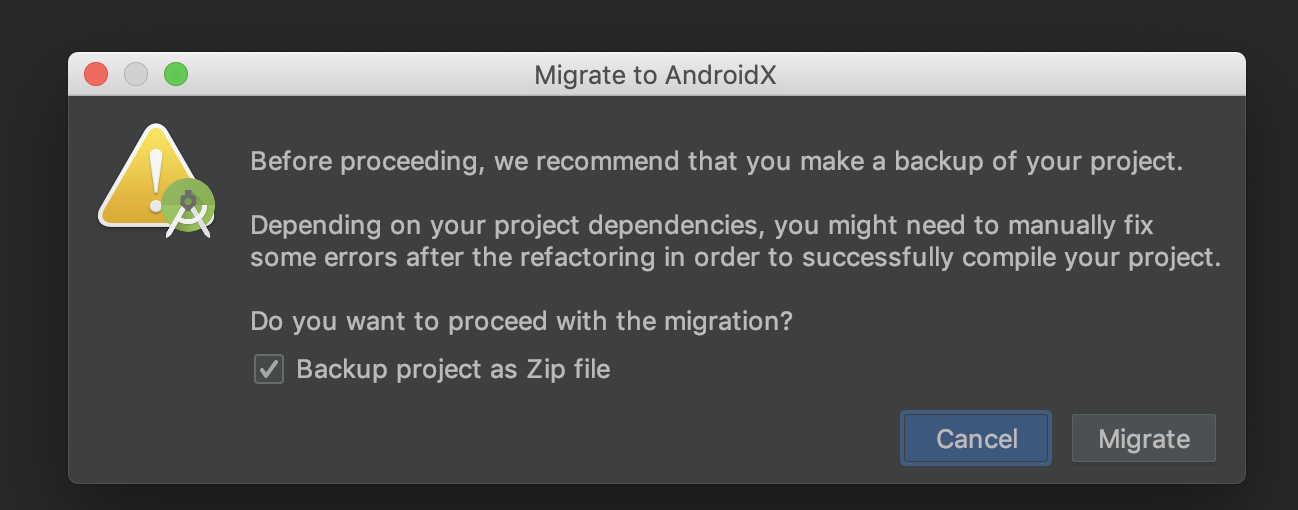
6. If you're asked to back up the project before proceeding,
check **Backup project as Zip file**, then click **Migrate**.
Lastly, save the zip file in your location of preference.
在继续之前,如果你被要求对项目进行备份,
请勾选 **Backup project as Zip file**,
然后点击 **Migrate**。
最后,将 zip 文件保存在你期望的位置。
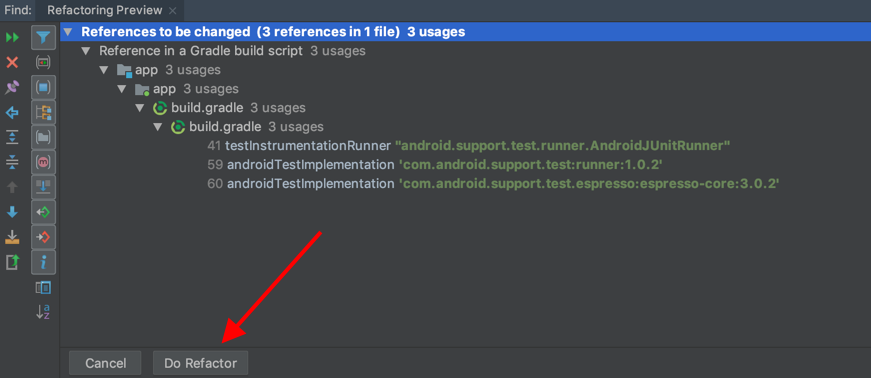
 7. The refactoring preview shows the list of changes.
Finally, click **Do Refactor**:
重构预览显示了变动的列表,
最后,点击 **Do Refactor** :
7. The refactoring preview shows the list of changes.
Finally, click **Do Refactor**:
重构预览显示了变动的列表,
最后,点击 **Do Refactor** :
 8. That is it! You successfully migrated your project to AndroidX.
大功告成!你成功地将项目迁移到了 AndroidX。
Finally, if you migrated a plugin,
publish the new AndroidX version to pub and update
your `CHANGELOG.md` to indicate that this new version
is compatible with AndroidX.
最后,如果你迁移了插件,
请发布新的 AndroidX 版本到 pub 并更新你的 `CHANGELOG.md`,
以表明该新版本与 AndroidX 兼容。
[Android Studio]: https://developer.android.google.cn/studio
### What if I can't use Android Studio?
### 如果我不能使用 Android Studio 怎么办?
You can create a new project using the Flutter tool
and then move the Dart code and
assets to the new project.
你可以使用 Flutter 工具创建一个新项目,
然后将原项目的 Dart 代码和资源文件转移到新项目中。
To create a new project run:
要创建一个新的项目,请运行:
```console
flutter create -t
```
### Add to app
### 集成到现有应用 (add-to-app)
If your Flutter project is a module type for adding
to an existing Android app, and contains a
`.android` directory, add the following line to `pubspec.yaml`:
如果你的 Flutter 项目是用于集成到现有 Android 应用的模块,
并且包含 `.android` 目录,
请在 `pubspec.yaml` 中添加以下内容:
```yaml
module:
...
androidX: true # Add this line.
```
Finally, run `flutter clean`.
最后,运行 `flutter clean`。
If your module contains an `android` directory instead,
then follow the steps in previous section.
如果你的模块包含 `android` 目录,
那么请按照上面相关章节的步骤操作。
### How do I know if my project is using AndroidX?
### 如何判断我的项目中是否在使用 AndroidX?
Starting from Flutter v1.12.13, new projects created with
`flutter create -t `
use AndroidX by default.
从 Flutter 1.12.13 版本开始,
用 `flutter create -t ` 创建的新项目
将默认使用 AndroidX。
Projects created prior to this Flutter version
mustn't depend on any [old build artifact][] or
[old Support Library class][].
在此 Flutter 版本(1.12.13 版本)之前创建的项目
不能依赖于任何 [旧构建工件][old build artifact] 和
[旧支持库类][old Support Library class]。
[old build artifact]: https://developer.android.google.cn/jetpack/androidx/migrate/artifact-mappings
[old Support Library class]: https://developer.android.google.cn/jetpack/androidx/migrate/class-mappings
In an app or module project,
the file `android/gradle.properties`
or `.android/gradle.properties`
must contain:
在应用程序和模块项目中,
`android/gradle.properties` 或
`.android/gradle.properties` 文件内
必须包含以下内容:
```properties
android.useAndroidX=true
android.enableJetifier=true
```
### What if I don't migrate my app or module to AndroidX?
### 如果我不将应用程序或模块迁移到 AndroidX 会怎么样?
Your app might continue to work. However,
combining AndroidX and Support artifacts
is generally not recommended because it can
result in dependency conflicts or
other kind of Gradle failures.
As a result, as more plugins migrate to AndroidX,
plugins depending on Android core libraries are likely
to cause build failures.
你的应用程序也许能继续使用。
然而,一般不建议将 AndroidX 和 Android Support 结合使用,
因为它可能导致依赖冲突或其他类型的 Gradle 故障。
因此,随着越来越多的插件迁移到 AndroidX,
依赖于 Android 核心库的插件可能会导致构建失败。
### What if my app is migrated to AndroidX, but not all of the plugins I use?
### 如果我的应用程序已经迁移到了 AndroidX,但我使用的插件未全部支持 AndroidX 怎么办?
The Flutter tool uses Jetifier to automatically
migrate Flutter plugins using the Support Library
to AndroidX, so you can use the same plugins even
if they haven't been migrated to AndroidX yet.
Flutter 工具通过 Jetifier 将
使用支持库的 Flutter 插件自动迁移到 AndroidX,
因此,即使这些插件尚未迁移到 AndroidX,
你仍然可以使用它们。
### I'm having issues migrating to AndroidX
### 我在迁移到 AndroidX 的过程中遇到问题
[Open an issue on GitHub][] and add `[androidx-migration]`
to the title of the issue.
[在 GitHub 提出一个 issue][Open an issue on GitHub]
并在 issue 的标题中添加 `[androidx-migration]`。
[Open an issue on GitHub]: https://github.com/flutter/flutter/issues/new/choose
8. That is it! You successfully migrated your project to AndroidX.
大功告成!你成功地将项目迁移到了 AndroidX。
Finally, if you migrated a plugin,
publish the new AndroidX version to pub and update
your `CHANGELOG.md` to indicate that this new version
is compatible with AndroidX.
最后,如果你迁移了插件,
请发布新的 AndroidX 版本到 pub 并更新你的 `CHANGELOG.md`,
以表明该新版本与 AndroidX 兼容。
[Android Studio]: https://developer.android.google.cn/studio
### What if I can't use Android Studio?
### 如果我不能使用 Android Studio 怎么办?
You can create a new project using the Flutter tool
and then move the Dart code and
assets to the new project.
你可以使用 Flutter 工具创建一个新项目,
然后将原项目的 Dart 代码和资源文件转移到新项目中。
To create a new project run:
要创建一个新的项目,请运行:
```console
flutter create -t
```
### Add to app
### 集成到现有应用 (add-to-app)
If your Flutter project is a module type for adding
to an existing Android app, and contains a
`.android` directory, add the following line to `pubspec.yaml`:
如果你的 Flutter 项目是用于集成到现有 Android 应用的模块,
并且包含 `.android` 目录,
请在 `pubspec.yaml` 中添加以下内容:
```yaml
module:
...
androidX: true # Add this line.
```
Finally, run `flutter clean`.
最后,运行 `flutter clean`。
If your module contains an `android` directory instead,
then follow the steps in previous section.
如果你的模块包含 `android` 目录,
那么请按照上面相关章节的步骤操作。
### How do I know if my project is using AndroidX?
### 如何判断我的项目中是否在使用 AndroidX?
Starting from Flutter v1.12.13, new projects created with
`flutter create -t `
use AndroidX by default.
从 Flutter 1.12.13 版本开始,
用 `flutter create -t ` 创建的新项目
将默认使用 AndroidX。
Projects created prior to this Flutter version
mustn't depend on any [old build artifact][] or
[old Support Library class][].
在此 Flutter 版本(1.12.13 版本)之前创建的项目
不能依赖于任何 [旧构建工件][old build artifact] 和
[旧支持库类][old Support Library class]。
[old build artifact]: https://developer.android.google.cn/jetpack/androidx/migrate/artifact-mappings
[old Support Library class]: https://developer.android.google.cn/jetpack/androidx/migrate/class-mappings
In an app or module project,
the file `android/gradle.properties`
or `.android/gradle.properties`
must contain:
在应用程序和模块项目中,
`android/gradle.properties` 或
`.android/gradle.properties` 文件内
必须包含以下内容:
```properties
android.useAndroidX=true
android.enableJetifier=true
```
### What if I don't migrate my app or module to AndroidX?
### 如果我不将应用程序或模块迁移到 AndroidX 会怎么样?
Your app might continue to work. However,
combining AndroidX and Support artifacts
is generally not recommended because it can
result in dependency conflicts or
other kind of Gradle failures.
As a result, as more plugins migrate to AndroidX,
plugins depending on Android core libraries are likely
to cause build failures.
你的应用程序也许能继续使用。
然而,一般不建议将 AndroidX 和 Android Support 结合使用,
因为它可能导致依赖冲突或其他类型的 Gradle 故障。
因此,随着越来越多的插件迁移到 AndroidX,
依赖于 Android 核心库的插件可能会导致构建失败。
### What if my app is migrated to AndroidX, but not all of the plugins I use?
### 如果我的应用程序已经迁移到了 AndroidX,但我使用的插件未全部支持 AndroidX 怎么办?
The Flutter tool uses Jetifier to automatically
migrate Flutter plugins using the Support Library
to AndroidX, so you can use the same plugins even
if they haven't been migrated to AndroidX yet.
Flutter 工具通过 Jetifier 将
使用支持库的 Flutter 插件自动迁移到 AndroidX,
因此,即使这些插件尚未迁移到 AndroidX,
你仍然可以使用它们。
### I'm having issues migrating to AndroidX
### 我在迁移到 AndroidX 的过程中遇到问题
[Open an issue on GitHub][] and add `[androidx-migration]`
to the title of the issue.
[在 GitHub 提出一个 issue][Open an issue on GitHub]
并在 issue 的标题中添加 `[androidx-migration]`。
[Open an issue on GitHub]: https://github.com/flutter/flutter/issues/new/choose