# 向 Android 应用添加启动页(闪屏页)
> 了解如何向你的 Android 应用添加一个启动页。
 ## Overview
## 概览
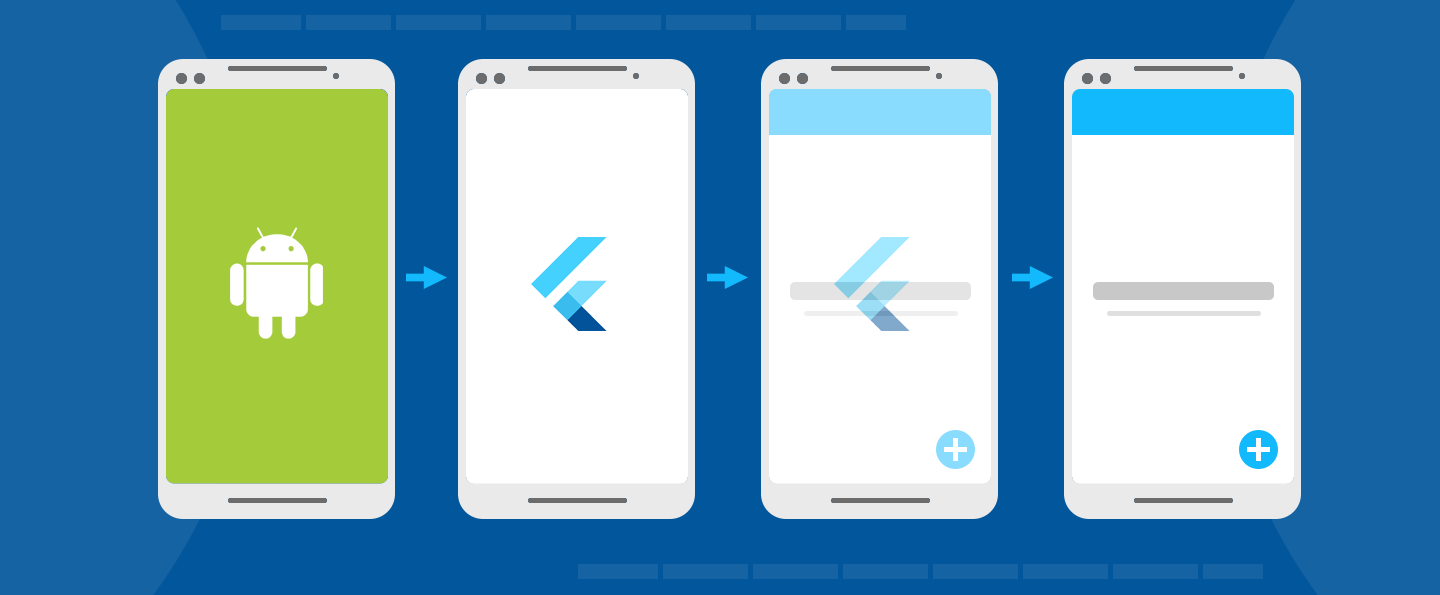
A splash screens (also known as a launch screen) provides
a simple initial experience while your Android app loads.
It sets the stage for your application,
while allowing time for the app engine
to load and your app to initialize.
闪屏页(也称为启动页)是你的应用在启动时给用户的第一印象。
它就像是你的应用的基础,同时让你在它展示的时间里,
加载你的引擎和初始化你的应用。
本指南将展示如何在 Flutter 编写的移动应用中恰当地使用闪屏页。
You have a couple options for implementing a splash screen:
你有以下几种方案来实现启动页:
1. You can use one of the packages available on [pub.dev][].
你可以使用 [pub.dev][] 上的 package。
2. You can implement it manually, as shown in the
[splash screen sample app][]. The rest of this page
assumes the manual approach.
你可以手动实现它,例如 [闪屏页示例应用][splash screen sample app]。
本篇其余内容均基于手动实现。
[pub.dev]: https://pub-web.flutter-io.cn/packages?q=splash+screen
[splash screen sample app]: https://github.com/flutter/samples/tree/main/android_splash_screen
## Initializing the app
## 初始化应用
Every Android app requires initialization time while the
operating system sets up the app's process.
Android provides the concept of a [launch screen][] to
display a `Drawable` while the app is initializing.
所有 Android 应用在操作系统准备应用进程时都需要一定的初始化时间。
因此 Android 提供了 [启动界面][launch screen] 的概念,
在应用初始化的时候显示 `Drawable`。
:::note
For apps that embed one or more Flutter screens within an
existing Android app, consider
[pre-warming a `FlutterEngine`][] and reusing the
same engine throughout your app to minimize wait
time associated with initialization of the Flutter engine.
对于集成了多个 Flutter 内容的 Android 应用,可以考虑
[预热 `FlutterEngine`][pre-warming a `FlutterEngine`]
以及在整个应用中复用同一个 Flutter 引擎,
以减少初始化的等待时间。
:::
A `Drawable` is an Android graphic.
To learn how to add a `Drawable` to your
Flutter project in Android Studio,
check out [Import drawables into your project][drawables][]
in the Android developer documentation.
`Drawable` 是一种 Android 图形图像处理。
要了解如何在 Android Studio 中
为 Flutter 添加 `Drawable`,
请查阅 Android 开发者文档:[将可绘制对象导入项目中][drawables]
The default Flutter project template includes a definition
of a launch theme and a launch background. You can customize
this by editing `styles.xml`, where you can define a theme
whose `windowBackground` is set to the
`Drawable` that should be displayed as the launch screen.
默认的 Flutter 项目模板定义了启动主题和启动背景。
你可以在 `styles.xml` 中自定义一个主题,
将一个 `Drawable` 配置给该主题的 `windowBackground`,
它将作为启动页被展示。
```xml
```
In addition, `styles.xml` defines a _normal theme_
to be applied to `FlutterActivity` after the launch
screen is gone. The normal theme background only shows
for a very brief moment after the splash screen disappears,
and during orientation change and `Activity` restoration.
Therefore, it's recommended that the normal theme use a
solid background color that looks similar to the primary
background color of the Flutter UI.
此外,在 `styles.xml` 中定义一个 **普通主题**,
当启动页消失后,它会应用在 `FlutterActivity` 上。
普通主题的背景仅仅展示非常短暂的时间,
例如,当启动页消失后、设备方向改变或者 `Activity` 恢复期间。
因此建议普通主题的背景颜色使用与 Flutter UI 主要背景颜色相似的纯色。
```xml
```
[drawables]: https://developer.android.google.cn/studio/write/resource-manager#import
## Set up the FlutterActivity in AndroidManifest.xml
## 在 AndroidManifest.xml 中配置 FlutterActivity
In `AndroidManifest.xml`, set the `theme` of
`FlutterActivity` to the launch theme. Then,
add a metadata element to the desired `FlutterActivity`
to instruct Flutter to switch from the launch theme
to the normal theme at the appropriate time.
在 `AndroidManifest.xml` 中,
将 `FlutterActivity` 的 `theme` 设置为启动主题,
将元数据元素添加到所需的 `FlutterActivity`,
以知会 Flutter 在适当的时机从启动主题切换到普通主题。
```xml
```
The Android app now displays the desired launch screen
while the app initializes.
如此一来,Android 应用程序就会在在初始化时展示对应的启动页面。
## SplashScreen API
## 闪屏 (SplashScreen) API
Android 12 introduced the [`SplashScreen`][] API.
Use the `SplashScreen` API in your `styles.xml`file.
For example:
从 Android 12 开始引入了 [`SplashScreen`][] API。
在你的 `styles.xml` 文件中使用 `SplashScreen` API。
例如:
```xml
```
:::note
If your Android app supports releases earlier than Android 12
_and_ post-Android 12 releases, consider using
two different resources in your `styles.xml` file.
Also, make sure that your background image is in line with
the icon guidelines. For more information,
visit [Android Splash Screens][].
如果你的 Android 应用 **同时** 支持 Android 12 之前以及之后的版本,
请考虑在 `styles.xml` 文件中使用两套不同的资源。
此外,请确保你的背景图像符合图标指南。
查看文档 [Android 闪屏页面][Android Splash Screens] 来了解更多。
:::
[Android Splash Screens]: https://developer.android.com/develop/ui/views/launch/splash-screen
[`SplashScreen`]: https://developer.android.com/reference/android/window/SplashScreen
Some apps might want to continue showing the last frame of
the Android launch screen in Flutter. For example,
this preserves the illusion of a single frame
while additional loading continues in Dart.
To achieve this, the following
Android APIs might be helpful:
某些应用可能希望在 Flutter 中继续显示 Android 闪屏页的最后一帧。
例如,保持一帧的展示,同时 Dart 继续加载其他内容。
想达到这样的效果,以下 API 可能有帮助:
```kotlin title="MainActivity.kt"
import android.os.Build
import android.os.Bundle
import androidx.core.view.WindowCompat
import io.flutter.embedding.android.FlutterActivity
class MainActivity : FlutterActivity() {
override fun onCreate(savedInstanceState: Bundle?) {
// Aligns the Flutter view vertically with the window.
WindowCompat.setDecorFitsSystemWindows(getWindow(), false)
if (Build.VERSION.SDK_INT >= Build.VERSION_CODES.S) {
// Disable the Android splash screen fade out animation to avoid
// a flicker before the similar frame is drawn in Flutter.
splashScreen.setOnExitAnimationListener { splashScreenView -> splashScreenView.remove() }
}
super.onCreate(savedInstanceState)
}
}
```
```java title="MainActivity.java"
import android.os.Build;
import android.os.Bundle;
import android.window.SplashScreenView;
import androidx.core.view.WindowCompat;
import io.flutter.embedding.android.FlutterActivity;
public class MainActivity extends FlutterActivity {
@Override
protected void onCreate(Bundle savedInstanceState) {
// Aligns the Flutter view vertically with the window.
WindowCompat.setDecorFitsSystemWindows(getWindow(), false);
if (Build.VERSION.SDK_INT >= Build.VERSION_CODES.S) {
// Disable the Android splash screen fade out animation to avoid
// a flicker before the similar frame is drawn in Flutter.
getSplashScreen()
.setOnExitAnimationListener(
(SplashScreenView splashScreenView) -> {
splashScreenView.remove();
});
}
super.onCreate(savedInstanceState);
}
}
```
Then, you can reimplement the first frame in Flutter
that shows elements of your Android launch screen in
the same positions on screen.
For an example of this, check out the
[splash screen sample app][].
然后你可以重新实现 Flutter 的第一帧,将元素摆放在与 Android 闪屏页相同的位置。
关于这个的示例,请参考 [闪屏页示例应用][splash screen sample app]。
[launch screen]: https://developer.android.google.cn/topic/performance/vitals/launch-time#themed
[pre-warming a `FlutterEngine`]: /add-to-app/android/add-flutter-fragment#using-a-pre-warmed-flutterengine
## Overview
## 概览
A splash screens (also known as a launch screen) provides
a simple initial experience while your Android app loads.
It sets the stage for your application,
while allowing time for the app engine
to load and your app to initialize.
闪屏页(也称为启动页)是你的应用在启动时给用户的第一印象。
它就像是你的应用的基础,同时让你在它展示的时间里,
加载你的引擎和初始化你的应用。
本指南将展示如何在 Flutter 编写的移动应用中恰当地使用闪屏页。
You have a couple options for implementing a splash screen:
你有以下几种方案来实现启动页:
1. You can use one of the packages available on [pub.dev][].
你可以使用 [pub.dev][] 上的 package。
2. You can implement it manually, as shown in the
[splash screen sample app][]. The rest of this page
assumes the manual approach.
你可以手动实现它,例如 [闪屏页示例应用][splash screen sample app]。
本篇其余内容均基于手动实现。
[pub.dev]: https://pub-web.flutter-io.cn/packages?q=splash+screen
[splash screen sample app]: https://github.com/flutter/samples/tree/main/android_splash_screen
## Initializing the app
## 初始化应用
Every Android app requires initialization time while the
operating system sets up the app's process.
Android provides the concept of a [launch screen][] to
display a `Drawable` while the app is initializing.
所有 Android 应用在操作系统准备应用进程时都需要一定的初始化时间。
因此 Android 提供了 [启动界面][launch screen] 的概念,
在应用初始化的时候显示 `Drawable`。
:::note
For apps that embed one or more Flutter screens within an
existing Android app, consider
[pre-warming a `FlutterEngine`][] and reusing the
same engine throughout your app to minimize wait
time associated with initialization of the Flutter engine.
对于集成了多个 Flutter 内容的 Android 应用,可以考虑
[预热 `FlutterEngine`][pre-warming a `FlutterEngine`]
以及在整个应用中复用同一个 Flutter 引擎,
以减少初始化的等待时间。
:::
A `Drawable` is an Android graphic.
To learn how to add a `Drawable` to your
Flutter project in Android Studio,
check out [Import drawables into your project][drawables][]
in the Android developer documentation.
`Drawable` 是一种 Android 图形图像处理。
要了解如何在 Android Studio 中
为 Flutter 添加 `Drawable`,
请查阅 Android 开发者文档:[将可绘制对象导入项目中][drawables]
The default Flutter project template includes a definition
of a launch theme and a launch background. You can customize
this by editing `styles.xml`, where you can define a theme
whose `windowBackground` is set to the
`Drawable` that should be displayed as the launch screen.
默认的 Flutter 项目模板定义了启动主题和启动背景。
你可以在 `styles.xml` 中自定义一个主题,
将一个 `Drawable` 配置给该主题的 `windowBackground`,
它将作为启动页被展示。
```xml
```
In addition, `styles.xml` defines a _normal theme_
to be applied to `FlutterActivity` after the launch
screen is gone. The normal theme background only shows
for a very brief moment after the splash screen disappears,
and during orientation change and `Activity` restoration.
Therefore, it's recommended that the normal theme use a
solid background color that looks similar to the primary
background color of the Flutter UI.
此外,在 `styles.xml` 中定义一个 **普通主题**,
当启动页消失后,它会应用在 `FlutterActivity` 上。
普通主题的背景仅仅展示非常短暂的时间,
例如,当启动页消失后、设备方向改变或者 `Activity` 恢复期间。
因此建议普通主题的背景颜色使用与 Flutter UI 主要背景颜色相似的纯色。
```xml
```
[drawables]: https://developer.android.google.cn/studio/write/resource-manager#import
## Set up the FlutterActivity in AndroidManifest.xml
## 在 AndroidManifest.xml 中配置 FlutterActivity
In `AndroidManifest.xml`, set the `theme` of
`FlutterActivity` to the launch theme. Then,
add a metadata element to the desired `FlutterActivity`
to instruct Flutter to switch from the launch theme
to the normal theme at the appropriate time.
在 `AndroidManifest.xml` 中,
将 `FlutterActivity` 的 `theme` 设置为启动主题,
将元数据元素添加到所需的 `FlutterActivity`,
以知会 Flutter 在适当的时机从启动主题切换到普通主题。
```xml
```
The Android app now displays the desired launch screen
while the app initializes.
如此一来,Android 应用程序就会在在初始化时展示对应的启动页面。
## SplashScreen API
## 闪屏 (SplashScreen) API
Android 12 introduced the [`SplashScreen`][] API.
Use the `SplashScreen` API in your `styles.xml`file.
For example:
从 Android 12 开始引入了 [`SplashScreen`][] API。
在你的 `styles.xml` 文件中使用 `SplashScreen` API。
例如:
```xml
```
:::note
If your Android app supports releases earlier than Android 12
_and_ post-Android 12 releases, consider using
two different resources in your `styles.xml` file.
Also, make sure that your background image is in line with
the icon guidelines. For more information,
visit [Android Splash Screens][].
如果你的 Android 应用 **同时** 支持 Android 12 之前以及之后的版本,
请考虑在 `styles.xml` 文件中使用两套不同的资源。
此外,请确保你的背景图像符合图标指南。
查看文档 [Android 闪屏页面][Android Splash Screens] 来了解更多。
:::
[Android Splash Screens]: https://developer.android.com/develop/ui/views/launch/splash-screen
[`SplashScreen`]: https://developer.android.com/reference/android/window/SplashScreen
Some apps might want to continue showing the last frame of
the Android launch screen in Flutter. For example,
this preserves the illusion of a single frame
while additional loading continues in Dart.
To achieve this, the following
Android APIs might be helpful:
某些应用可能希望在 Flutter 中继续显示 Android 闪屏页的最后一帧。
例如,保持一帧的展示,同时 Dart 继续加载其他内容。
想达到这样的效果,以下 API 可能有帮助:
```kotlin title="MainActivity.kt"
import android.os.Build
import android.os.Bundle
import androidx.core.view.WindowCompat
import io.flutter.embedding.android.FlutterActivity
class MainActivity : FlutterActivity() {
override fun onCreate(savedInstanceState: Bundle?) {
// Aligns the Flutter view vertically with the window.
WindowCompat.setDecorFitsSystemWindows(getWindow(), false)
if (Build.VERSION.SDK_INT >= Build.VERSION_CODES.S) {
// Disable the Android splash screen fade out animation to avoid
// a flicker before the similar frame is drawn in Flutter.
splashScreen.setOnExitAnimationListener { splashScreenView -> splashScreenView.remove() }
}
super.onCreate(savedInstanceState)
}
}
```
```java title="MainActivity.java"
import android.os.Build;
import android.os.Bundle;
import android.window.SplashScreenView;
import androidx.core.view.WindowCompat;
import io.flutter.embedding.android.FlutterActivity;
public class MainActivity extends FlutterActivity {
@Override
protected void onCreate(Bundle savedInstanceState) {
// Aligns the Flutter view vertically with the window.
WindowCompat.setDecorFitsSystemWindows(getWindow(), false);
if (Build.VERSION.SDK_INT >= Build.VERSION_CODES.S) {
// Disable the Android splash screen fade out animation to avoid
// a flicker before the similar frame is drawn in Flutter.
getSplashScreen()
.setOnExitAnimationListener(
(SplashScreenView splashScreenView) -> {
splashScreenView.remove();
});
}
super.onCreate(savedInstanceState);
}
}
```
Then, you can reimplement the first frame in Flutter
that shows elements of your Android launch screen in
the same positions on screen.
For an example of this, check out the
[splash screen sample app][].
然后你可以重新实现 Flutter 的第一帧,将元素摆放在与 Android 闪屏页相同的位置。
关于这个的示例,请参考 [闪屏页示例应用][splash screen sample app]。
[launch screen]: https://developer.android.google.cn/topic/performance/vitals/launch-time#themed
[pre-warming a `FlutterEngine`]: /add-to-app/android/add-flutter-fragment#using-a-pre-warmed-flutterengine