# 简单的应用状态管理
> 一个简单形式的状态管理。
Now that you know about [declarative UI programming][]
and the difference between [ephemeral and app state][],
you are ready to learn about simple app state management.
现在大家已经了解了
[声明式的编程思维][declarative UI programming] 和
[短时 (ephemeral) 与应用 (app) 状态][ephemeral and app state]
之间的区别,现在可以学习如何管理简单的全局应用状态。
On this page, we are going to be using the `provider` package.
If you are new to Flutter and you don't have a strong reason to choose
another approach (Redux, Rx, hooks, etc.), this is probably the approach
you should start with. The `provider` package is easy to understand
and it doesn't use much code.
It also uses concepts that are applicable in every other approach.
在这里,我们打算使用 `provider` package。如果你是 Flutter 的初学者,
而且也没有很重要的理由必须选择别的方式来实现(Redux、Rx、hooks 等等),
那么这就是你应该入门使用的。`provider` 非常好理解而且不需要写很多代码。
它也会用到一些在其它实现方式中用到的通用概念。
That said, if you have a strong background in
state management from other reactive frameworks,
you can find packages and tutorials listed on the [options page][].
即便如此,如果你已经从其它响应式框架上积累了丰富的状态管理经验的话,
那么可以在
[状态 (State) 管理参考][options page]
中找到相关的 package 和教程。
## Our example
## 示例
 For illustration, consider the following simple app.
为了演示效果,我们实现下面这个简单应用。
The app has two separate screens: a catalog,
and a cart (represented by the `MyCatalog`,
and `MyCart` widgets, respectively). It could be a shopping app,
but you can imagine the same structure in a simple social networking
app (replace catalog for "wall" and cart for "favorites").
这个应用有两个独立的页面:一个类别页面和一个购物车页面
(分别用 `MyCatalog`,`MyCart` widget 来展示)。
虽然看上去是一个购物应用程序,
但是你也可以和社交网络应用类比
(把类别页面替换成朋友圈,把购物车替换成关注的人)。
The catalog screen includes a custom app bar (`MyAppBar`)
and a scrolling view of many list items (`MyListItems`).
类别页面包含一个自定义的 app bar (`MyAppBar`)
以及一个包含元素列表的可滑动的视图 (`MyListItems`)。
Here's the app visualized as a widget tree.
这是应用程序对应的可视化的 widget 树。
For illustration, consider the following simple app.
为了演示效果,我们实现下面这个简单应用。
The app has two separate screens: a catalog,
and a cart (represented by the `MyCatalog`,
and `MyCart` widgets, respectively). It could be a shopping app,
but you can imagine the same structure in a simple social networking
app (replace catalog for "wall" and cart for "favorites").
这个应用有两个独立的页面:一个类别页面和一个购物车页面
(分别用 `MyCatalog`,`MyCart` widget 来展示)。
虽然看上去是一个购物应用程序,
但是你也可以和社交网络应用类比
(把类别页面替换成朋友圈,把购物车替换成关注的人)。
The catalog screen includes a custom app bar (`MyAppBar`)
and a scrolling view of many list items (`MyListItems`).
类别页面包含一个自定义的 app bar (`MyAppBar`)
以及一个包含元素列表的可滑动的视图 (`MyListItems`)。
Here's the app visualized as a widget tree.
这是应用程序对应的可视化的 widget 树。
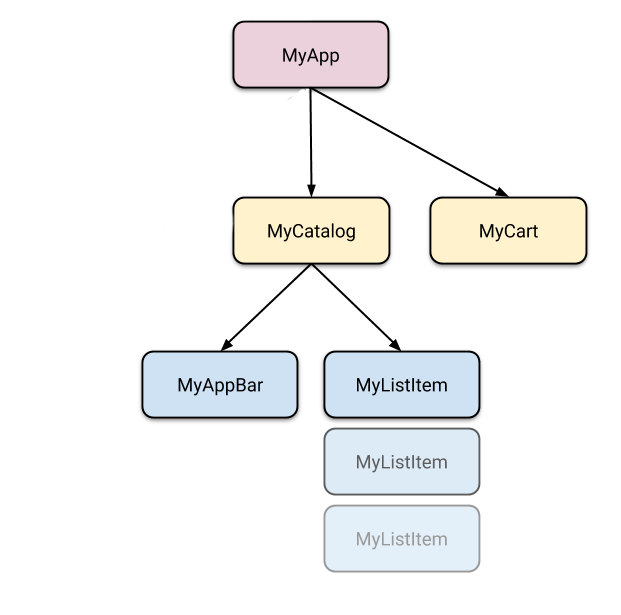 So we have at least 5 subclasses of `Widget`. Many of them need
access to state that "belongs" elsewhere. For example, each
`MyListItem` needs to be able to add itself to the cart.
It might also want to see whether the currently displayed item
is already in the cart.
所以我们有至少 5 个 `Widget` 的子类。他们中有很多需要访问一些全局的状态。
比如,`MyListItem` 会被添加到购物车中。
但是它可能需要检查和自己相同的元素是否已经被添加到购物车中。
This takes us to our first question: where should we put the current
state of the cart?
这里我们出现了第一个问题:我们把当前购物车的状态放在哪合适呢?
## Lifting state up
## 提高状态的层级
In Flutter,
it makes sense to keep the state above the widgets that use it.
在 Flutter 中,有必要将存储状态的对象置于 widget 树中对应 widget 的上层。
Why? In declarative frameworks like Flutter, if you want to change the UI,
you have to rebuild it. There is no easy way to have
`MyCart.updateWith(somethingNew)`. In other words, it's hard to
imperatively change a widget from outside, by calling a method on it.
And even if you could make this work, you would be fighting the
framework instead of letting it help you.
为什么呢?在类似 Flutter 的声明式框架中,如果你想要修改 UI,那么你需要重构它。
并没有类似 `MyCart.updateWith(somethingNew)` 的简单调用方法。
换言之,你很难通过外部调用方法修改一个 widget。
即便你自己实现了这样的模式,那也是和整个框架不相兼容。
```dart
// BAD: DO NOT DO THIS
void myTapHandler() {
var cartWidget = somehowGetMyCartWidget();
cartWidget.updateWith(item);
}
```
Even if you get the above code to work,
you would then have to deal
with the following in the `MyCart` widget:
即使你实现了上面的代码,也得处理 `MyCart` widget 中的代码:
```dart
// BAD: DO NOT DO THIS
Widget build(BuildContext context) {
return SomeWidget(
// The initial state of the cart.
);
}
void updateWith(Item item) {
// Somehow you need to change the UI from here.
}
```
You would need to take into consideration the current state of the UI
and apply the new data to it. It's hard to avoid bugs this way.
你可能需要考虑当前 UI 的状态,然后把最新的数据添加进去。但是这样的方式很难避免出现 bug。
In Flutter, you construct a new widget every time its contents change.
Instead of `MyCart.updateWith(somethingNew)` (a method call)
you use `MyCart(contents)` (a constructor). Because you can only
construct new widgets in the build methods of their parents,
if you want to change `contents`, it needs to live in `MyCart`'s
parent or above.
在 Flutter 中,每次当 widget 内容发生改变的时候,你就需要构造一个新的。
你会调用 `MyCart(contents)`(构造函数),
而不是 `MyCart.updateWith(somethingNew)`(调用方法)。
因为你只能通过父类的 build 方法来构建新 widget,
如果你想修改 `contents`,就需要调用 `MyCart` 的父类甚至更高一级的类。
```dart
// GOOD
void myTapHandler(BuildContext context) {
var cartModel = somehowGetMyCartModel(context);
cartModel.add(item);
}
```
Now `MyCart` has only one code path for building any version of the UI.
这里 `MyCart` 可以在各种版本的 UI 中调用同一个代码路径。
```dart
// GOOD
Widget build(BuildContext context) {
var cartModel = somehowGetMyCartModel(context);
return SomeWidget(
// Just construct the UI once, using the current state of the cart.
// ···
);
}
```
In our example, `contents` needs to live in `MyApp`. Whenever it changes,
it rebuilds `MyCart` from above (more on that later). Because of this,
`MyCart` doesn't need to worry about lifecycle—it just declares
what to show for any given `contents`. When that changes, the old
`MyCart` widget disappears and is completely replaced by the new one.
在我们的例子中,`contents`会存在于 `MyApp` 的生命周期中。
当它发生改变的时候,它会从上层重构 `MyCart` 。因为这个机制,
所以 `MyCart` 无需考虑生命周期的问题—它只需要针对
`contents` 声明所需显示内容即可。
当内容发生改变的时候,旧的 `MyCart` widget 就会消失,
完全被新的 widget 替代。
So we have at least 5 subclasses of `Widget`. Many of them need
access to state that "belongs" elsewhere. For example, each
`MyListItem` needs to be able to add itself to the cart.
It might also want to see whether the currently displayed item
is already in the cart.
所以我们有至少 5 个 `Widget` 的子类。他们中有很多需要访问一些全局的状态。
比如,`MyListItem` 会被添加到购物车中。
但是它可能需要检查和自己相同的元素是否已经被添加到购物车中。
This takes us to our first question: where should we put the current
state of the cart?
这里我们出现了第一个问题:我们把当前购物车的状态放在哪合适呢?
## Lifting state up
## 提高状态的层级
In Flutter,
it makes sense to keep the state above the widgets that use it.
在 Flutter 中,有必要将存储状态的对象置于 widget 树中对应 widget 的上层。
Why? In declarative frameworks like Flutter, if you want to change the UI,
you have to rebuild it. There is no easy way to have
`MyCart.updateWith(somethingNew)`. In other words, it's hard to
imperatively change a widget from outside, by calling a method on it.
And even if you could make this work, you would be fighting the
framework instead of letting it help you.
为什么呢?在类似 Flutter 的声明式框架中,如果你想要修改 UI,那么你需要重构它。
并没有类似 `MyCart.updateWith(somethingNew)` 的简单调用方法。
换言之,你很难通过外部调用方法修改一个 widget。
即便你自己实现了这样的模式,那也是和整个框架不相兼容。
```dart
// BAD: DO NOT DO THIS
void myTapHandler() {
var cartWidget = somehowGetMyCartWidget();
cartWidget.updateWith(item);
}
```
Even if you get the above code to work,
you would then have to deal
with the following in the `MyCart` widget:
即使你实现了上面的代码,也得处理 `MyCart` widget 中的代码:
```dart
// BAD: DO NOT DO THIS
Widget build(BuildContext context) {
return SomeWidget(
// The initial state of the cart.
);
}
void updateWith(Item item) {
// Somehow you need to change the UI from here.
}
```
You would need to take into consideration the current state of the UI
and apply the new data to it. It's hard to avoid bugs this way.
你可能需要考虑当前 UI 的状态,然后把最新的数据添加进去。但是这样的方式很难避免出现 bug。
In Flutter, you construct a new widget every time its contents change.
Instead of `MyCart.updateWith(somethingNew)` (a method call)
you use `MyCart(contents)` (a constructor). Because you can only
construct new widgets in the build methods of their parents,
if you want to change `contents`, it needs to live in `MyCart`'s
parent or above.
在 Flutter 中,每次当 widget 内容发生改变的时候,你就需要构造一个新的。
你会调用 `MyCart(contents)`(构造函数),
而不是 `MyCart.updateWith(somethingNew)`(调用方法)。
因为你只能通过父类的 build 方法来构建新 widget,
如果你想修改 `contents`,就需要调用 `MyCart` 的父类甚至更高一级的类。
```dart
// GOOD
void myTapHandler(BuildContext context) {
var cartModel = somehowGetMyCartModel(context);
cartModel.add(item);
}
```
Now `MyCart` has only one code path for building any version of the UI.
这里 `MyCart` 可以在各种版本的 UI 中调用同一个代码路径。
```dart
// GOOD
Widget build(BuildContext context) {
var cartModel = somehowGetMyCartModel(context);
return SomeWidget(
// Just construct the UI once, using the current state of the cart.
// ···
);
}
```
In our example, `contents` needs to live in `MyApp`. Whenever it changes,
it rebuilds `MyCart` from above (more on that later). Because of this,
`MyCart` doesn't need to worry about lifecycle—it just declares
what to show for any given `contents`. When that changes, the old
`MyCart` widget disappears and is completely replaced by the new one.
在我们的例子中,`contents`会存在于 `MyApp` 的生命周期中。
当它发生改变的时候,它会从上层重构 `MyCart` 。因为这个机制,
所以 `MyCart` 无需考虑生命周期的问题—它只需要针对
`contents` 声明所需显示内容即可。
当内容发生改变的时候,旧的 `MyCart` widget 就会消失,
完全被新的 widget 替代。
 This is what we mean when we say that widgets are immutable.
They don't change—they get replaced.
这就是我们所说的 widget 是不可变的。因为它们会直接被替换。
Now that we know where to put the state of the cart, let's see how
to access it.
现在我们知道在哪里放置购物车的状态,接下来看一下如何读取该状态。
## Accessing the state
## 读取状态
When a user clicks on one of the items in the catalog,
it's added to the cart. But since the cart lives above `MyListItem`,
how do we do that?
当用户点击类别页面中的一个元素,它会被添加到购物车里。
然而当购物车在 widget 树中,处于 MyListItem 的层级之上时,又该如何访问状态呢?
A simple option is to provide a callback that `MyListItem` can call
when it is clicked. Dart's functions are first class objects,
so you can pass them around any way you want. So, inside
`MyCatalog` you can define the following:
一个简单的实现方法是提供一个回调函数,当 `MyListItem` 被点击的时候可以调用。
Dart 的函数都是 first class 对象,所以你可以以任意方式传递它们。
所以在 `MyCatalog` 里你可以使用下面的代码:
```dart
@override
Widget build(BuildContext context) {
return SomeWidget(
// Construct the widget, passing it a reference to the method above.
MyListItem(myTapCallback),
);
}
void myTapCallback(Item item) {
print('user tapped on $item');
}
```
This works okay, but for an app state that you need to modify from
many different places, you'd have to pass around a lot of
callbacks—which gets old pretty quickly.
这段代码是没问题的,但是对于全局应用状态来说,你需要在不同的地方进行修改,
可能需要大量传递回调函数——这些回调很快就会过时。
Fortunately, Flutter has mechanisms for widgets to provide data and
services to their descendants (in other words, not just their children,
but any widgets below them). As you would expect from Flutter,
where _Everything is a Widget™_, these mechanisms are just special
kinds of widgets—`InheritedWidget`, `InheritedNotifier`,
`InheritedModel`, and more. We won't be covering those here,
because they are a bit low-level for what we're trying to do.
幸运的是 Flutter 在 widget 中存在一种机制,能够为其子孙节点提供数据和服务。
(换言之,不仅仅是它的子节点,所有在它下层的 widget 都可以)。就像你所了解的,
Flutter 中的 _Everything is a Widget™_。
这里的机制也是一种 widget —`InheritedWidget`, `InheritedNotifier`,
`InheritedModel`等等。我们这里不会详细解释他们,因为这些 widget 都太底层。
Instead, we are going to use a package that works with the low-level
widgets but is simple to use. It's called `provider`.
我们会用一个 package 来和这些底层的 widget 打交道,
就是 `provider` package。
Before working with `provider`,
don't forget to add the dependency on it to your `pubspec.yaml`.
在使用 `provider` 之前,请不要忘记在
`pubspec.yaml` 文件里加入依赖。
To add the `provider` package as a dependency, run `flutter pub add`:
运行 `flutter pub add` 将 `provider` 添加为依赖:
```console
$ flutter pub add provider
```
Now you can `import 'package:provider/provider.dart';`
and start building.
现在可以在代码里加入 `import 'package:provider/provider.dart';`
进而开始构建你的应用了。
With `provider`, you don't need to worry about callbacks or
`InheritedWidgets`. But you do need to understand 3 concepts:
`provider` package 中,你无须关心回调或者 `InheritedWidgets`。
但是你需要理解三个概念:
* ChangeNotifier
* ChangeNotifierProvider
* Consumer
## ChangeNotifier
`ChangeNotifier` is a simple class included in the Flutter SDK which provides
change notification to its listeners. In other words, if something is
a `ChangeNotifier`, you can subscribe to its changes. (It is a form of
Observable, for those familiar with the term.)
`ChangeNotifier` 是 Flutter SDK 中的一个简单的类。它用于向监听器发送通知。
换言之,如果被定义为 `ChangeNotifier`,你可以订阅它的状态变化。
(这和大家所熟悉的观察者模式相类似)。
In `provider`, `ChangeNotifier` is one way to encapsulate your application
state. For very simple apps, you get by with a single `ChangeNotifier`.
In complex ones, you'll have several models, and therefore several
`ChangeNotifiers`. (You don't need to use `ChangeNotifier` with `provider`
at all, but it's an easy class to work with.)
在 `provider` 中,`ChangeNotifier` 是一种能够封装应用程序状态的方法。
对于特别简单的程序,你可以通过一个 `ChangeNotifier` 来满足全部需求。
在相对复杂的应用中,由于会有多个模型,所以可能会有多个 `ChangeNotifier`。
(不是必须得把 `ChangeNotifier` 和 `provider` 结合起来用,
不过它确实是一个特别简单的类)。
In our shopping app example, we want to manage the state of the cart in a
`ChangeNotifier`. We create a new class that extends it, like so:
在我们的购物应用示例中,我们打算用 `ChangeNotifier` 来管理购物车的状态。
我们创建一个新类,继承它,像下面这样:
```dart
class CartModel extends [!ChangeNotifier!] {
/// Internal, private state of the cart.
final List
This is what we mean when we say that widgets are immutable.
They don't change—they get replaced.
这就是我们所说的 widget 是不可变的。因为它们会直接被替换。
Now that we know where to put the state of the cart, let's see how
to access it.
现在我们知道在哪里放置购物车的状态,接下来看一下如何读取该状态。
## Accessing the state
## 读取状态
When a user clicks on one of the items in the catalog,
it's added to the cart. But since the cart lives above `MyListItem`,
how do we do that?
当用户点击类别页面中的一个元素,它会被添加到购物车里。
然而当购物车在 widget 树中,处于 MyListItem 的层级之上时,又该如何访问状态呢?
A simple option is to provide a callback that `MyListItem` can call
when it is clicked. Dart's functions are first class objects,
so you can pass them around any way you want. So, inside
`MyCatalog` you can define the following:
一个简单的实现方法是提供一个回调函数,当 `MyListItem` 被点击的时候可以调用。
Dart 的函数都是 first class 对象,所以你可以以任意方式传递它们。
所以在 `MyCatalog` 里你可以使用下面的代码:
```dart
@override
Widget build(BuildContext context) {
return SomeWidget(
// Construct the widget, passing it a reference to the method above.
MyListItem(myTapCallback),
);
}
void myTapCallback(Item item) {
print('user tapped on $item');
}
```
This works okay, but for an app state that you need to modify from
many different places, you'd have to pass around a lot of
callbacks—which gets old pretty quickly.
这段代码是没问题的,但是对于全局应用状态来说,你需要在不同的地方进行修改,
可能需要大量传递回调函数——这些回调很快就会过时。
Fortunately, Flutter has mechanisms for widgets to provide data and
services to their descendants (in other words, not just their children,
but any widgets below them). As you would expect from Flutter,
where _Everything is a Widget™_, these mechanisms are just special
kinds of widgets—`InheritedWidget`, `InheritedNotifier`,
`InheritedModel`, and more. We won't be covering those here,
because they are a bit low-level for what we're trying to do.
幸运的是 Flutter 在 widget 中存在一种机制,能够为其子孙节点提供数据和服务。
(换言之,不仅仅是它的子节点,所有在它下层的 widget 都可以)。就像你所了解的,
Flutter 中的 _Everything is a Widget™_。
这里的机制也是一种 widget —`InheritedWidget`, `InheritedNotifier`,
`InheritedModel`等等。我们这里不会详细解释他们,因为这些 widget 都太底层。
Instead, we are going to use a package that works with the low-level
widgets but is simple to use. It's called `provider`.
我们会用一个 package 来和这些底层的 widget 打交道,
就是 `provider` package。
Before working with `provider`,
don't forget to add the dependency on it to your `pubspec.yaml`.
在使用 `provider` 之前,请不要忘记在
`pubspec.yaml` 文件里加入依赖。
To add the `provider` package as a dependency, run `flutter pub add`:
运行 `flutter pub add` 将 `provider` 添加为依赖:
```console
$ flutter pub add provider
```
Now you can `import 'package:provider/provider.dart';`
and start building.
现在可以在代码里加入 `import 'package:provider/provider.dart';`
进而开始构建你的应用了。
With `provider`, you don't need to worry about callbacks or
`InheritedWidgets`. But you do need to understand 3 concepts:
`provider` package 中,你无须关心回调或者 `InheritedWidgets`。
但是你需要理解三个概念:
* ChangeNotifier
* ChangeNotifierProvider
* Consumer
## ChangeNotifier
`ChangeNotifier` is a simple class included in the Flutter SDK which provides
change notification to its listeners. In other words, if something is
a `ChangeNotifier`, you can subscribe to its changes. (It is a form of
Observable, for those familiar with the term.)
`ChangeNotifier` 是 Flutter SDK 中的一个简单的类。它用于向监听器发送通知。
换言之,如果被定义为 `ChangeNotifier`,你可以订阅它的状态变化。
(这和大家所熟悉的观察者模式相类似)。
In `provider`, `ChangeNotifier` is one way to encapsulate your application
state. For very simple apps, you get by with a single `ChangeNotifier`.
In complex ones, you'll have several models, and therefore several
`ChangeNotifiers`. (You don't need to use `ChangeNotifier` with `provider`
at all, but it's an easy class to work with.)
在 `provider` 中,`ChangeNotifier` 是一种能够封装应用程序状态的方法。
对于特别简单的程序,你可以通过一个 `ChangeNotifier` 来满足全部需求。
在相对复杂的应用中,由于会有多个模型,所以可能会有多个 `ChangeNotifier`。
(不是必须得把 `ChangeNotifier` 和 `provider` 结合起来用,
不过它确实是一个特别简单的类)。
In our shopping app example, we want to manage the state of the cart in a
`ChangeNotifier`. We create a new class that extends it, like so:
在我们的购物应用示例中,我们打算用 `ChangeNotifier` 来管理购物车的状态。
我们创建一个新类,继承它,像下面这样:
```dart
class CartModel extends [!ChangeNotifier!] {
/// Internal, private state of the cart.
final List- _items = [];
/// An unmodifiable view of the items in the cart.
UnmodifiableListView
- get items => UnmodifiableListView(_items);
/// The current total price of all items (assuming all items cost $42).
int get totalPrice => _items.length * 42;
/// Adds [item] to cart. This and [removeAll] are the only ways to modify the
/// cart from the outside.
void add(Item item) {
_items.add(item);
// This call tells the widgets that are listening to this model to rebuild.
[!notifyListeners!]();
}
/// Removes all items from the cart.
void removeAll() {
_items.clear();
// This call tells the widgets that are listening to this model to rebuild.
[!notifyListeners!]();
}
}
```
The only code that is specific to `ChangeNotifier` is the call
to `notifyListeners()`. Call this method any time the model changes in a way
that might change your app's UI. Everything else in `CartModel` is the
model itself and its business logic.
唯一一行和 `ChangeNotifier` 相关的代码就是调用 `notifyListeners()`。
当模型发生改变并且需要更新 UI 的时候可以调用该方法。
而剩下的代码就是 `CartModel` 和它本身的业务逻辑。
`ChangeNotifier` is part of `flutter:foundation` and doesn't depend on
any higher-level classes in Flutter. It's easily testable (you don't even need
to use [widget testing][] for it). For example,
here's a simple unit test of `CartModel`:
`ChangeNotifier` 是 `flutter:foundation` 的一部分,
而且不依赖 Flutter 中任何高级别类。测试起来非常简单
(你都不需要使用 [widget 测试][widget testing])。
比如,这里有一个针对 `CartModel` 简单的单元测试:
```dart
test('adding item increases total cost', () {
final cart = CartModel();
final startingPrice = cart.totalPrice;
var i = 0;
cart.addListener(() {
expect(cart.totalPrice, greaterThan(startingPrice));
i++;
});
cart.add(Item('Dash'));
expect(i, 1);
});
```
## ChangeNotifierProvider
`ChangeNotifierProvider` is the widget that provides an instance of
a `ChangeNotifier` to its descendants. It comes from the `provider` package.
`ChangeNotifierProvider` widget 可以向其子孙节点暴露一个 `ChangeNotifier` 实例。
它属于 `provider` package。
We already know where to put `ChangeNotifierProvider`: above the widgets that
need to access it. In the case of `CartModel`, that means somewhere
above both `MyCart` and `MyCatalog`.
我们已经知道了该把 `ChangeNotifierProvider` 放在什么位置:
在需要访问它的 widget 之上。在 `CartModel` 里,
也就意味着将它置于 `MyCart` 和 `MyCatalog` 之上。
You don't want to place `ChangeNotifierProvider` higher than necessary
(because you don't want to pollute the scope). But in our case,
the only widget that is on top of both `MyCart` and `MyCatalog` is `MyApp`.
你肯定不愿意把 `ChangeNotifierProvider`
放的级别太高(因为你不希望破坏整个结构)。
但是在我们这里的例子中,`MyCart` 和 `MyCatalog` 之上只有 `MyApp`。
```dart
void main() {
runApp(
[!ChangeNotifierProvider!](
create: (context) => CartModel(),
child: const MyApp(),
),
);
}
```
Note that we're defining a builder that creates a new instance
of `CartModel`. `ChangeNotifierProvider` is smart enough _not_ to rebuild
`CartModel` unless absolutely necessary. It also automatically calls
`dispose()` on `CartModel` when the instance is no longer needed.
请注意我们定义了一个 builder 来创建一个 `CartModel` 的实例。
`ChangeNotifierProvider` 非常聪明,它 **不会** 重复实例化 `CartModel`,
除非在个别场景下。如果该实例已经不会再被调用,
`ChangeNotifierProvider` 也会自动调用 `CartModel` 的 `dispose()` 方法。
If you want to provide more than one class, you can use `MultiProvider`:
如果你想提供更多状态,可以使用 `MultiProvider`:
```dart
void main() {
runApp(
[!MultiProvider!](
providers: [
ChangeNotifierProvider(create: (context) => CartModel()),
Provider(create: (context) => SomeOtherClass()),
],
child: const MyApp(),
),
);
}
```
## Consumer
Now that `CartModel` is provided to widgets in our app through the
`ChangeNotifierProvider` declaration at the top, we can start using it.
现在 `CartModel` 已经通过 `ChangeNotifierProvider` 在应用中与 widget 相关联。
我们可以开始调用它了。
This is done through the `Consumer` widget.
完成这一步需要通过 `Consumer` widget。
```dart
return [!Consumer!](
builder: (context, cart, child) {
return Text('Total price: ${cart.totalPrice}');
},
);
```
We must specify the type of the model that we want to access.
In this case, we want `CartModel`, so we write
`Consumer`. If you don't specify the generic (``),
the `provider` package won't be able to help you. `provider` is based on types,
and without the type, it doesn't know what you want.
我们必须指定要访问的模型类型。在这个示例中,我们要访问 `CartModel`,那么就写上 `Consumer`。
如果你不指定泛型 (``),`provider` package 将无法帮到你。
`provider` 基于类型工作,没有类型,它就无法知道你想要什么。
The only required argument of the `Consumer` widget
is the builder. Builder is a function that is called whenever the
`ChangeNotifier` changes. (In other words, when you call `notifyListeners()`
in your model, all the builder methods of all the corresponding
`Consumer` widgets are called.)
`Consumer` widget 唯一必须的参数就是 builder。
当 `ChangeNotifier` 发生变化的时候会调用 builder 这个函数。
(换言之,当你在模型中调用 `notifyListeners()` 时,
所有相关的 `Consumer` widget 的 builder 方法都会被调用。)
The builder is called with three arguments. The first one is `context`,
which you also get in every build method.
builder 在被调用的时候会用到三个参数。第一个是 `context`。
在每个 build 方法中都能找到这个参数。
The second argument of the builder function is the instance of
the `ChangeNotifier`. It's what we were asking for in the first place.
You can use the data in the model to define what the UI should look like
at any given point.
builder 函数的第二个参数是 `ChangeNotifier` 的实例。
它是我们最开始就能得到的实例。你可以通过该实例定义 UI 的内容。
The third argument is `child`, which is there for optimization.
If you have a large widget subtree under your `Consumer`
that _doesn't_ change when the model changes, you can construct it
once and get it through the builder.
第三个参数是 `child`,用于优化目的。如果 `Consumer` 下面有一个庞大的子树,
当模型发生改变的时候,该子树 **并不会** 改变,
那么你就可以仅仅创建它一次,然后通过 builder 获得该实例。
```dart
return Consumer(
builder: (context, cart, [!child!]) => Stack(
children: [
// Use SomeExpensiveWidget here, without rebuilding every time.
?[!child!],
Text('Total price: ${cart.totalPrice}'),
],
),
// Build the expensive widget here.
[!child!]: const SomeExpensiveWidget(),
);
```
It is best practice to put your `Consumer` widgets as deep in the tree
as possible. You don't want to rebuild large portions of the UI
just because some detail somewhere changed.
最好能把 `Consumer` 放在 widget 树尽量低的位置上。
你总不希望 UI 上任何一点小变化就全盘重新构建 widget 吧。
```dart
// DON'T DO THIS
return Consumer(
builder: (context, cart, child) {
return HumongousWidget(
// ...
child: AnotherMonstrousWidget(
// ...
child: Text('Total price: ${cart.totalPrice}'),
),
);
},
);
```
Instead:
换成:
```dart
// DO THIS
return HumongousWidget(
// ...
child: AnotherMonstrousWidget(
// ...
child: Consumer(
builder: (context, cart, child) {
return Text('Total price: ${cart.totalPrice}');
},
),
),
);
```
### Provider.of
Sometimes, you don't really need the _data_ in the model to change the
UI but you still need to access it. For example, a `ClearCart`
button wants to allow the user to remove everything from the cart.
It doesn't need to display the contents of the cart,
it just needs to call the `clear()` method.
有的时候你不需要模型中的 **数据** 来改变 UI,但是你可能还是需要访问该数据。
比如,`ClearCart` 按钮能够清空购物车的所有商品。
它不需要显示购物车里的内容,只需要调用 `clear()` 方法。
We could use `Consumer` for this,
but that would be wasteful. We'd be asking the framework to
rebuild a widget that doesn't need to be rebuilt.
我们可以使用 `Consumer` 来实现这个效果,
不过这么实现有点浪费。因为我们让整体框架重构了一个无需重构的 widget。
For this use case, we can use `Provider.of`,
with the `listen` parameter set to `false`.
所以这里我们可以使用 `Provider.of`,
并且将 `listen` 设置为 `false`。
```dart
Provider.of(context, [!listen: false!]).removeAll();
```
Using the above line in a build method won't cause this widget to
rebuild when `notifyListeners` is called.
在 build 方法中使用上面的代码,当 `notifyListeners` 被调用的时候,
并不会使 widget 被重构。
[declarative UI programming]: /data-and-backend/state-mgmt/declarative
[ephemeral and app state]: /data-and-backend/state-mgmt/ephemeral-vs-app
[options page]: /data-and-backend/state-mgmt/options
[widget testing]: /testing/overview#widget-tests