# 使用 Firestore 添加多人游戏支持
> 如何使用 Firebase Cloud Firestore 在游戏中实现多人游戏。
Multiplayer games need a way to synchronize game states between players.
Broadly speaking, two types of multiplayer games exist:
多人游戏需要在玩家之间同步游戏状态。概括而言,存在两类多人游戏:
1. **High tick rate**.
These games need to synchronize game states many times per second
with low latency.
These would include action games, sports games, fighting games.
**高 tick rate**。
这类游戏需要每秒多次以低延迟同步游戏状态。
包括动作游戏、体育游戏、格斗游戏等。
2. **Low tick rate**.
These games only need to synchronize game states occasionally
with latency having less impact.
These would include card games, strategy games, puzzle games.
**低 tick rate**。
这类游戏只需偶尔同步游戏状态,延迟影响较小。
包括纸牌游戏、策略游戏、益智游戏等。
This resembles the differentiation between real-time versus turn-based
games, though the analogy falls short.
For example, real-time strategy games run—as the name suggests—in
real-time, but that doesn't correlate to a high tick rate.
These games can simulate much of what happens
in between player interactions on local machines.
Therefore, they don't need to synchronize game states that often.
这与即时制与回合制游戏的区分类似,但类比并不完全准确。
例如,即时战略游戏顾名思义是实时运行的,但这并不等同于高 tick rate。
这类游戏可以在本地机器上模拟玩家交互之间发生的许多内容,因此不需要频繁同步游戏状态。
{:.site-illustration}
If you can choose low tick rates as a developer, you should.
Low tick lowers latency requirements and server costs.
Sometimes, a game requires high tick rates of synchronization.
For those cases, solutions such as Firestore *don't make a good fit*.
Pick a dedicated multiplayer server solution such as [Nakama][].
Nakama has a [Dart package][].
如果你能作为开发者选择低 tick rate,就应该这样做。
低 tick 可降低延迟要求和服务器成本。
有时游戏需要高 tick rate 的同步,此时 Firestore 等方案 **并不合适**。
应选择专用多人服务器方案,例如 [Nakama][]。Nakama 提供 [Dart package][]。
If you expect that your game requires a low tick rate of synchronization,
continue reading.
如果你预计游戏需要低 tick rate 的同步,请继续阅读。
This recipe demonstrates how to use the
[`cloud_firestore` package][]
to implement multiplayer capabilities in your game.
This recipe doesn't require a server.
It uses two or more clients sharing game state using Cloud Firestore.
本实用教程演示如何使用 [`cloud_firestore` package][] 在游戏中实现多人功能。
本实用教程不需要服务器,它使用两个或多个客户端通过 Cloud Firestore 共享游戏状态。
[`cloud_firestore` package]: https://pub-web.flutter-io.cn/packages/cloud_firestore
[Dart package]: https://pub-web.flutter-io.cn/packages/nakama
[Nakama]: https://heroiclabs.com/nakama/
## 1. Prepare your game for multiplayer
## 1. 为多人游戏准备你的游戏
Write your game code to allow changing the game state
in response to both local events and remote events.
A local event could be a player action or some game logic.
A remote event could be a world update coming from the server.
编写游戏代码,使其能响应本地事件和远程事件而改变游戏状态。
本地事件可以是玩家操作或某些游戏逻辑,远程事件可以是来自服务器的世界更新。
{:.site-mobile-screenshot .site-illustration}
To simplify this cookbook recipe, start with
the [`card`][] template that you'll find
in the [`flutter/games` repository][].
Run the following command to clone that repository:
为简化本实用教程,请从 [`flutter/games` repository][] 中的 [`card`][] 模板开始。运行以下命令克隆该仓库:
```console
git clone https://github.com/flutter/games.git
```
Open the project in `templates/card`.
在 `templates/card` 中打开项目。
:::note
You can ignore this step and follow the recipe with your own game
project. Adapt the code at appropriate places.
你可以跳过此步骤,用自己的游戏项目跟随本实用教程,并在适当位置调整代码。
:::
[`card`]: https://github.com/flutter/games/tree/main/templates/card#readme
[`flutter/games` repository]: https://github.com/flutter/games
## 2. Install Firestore
## 2. 安装 Firestore
[Cloud Firestore][] is a horizontally scaling,
NoSQL document database in the cloud.
It includes built-in live synchronization.
This is perfect for our needs.
It keeps the game state updated in the cloud database,
so every player sees the same state.
[Cloud Firestore][] 是云端可水平扩展的 NoSQL 文档数据库,内置实时同步,非常适合我们的需求。
它会在云数据库中保持游戏状态更新,使每位玩家看到相同的状态。
If you want a quick, 15-minute primer on Cloud Firestore,
check out the following video:
若想快速了解 Cloud Firestore(约 15 分钟),可观看以下视频:
To add Firestore to your Flutter project,
follow the first two steps of the
[Get started with Cloud Firestore][] guide:
要将 Firestore 添加到你的 Flutter 项目,
请遵循 [Cloud Firestore 入门指南][Get started with Cloud Firestore] 的前两步:
* [Create a Cloud Firestore database][]
[创建 Cloud Firestore 数据库][Create a Cloud Firestore database]
* [Set up your development environment][]
[设置开发环境][Set up your development environment]
The desired outcomes include:
预期结果包括:
* A Firestore database ready in the cloud, in **Test mode**
云端已就绪的 Firestore 数据库,处于 **Test mode**
* A generated `firebase_options.dart` file
已生成的 `firebase_options.dart` 文件
* The appropriate plugins added to your `pubspec.yaml`
已在 `pubspec.yaml` 中添加相应插件
You *don't* need to write any Dart code in this step.
As soon as you understand the step of writing
Dart code in that guide, return to this recipe.
此步骤 **无需** 编写任何 Dart 代码。一旦理解该指南中编写 Dart 代码的步骤,请返回本实用教程。
[Cloud Firestore]: https://cloud.google.com/firestore/
[Create a Cloud Firestore database]: https://firebase.google.cn/docs/firestore/quickstart#create
[Get started with Cloud Firestore]: https://firebase.google.cn/docs/firestore/quickstart
[Set up your development environment]: https://firebase.google.cn/docs/firestore/quickstart#set_up_your_development_environment
## 3. Initialize Firestore
## 3. 初始化 Firestore
1. Open `lib/main.dart` and import the plugins,
as well as the `firebase_options.dart` file
that was generated by `flutterfire configure` in the previous step.
打开 `lib/main.dart`,
导入插件以及上一步由 `flutterfire configure` 生成的 `firebase_options.dart` 文件。
```dart
import 'package:cloud_firestore/cloud_firestore.dart';
import 'package:firebase_core/firebase_core.dart';
import 'firebase_options.dart';
```
2. Add the following code just above the call to `runApp()`
in `lib/main.dart`:
在 `lib/main.dart` 中 `runApp()` 调用正上方添加以下代码:
```dart
WidgetsFlutterBinding.ensureInitialized();
await Firebase.initializeApp(options: DefaultFirebaseOptions.currentPlatform);
```
This ensures that Firebase is initialized on game startup.
这可确保游戏启动时初始化 Firebase。
3. Add the Firestore instance to the app.
That way, any widget can access this instance.
Widgets can also react to the instance missing, if needed.
将 Firestore 实例添加到应用中,
这样任何 widget 都可以访问该实例,
必要时 widget 也可对实例缺失做出响应。
To do this with the `card` template, you can use
the `provider` package
(which is already installed as a dependency).
对于 `card` 模板,你可以使用 `provider` package(已作为依赖安装)。
Replace the boilerplate `runApp(MyApp())` with the following:
将样板 `runApp(MyApp())` 替换为:
```dart
runApp(Provider.value(value: FirebaseFirestore.instance, child: MyApp()));
```
Put the provider above `MyApp`, not inside it.
This enables you to test the app without Firebase.
将 provider 放在 `MyApp` 之上,而非其内部,这样你可以在不使用 Firebase 的情况下测试应用。
:::note
In case you are *not* working with the `card` template,
you must either [install the `provider` package][]
or use your own method of accessing the `FirebaseFirestore`
instance from various parts of your codebase.
如果你 **未** 使用 `card` 模板,
则必须 [安装 `provider` package][install the `provider` package],
或使用你自己的方式从代码库各处访问 `FirebaseFirestore` 实例。
:::
[install the `provider` package]: https://pub-web.flutter-io.cn/packages/provider/install
## 4. Create a Firestore controller class
## 4. 创建 Firestore controller 类
Though you can talk to Firestore directly,
you should write a dedicated controller class
to make the code more readable and maintainable.
虽然可以直接与 Firestore 通信,
但你应编写专用的 controller 类,
使代码更易读、更易维护。
How you implement the controller depends on your game
and on the exact design of your multiplayer experience.
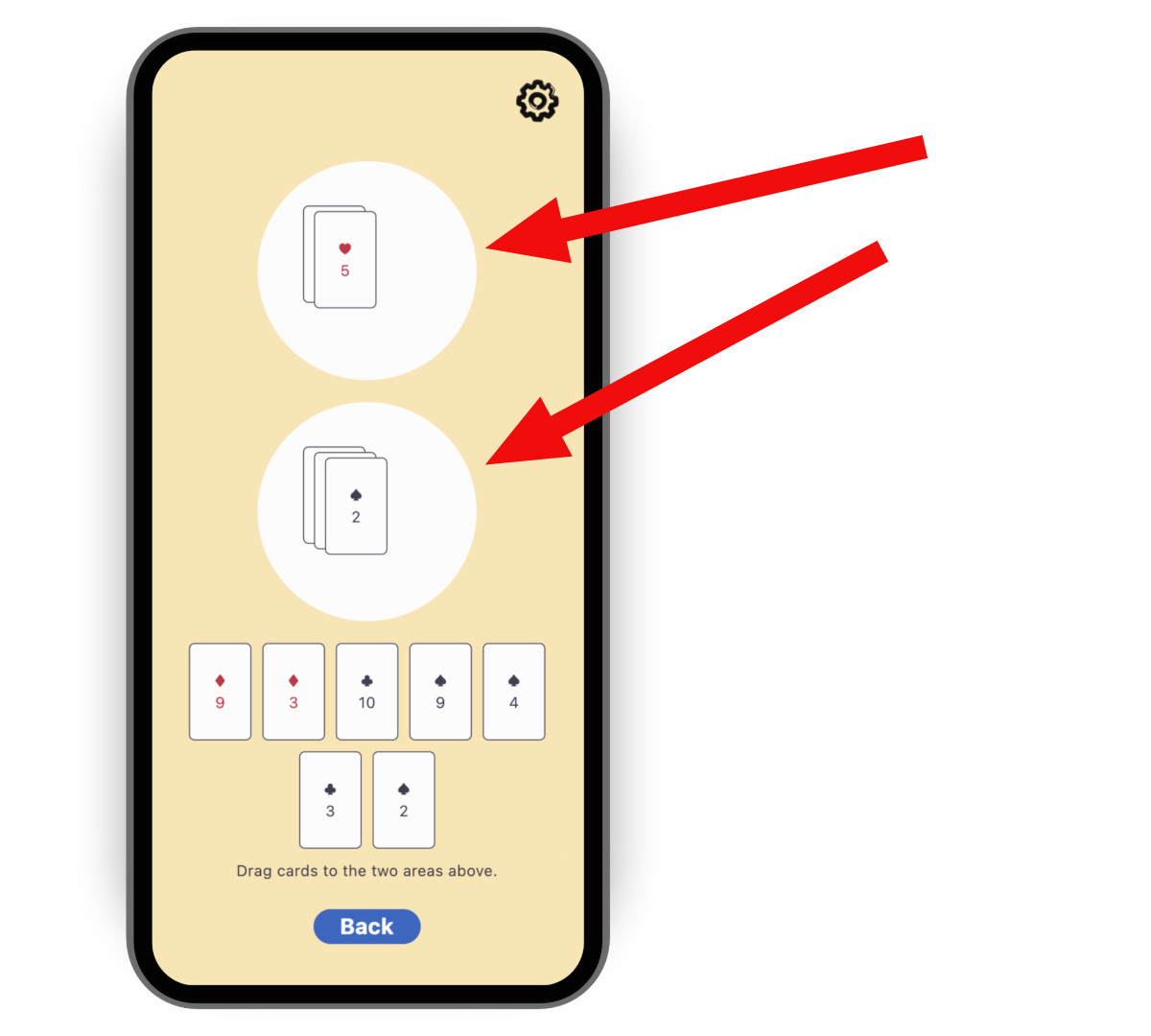
For the case of the `card` template,
you could synchronize the contents of the two circular playing areas.
It's not enough for a full multiplayer experience,
but it's a good start.
如何实现 controller 取决于你的游戏以及多人体验的具体设计。
对于 `card` 模板,你可以同步两个圆形游戏区域的内容。
这不足以构成完整的多人体验,但是个良好的起点。
{:.site-mobile-screenshot .site-illustration}
To create a controller, copy,
then paste the following code into a new file called
`lib/multiplayer/firestore_controller.dart`.
要创建 controller,请将以下代码复制并粘贴到新文件 `lib/multiplayer/firestore_controller.dart`。
```dart
import 'dart:async';
import 'package:cloud_firestore/cloud_firestore.dart';
import 'package:flutter/foundation.dart';
import 'package:logging/logging.dart';
import '../game_internals/board_state.dart';
import '../game_internals/playing_area.dart';
import '../game_internals/playing_card.dart';
class FirestoreController {
static final _log = Logger('FirestoreController');
final FirebaseFirestore instance;
final BoardState boardState;
/// For now, there is only one match. But in order to be ready
/// for match-making, put it in a Firestore collection called matches.
late final DocumentReference> _matchRef = instance
.collection('matches')
.doc('match_1');
late final DocumentReference> _areaOneRef = _matchRef
.collection('areas')
.doc('area_one')
.withConverter>(
fromFirestore: _cardsFromFirestore,
toFirestore: _cardsToFirestore,
);
late final DocumentReference> _areaTwoRef = _matchRef
.collection('areas')
.doc('area_two')
.withConverter>(
fromFirestore: _cardsFromFirestore,
toFirestore: _cardsToFirestore,
);
late final StreamSubscription _areaOneFirestoreSubscription;
late final StreamSubscription _areaTwoFirestoreSubscription;
late final StreamSubscription _areaOneLocalSubscription;
late final StreamSubscription _areaTwoLocalSubscription;
FirestoreController({required this.instance, required this.boardState}) {
// Subscribe to the remote changes (from Firestore).
_areaOneFirestoreSubscription = _areaOneRef.snapshots().listen((snapshot) {
_updateLocalFromFirestore(boardState.areaOne, snapshot);
});
_areaTwoFirestoreSubscription = _areaTwoRef.snapshots().listen((snapshot) {
_updateLocalFromFirestore(boardState.areaTwo, snapshot);
});
// Subscribe to the local changes in game state.
_areaOneLocalSubscription = boardState.areaOne.playerChanges.listen((_) {
_updateFirestoreFromLocalAreaOne();
});
_areaTwoLocalSubscription = boardState.areaTwo.playerChanges.listen((_) {
_updateFirestoreFromLocalAreaTwo();
});
_log.fine('Initialized');
}
void dispose() {
_areaOneFirestoreSubscription.cancel();
_areaTwoFirestoreSubscription.cancel();
_areaOneLocalSubscription.cancel();
_areaTwoLocalSubscription.cancel();
_log.fine('Disposed');
}
/// Takes the raw JSON snapshot coming from Firestore and attempts to
/// convert it into a list of [PlayingCard]s.
List _cardsFromFirestore(
DocumentSnapshot> snapshot,
SnapshotOptions? options,
) {
final data = snapshot.data()?['cards'] as List?;
if (data == null) {
_log.info('No data found on Firestore, returning empty list');
return [];
}
try {
return data
.cast>()
.map(PlayingCard.fromJson)
.toList();
} catch (e) {
throw FirebaseControllerException(
'Failed to parse data from Firestore: $e',
);
}
}
/// Takes a list of [PlayingCard]s and converts it into a JSON object
/// that can be saved into Firestore.
Map _cardsToFirestore(
List cards,
SetOptions? options,
) {
return {'cards': cards.map((c) => c.toJson()).toList()};
}
/// Updates Firestore with the local state of [area].
Future _updateFirestoreFromLocal(
PlayingArea area,
DocumentReference> ref,
) async {
try {
_log.fine('Updating Firestore with local data (${area.cards}) ...');
await ref.set(area.cards);
_log.fine('... done updating.');
} catch (e) {
throw FirebaseControllerException(
'Failed to update Firestore with local data (${area.cards}): $e',
);
}
}
/// Sends the local state of `boardState.areaOne` to Firestore.
void _updateFirestoreFromLocalAreaOne() {
_updateFirestoreFromLocal(boardState.areaOne, _areaOneRef);
}
/// Sends the local state of `boardState.areaTwo` to Firestore.
void _updateFirestoreFromLocalAreaTwo() {
_updateFirestoreFromLocal(boardState.areaTwo, _areaTwoRef);
}
/// Updates the local state of [area] with the data from Firestore.
void _updateLocalFromFirestore(
PlayingArea area,
DocumentSnapshot> snapshot,
) {
_log.fine('Received new data from Firestore (${snapshot.data()})');
final cards = snapshot.data() ?? [];
if (listEquals(cards, area.cards)) {
_log.fine('No change');
} else {
_log.fine('Updating local data with Firestore data ($cards)');
area.replaceWith(cards);
}
}
}
class FirebaseControllerException implements Exception {
final String message;
FirebaseControllerException(this.message);
@override
String toString() => 'FirebaseControllerException: $message';
}
```
Notice the following features of this code:
请注意此代码的以下特点:
* The controller's constructor takes a `BoardState`.
This enables the controller to manipulate the local state of the game.
controller 的构造函数接受 `BoardState`,使 controller 能够操作游戏的本地状态。
* The controller subscribes to both local changes to update Firestore
and to remote changes to update the local state and UI.
controller 既订阅本地变更以更新 Firestore,也订阅远程变更以更新本地状态和 UI。
* The fields `_areaOneRef` and `_areaTwoRef` are
Firebase document references.
They describe where the data for each area resides,
and how to convert between the local Dart objects (`List`)
and remote JSON objects (`Map`).
The Firestore API lets us subscribe to these references
with `.snapshots()`, and write to them with `.set()`.
字段 `_areaOneRef` 和 `_areaTwoRef` 是 Firebase 文档引用。
它们描述每个区域数据的存放位置,
以及如何在本地 Dart 对象(`List`)与远程 JSON 对象(`Map`)之间转换。
Firestore API 允许我们通过 `.snapshots()` 订阅这些引用,并通过 `.set()` 写入。
## 5. Use the Firestore controller
## 5. 使用 Firestore controller
1. Open the file responsible for starting the play session:
`lib/play_session/play_session_screen.dart` in the case of the
`card` template.
You instantiate the Firestore controller from this file.
打开负责开始对局会话的文件:对于 `card` 模板,
即 `lib/play_session/play_session_screen.dart`。
你将在此文件中实例化 Firestore controller。
2. Import Firebase and the controller:
导入 Firebase 和 controller:
```dart
import 'package:cloud_firestore/cloud_firestore.dart';
import '../multiplayer/firestore_controller.dart';
```
3. Add a nullable field to the `_PlaySessionScreenState` class
to contain a controller instance:
在 `_PlaySessionScreenState` 类中添加可空字段以保存 controller 实例:
```dart
FirestoreController? _firestoreController;
```
4. In the `initState()` method of the same class,
add code that tries to read the FirebaseFirestore instance
and, if successful, constructs the controller.
You added the `FirebaseFirestore` instance to `main.dart`
in the *Initialize Firestore* step.
在同一类的 `initState()` 方法中,
添加尝试读取 FirebaseFirestore 实例并在成功时构建 controller 的代码。
你在 **初始化 Firestore** 步骤中已将 `FirebaseFirestore` 实例添加到 `main.dart`。
```dart
final firestore = context.read();
if (firestore == null) {
_log.warning(
"Firestore instance wasn't provided. "
'Running without _firestoreController.',
);
} else {
_firestoreController = FirestoreController(
instance: firestore,
boardState: _boardState,
);
}
```
5. Dispose of the controller using the `dispose()` method
of the same class.
在同一类的 `dispose()` 方法中释放 controller。
```dart
_firestoreController?.dispose();
```
## 6. Test the game
## 6. 测试游戏
1. Run the game on two separate devices
or in 2 different windows on the same device.
在两台独立设备上运行游戏,或在同一设备的 2 个不同窗口中运行。
2. Watch how adding a card to an area on one device
makes it appear on the other one.
观察在一台设备的某个区域添加卡牌后,它如何出现在另一台设备上。
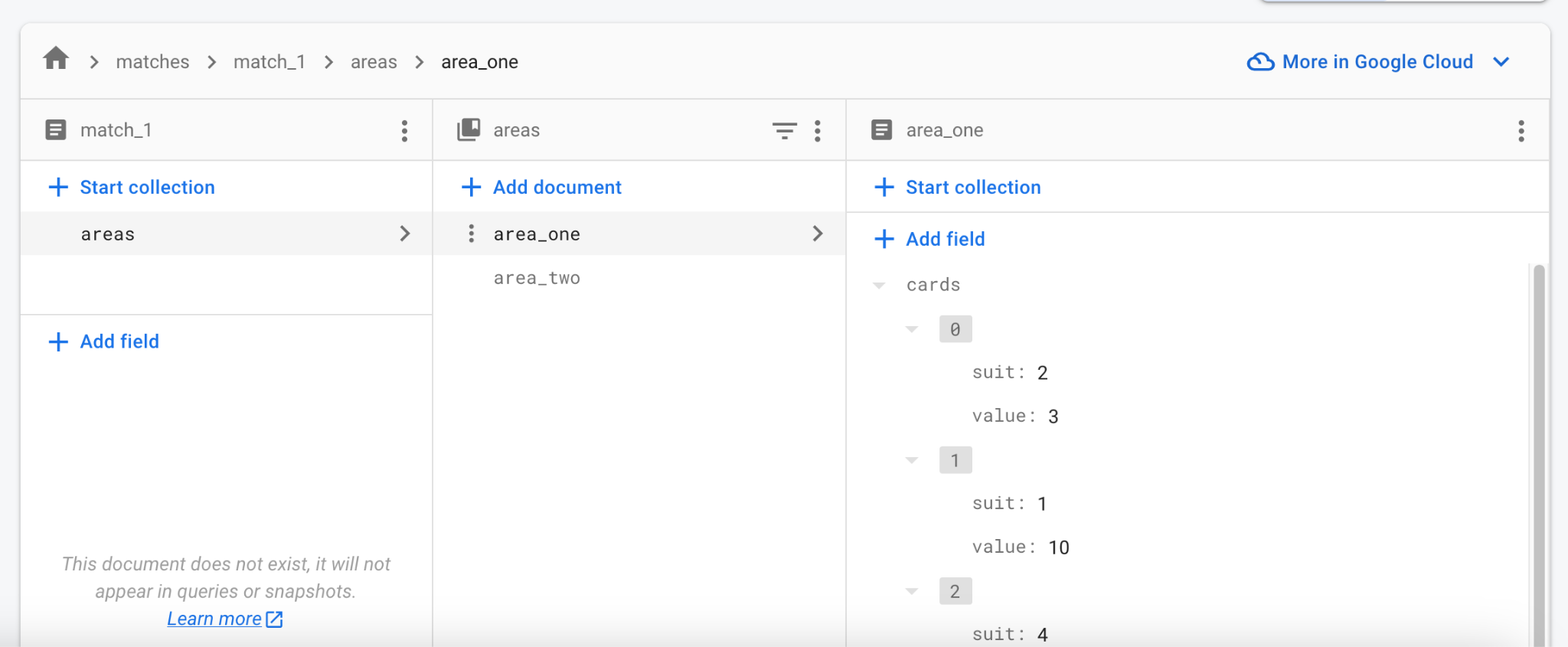
3. Open the [Firebase web console][]
and navigate to your project's Firestore Database.
打开 [Firebase 网页控制台][Firebase web console],
导航到你项目的 Firestore Database。
4. Watch how it updates the data in real time.
You can even edit the data in the console
and see all running clients update.
观察它如何实时更新数据。
你甚至可以在控制台中编辑数据,
并看到所有运行中的客户端随之更新。
[Firebase web console]: https://console.firebase.google.com/
### Troubleshooting
### 故障排除
The most common issues you might encounter when testing
Firebase integration include the following:
测试 Firebase 集成时可能遇到的常见问题包括:
* **The game crashes when trying to reach Firebase.**
**游戏在尝试连接 Firebase 时崩溃。**
* Firebase integration hasn't been properly set up.
Revisit *Step 2* and make sure to run `flutterfire configure`
as part of that step.
Firebase 集成未正确配置。
请重新查看 **步骤 2**,并确保在该步骤中运行 `flutterfire configure`。
* **The game doesn't communicate with Firebase on macOS.**
**游戏在 macOS 上无法与 Firebase 通信。**
* By default, macOS apps don't have internet access.
Enable [internet entitlement][] first.
默认情况下,macOS 应用没有网络访问权限。
请先启用 [网络权限][internet entitlement]。
[internet entitlement]: /data-and-backend/networking#macos
## 7. Next steps
## 7. 后续步骤
At this point, the game has near-instant and
dependable synchronization of state across clients.
It lacks actual game rules:
what cards can be played when, and with what results.
This depends on the game itself and is left to you to try.
此时,游戏已在各客户端之间实现近乎即时且可靠的状态同步。
它尚缺少实际游戏规则:何时可以打出哪些牌以及结果如何。
这取决于游戏本身,留给你自行尝试。
{:.site-illustration}
At this point, the shared state of the match only includes
the two playing areas and the cards within them.
You can save other data into `_matchRef`, too,
like who the players are and whose turn it is.
If you're unsure where to start,
follow [a Firestore codelab or two][]
to familiarize yourself with the API.
此时,对局的共享状态仅包含两个游戏区域及其中的卡牌。
你也可以将其他数据保存到 `_matchRef`,例如玩家是谁以及轮到谁。
如果不确定从何入手,可跟随 [一两个 Firestore codelab][a Firestore codelab or two] 熟悉 API。
At first, a single match should suffice
for testing your multiplayer game with colleagues and friends.
As you approach the release date,
think about authentication and match-making.
Thankfully, Firebase provides a
[built-in way to authenticate users][]
and the Firestore database structure can handle multiple matches.
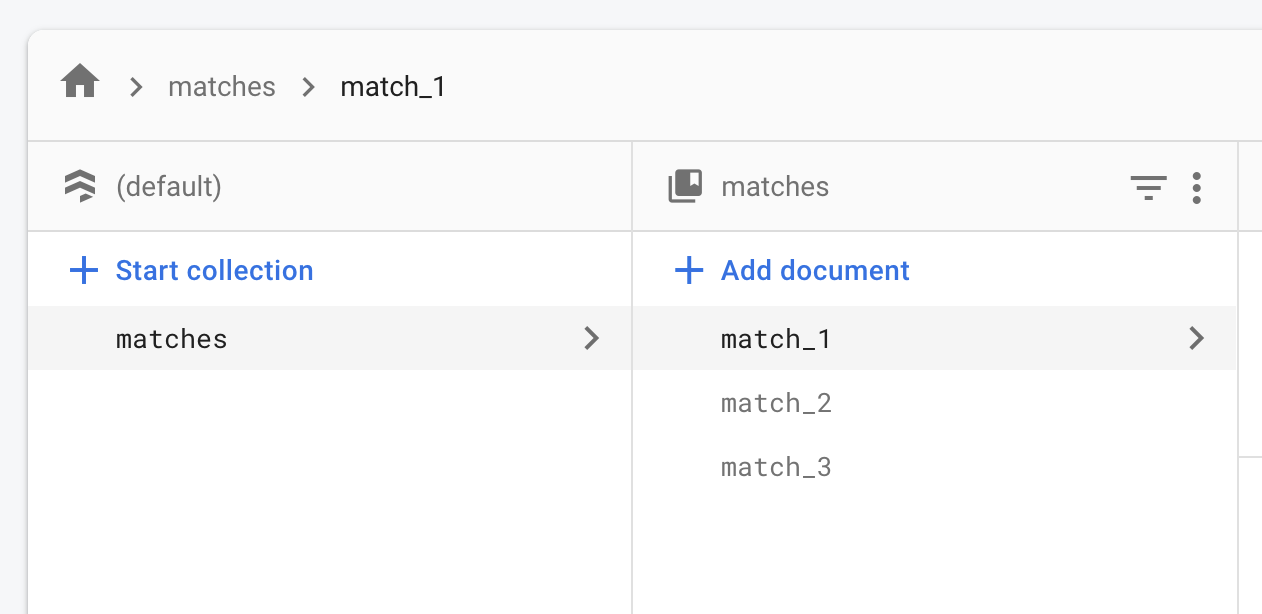
Instead of a single `match_1`,
you can populate the matches collection with as many records as needed.
起初,单个对局足以与同事和朋友测试多人游戏。
临近发布时,请考虑身份验证和匹配。
好在 Firebase 提供 [内置的用户身份验证方式][built-in way to authenticate users],
Firestore 数据库结构也能处理多个对局。
除了单个 `match_1`,你可以在 matches 集合中填充所需数量的记录。
An online match can start in a "waiting" state,
with only the first player present.
Other players can see the "waiting" matches in some kind of lobby.
Once enough players join a match, it becomes "active".
Once again, the exact implementation depends on
the kind of online experience you want.
The basics remain the same:
a large collection of documents,
each representing one active or potential match.
在线对局可以以「等待」状态开始,仅首位玩家在场。
其他玩家可在某种大厅中看到「等待」中的对局。
足够玩家加入后,对局变为「活跃」。
具体实现再次取决于你想要的在线体验类型。
基本原理不变:一个大型文档集合,每个文档代表一个活跃或潜在的对局。
[a Firestore codelab or two]: https://codelabs.developers.google.cn/?product=flutter&text=firestore
[built-in way to authenticate users]: https://firebase.google.cn/docs/auth/flutter/start