# 为移动游戏添加成就与排行榜
> 如何使用 games_services 插件为你的游戏添加相关功能。
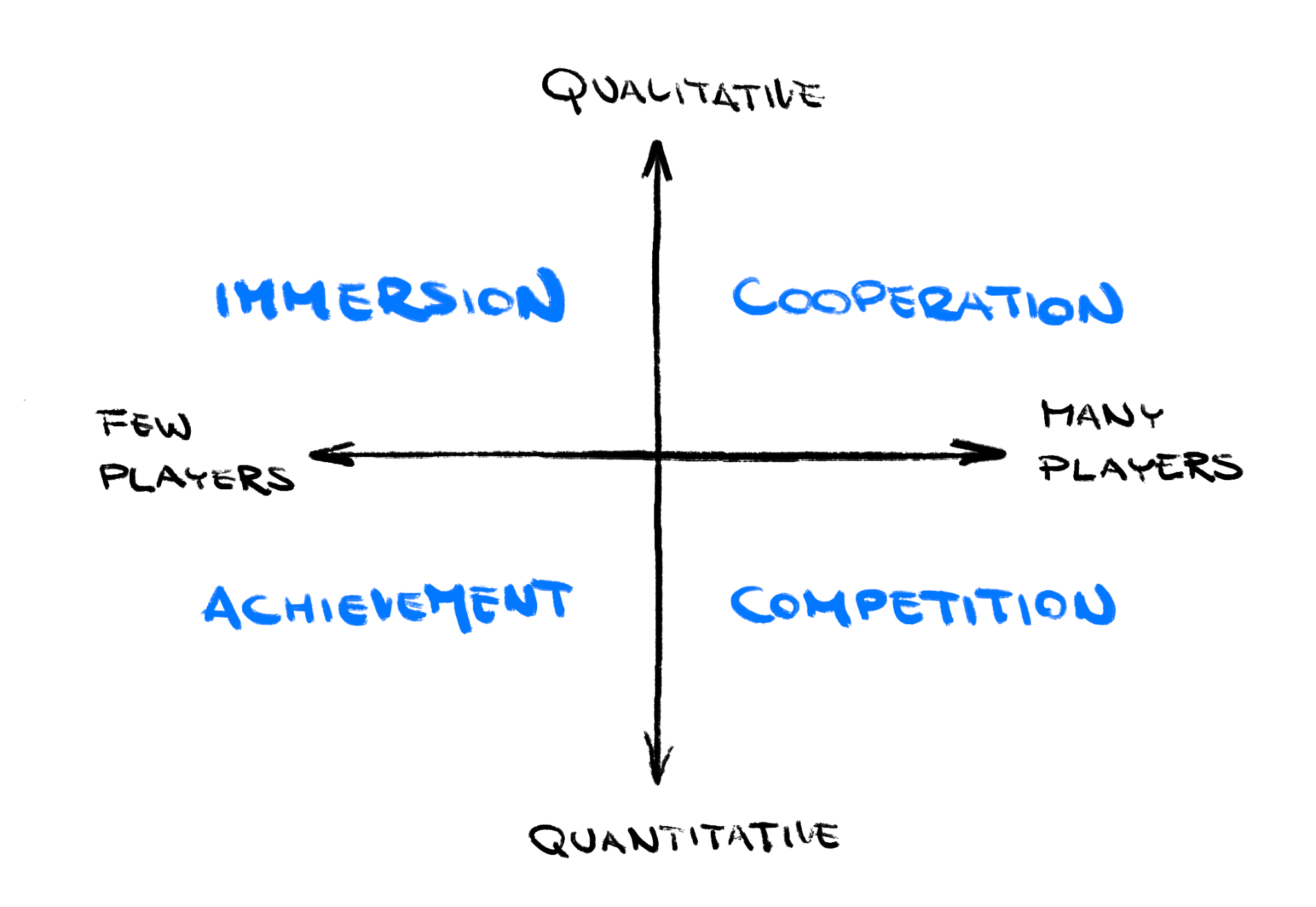
Gamers have various motivations for playing games.
In broad strokes, there are four major motivations:
[immersion, achievement, cooperation, and competition][].
No matter the game you build, some players want to *achieve* in it.
This could be trophies won or secrets unlocked.
Some players want to *compete* in it.
This could be hitting high scores or accomplishing speedruns.
These two ideas map to the concepts of *achievements* and *leaderboards*.
玩家玩游戏有多种动机。概括而言,主要有四种动机:
[沉浸、成就、合作与竞争][immersion, achievement, cooperation, and competition]。
无论你构建什么游戏,总有一些玩家想在游戏中 **取得成就**,例如赢得奖杯或解锁秘密。
也有一些玩家想在游戏中 **竞争**,例如冲击高分或完成速通。
这两种诉求对应 **成就** 和 **排行榜** 的概念。
{:.site-illustration}
Ecosystems such as the App Store and Google Play provide
centralized services for achievements and leaderboards.
Players can view achievements from all their games in one place and
developers don't need to re-implement them for every game.
App Store 和 Google Play 等生态提供成就与排行榜的集中式服务。
玩家可以在一处查看所有游戏的成就,
开发者也无需为每个游戏重复实现这些功能。
This recipe demonstrates how to use the [`games_services` package][]
to add achievements and leaderboard functionality to your mobile game.
本实用教程演示如何使用 [`games_services` package][] 为你的移动游戏添加成就与排行榜功能。
[`games_services` package]: https://pub-web.flutter-io.cn/packages/games_services
[immersion, achievement, cooperation, and competition]: https://meditations.metavert.io/p/game-player-motivations
## 1. Enable platform services
## 1. 启用平台服务
To enable games services, set up *Game Center* on iOS and
*Google Play Games Services* on Android.
要启用游戏服务,请在 iOS 上配置 **Game Center**,
在 Android 上配置 **Google Play Games Services**。
### iOS
To enable Game Center (GameKit) on iOS:
要在 iOS 上启用 Game Center (GameKit):
1. Open your Flutter project in Xcode.
Open `ios/Runner.xcworkspace`
在 Xcode 中打开你的 Flutter 项目。
打开 `ios/Runner.xcworkspace`
2. Select the root **Runner** project.
选择根级 **Runner** 项目。
3. Go to the **Signing & Capabilities** tab.
进入 **Signing & Capabilities** 标签页。
4. Click the `+` button to add **Game Center** as a capability.
点击 `+` 按钮,将 **Game Center** 添加为 capability。
5. Close Xcode.
关闭 Xcode。
6. If you haven't already,
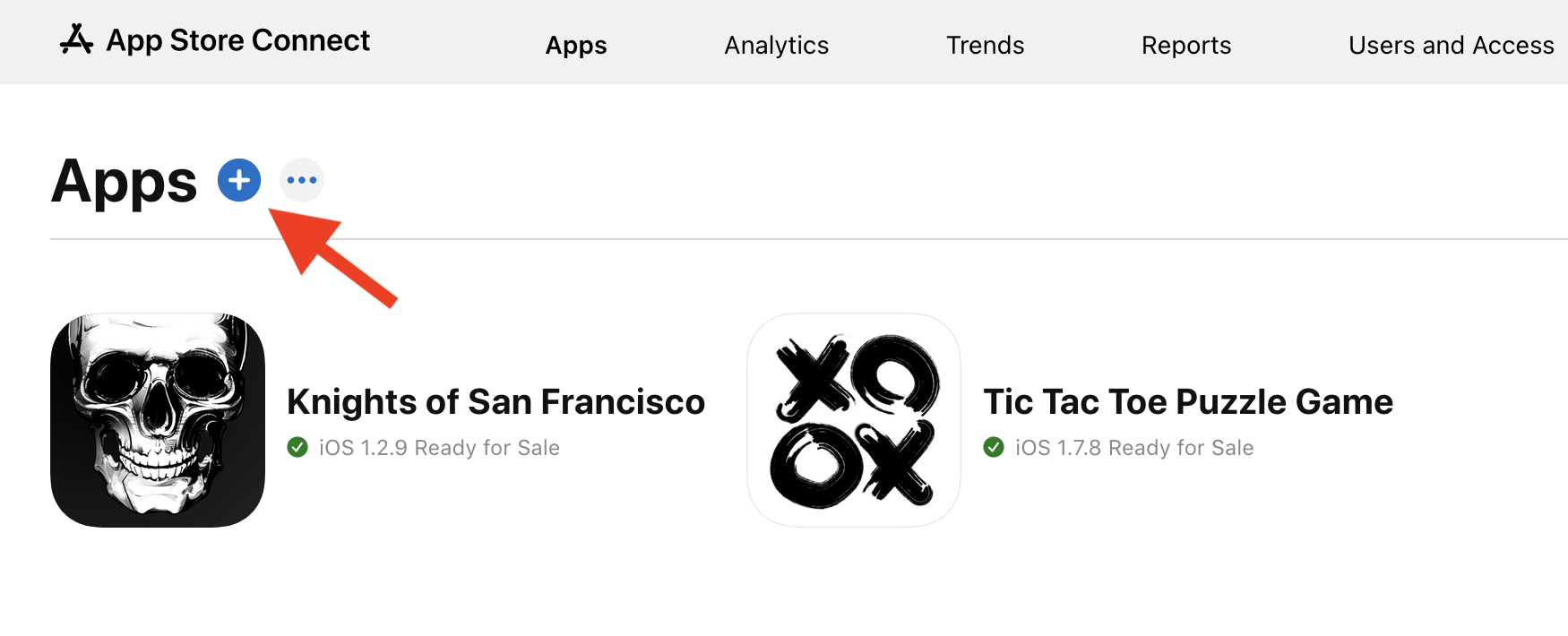
register your game in [App Store Connect][]
and from the **My App** section press the `+` icon.
如果尚未注册,请在 [App Store Connect][] 中注册你的游戏,
并在 **My App** 部分点击 `+` 图标。
7. Still in App Store Connect, look for the *Game Center* section. You
can find it in **Services** as of this writing. On the **Game
Center** page, you might want to set up a leaderboard and several
achievements, depending on your game. Take note of the IDs of the
leaderboards and achievements you create.
仍在 App Store Connect 中,找到 **Game Center** 部分(撰写本文时位于 **Services**)。
在 **Game Center** 页面,可根据游戏需要设置排行榜和若干成就。
记下你创建的排行榜与成就的 ID。
[App Store Connect]: https://appstoreconnect.apple.com/
### Android
To enable *Play Games Services* on Android:
要在 Android 上启用 **Play Games Services**:
1. If you haven't already, go to [Google Play Console][]
and register your game there.
如果尚未注册,请前往 [Google Play Console][] 注册你的游戏。

2. Still in Google Play Console, select *Play Games Services* → *Setup
and management* → *Configuration* from the navigation menu and
follow their instructions.
仍在 Google Play Console 中,从导航菜单选择 **Play Games Services** → **Setup and management** → **Configuration**,
并按说明操作。
* This takes a significant amount of time and patience.
Among other things, you'll need to set up an
OAuth consent screen in Google Cloud Console.
If at any point you feel lost, consult the
official [Play Games Services guide][].
这需要较多时间和耐心。
除其他事项外,你还需要在 Google Cloud Console 中配置 OAuth 同意屏幕。
如有困惑,请参阅官方 [Play Games Services 指南][Play Games Services guide]。

3. When done, you can start adding leaderboards and achievements in
**Play Games Services** → **Setup and management**. Create the exact
same set as you did on the iOS side. Make note of IDs.
完成后,可在 **Play Games Services** → **Setup and management** 中添加排行榜和成就。
创建与 iOS 端完全相同的集合,并记下 ID。
4. Go to **Play Games Services → Setup and management → Publishing**.
前往 **Play Games Services → Setup and management → Publishing**。
5. Click **Publish**. Don't worry, this doesn't actually publish your
game. It only publishes the achievements and leaderboard. Once a
leaderboard, for example, is published this way, it cannot be
unpublished.
点击 **Publish**。不必担心,这并不会真正发布你的游戏,只会发布成就和排行榜。
例如,排行榜一旦以此方式发布,就无法取消发布。
6. Go to **Play Games Services** **→ Setup and management →
Configuration → Credentials**.
前往 **Play Games Services → Setup and management → Configuration → Credentials**。
7. Find the **Get resources** button.
It returns an XML file with the Play Games Services IDs.
找到 **Get resources** 按钮。
它会返回包含 Play Games Services ID 的 XML 文件。
```xml
424242424242
dev.flutter.tictactoe
sOmEiDsTrInG
sOmEiDsTrInG
```
8. Add a file at `android/app/src/main/res/values/games-ids.xml`
containing the XML you received in the previous step.
在 `android/app/src/main/res/values/games-ids.xml` 添加文件,内容为上一步收到的 XML。
[Google Play Console]: https://play.google.com/console/
[Play Games Services guide]: https://developers.google.cn/games/services/console/enabling
## 2. Sign in to the game service
## 2. 登录游戏服务
Now that you have set up *Game Center* and *Play Games Services*, and
have your achievement & leaderboard IDs ready, it's finally Dart time.
既然你已配置好 **Game Center** 和 **Play Games Services**,
并准备好了成就与排行榜 ID,接下来就该写 Dart 了。
1. Add a dependency on the [`games_services` package](https://pub-web.flutter-io.cn/packages/games_services).
添加对 [`games_services` package](https://pub-web.flutter-io.cn/packages/games_services) 的依赖。
```console
$ flutter pub add games_services
```
2. Before you can do anything else, you have to sign the player into
the game service.
在做其他操作之前,你必须让玩家登录游戏服务。
```dart
try {
await GamesServices.signIn();
} on PlatformException catch (e) {
// ... deal with failures ...
}
```
The sign in happens in the background. It takes several seconds, so
don't call `signIn()` before `runApp()` or the players will be forced to
stare at a blank screen every time they start your game.
登录在后台进行,需要数秒,因此不要在 `runApp()` 之前调用 `signIn()`,
否则玩家每次启动游戏都会面对空白屏幕。
The API calls to the `games_services` API can fail for a multitude of
reasons. Therefore, every call should be wrapped in a try-catch block as
in the previous example. The rest of this recipe omits exception
handling for clarity.
调用 `games_services` API 可能因多种原因失败。
因此,每次调用都应像上例那样用 try-catch 包裹。
为清晰起见,本实用教程其余部分省略异常处理。
:::tip
It's a good practice to create a controller. This would be a
`ChangeNotifier`, a bloc, or some other piece of logic that wraps around
the raw functionality of the `games_services` plugin.
创建一个 controller 是好做法。可以是 `ChangeNotifier`、bloc,
或其他封装 `games_services` 插件原始功能的逻辑。
:::
## 3. Unlock achievements
## 3. 解锁成就
1. Register achievements in Google Play Console and App Store Connect,
and take note of their IDs. Now you can award any of those
achievements from your Dart code:
在 Google Play Console 和 App Store Connect 中注册成就并记下 ID。
现在你可以从 Dart 代码授予这些成就:
```dart
await GamesServices.unlock(
achievement: Achievement(
androidID: 'your android id',
iOSID: 'your ios id',
),
);
```
The player's account on Google Play Games or Apple Game Center now
lists the achievement.
玩家在 Google Play Games 或 Apple Game Center 的账户中现在会显示该成就。
2. To display the achievements UI from your game, call the
`games_services` API:
要从游戏中显示成就 UI,请调用 `games_services` API:
```dart
await GamesServices.showAchievements();
```
This displays the platform achievements UI as an overlay on your game.
这会在你的游戏上以叠加层形式显示平台成就 UI。
3. To display the achievements in your own UI, use
[`GamesServices.loadAchievements()`][].
若要在自己的 UI 中显示成就,请使用 [`GamesServices.loadAchievements()`][]。
[`GamesServices.loadAchievements()`]: https://pub-web.flutter-io.cn/documentation/games_services/latest/games_services/GamesServices/loadAchievements.html
## 4. Submit scores
## 4. 提交分数
When the player finishes a play-through, your game can submit the result
of that play session into one or more leaderboards.
当玩家完成一局时,你的游戏可将该局结果提交到一个或多个排行榜。
For example, a platformer game like Super Mario can submit both the
final score and the time taken to complete the level, to two separate
leaderboards.
例如,像超级马里奥这样的平台游戏可将最终得分和通关用时分别提交到两个不同的排行榜。
1. In the first step, you registered a leaderboard in Google Play
Console and App Store Connect, and took note of its ID. Using this
ID, you can submit new scores for the player:
在第一步中,你已在 Google Play Console 和 App Store Connect 注册排行榜并记下 ID。
使用该 ID,你可以为玩家提交新分数:
```dart
await GamesServices.submitScore(
score: Score(
iOSLeaderboardID: 'some_id_from_app_store',
androidLeaderboardID: 'sOmE_iD_fRoM_gPlAy',
value: 100,
),
);
```
You don't need to check whether the new score is the player's
highest. The platform game services handle that for you.
你无需检查新分数是否为玩家最高分,平台游戏服务会替你处理。
2. To display the leaderboard as an overlay over your game, make the
following call:
要在游戏上以叠加层显示排行榜,请进行以下调用:
```dart
await GamesServices.showLeaderboards(
iOSLeaderboardID: 'some_id_from_app_store',
androidLeaderboardID: 'sOmE_iD_fRoM_gPlAy',
);
```
3. If you want to display the leaderboard scores in your own UI, you
can fetch them with [`GamesServices.loadLeaderboardScores()`][].
若要在自己的 UI 中显示排行榜分数,可使用 [`GamesServices.loadLeaderboardScores()`][] 获取。
[`GamesServices.loadLeaderboardScores()`]: https://pub-web.flutter-io.cn/documentation/games_services/latest/games_services/GamesServices/loadLeaderboardScores.html
## 5. Next steps
## 5. 后续步骤
There's more to the `games_services` plugin. With this plugin, you can:
`games_services` 插件还有更多功能。借助该插件,你可以:
- Get the player's icon, name or unique ID
获取玩家头像、名称或唯一 ID
- Save and load game states
保存和加载游戏状态
- Sign out of the game service
退出游戏服务
Some achievements can be incremental. For example: "You have collected
all 10 pieces of the McGuffin."
部分成就可以是递增的,例如:「你已收集齐 McGuffin 的全部 10 个碎片。」
Each game has different needs from game services.
每个游戏对游戏服务的需求各不相同。
To start, you might want to create this controller
in order to keep all achievements & leaderboards logic in one place:
开始时,你可以创建如下 controller,将所有成就与排行榜逻辑集中在一处:
```dart
import 'dart:async';
import 'package:games_services/games_services.dart';
import 'package:logging/logging.dart';
/// Allows awarding achievements and leaderboard scores,
/// and also showing the platforms' UI overlays for achievements
/// and leaderboards.
///
/// A facade of `package:games_services`.
class GamesServicesController {
static final Logger _log = Logger('GamesServicesController');
final Completer _signedInCompleter = Completer();
Future get signedIn => _signedInCompleter.future;
/// Unlocks an achievement on Game Center / Play Games.
///
/// You must provide the achievement ids via the [iOS] and [android]
/// parameters.
///
/// Does nothing when the game isn't signed into the underlying
/// games service.
Future awardAchievement({
required String iOS,
required String android,
}) async {
if (!await signedIn) {
_log.warning('Trying to award achievement when not logged in.');
return;
}
try {
await GamesServices.unlock(
achievement: Achievement(androidID: android, iOSID: iOS),
);
} catch (e) {
_log.severe('Cannot award achievement: $e');
}
}
/// Signs into the underlying games service.
Future initialize() async {
try {
await GamesServices.signIn();
// The API is unclear so we're checking to be sure. The above call
// returns a String, not a boolean, and there's no documentation
// as to whether every non-error result means we're safely signed in.
final signedIn = await GamesServices.isSignedIn;
_signedInCompleter.complete(signedIn);
} catch (e) {
_log.severe('Cannot log into GamesServices: $e');
_signedInCompleter.complete(false);
}
}
/// Launches the platform's UI overlay with achievements.
Future showAchievements() async {
if (!await signedIn) {
_log.severe('Trying to show achievements when not logged in.');
return;
}
try {
await GamesServices.showAchievements();
} catch (e) {
_log.severe('Cannot show achievements: $e');
}
}
/// Launches the platform's UI overlay with leaderboard(s).
Future showLeaderboard() async {
if (!await signedIn) {
_log.severe('Trying to show leaderboard when not logged in.');
return;
}
try {
await GamesServices.showLeaderboards(
// TODO: When ready, change both these leaderboard IDs.
iOSLeaderboardID: 'some_id_from_app_store',
androidLeaderboardID: 'sOmE_iD_fRoM_gPlAy',
);
} catch (e) {
_log.severe('Cannot show leaderboard: $e');
}
}
/// Submits [score] to the leaderboard.
Future submitLeaderboardScore(int score) async {
if (!await signedIn) {
_log.warning('Trying to submit leaderboard when not logged in.');
return;
}
_log.info('Submitting $score to leaderboard.');
try {
await GamesServices.submitScore(
score: Score(
// TODO: When ready, change these leaderboard IDs.
iOSLeaderboardID: 'some_id_from_app_store',
androidLeaderboardID: 'sOmE_iD_fRoM_gPlAy',
value: score,
),
);
} catch (e) {
_log.severe('Cannot submit leaderboard score: $e');
}
}
}
```
## More information
## 更多信息
The Flutter Casual Games Toolkit includes the following templates:
Flutter Casual Games Toolkit 包含以下模板:
* [basic][]: basic starter game
[basic][]:基础入门游戏
* [card][]: starter card game
[card][]:入门纸牌游戏
* [endless runner][]: starter game (using Flame)
where the player endlessly runs, avoiding pitfalls
and gaining rewards
[endless runner][]:入门游戏(使用 Flame),
玩家无尽奔跑、躲避陷阱并获取奖励
[basic]: https://github.com/flutter/games/tree/main/templates/basic#readme
[card]: https://github.com/flutter/games/tree/main/templates/card#readme
[endless runner]: https://github.com/flutter/games/tree/main/templates/endless_runner#readme