# 应用架构指南
> 构建 Flutter 应用的推荐架构方式。
The following pages demonstrate how to build an app using best practices.
The recommendations in this guide can be applied to most apps,
making them easier to scale, test, and maintain.
However, they're guidelines, not steadfast rules,
and you should adapt them to your unique requirements.
以下页面演示如何按最佳实践构建应用。
本指南建议适用于大多数应用,使其更易扩展、测试与维护。
但它们是指导原则而非铁律,你应根据自身需求调整。
This section provides a high-level overview of how Flutter applications
can be architected. It explains the layers of an application,
along with the classes that exist within each layer.
The section after this provides concrete code samples and
walks through a Flutter application that's implemented these recommendations.
本节从宏观概述 Flutter 应用如何架构,说明应用各层及层内存在的类。
其后一节提供具体代码示例,并逐步讲解一个落实这些建议的 Flutter 应用。
## Overview of project structure
## 项目结构概览
[Separation-of-concerns][] is the most important principle to follow when
designing your Flutter app.
Your Flutter application should split into two broad layers,
the UI layer and the Data layer.
设计 Flutter 应用时,[关注点分离][Separation-of-concerns] 是最重要的原则。
Flutter 应用应划分为两大层:UI 层与数据层。
Each layer is further split into different components,
each of which has distinct responsibilities, a well-defined interface,
boundaries and dependencies.
This guide recommends you split your application into the following components:
每一层再拆分为不同组件,各自职责、接口、边界与依赖清晰。
本指南建议将应用拆分为以下组件:
* Views
View(视图)
* View models
View model(视图模型)
* Repositories
Repository(仓库)
* Services
Service(服务)
### MVVM
If you've encountered the [Model-View-ViewModel architectural pattern][] (MVVM),
this will be familiar.
MVVM is an architectural pattern that separates a
feature of an application into three parts:
the `Model`, the `ViewModel` and the `View`.
Views and view models make up the UI layer of an application.
Repositories and services represent the data of an application,
or the model layer of MVVM.
Each of these components is defined in the next section.
若你见过 [Model-View-ViewModel 架构模式][Model-View-ViewModel architectural pattern](MVVM),会对此感到熟悉。
MVVM 将应用的一个功能拆为三部分:`Model`、`ViewModel` 与 `View`。
View 与 view model 构成应用的 UI 层;
Repository 与 Service 代表应用数据,即 MVVM 的 model 层。
下一节将定义这些组件。
 Every feature in an application will contain one view to describe the UI and
one view model to handle logic,
one or more repositories as the sources of truth for your application data,
and zero or more services that interact with external APIs,
like client servers and platform plugins.
应用中每个功能通常包含:一个描述 UI 的 view、一个处理逻辑的 view model、
一个或多个作为应用数据单一数据源的 repository,
以及零个或多个与客户端服务器、平台插件等外部 API 交互的 service。
A single feature of an application might require all of the following objects:
单个应用功能可能需要以下全部对象:
Every feature in an application will contain one view to describe the UI and
one view model to handle logic,
one or more repositories as the sources of truth for your application data,
and zero or more services that interact with external APIs,
like client servers and platform plugins.
应用中每个功能通常包含:一个描述 UI 的 view、一个处理逻辑的 view model、
一个或多个作为应用数据单一数据源的 repository,
以及零个或多个与客户端服务器、平台插件等外部 API 交互的 service。
A single feature of an application might require all of the following objects:
单个应用功能可能需要以下全部对象:
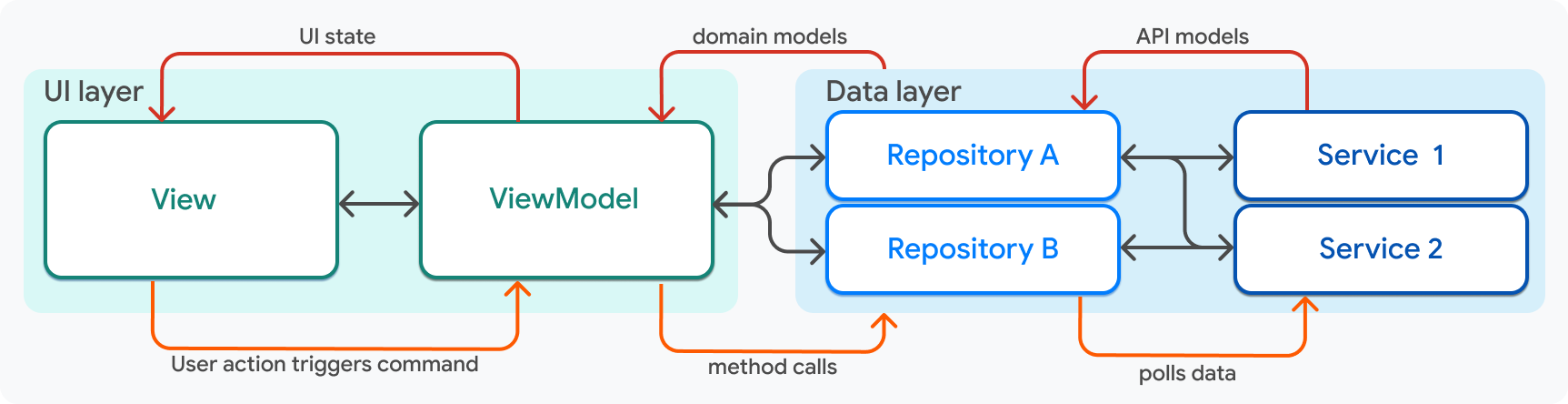
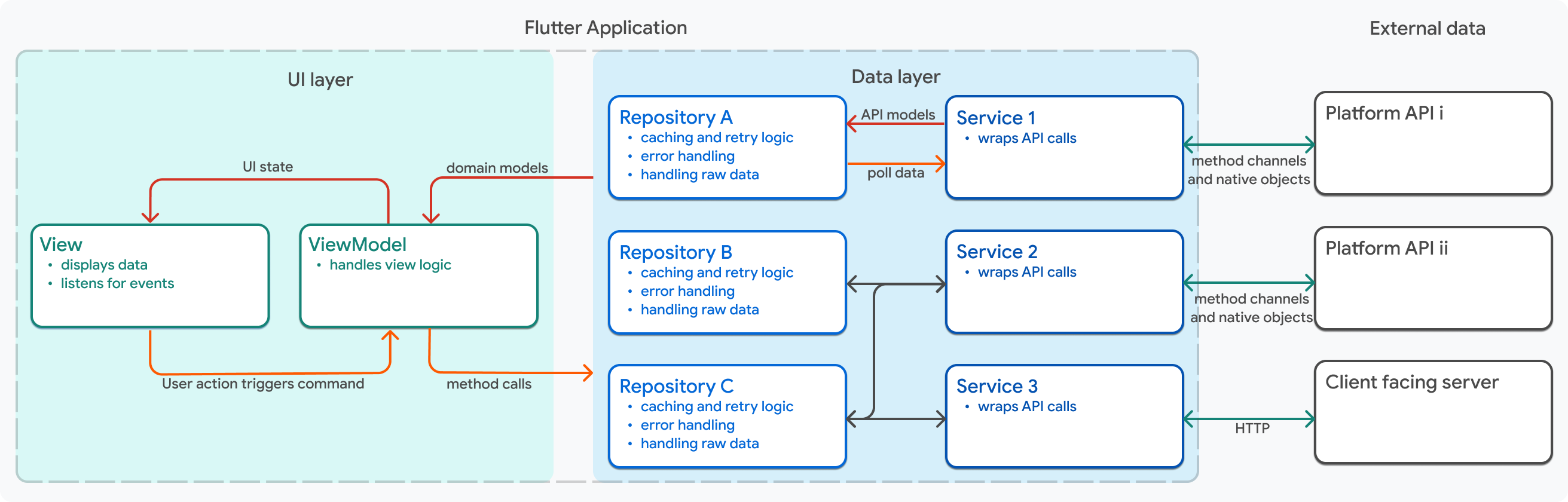 Each of these objects and the arrows that connect them will be explained
thoroughly by the end of this page. Throughout this guide,
the following simplified version of that diagram will be used as an anchor.
本页末尾将详细解释这些对象及其连接箭头。
贯穿本指南,将以下述简化图作为锚点。
Each of these objects and the arrows that connect them will be explained
thoroughly by the end of this page. Throughout this guide,
the following simplified version of that diagram will be used as an anchor.
本页末尾将详细解释这些对象及其连接箭头。
贯穿本指南,将以下述简化图作为锚点。
 :::note
Apps with complex logic might also have a logic layer that sits in between the
UI layer and data layer. This logic layer is commonly called the *domain layer*.
The domain layer contains additional components often called *interactors* or
*use-cases*. The domain layer is covered later in this guide.
逻辑复杂的应用还可在 UI 层与数据层之间增设逻辑层,常称为 **领域层**。
领域层包含常称为 **interactor** 或 **use-case** 的额外组件。本指南后文将介绍领域层。
:::
[Model-View-ViewModel architectural pattern]: https://en.wikipedia.org/wiki/Model–view–viewmodel
## UI layer
## UI 层
An application's UI layer is responsible for interacting with the user.
It displays an application's data to the user and receives user input,
such as tap events and form inputs.
应用的 UI 层负责与用户交互:
向用户展示应用数据,并接收点击事件、表单输入等用户输入。
The UI reacts to data changes or user input.
When the UI receives new data from a Repository,
it should re-render to display that new data.
When the user interacts with the UI,
it should change to reflect that interaction.
UI 会对数据变化或用户输入做出反应。
当 UI 从 Repository 收到新数据时,应重新渲染以展示新数据;
当用户与 UI 交互时,UI 应变化以反映该交互。
The UI layer is made up of two architectural components,
based on the MVVM design pattern:
UI 层基于 MVVM 设计模式,由两个架构组件构成:
* **Views** describe how to present application data to the user.
Specifically, they refer to *compositions of widgets* that make a feature.
For instance, a view is often (but not always) a screen that
has a `Scaffold` widget, along with
all of the widgets below it in the widget tree.
Views are also responsible for passing events to
the view model in response to user interactions.
**View** 描述如何向用户呈现应用数据,具体指构成某一功能的 **widget 组合**。
例如,view 常常是(但不总是)包含 `Scaffold` 及 widget 树中其下所有 widget 的屏幕。
View 还负责将用户交互产生的事件传递给 view model。
* **View models** contain the logic that converts app data into *UI State*,
because data from repositories is often formatted differently from
the data that needs to be displayed.
For example, you might need to combine data from multiple repositories,
or you might want to filter a list of data records.
**View model** 包含将应用数据转换为 **UI State** 的逻辑,
因为 Repository 数据格式常与展示所需格式不同。
例如,你可能需要合并多个 Repository 的数据,或过滤数据记录列表。
Views and view models should have a one-to-one relationship.
View 与 view model 应为一一对应关系。
:::note
Apps with complex logic might also have a logic layer that sits in between the
UI layer and data layer. This logic layer is commonly called the *domain layer*.
The domain layer contains additional components often called *interactors* or
*use-cases*. The domain layer is covered later in this guide.
逻辑复杂的应用还可在 UI 层与数据层之间增设逻辑层,常称为 **领域层**。
领域层包含常称为 **interactor** 或 **use-case** 的额外组件。本指南后文将介绍领域层。
:::
[Model-View-ViewModel architectural pattern]: https://en.wikipedia.org/wiki/Model–view–viewmodel
## UI layer
## UI 层
An application's UI layer is responsible for interacting with the user.
It displays an application's data to the user and receives user input,
such as tap events and form inputs.
应用的 UI 层负责与用户交互:
向用户展示应用数据,并接收点击事件、表单输入等用户输入。
The UI reacts to data changes or user input.
When the UI receives new data from a Repository,
it should re-render to display that new data.
When the user interacts with the UI,
it should change to reflect that interaction.
UI 会对数据变化或用户输入做出反应。
当 UI 从 Repository 收到新数据时,应重新渲染以展示新数据;
当用户与 UI 交互时,UI 应变化以反映该交互。
The UI layer is made up of two architectural components,
based on the MVVM design pattern:
UI 层基于 MVVM 设计模式,由两个架构组件构成:
* **Views** describe how to present application data to the user.
Specifically, they refer to *compositions of widgets* that make a feature.
For instance, a view is often (but not always) a screen that
has a `Scaffold` widget, along with
all of the widgets below it in the widget tree.
Views are also responsible for passing events to
the view model in response to user interactions.
**View** 描述如何向用户呈现应用数据,具体指构成某一功能的 **widget 组合**。
例如,view 常常是(但不总是)包含 `Scaffold` 及 widget 树中其下所有 widget 的屏幕。
View 还负责将用户交互产生的事件传递给 view model。
* **View models** contain the logic that converts app data into *UI State*,
because data from repositories is often formatted differently from
the data that needs to be displayed.
For example, you might need to combine data from multiple repositories,
or you might want to filter a list of data records.
**View model** 包含将应用数据转换为 **UI State** 的逻辑,
因为 Repository 数据格式常与展示所需格式不同。
例如,你可能需要合并多个 Repository 的数据,或过滤数据记录列表。
Views and view models should have a one-to-one relationship.
View 与 view model 应为一一对应关系。
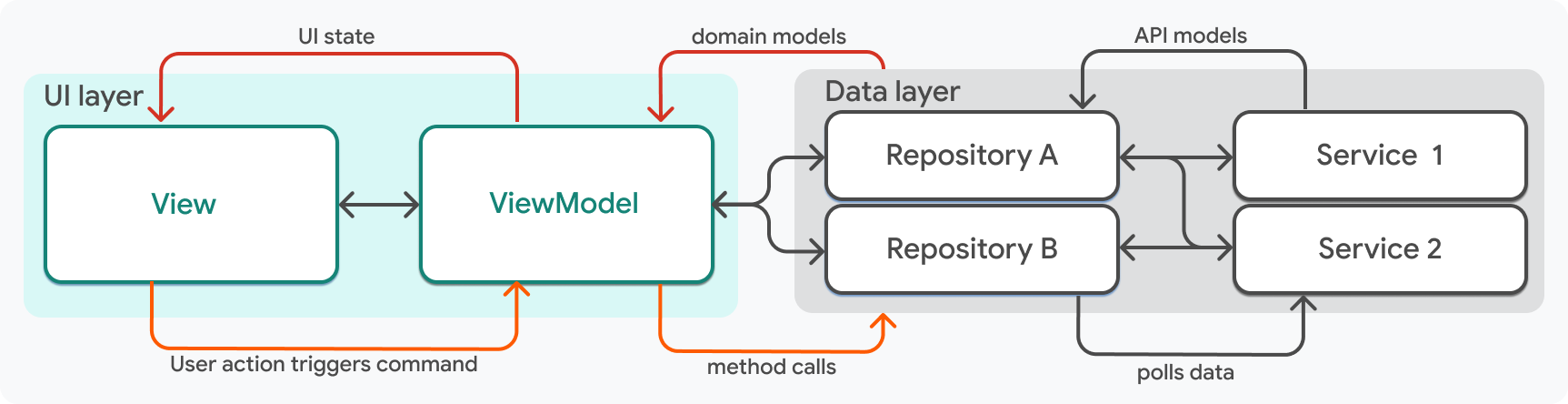 In the simplest terms,
a view model manages the UI state and the view displays that state.
Using views and view models, your UI layer can maintain state during
configuration changes (such as screen rotations),
and you can test the logic of your UI independently of Flutter widgets.
简而言之,view model 管理 UI 状态,view 展示该状态。
借助 view 与 view model,UI 层可在配置变更(如屏幕旋转)时保持状态,
且可将 UI 逻辑与 Flutter widget 分开测试。
:::note
'View' is an abstract term, and one view doesn't equal one widget.
Widgets are composable, and several can be combined to create one view.
Therefore, view models don't have a one-to-one relationship with widgets,
but rather a one-to-one relationship with a *collection* of widgets.
「View」是抽象概念,一个 view 不等于一个 widget。
Widget 可组合,多个 widget 可组成一个 view。
因此 view model 与 widget 并非一一对应,而是与 **一组** widget 一一对应。
:::
A feature of an application is user centric,
and therefore defined by the UI layer.
Every instance of a paired *view* and *view model* defines one feature in your app.
This is often a screen in your app, but it doesn't have to be.
For example, consider logging in and out.
Logging in is generally done on a specific screen whose
only purpose is to provide the user with a way to log in.
In the application code, the login screen would be
made up of a `LoginViewModel` class and a `LoginView` class.
应用功能以用户为中心,因此由 UI 层定义。
每一对 **view** 与 **view model** 定义应用中的一个功能,通常是应用中的一个屏幕,但未必如此。
例如登录与登出:登录通常在专用屏幕上完成,该屏幕唯一目的是提供登录方式;
在应用代码中,登录屏幕由 `LoginViewModel` 与 `LoginView` 类构成。
On the other hand,
logging out of an app is generally not done on a dedicated screen.
The ability to log out is generally presented to the user as a button in
a menu, a user account screen, or any number of different locations.
It's often presented in multiple locations.
In such scenarios, you might have a `LogoutViewModel` and a `LogoutView` which
only contains a single button that can be dropped into other widgets.
另一方面,登出通常不在专用屏幕完成,
而是以菜单、账户屏幕等多处按钮呈现,且常出现在多个位置。
此时可有仅含一个可嵌入其他 widget 的按钮的 `LogoutViewModel` 与 `LogoutView`。
### Views
### View(视图)
In Flutter, views are the widget classes of your application.
Views are the primary method of rendering UI,
and shouldn't contain any business logic.
They should be passed all data they need to render from the view model.
在 Flutter 中,view 是应用的 widget 类,是渲染 UI 的主要方式,不应包含业务逻辑。
渲染所需数据应全部由 view model 传入。
In the simplest terms,
a view model manages the UI state and the view displays that state.
Using views and view models, your UI layer can maintain state during
configuration changes (such as screen rotations),
and you can test the logic of your UI independently of Flutter widgets.
简而言之,view model 管理 UI 状态,view 展示该状态。
借助 view 与 view model,UI 层可在配置变更(如屏幕旋转)时保持状态,
且可将 UI 逻辑与 Flutter widget 分开测试。
:::note
'View' is an abstract term, and one view doesn't equal one widget.
Widgets are composable, and several can be combined to create one view.
Therefore, view models don't have a one-to-one relationship with widgets,
but rather a one-to-one relationship with a *collection* of widgets.
「View」是抽象概念,一个 view 不等于一个 widget。
Widget 可组合,多个 widget 可组成一个 view。
因此 view model 与 widget 并非一一对应,而是与 **一组** widget 一一对应。
:::
A feature of an application is user centric,
and therefore defined by the UI layer.
Every instance of a paired *view* and *view model* defines one feature in your app.
This is often a screen in your app, but it doesn't have to be.
For example, consider logging in and out.
Logging in is generally done on a specific screen whose
only purpose is to provide the user with a way to log in.
In the application code, the login screen would be
made up of a `LoginViewModel` class and a `LoginView` class.
应用功能以用户为中心,因此由 UI 层定义。
每一对 **view** 与 **view model** 定义应用中的一个功能,通常是应用中的一个屏幕,但未必如此。
例如登录与登出:登录通常在专用屏幕上完成,该屏幕唯一目的是提供登录方式;
在应用代码中,登录屏幕由 `LoginViewModel` 与 `LoginView` 类构成。
On the other hand,
logging out of an app is generally not done on a dedicated screen.
The ability to log out is generally presented to the user as a button in
a menu, a user account screen, or any number of different locations.
It's often presented in multiple locations.
In such scenarios, you might have a `LogoutViewModel` and a `LogoutView` which
only contains a single button that can be dropped into other widgets.
另一方面,登出通常不在专用屏幕完成,
而是以菜单、账户屏幕等多处按钮呈现,且常出现在多个位置。
此时可有仅含一个可嵌入其他 widget 的按钮的 `LogoutViewModel` 与 `LogoutView`。
### Views
### View(视图)
In Flutter, views are the widget classes of your application.
Views are the primary method of rendering UI,
and shouldn't contain any business logic.
They should be passed all data they need to render from the view model.
在 Flutter 中,view 是应用的 widget 类,是渲染 UI 的主要方式,不应包含业务逻辑。
渲染所需数据应全部由 view model 传入。
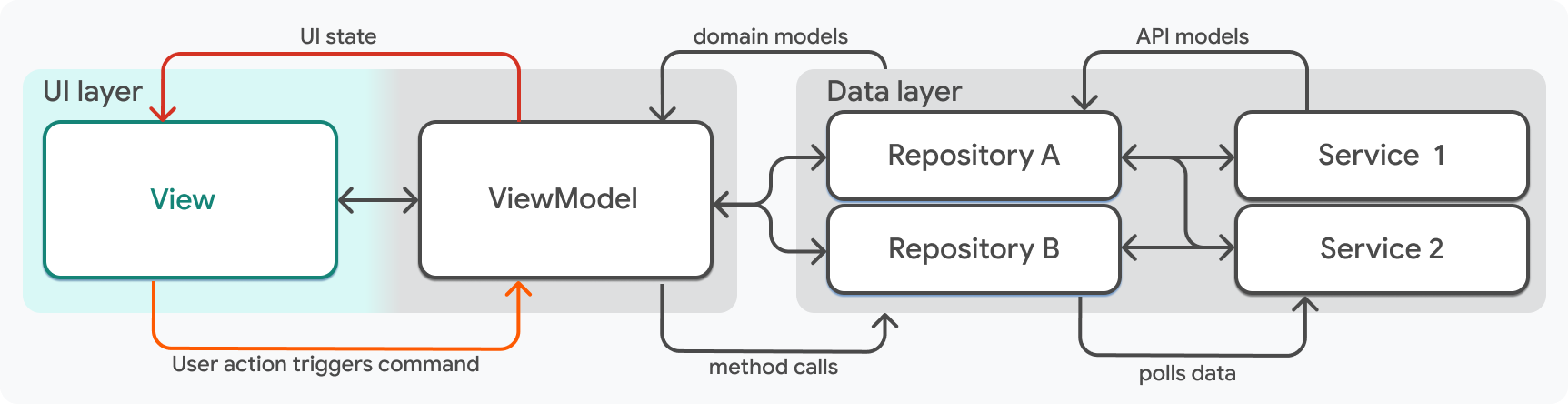 The only logic a view should contain is:
View 仅应包含以下逻辑:
* Simple if-statements to show and hide widgets based on a flag or nullable
field in the view model
根据 view model 中的标志或可空字段,用简单 if 语句显示或隐藏 widget
* Animation logic
动画逻辑
* Layout logic based on device information, like screen size or orientation.
基于屏幕尺寸、方向等设备信息的布局逻辑
* Simple routing logic
简单路由逻辑
All logic related to data should be handled in the view model.
所有与数据相关的逻辑都应在 view model 中处理。
### View models
### View model(视图模型)
A view model exposes the application data necessary to render a view.
In the architecture design described on this page,
most of the logic in your Flutter application lives in view models.
View model 暴露渲染 view 所需的应用数据。
在本页描述的架构中,Flutter 应用的大部分逻辑位于 view model。
The only logic a view should contain is:
View 仅应包含以下逻辑:
* Simple if-statements to show and hide widgets based on a flag or nullable
field in the view model
根据 view model 中的标志或可空字段,用简单 if 语句显示或隐藏 widget
* Animation logic
动画逻辑
* Layout logic based on device information, like screen size or orientation.
基于屏幕尺寸、方向等设备信息的布局逻辑
* Simple routing logic
简单路由逻辑
All logic related to data should be handled in the view model.
所有与数据相关的逻辑都应在 view model 中处理。
### View models
### View model(视图模型)
A view model exposes the application data necessary to render a view.
In the architecture design described on this page,
most of the logic in your Flutter application lives in view models.
View model 暴露渲染 view 所需的应用数据。
在本页描述的架构中,Flutter 应用的大部分逻辑位于 view model。
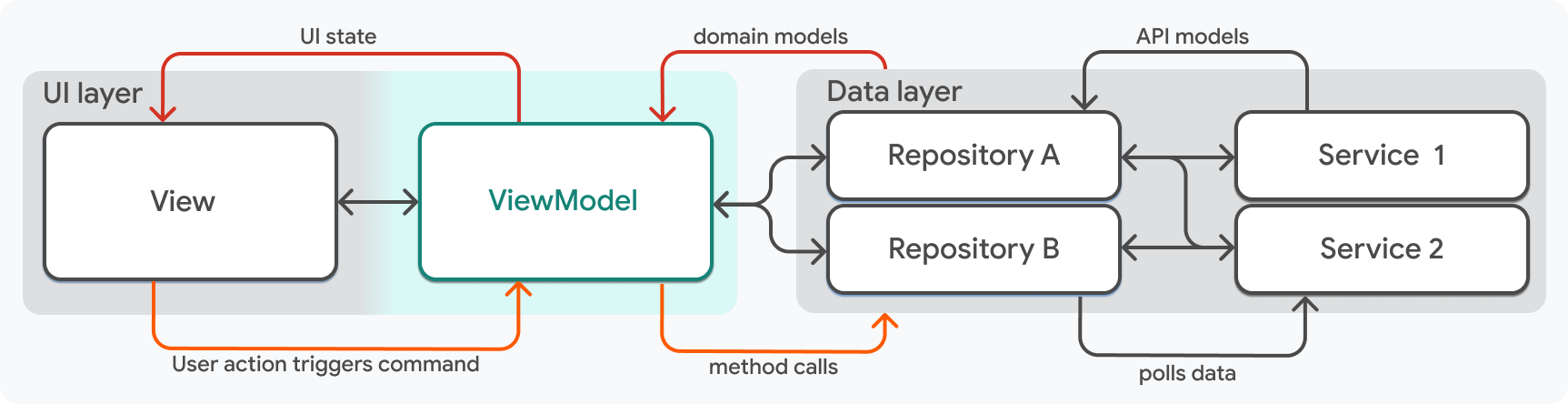 A view model's main responsibilities include:
View model 的主要职责包括:
* Retrieving application data from repositories and transforming it into a
format suitable for presentation in the view.
For example, it might filter, sort, or aggregate data.
从 Repository 获取应用数据并转换为适合在 view 中展示的格式,例如过滤、排序或聚合数据。
* Maintaining the current state needed in the view,
so that the view can rebuild without losing data.
For example, it might contain boolean flags to
conditionally render widgets in the view, or a field that
tracks which section of a carousel is active on screen.
维护 view 所需的当前状态,使 view 重建时不丢失数据;
例如包含用于条件渲染 widget 的布尔标志,或跟踪轮播当前区块的字段。
* Exposes callbacks (called **commands**) to the view that can be
attached to an event handler, like a button press or form submission.
向 view 暴露可挂到事件处理器(如按钮点击、表单提交)的回调(称为 **command**)。
Commands are named for the [command pattern][],
and are Dart functions that allow views to
execute complex logic without knowledge of its implementation.
Commands are written as members of the view model class to
be called by the gesture handlers in the view class.
Command 得名于 [命令模式][command pattern],是允许 view 在不了解实现细节的情况下执行复杂逻辑的 Dart 函数。
Command 作为 view model 类的成员编写,由 view 类中的手势处理器调用。
You can find examples of views, view models, and commands on
the [UI layer][] portion of the [App architecture case study][].
可在 [应用架构案例研究][App architecture case study] 的 [UI 层][UI layer] 部分查看 view、view model 与 command 的示例。
For a gentle introduction to MVVM in Flutter,
check out the [state management fundamentals][].
若要温和入门 Flutter 中的 MVVM,请参阅 [状态管理基础][state management fundamentals]。
[UI layer]: /app-architecture/case-study/ui-layer
[App architecture case study]: /app-architecture/case-study
[state management fundamentals]: /data-and-backend/state-mgmt/intro
## Data layer
## 数据层
The data layer of an app handles your business data and logic.
Two pieces of architecture make up the data layer: services and repositories.
These pieces should have well-defined inputs and outputs
to simplify their reusability and testability.
应用的数据层处理业务数据与逻辑。
数据层由 service 与仓库两部分构成,应有清晰的输入输出以便复用与测试。
A view model's main responsibilities include:
View model 的主要职责包括:
* Retrieving application data from repositories and transforming it into a
format suitable for presentation in the view.
For example, it might filter, sort, or aggregate data.
从 Repository 获取应用数据并转换为适合在 view 中展示的格式,例如过滤、排序或聚合数据。
* Maintaining the current state needed in the view,
so that the view can rebuild without losing data.
For example, it might contain boolean flags to
conditionally render widgets in the view, or a field that
tracks which section of a carousel is active on screen.
维护 view 所需的当前状态,使 view 重建时不丢失数据;
例如包含用于条件渲染 widget 的布尔标志,或跟踪轮播当前区块的字段。
* Exposes callbacks (called **commands**) to the view that can be
attached to an event handler, like a button press or form submission.
向 view 暴露可挂到事件处理器(如按钮点击、表单提交)的回调(称为 **command**)。
Commands are named for the [command pattern][],
and are Dart functions that allow views to
execute complex logic without knowledge of its implementation.
Commands are written as members of the view model class to
be called by the gesture handlers in the view class.
Command 得名于 [命令模式][command pattern],是允许 view 在不了解实现细节的情况下执行复杂逻辑的 Dart 函数。
Command 作为 view model 类的成员编写,由 view 类中的手势处理器调用。
You can find examples of views, view models, and commands on
the [UI layer][] portion of the [App architecture case study][].
可在 [应用架构案例研究][App architecture case study] 的 [UI 层][UI layer] 部分查看 view、view model 与 command 的示例。
For a gentle introduction to MVVM in Flutter,
check out the [state management fundamentals][].
若要温和入门 Flutter 中的 MVVM,请参阅 [状态管理基础][state management fundamentals]。
[UI layer]: /app-architecture/case-study/ui-layer
[App architecture case study]: /app-architecture/case-study
[state management fundamentals]: /data-and-backend/state-mgmt/intro
## Data layer
## 数据层
The data layer of an app handles your business data and logic.
Two pieces of architecture make up the data layer: services and repositories.
These pieces should have well-defined inputs and outputs
to simplify their reusability and testability.
应用的数据层处理业务数据与逻辑。
数据层由 service 与仓库两部分构成,应有清晰的输入输出以便复用与测试。
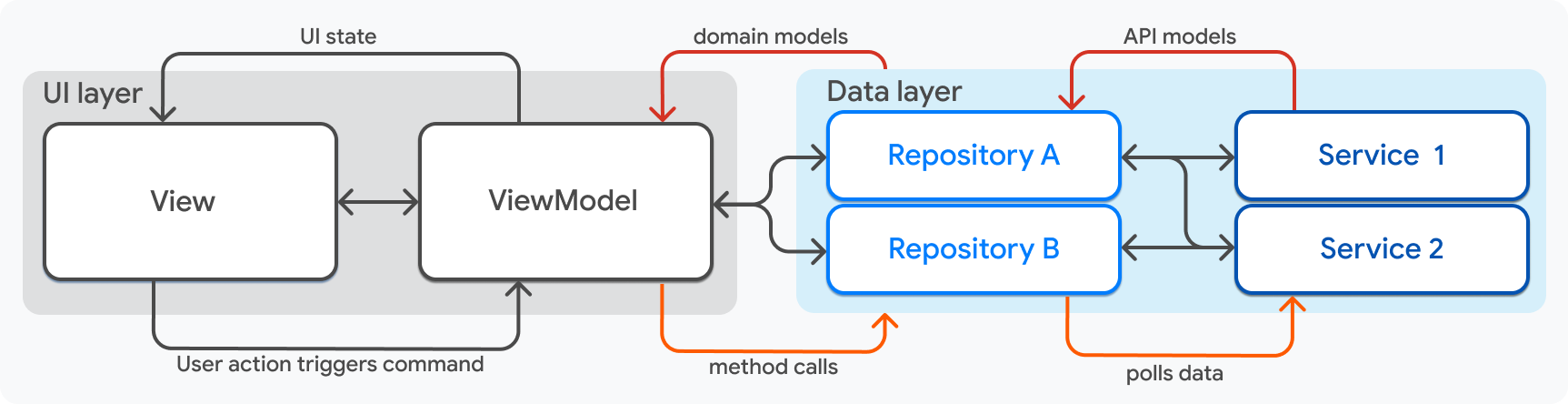 Using MVVM language, services and repositories make up your *model layer*.
用 MVVM 术语说,service 与 repository 构成 **model 层**。
### Repositories
### Repository(仓库)
[Repository][] classes are the source of truth for your model data.
They're responsible for polling data from services,
and transforming that raw data into **domain models**.
Domain models represent the data that the application needs,
formatted in a way that your view model classes can consume.
There should be a repository class for
each different type of data handled in your app.
[Repository(仓库)][Repository] 类是 model 数据的单一数据源,
负责从 service 轮询数据并将原始数据转换为 **领域模型 (domain model)**。
领域模型表示应用所需数据,格式可供 view model 消费。
应用中每种不同数据类型应有一个 Repository 类。
Repositories handle the business logic associated with services, such as:
Repository 处理与 Service 相关的业务逻辑,例如:
* Caching
缓存
* Error handling
错误处理
* Retry logic
重试逻辑
* Refreshing data
刷新数据
* Polling services for new data
轮询 service 获取新数据
* Refreshing data based on user actions
根据用户操作刷新数据
Using MVVM language, services and repositories make up your *model layer*.
用 MVVM 术语说,service 与 repository 构成 **model 层**。
### Repositories
### Repository(仓库)
[Repository][] classes are the source of truth for your model data.
They're responsible for polling data from services,
and transforming that raw data into **domain models**.
Domain models represent the data that the application needs,
formatted in a way that your view model classes can consume.
There should be a repository class for
each different type of data handled in your app.
[Repository(仓库)][Repository] 类是 model 数据的单一数据源,
负责从 service 轮询数据并将原始数据转换为 **领域模型 (domain model)**。
领域模型表示应用所需数据,格式可供 view model 消费。
应用中每种不同数据类型应有一个 Repository 类。
Repositories handle the business logic associated with services, such as:
Repository 处理与 Service 相关的业务逻辑,例如:
* Caching
缓存
* Error handling
错误处理
* Retry logic
重试逻辑
* Refreshing data
刷新数据
* Polling services for new data
轮询 service 获取新数据
* Refreshing data based on user actions
根据用户操作刷新数据
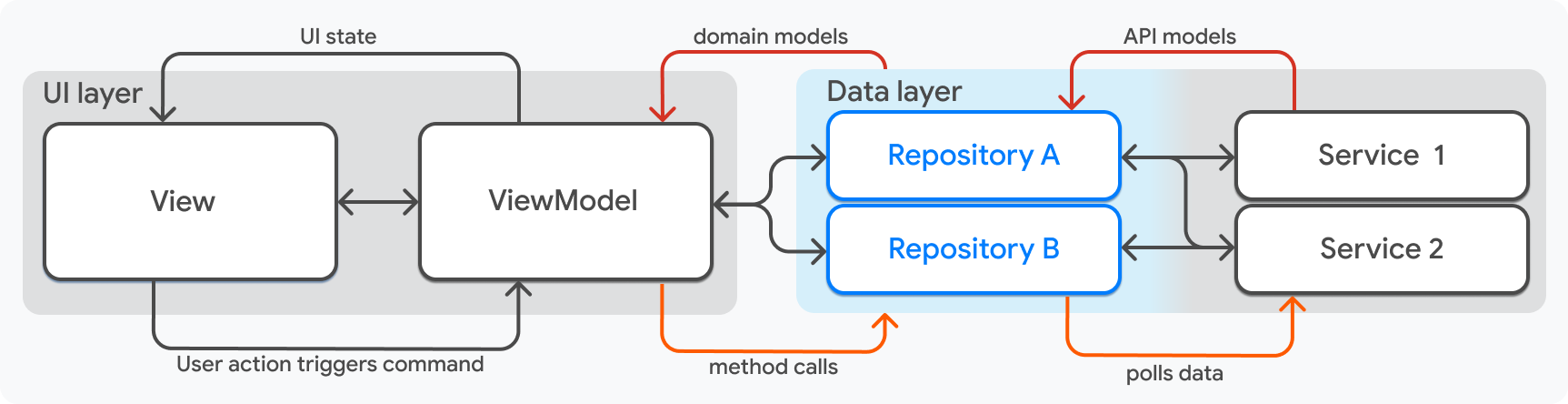 Repositories output application data as domain models.
For example, a social media app might have a
`UserProfileRepository` class that exposes a `Stream`,
which emits a new value whenever the user signs in or out.
Repository 以领域模型形式输出应用数据。
例如,社交应用可有 `UserProfileRepository`,暴露 `Stream`,
在用户登录或登出时发出新值。
The models output by repositories are consumed by view models.
Repositories and view models have a many-to-many relationship.
A view model can use many repositories to get the data it needs,
and a repository can be used by many view models.
Repository 输出的模型由 view model 消费。Repository 与 view model 为多对多关系:
一个 view model 可使用多个 Repository 获取数据,一个 Repository 也可被多个 view model 使用。
Repositories should never be aware of each other.
If your application has business logic that needs data from two repositories,
you should combine the data in the view model or in the domain layer,
especially if your repository-to-view-model relationship is complex.
Repository 彼此不应感知。若业务逻辑需要两个 Repository 的数据,
应在 view model 或领域层合并数据,尤其在 Repository 与 view model 关系复杂时。
#### Managing app-wide session state
#### 管理应用级会话状态
Because repositories are the single source of truth for application data,
they are also the ideal place to manage **app-wide lifecycle state**—state that
needs to be shared across multiple view models but shouldn't persist beyond the
current application session.
Repository 是应用数据的单一数据源,也是管理 **应用级生命周期状态** 的理想位置——
需在多个 view model 间共享但不应超出当前应用会话持久化的状态。
Examples of app-wide lifecycle state include an active user session,
in-memory data caches, or transient application settings.
Because view models and repositories have a many-to-many relationship,
multiple view models can depend on the same repository instance
(typically managed through a service locator or dependency injection container).
This allows distinct features to reactively observe and modify
the same shared state through streams and methods exposed by the repository,
without violating the clean one-to-one boundary between a view and its view model.
应用级生命周期状态的例子包括活跃用户会话、内存数据缓存或临时应用设置。
由于 view model 与 Repository 为多对多关系,多个 view model 可依赖同一 Repository 实例
(通常通过 service locator 或依赖注入容器管理),
使不同功能通过 Repository 暴露的 stream 与方法响应式观察并修改同一共享状态,
同时不破坏 view 与其 view model 之间清晰的一对一边界。
### Services
### Service(服务)
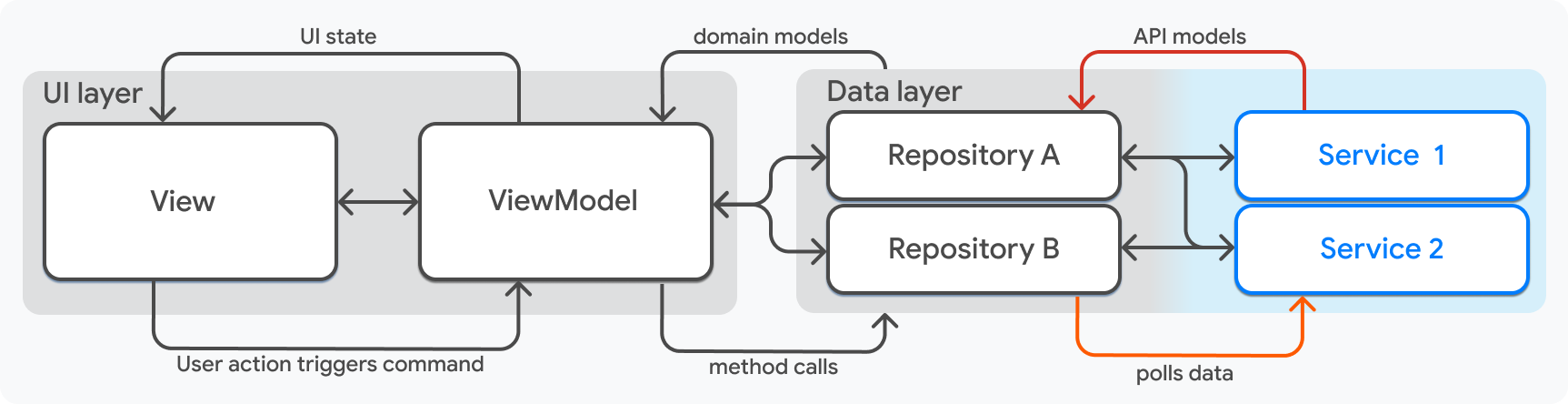
Services are in the lowest layer of your application.
They wrap API endpoints and expose asynchronous response objects,
such as `Future` and `Stream` objects.
They're only used to isolate data-loading, and they hold no state.
Your app should have one service class per data source.
Examples of endpoints that services might wrap include:
Service 位于应用最底层,封装 API 端点并暴露 `Future`、`Stream` 等异步响应对象;
仅用于隔离数据加载,不持有状态。每个数据源应有一个 service 类。
Service 可能封装的端点示例包括:
* The underlying platform, like iOS and Android APIs
底层平台,如 iOS 与 Android API
* REST endpoints
REST 端点
* Local files
本地文件
As a rule of thumb, services are most helpful when
the necessary data lives outside of your application's Dart code -
which is true of each of the preceding examples.
经验法则:当所需数据位于应用 Dart 代码之外时,service 最有用——上述示例皆属此类。
Services and repositories have a many-to-many relationship.
A single Repository can use several services,
and a service can be used by multiple repositories.
Service 与 Repository 为多对多关系:单个 repository 可使用多个 service,一个 service 也可被多个 repository 使用。
Repositories output application data as domain models.
For example, a social media app might have a
`UserProfileRepository` class that exposes a `Stream`,
which emits a new value whenever the user signs in or out.
Repository 以领域模型形式输出应用数据。
例如,社交应用可有 `UserProfileRepository`,暴露 `Stream`,
在用户登录或登出时发出新值。
The models output by repositories are consumed by view models.
Repositories and view models have a many-to-many relationship.
A view model can use many repositories to get the data it needs,
and a repository can be used by many view models.
Repository 输出的模型由 view model 消费。Repository 与 view model 为多对多关系:
一个 view model 可使用多个 Repository 获取数据,一个 Repository 也可被多个 view model 使用。
Repositories should never be aware of each other.
If your application has business logic that needs data from two repositories,
you should combine the data in the view model or in the domain layer,
especially if your repository-to-view-model relationship is complex.
Repository 彼此不应感知。若业务逻辑需要两个 Repository 的数据,
应在 view model 或领域层合并数据,尤其在 Repository 与 view model 关系复杂时。
#### Managing app-wide session state
#### 管理应用级会话状态
Because repositories are the single source of truth for application data,
they are also the ideal place to manage **app-wide lifecycle state**—state that
needs to be shared across multiple view models but shouldn't persist beyond the
current application session.
Repository 是应用数据的单一数据源,也是管理 **应用级生命周期状态** 的理想位置——
需在多个 view model 间共享但不应超出当前应用会话持久化的状态。
Examples of app-wide lifecycle state include an active user session,
in-memory data caches, or transient application settings.
Because view models and repositories have a many-to-many relationship,
multiple view models can depend on the same repository instance
(typically managed through a service locator or dependency injection container).
This allows distinct features to reactively observe and modify
the same shared state through streams and methods exposed by the repository,
without violating the clean one-to-one boundary between a view and its view model.
应用级生命周期状态的例子包括活跃用户会话、内存数据缓存或临时应用设置。
由于 view model 与 Repository 为多对多关系,多个 view model 可依赖同一 Repository 实例
(通常通过 service locator 或依赖注入容器管理),
使不同功能通过 Repository 暴露的 stream 与方法响应式观察并修改同一共享状态,
同时不破坏 view 与其 view model 之间清晰的一对一边界。
### Services
### Service(服务)
Services are in the lowest layer of your application.
They wrap API endpoints and expose asynchronous response objects,
such as `Future` and `Stream` objects.
They're only used to isolate data-loading, and they hold no state.
Your app should have one service class per data source.
Examples of endpoints that services might wrap include:
Service 位于应用最底层,封装 API 端点并暴露 `Future`、`Stream` 等异步响应对象;
仅用于隔离数据加载,不持有状态。每个数据源应有一个 service 类。
Service 可能封装的端点示例包括:
* The underlying platform, like iOS and Android APIs
底层平台,如 iOS 与 Android API
* REST endpoints
REST 端点
* Local files
本地文件
As a rule of thumb, services are most helpful when
the necessary data lives outside of your application's Dart code -
which is true of each of the preceding examples.
经验法则:当所需数据位于应用 Dart 代码之外时,service 最有用——上述示例皆属此类。
Services and repositories have a many-to-many relationship.
A single Repository can use several services,
and a service can be used by multiple repositories.
Service 与 Repository 为多对多关系:单个 repository 可使用多个 service,一个 service 也可被多个 repository 使用。
 ## Optional: Domain layer
## 可选:领域层
As your app grows and adds features, you might need to abstract away logic
that adds too much complexity to your view models.
These classes are often called interactors or **use-cases**.
随应用增长与功能增加,你可能需要将过多复杂逻辑从 view model 中抽象出来,
这类类常称为 interactor 或 **用例 (use-case)**。
Use-cases are responsible for making interactions between
the UI and Data layers simpler and more reusable.
They take data from repositories and make it suitable for the UI layer.
用例负责简化并复用 UI 层与数据层之间的交互,从 Repository 取数并整理为 UI 层可用形式。
## Optional: Domain layer
## 可选:领域层
As your app grows and adds features, you might need to abstract away logic
that adds too much complexity to your view models.
These classes are often called interactors or **use-cases**.
随应用增长与功能增加,你可能需要将过多复杂逻辑从 view model 中抽象出来,
这类类常称为 interactor 或 **用例 (use-case)**。
Use-cases are responsible for making interactions between
the UI and Data layers simpler and more reusable.
They take data from repositories and make it suitable for the UI layer.
用例负责简化并复用 UI 层与数据层之间的交互,从 Repository 取数并整理为 UI 层可用形式。
 Use-cases are primarily used to encapsulate business logic that would otherwise
live in the view model and meets one or more of the following conditions:
用例主要用于封装否则会放在 view model 中、且满足以下一项或多项条件的业务逻辑:
1. Requires merging data from multiple repositories
需要合并多个 Repository 的数据
2. Is exceedingly complex
极其复杂
3. The logic will be reused by different view models
逻辑将被不同 view model 复用
This layer is optional because not all applications or features within an
application have these requirements.
If you suspect your application would
benefit from this additional layer, consider the pros and cons:
该层是可选的,因为并非所有应用或应用内功能都有这些需求。
若你认为应用会受益于这一额外层,请权衡利弊:
| Pros优点 | Cons缺点 |
|--------------------------------------------------------------------------|--------------------------------------------------------------------------------------------|
| ✅ Avoid code duplication in view models | ❌ Increases complexity of your architecture, adding more classes and higher cognitive load |
| ✅ 避免 view model 中的代码重复 | ❌ 增加架构复杂度,类更多、认知负担更高 |
| ✅ Improve testability by separating complex business logic from UI logic | ❌ Testing requires additional mocks |
| ✅ 将复杂业务逻辑与 UI 逻辑分离,提升可测试性 | ❌ 测试需要额外 mock |
| ✅ Improve code readability in view models | ❌ Adds additional boilerplate to your code |
| ✅ 提升 view model 代码可读性 | ❌ 增加样板代码 |
{:.table .table-striped}
### Data access with use-cases
### 通过用例访问数据
Another consideration when adding a Domain layer is whether view models will
continue to have access to repository data directly, or if you'll enforce
view models to go through use-cases to get their data. Put another way,
will you add use-cases as you need them?
Perhaps when you notice repeated logic in your view models?
Or, will you create a use-case each time a view model needs data,
even if the logic in the use-case is simple?
增设领域层时还需考虑:view model 是否仍可直接访问 repository 数据,
还是强制通过用例获取数据。
换言之,是按需添加用例(例如在 view model 中发现重复逻辑时),
还是每次 view model 需要数据都创建用例,即使用例逻辑很简单?
If you choose to do the latter,
it intensifies the earlier outlined pros and cons.
Your application code will be extremely modular and testable,
but it also adds a significant amount of unnecessary overhead.
若选择后者,会放大前述利弊:代码将极度模块化且可测试,但也会带来大量不必要开销。
A good approach is to add use-cases only when needed.
If you find that your view models are
accessing data through use-cases most of the time,
you can always refactor your code to utilize use-cases exclusively.
The example app used later in this guide has use-cases for some features,
but also has view models that interact with repositories directly.
A complex feature might ultimately end up looking like this:
较好做法是仅在需要时添加用例。
若发现 view model 大多通过用例访问数据,可随时重构为完全通过用例。
本指南后续示例应用部分功能有用例,也有 view model 直接与 repository 交互。
复杂功能最终可能如下:
Use-cases are primarily used to encapsulate business logic that would otherwise
live in the view model and meets one or more of the following conditions:
用例主要用于封装否则会放在 view model 中、且满足以下一项或多项条件的业务逻辑:
1. Requires merging data from multiple repositories
需要合并多个 Repository 的数据
2. Is exceedingly complex
极其复杂
3. The logic will be reused by different view models
逻辑将被不同 view model 复用
This layer is optional because not all applications or features within an
application have these requirements.
If you suspect your application would
benefit from this additional layer, consider the pros and cons:
该层是可选的,因为并非所有应用或应用内功能都有这些需求。
若你认为应用会受益于这一额外层,请权衡利弊:
| Pros优点 | Cons缺点 |
|--------------------------------------------------------------------------|--------------------------------------------------------------------------------------------|
| ✅ Avoid code duplication in view models | ❌ Increases complexity of your architecture, adding more classes and higher cognitive load |
| ✅ 避免 view model 中的代码重复 | ❌ 增加架构复杂度,类更多、认知负担更高 |
| ✅ Improve testability by separating complex business logic from UI logic | ❌ Testing requires additional mocks |
| ✅ 将复杂业务逻辑与 UI 逻辑分离,提升可测试性 | ❌ 测试需要额外 mock |
| ✅ Improve code readability in view models | ❌ Adds additional boilerplate to your code |
| ✅ 提升 view model 代码可读性 | ❌ 增加样板代码 |
{:.table .table-striped}
### Data access with use-cases
### 通过用例访问数据
Another consideration when adding a Domain layer is whether view models will
continue to have access to repository data directly, or if you'll enforce
view models to go through use-cases to get their data. Put another way,
will you add use-cases as you need them?
Perhaps when you notice repeated logic in your view models?
Or, will you create a use-case each time a view model needs data,
even if the logic in the use-case is simple?
增设领域层时还需考虑:view model 是否仍可直接访问 repository 数据,
还是强制通过用例获取数据。
换言之,是按需添加用例(例如在 view model 中发现重复逻辑时),
还是每次 view model 需要数据都创建用例,即使用例逻辑很简单?
If you choose to do the latter,
it intensifies the earlier outlined pros and cons.
Your application code will be extremely modular and testable,
but it also adds a significant amount of unnecessary overhead.
若选择后者,会放大前述利弊:代码将极度模块化且可测试,但也会带来大量不必要开销。
A good approach is to add use-cases only when needed.
If you find that your view models are
accessing data through use-cases most of the time,
you can always refactor your code to utilize use-cases exclusively.
The example app used later in this guide has use-cases for some features,
but also has view models that interact with repositories directly.
A complex feature might ultimately end up looking like this:
较好做法是仅在需要时添加用例。
若发现 view model 大多通过用例访问数据,可随时重构为完全通过用例。
本指南后续示例应用部分功能有用例,也有 view model 直接与 repository 交互。
复杂功能最终可能如下:
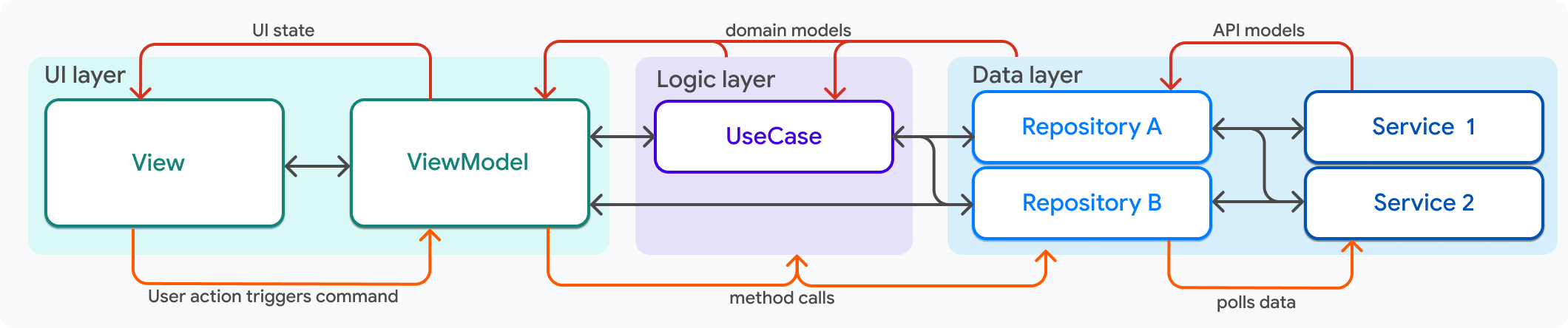 This method of adding use-cases is defined by the following rules:
这种添加用例的方式遵循以下规则:
* Use-cases depend on repositories
用例依赖 Repository
* Use-cases and repositories have a many-to-many relationship
用例与 Repository 为多对多关系
* View models depend on one or more use-cases *and* one or more repositories
View model 依赖一个或多个用例 **以及** 一个或多个 Repository
This method of using use-cases ends up looking
less like a layered lasagna, and more like a plated dinner with
two mains (UI and data layers) and a side (domain layer).
Use-cases are just utility classes that have well-defined inputs and outputs.
This approach is flexible and extendable,
but it requires greater diligence to maintain order.
这种用例用法看起来不像分层千层面,而像一盘有两道主菜(UI 层与数据层)和配菜(领域层)的晚餐。
用例只是输入输出清晰的工具类。该方式灵活可扩展,但需更用心维护秩序。
[Separation-of-concerns]: https://en.wikipedia.org/wiki/Separation_of_concerns
[command pattern]: https://en.wikipedia.org/wiki/Command_pattern
[命令模式]: https://en.wikipedia.org/wiki/Command_pattern
[Repository]: https://martinfowler.com/eaaCatalog/repository.html
## Feedback
## 反馈
As this section of the website is evolving,
we [welcome your feedback][]!
网站本节内容仍在完善中,
[欢迎提供反馈][welcome your feedback]!
[welcome your feedback]: https://google.qualtrics.com/jfe/form/SV_4T0XuR9Ts29acw6?page="guide"
This method of adding use-cases is defined by the following rules:
这种添加用例的方式遵循以下规则:
* Use-cases depend on repositories
用例依赖 Repository
* Use-cases and repositories have a many-to-many relationship
用例与 Repository 为多对多关系
* View models depend on one or more use-cases *and* one or more repositories
View model 依赖一个或多个用例 **以及** 一个或多个 Repository
This method of using use-cases ends up looking
less like a layered lasagna, and more like a plated dinner with
two mains (UI and data layers) and a side (domain layer).
Use-cases are just utility classes that have well-defined inputs and outputs.
This approach is flexible and extendable,
but it requires greater diligence to maintain order.
这种用例用法看起来不像分层千层面,而像一盘有两道主菜(UI 层与数据层)和配菜(领域层)的晚餐。
用例只是输入输出清晰的工具类。该方式灵活可扩展,但需更用心维护秩序。
[Separation-of-concerns]: https://en.wikipedia.org/wiki/Separation_of_concerns
[command pattern]: https://en.wikipedia.org/wiki/Command_pattern
[命令模式]: https://en.wikipedia.org/wiki/Command_pattern
[Repository]: https://martinfowler.com/eaaCatalog/repository.html
## Feedback
## 反馈
As this section of the website is evolving,
we [welcome your feedback][]!
网站本节内容仍在完善中,
[欢迎提供反馈][welcome your feedback]!
[welcome your feedback]: https://google.qualtrics.com/jfe/form/SV_4T0XuR9Ts29acw6?page="guide"