# 各层级之间的通信
> 如何通过依赖注入实现 MVVM 各层之间的通信。
Along with defining clear responsibilities for each component of the architecture,
it's important to consider how the components communicate.
This refers to both the rules that dictate communication,
and the technical implementation of how components communicate.
An app's architecture should answer the following questions:
除为架构各组件定义清晰职责外,还需考虑组件如何通信——
既包括约束通信的规则,也包括通信的技术实现。
应用架构应回答以下问题:
* Which components are allowed to communicate with which other components
(including components of the same type)?
哪些组件可以与哪些其他组件(含同类型组件)通信?
* What do these components expose as output to each other?
这些组件向彼此暴露什么作为输出?
* How is any given layer 'wired up' to another layer?
任意一层如何与另一层「接线」?
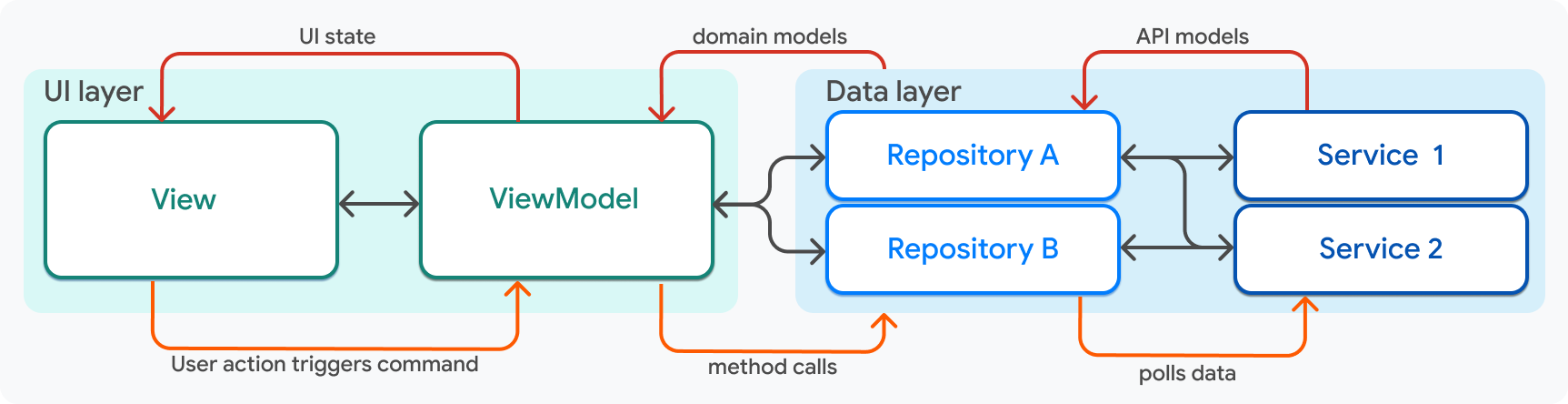
Using this diagram as a guide, the rules of engagement are as follows:
以该图为指南,协作规则如下:
| Component组件 | Rules of engagement协作规 |
|------------|-------------------------------------------------------------------------------------------------------------------------------------------------------------------------------------------------------------------------------------------------------------------|
| View | - A view is only aware of exactly one view model, and is never aware of any other layer or component. When created, Flutter passes the view model to the view as an argument, exposing the view model's data and command callbacks to the view.
|
| View | - View 仅感知恰好一个 view model,从不感知任何其他层或组件。创建时 Flutter 将 view model 作为参数传给 view,向 view 暴露 view model 的数据与 command 回调。
|
| ViewModel | - A ViewModel belongs to exactly one view, which can see its data, but the model never needs to know that a view exists.
- A view model is aware of one or more repositories, which are passed into the view model's constructor.
|
| ViewModel | - ViewModel 属于恰好一个 view,view 可见其数据,但 model 无需知道 view 存在。
- View model 感知一个或多个通过构造函数传入的 Repository。
|
| Repository | - A repository can be aware of many services, which are passed as arguments into the repository constructor.
- A repository can be used by many view models, but it never needs to be aware of them.
|
| Repository | - Repository 可感知多个通过构造函数参数传入的 service。
- Repository 可被多个 view model 使用,但无需感知它们。
|
| Service | - A service can be used by many repositories, but it never needs to be aware of a repository (or any other object).
|
| Service | - Service 可被多个 Repository 使用,但无需感知 Repository(或任何其他对象)。
|
{:.table .table-striped}
## Dependency injection
## 依赖注入
This guide has shown how these different components communicate
with each other by using inputs and outputs.
In every case, communication between two layers is facilitated by passing
a component into the constructor methods (of the components that
consume its data), such as a `Service` into a `Repository.`
本指南已说明各组件如何通过输入输出通信。
层间通信一律通过将组件传入消费方构造函数实现,例如将 `Service` 传入 `Repository`。
```dart
class MyRepository {
MyRepository({required MyService myService})
: _myService = myService;
late final MyService _myService;
}
```
One thing that's missing, however, is object creation. Where,
in an application, is the `MyService` instance created so that it can be
passed into `MyRepository`?
This answer to this question involves a
pattern known as [dependency injection][].
然而还缺一环:对象创建。应用中 `MyService` 实例在何处创建以便传入 `MyRepository`?
答案涉及 [依赖注入][dependency injection] 模式。
In the Compass app, *dependency injection* is handled using
[`package:provider`][]. Based on their experience building Flutter apps,
teams at Google recommend using `package:provider` to implement
dependency injection.
在 Compass 中,*依赖注入* 通过 [`package:provider`][] 实现。
基于构建 Flutter 应用的经验,Google 团队推荐使用 `package:provider` 实现依赖注入。
Services and repositories are exposed to the top level of the widget tree of
the Flutter application as `Provider` objects.
Service 与 Repository 作为 `Provider` 对象暴露于 Flutter 应用 widget 树顶层。
```dart title=dependencies.dart
runApp(
MultiProvider(
providers: [
Provider(create: (context) => AuthApiClient()),
Provider(create: (context) => ApiClient()),
Provider(create: (context) => SharedPreferencesService()),
ChangeNotifierProvider(
create: (context) => AuthRepositoryRemote(
authApiClient: context.read(),
apiClient: context.read(),
sharedPreferencesService: context.read(),
) as AuthRepository,
),
Provider(create: (context) =>
DestinationRepositoryRemote(
apiClient: context.read(),
) as DestinationRepository,
),
Provider(create: (context) =>
ContinentRepositoryRemote(
apiClient: context.read(),
) as ContinentRepository,
),
// In the Compass app, additional service and repository providers live here.
],
child: const MainApp(),
),
);
```
Services are exposed only so they can immediately be
injected into repositories via the `BuildContext.read` method from `provider`,
as shown in the preceding snippet.
Repositories are then exposed so that they can be
injected into view models as needed.
Service 仅为了立即通过 `provider` 的 `BuildContext.read` 注入 Repository 而暴露,如上一片段所示。
随后暴露 Repository 以便按需注入 view model。
Slightly lower in the widget tree, view models that correspond to
a full screen are created in the [`package:go_router`][] configuration,
where provider is again used to inject the necessary repositories.
在 widget 树稍低处,对应全屏的 view model 在 [`package:go_router`][] 配置中创建,
再次用 provider 注入所需 Repository。
```dart title=router.dart
// This code was modified for demo purposes.
GoRouter router(
AuthRepository authRepository,
) =>
GoRouter(
initialLocation: Routes.home,
debugLogDiagnostics: true,
redirect: _redirect,
refreshListenable: authRepository,
routes: [
GoRoute(
path: Routes.login,
builder: (context, state) {
return LoginScreen(
viewModel: LoginViewModel(
authRepository: context.read(),
),
);
},
),
GoRoute(
path: Routes.home,
builder: (context, state) {
final viewModel = HomeViewModel(
bookingRepository: context.read(),
);
return HomeScreen(viewModel: viewModel);
},
routes: [
// ...
],
),
],
);
```
Within the view model or repository, the injected component should be private.
For example, the `HomeViewModel` class looks like this:
在 view model 或 Repository 内部,注入的组件应为私有。例如 `HomeViewModel` 如下:
```dart title=home_viewmodel.dart
class HomeViewModel extends ChangeNotifier {
HomeViewModel({
required BookingRepository bookingRepository,
required UserRepository userRepository,
}) : _bookingRepository = bookingRepository,
_userRepository = userRepository;
final BookingRepository _bookingRepository;
final UserRepository _userRepository;
// ...
}
```
Private methods prevent the view, which has access to the view model, from
calling methods on the repository directly.
私有成员防止能访问 view model 的 view 直接调用 Repository 方法。
This concludes the code walkthrough of the Compass app. This page only walked
through the architecture-related code, but it doesn't tell the whole story. Most
utility code, widget code, and UI styling was ignored. Browse the code in
the [Compass app repository][] for a complete
example of a robust Flutter application built following these principles.
Compass 应用的代码讲解到此结束。本页仅涵盖架构相关代码,并非全貌;
大部分工具代码、widget 代码与 UI 样式未涉及。
请在 [Compass 应用仓库][] 浏览完整示例。
[`package:provider`]: https://pub-web.flutter-io.cn/packages/provider
[`package:go_router`]: https://pub-web.flutter-io.cn/packages/go_router
[Compass app repository]: https://github.com/flutter/samples/tree/main/compass_app
[Compass 应用仓库]: https://github.com/flutter/samples/tree/main/compass_app
[dependency injection]: https://en.wikipedia.org/wiki/Dependency_injection
[依赖注入]: https://en.wikipedia.org/wiki/Dependency_injection
## Feedback
## 反馈
As this section of the website is evolving,
we [welcome your feedback][]!
网站本节内容仍在完善中,
[欢迎提供反馈][welcome your feedback]!
[welcome your feedback]: https://google.qualtrics.com/jfe/form/SV_4T0XuR9Ts29acw6?page="case-study/dependency-injection"